
Key takeaways:
There are two different things people mean by "a proxy for WhatsApp," and mixing them up is the most common reason a setup does not work. This guide separates the two, walks through the in-app proxy setting step by step, and shows how to put a Proxy-Cheap IP in front of each WhatsApp account you manage so every number stays on a clean, consistent connection.
A WhatsApp proxy is an intermediary server that routes your WhatsApp connection through a different IP address before it reaches WhatsApp's servers. Instead of WhatsApp seeing the IP your device or server was assigned, it sees the proxy's IP. That changes the network and location tied to the session without touching the contents of your messages.
In practice the term covers two separate setups:
The rest of this guide covers both, because the right one depends entirely on what you are trying to do.
Most people who buy WhatsApp proxies are not hiding anything. They are running more numbers than one phone and one connection can support, or they need a steady connection from a specific market. The common, terms-respecting reasons:
Four proxy types show up in WhatsApp workflows. Here is how they compare for account work.
Mobile proxies route through real 5G, 4G, and LTE carrier IPs. Because many real users share a single mobile IP at any moment, mobile is the IP type WhatsApp treats with the most trust, which makes mobile proxies the first choice for creating and warming new numbers. Proxy-Cheap mobile covers 100+ countries on real carrier IPs.
Static residential and ISP proxies give each account one fixed, location-accurate IP for long, consistent sessions, which is what most account managers want day to day. Compare static residential proxies and ISP proxies when a number needs to stay on the same IP for weeks.
Rotating residential proxies use real home-internet IPs that refresh on a schedule or per request. They suit research and broad public data collection rather than long-lived logins. Proxy-Cheap rotating residential proxies cover 180+ countries with country and city targeting.
Datacenter proxies deliver high throughput from data-center IPs. Reserve datacenter proxies for high-volume public research and monitoring. For logging into and running accounts, choose mobile or residential IPs that match the networks real users connect from.
| Proxy type | How the IP behaves | Best WhatsApp use |
|---|---|---|
| Mobile (5G/4G/LTE) | Shared real carrier IP, high trust | Creating, warming, and running numbers |
| Static residential / ISP | Fixed real-network IP, long sessions | Day-to-day management of business numbers |
| Rotating residential | Real home IP, refreshes on a schedule | Research and broad public data collection |
| Datacenter | Fast data-center IP, public targets | High-volume research and monitoring |
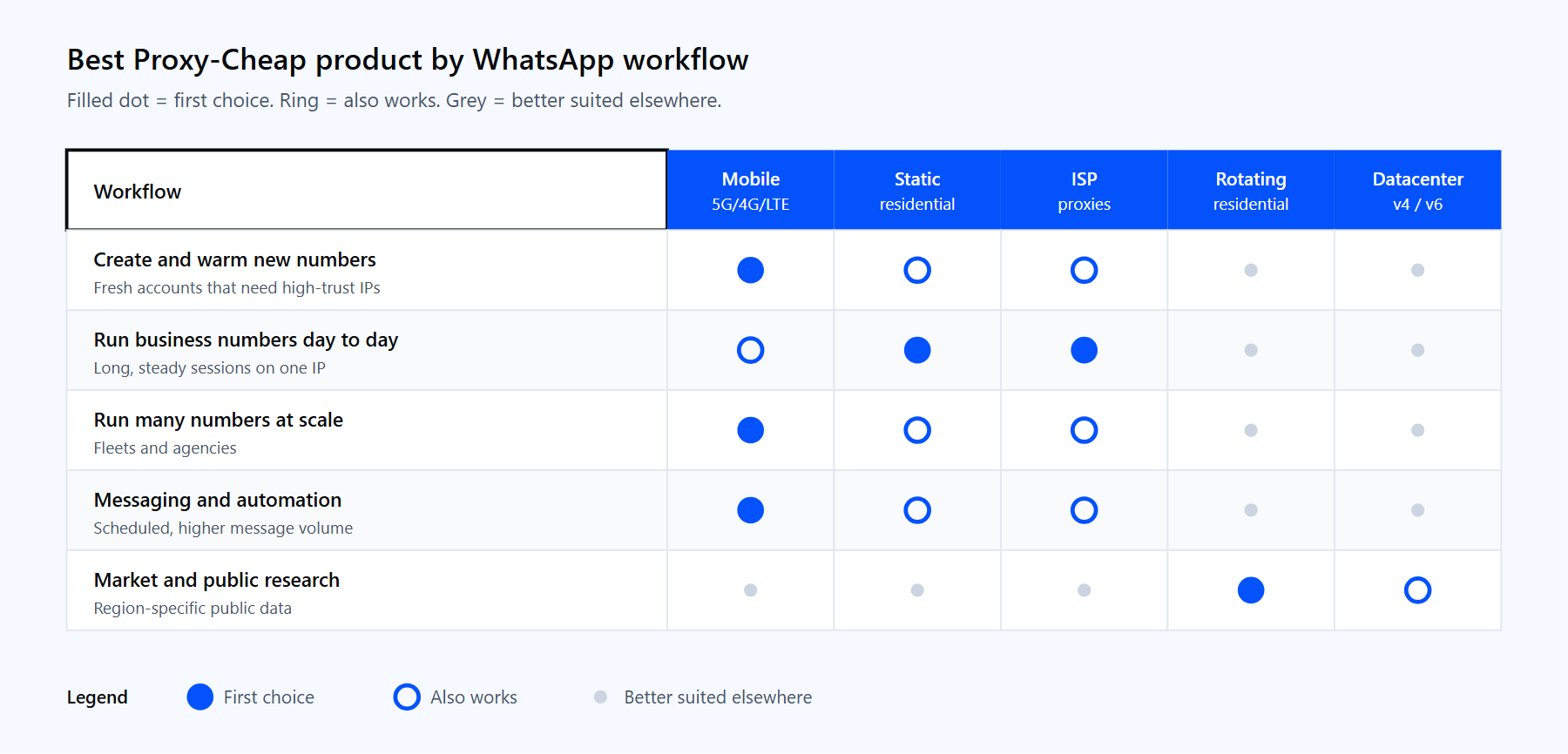
Match each WhatsApp workflow to the Proxy-Cheap proxy type that fits it best.
Yes. WhatsApp built a proxy connection feature directly into the app, so connecting through a proxy is officially supported. The feature keeps your messages and calls end-to-end encrypted; the proxy only relays the encrypted traffic and cannot read it.
For running multiple numbers, WhatsApp's terms govern how you use accounts, not the network you connect from. Many legitimate teams use proxies to manage business numbers and run research. The proxy gives each account a clean, consistent IP, while staying in good standing still depends on how you message and engage. Use proxies together with normal, policy-respecting account behavior, reasonable message volumes, and recipients who expect to hear from you.
This is the native, in-app relay. Use it when you need a steadier connection to WhatsApp on an unreliable network. It needs a WhatsApp-compatible proxy server, which is a relay that listens on the ports WhatsApp expects (chat traffic on port 80, 443, or 5222, and media on port 587). A standard residential or datacenter gateway will not work in this field, because that field expects a WhatsApp proxy server rather than a forward proxy.
On Android:
On iPhone:
The in-app proxy only affects WhatsApp traffic, not the rest of your device. It is a connection tool for one app, so it does not give each account a separate identity. For that, you need the per-account setup below.
This is the setup most operators are after. You are not changing a setting inside WhatsApp itself; you are running each WhatsApp account inside a tool that supports proxies, then assigning a dedicated IP to that tool. The three common tools:
The flow is the same in all three:
A rotating residential connection uses the regional gateway:
Host:     thehub.proxy-cheap.com
Port:     8080
Username: <your-proxycheap-username>
Password: <your-proxycheap-password>There is no separate EU pool; the same hub serves every country you generate in the dashboard credential generator.
Before you bind a proxy to an account, confirm it works with a quick command-line test. A successful run prints the proxy's outbound IP, not your own:
# Confirm the proxy works before you attach it to a WhatsApp profile.
# This should print the proxy IP and its location, not your real IP.
curl --max-time 15 \
  -x http://thehub.proxy-cheap.com:8080 \
  -U "<your-proxycheap-username>:<your-proxycheap-password>" \
  https://ipinfo.io/ip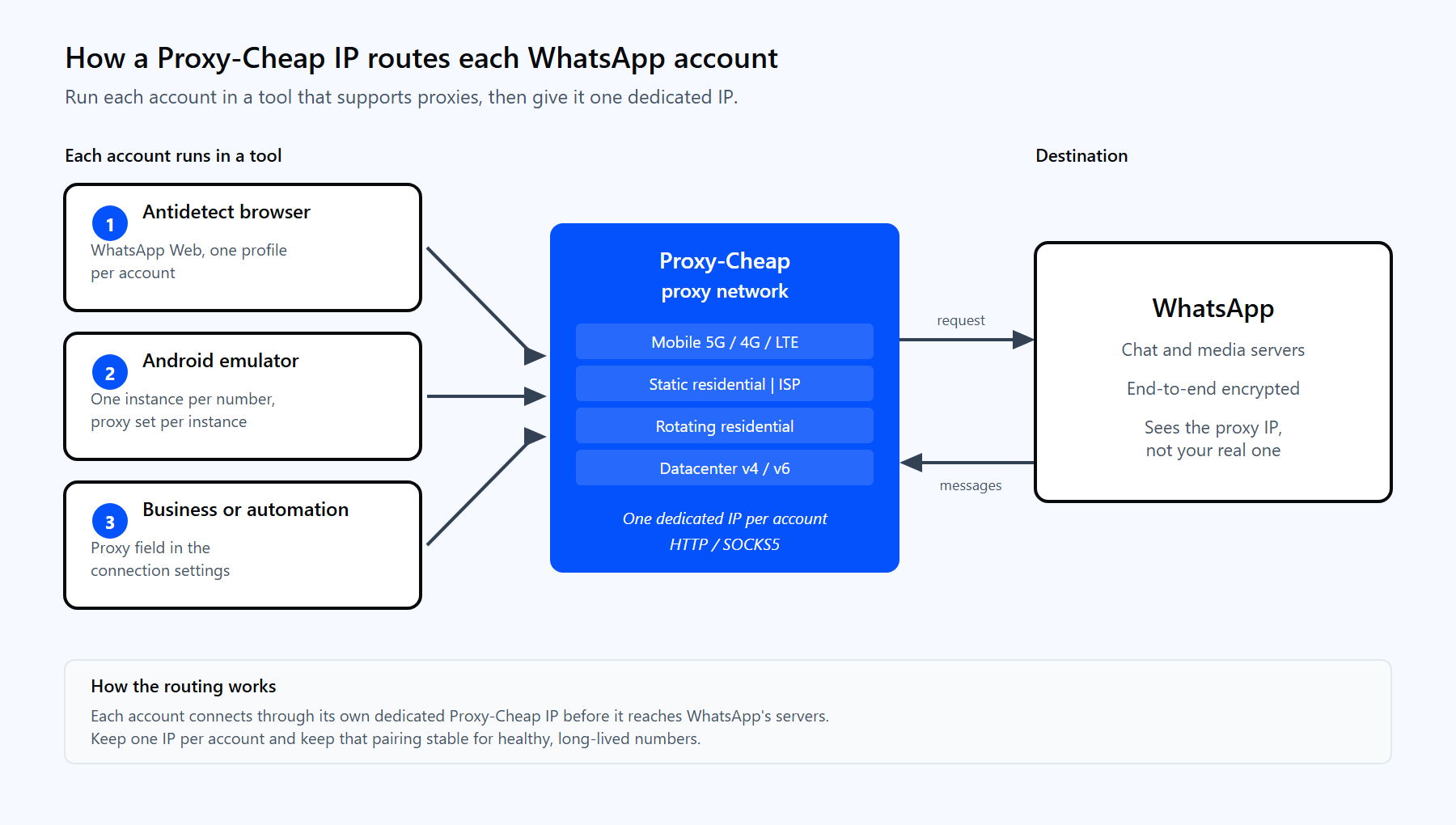
Each WhatsApp account's session routes through its own Proxy-Cheap IP before it reaches WhatsApp.
For mobile and static products, copy the exact host and port from the dashboard rather than using the rotating gateway above. Mobile and static lines support HTTP and SOCKS5, so set the protocol in your tool to match the credentials you generated.
The session style you pick decides how the IP behaves under each account.
For a deeper look at the tradeoff, read static vs rotating proxies. As a rule of thumb for WhatsApp: one account, one steady IP. Keep high-value business numbers on their own static residential, ISP, or mobile IP, and reserve rotating IPs for research tasks that are not tied to a single login.
Scaling past a handful of numbers is mostly about discipline with IPs. WhatsApp's automated quality systems watch how each number connects and behaves, and the clearest signal of a problem is many accounts sharing one IP or one account hopping between IPs.
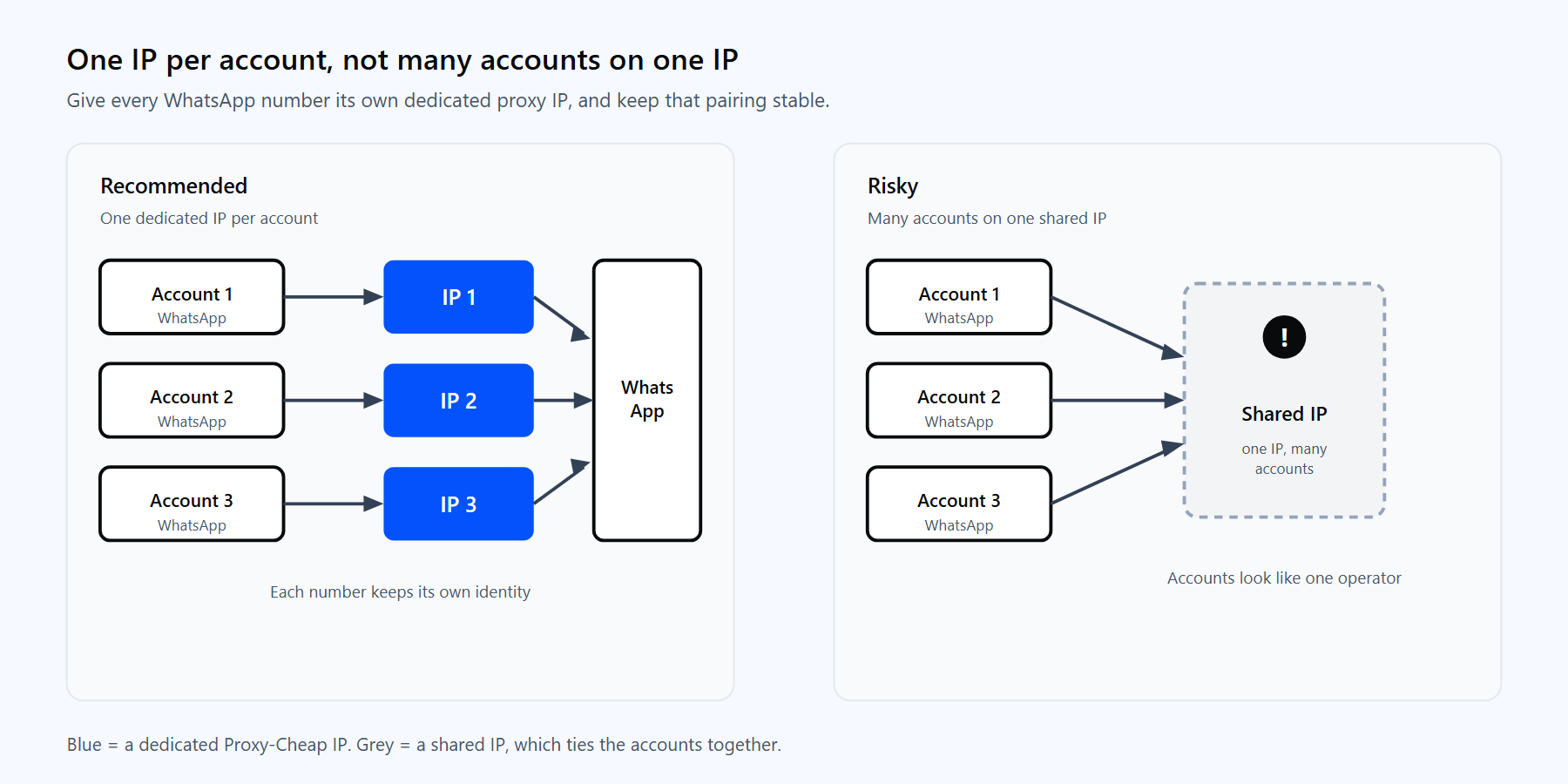
One dedicated IP per account keeps each number's activity tied to a single identity.
Five practices that keep large fleets healthy:
For mobile-heavy fleets, mobile proxies tolerate more accounts per IP than static lines because the carrier already shares that IP among many real users, which is why agencies favor mobile for scale.
Most WhatsApp proxy problems fall into a few buckets. Each has a simple fix.
1. The in-app proxy will not connect. You entered a standard residential or datacenter host in WhatsApp's built-in proxy field. That field needs a WhatsApp-compatible proxy server on the supported ports (80, 443, or 5222 for chat and 587 for media), not a forward proxy. Use a relay built for WhatsApp, or use the per-account setup instead.
2. `407 Proxy Authentication Required` in your tool or test. The credentials are missing or in the wrong place. Put the username and password in their own fields, not inside the server URL. The curl test above returns a clean IP once the credentials are correct.
3. An account loses standing after an IP change. The number switched IPs mid-life, which reads as suspicious. Keep each account on one stable IP and avoid hopping between proxies.
4. The proxy works in a browser but not in an emulator. The protocol does not match. Mobile and static products support HTTP and SOCKS5; set the emulator's proxy type to the one your credentials were generated for, and copy the host and port from the dashboard.
5. Several accounts get flagged together. They are sharing one IP. Give every number its own dedicated IP so a problem on one does not spread to the others.
6. Slow or dropped connections on a free proxy. Public lists are shared by many people, slow, and short-lived. Move account work to a low-cost mobile or residential plan with stable sessions.
7. The account location does not match the number. The IP is in the wrong country. Pick an IP in the market the number represents so the location stays consistent.
Free, public proxy lists exist, and they have a place for throwaway tests. For real account work they fall short, so it is worth knowing the tradeoff before you commit a business number to one.
Free proxies
Paid mobile and residential proxies
For anything past a single personal number, a low-cost paid plan pays for itself quickly in account stability. Start with mobile for creating and scaling numbers, add static residential or ISP for the business profiles you keep long term, and pay only for what you use.