
Key takeaways:
Guzzle is a PHP HTTP client. It sends HTTP requests and talks to REST APIs and web services through a clean, object-oriented interface. It builds on the PSR-7 (HTTP messages), PSR-18 (HTTP client), and PSR-17 (factories) standards, so requests and responses are interoperable objects you can pass around any modern PHP or Laravel application.
Under the hood, Guzzle uses PHP's cURL extension when it is available and falls back to PHP stream wrappers when it is not. It supports synchronous and asynchronous requests, streaming uploads and downloads, a middleware handler stack, and connection pooling. The current series is Guzzle 7, version 7.11 at the time of writing, installed through Composer as guzzlehttp/guzzle.
Two facts shape everything in this guide. First, Guzzle reads a proxy request option that maps directly onto cURL's proxy handling, so every proxy capability cURL has is available to you. Second, options can be set once on the client or per request, which is exactly what makes proxy rotation simple.
Guzzle is the default choice whenever PHP code needs to make an outbound HTTP call. The most common jobs:
Several of these scale to thousands of requests against the same set of hosts. That is the point where the source IP starts to matter, and where a proxy becomes part of the setup rather than an afterthought.
The capabilities that matter once you move past a single request:
Yes. Guzzle is open source under the MIT license, free for both commercial and personal projects. There is no API key, no rate limit, and no usage cap inside the library. Its dependencies, including guzzlehttp/psr7 and guzzlehttp/promises, are MIT licensed too.
Your only costs are the infrastructure that runs your PHP and, once you scrape or call APIs at volume, proxies. The rest of this guide assumes you are running Guzzle on your own server and want to route its requests through a proxy network.
Guzzle installs with Composer. It needs PHP 7.2.5 or newer, and PHP 8.1 or newer is recommended for current releases. Install the cURL extension as well: Guzzle works without it, but cURL is required for true concurrency and for SOCKS5 proxies.
composer require guzzlehttp/guzzleConfirm the version you actually pulled before copying code from any tutorial:
composer show guzzlehttp/guzzleThis guide was written and tested against guzzlehttp/guzzle 7.11.0 on PHP 8.3 with libcurl 8.20. Once Composer finishes, include the autoloader and you are ready to send requests.
The minimal working example creates a client, sends a GET request, and reads the response. Options passed to the constructor become defaults for every request the client sends.
<?php
require 'vendor/autoload.php';

use GuzzleHttp\Client;

// Constructor options become the defaults for every request this client sends.
$client = new Client([
    'base_uri' => 'https://api.ipify.org',
    'timeout'  => 10,
]);

$response = $client->request('GET', '/?format=json');

echo $response->getStatusCode();               // 200
echo $response->getHeaderLine('Content-Type'); // application/json
echo (string) $response->getBody(); // {"ip":"198.51.100.23"}Run it and you get a 200 status, an application/json content type, and a small JSON body with your server's current outbound IP (shown here as an illustrative address).
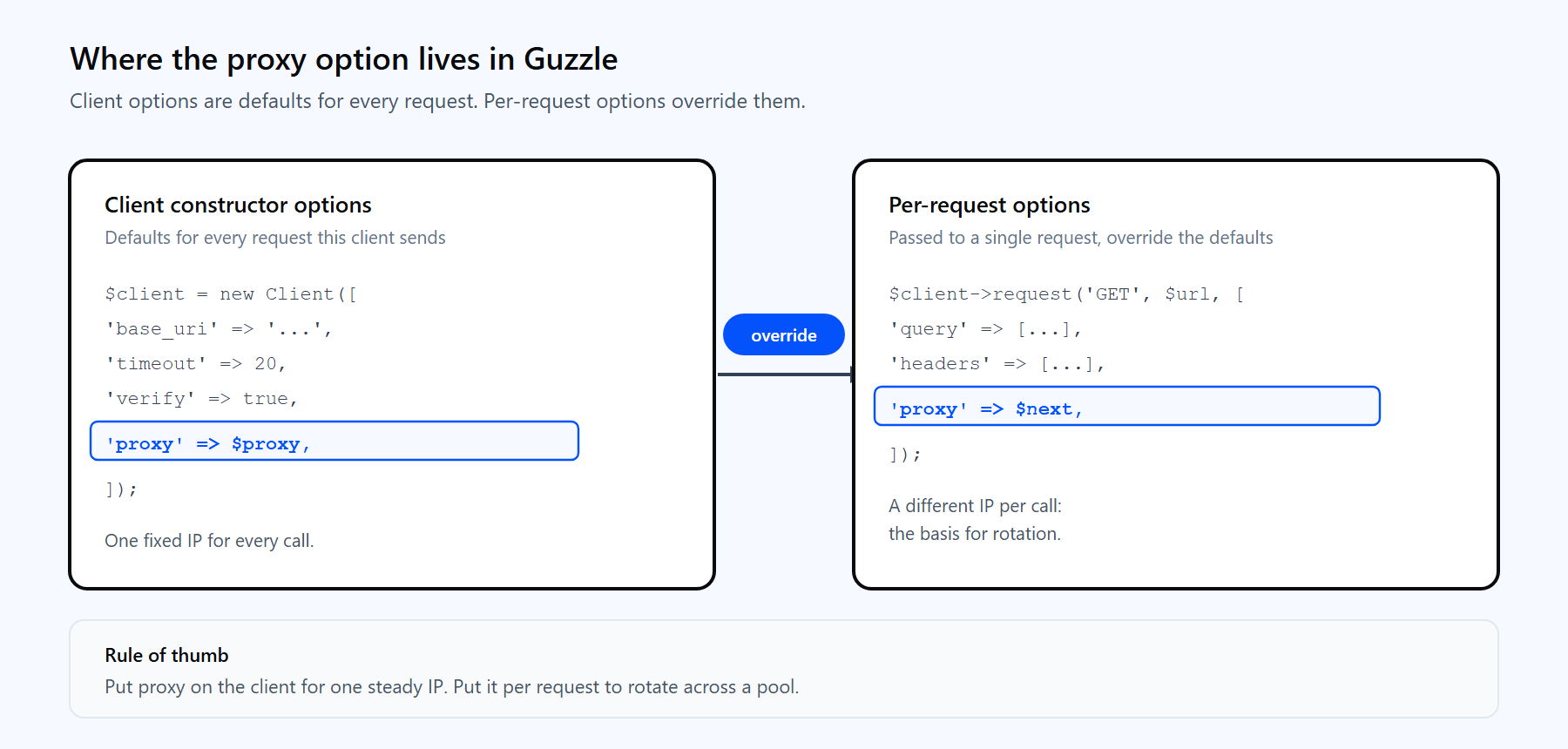
Options set on the client are defaults for every request. Per-request options override them. The proxy setting can live in either place, which is the key to rotation.
The client-versus-request split is the single most useful idea for proxy work. Put the proxy option on the client and every request uses the same IP. Put it on the individual request and you can hand each call a different proxy. You will use both patterns below.
A request returns a PSR-7 ResponseInterface object. You read it through a small, predictable set of methods.
| Method | Returns | Use it for |
|---|---|---|
| getStatusCode() | Integer such as 200 | Branching on success or failure |
| getReasonPhrase() | String such as OK | Logging and diagnostics |
| getHeaderLine('Name') | Comma-joined header string | Reading content type or rate-limit headers |
| getHeaders() | Array of all headers | Inspecting the full header set |
| getBody() | A PSR-7 stream object | Streaming large bodies in chunks |
| (string) getBody() | The full body as a string | Parsing JSON or HTML |
The body is a stream (GuzzleHttp\Psr7\Stream), not a plain string. Cast it with (string) for small payloads, or read it in chunks with $body->read(8192) for large ones. For JSON APIs, decode it directly:
$response = $client->request('GET', 'https://api.ipify.org?format=json');
$data = json_decode((string) $response->getBody(), true);
echo $data['ip'];One default to know early: Guzzle treats 4xx and 5xx responses as errors and throws an exception. Keep that behavior for APIs where a bad status is a real failure, or set 'http_errors' => false when you want to inspect the status code yourself. This matters for proxy work, because a proxy authentication failure surfaces as an exception you need to catch.
A single server IP is fine for light API traffic. It stops being fine the moment you fetch the same host thousands of times, because many sites rate-limit repeated requests from one address. Routing through a proxy network spreads those requests across a pool of IPs, which is why production PHP scraping runs behind one. For criteria on picking a network, the guide to the best proxies for web scraping walks through the trade-offs.
Three concrete reasons to put a proxy in front of Guzzle at scale:
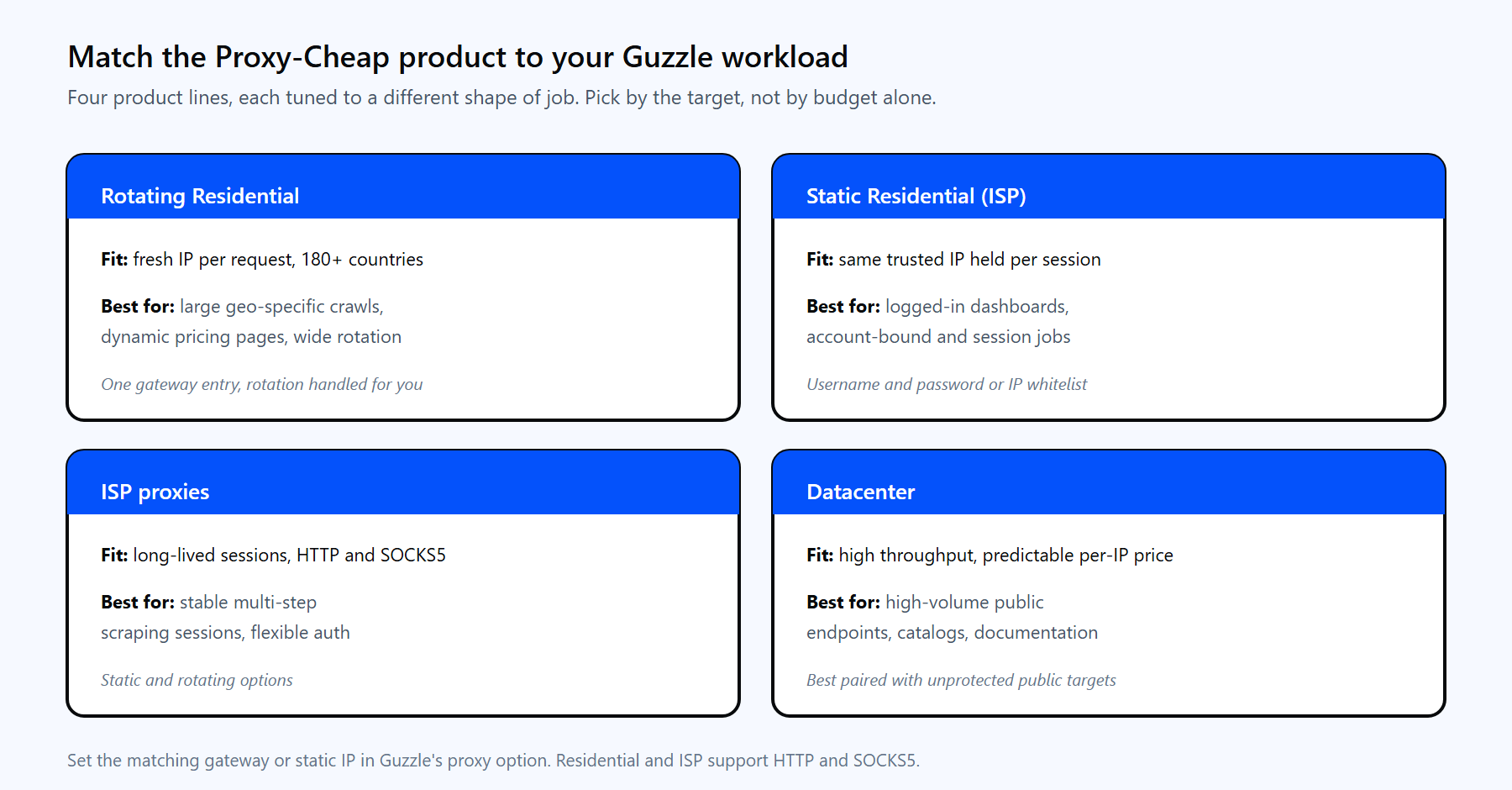
Each Proxy-Cheap product line fits a different shape of Guzzle workload. Pick by the target site, not by budget alone.
Proxy-Cheap offers four product lines that map cleanly onto typical Guzzle jobs:
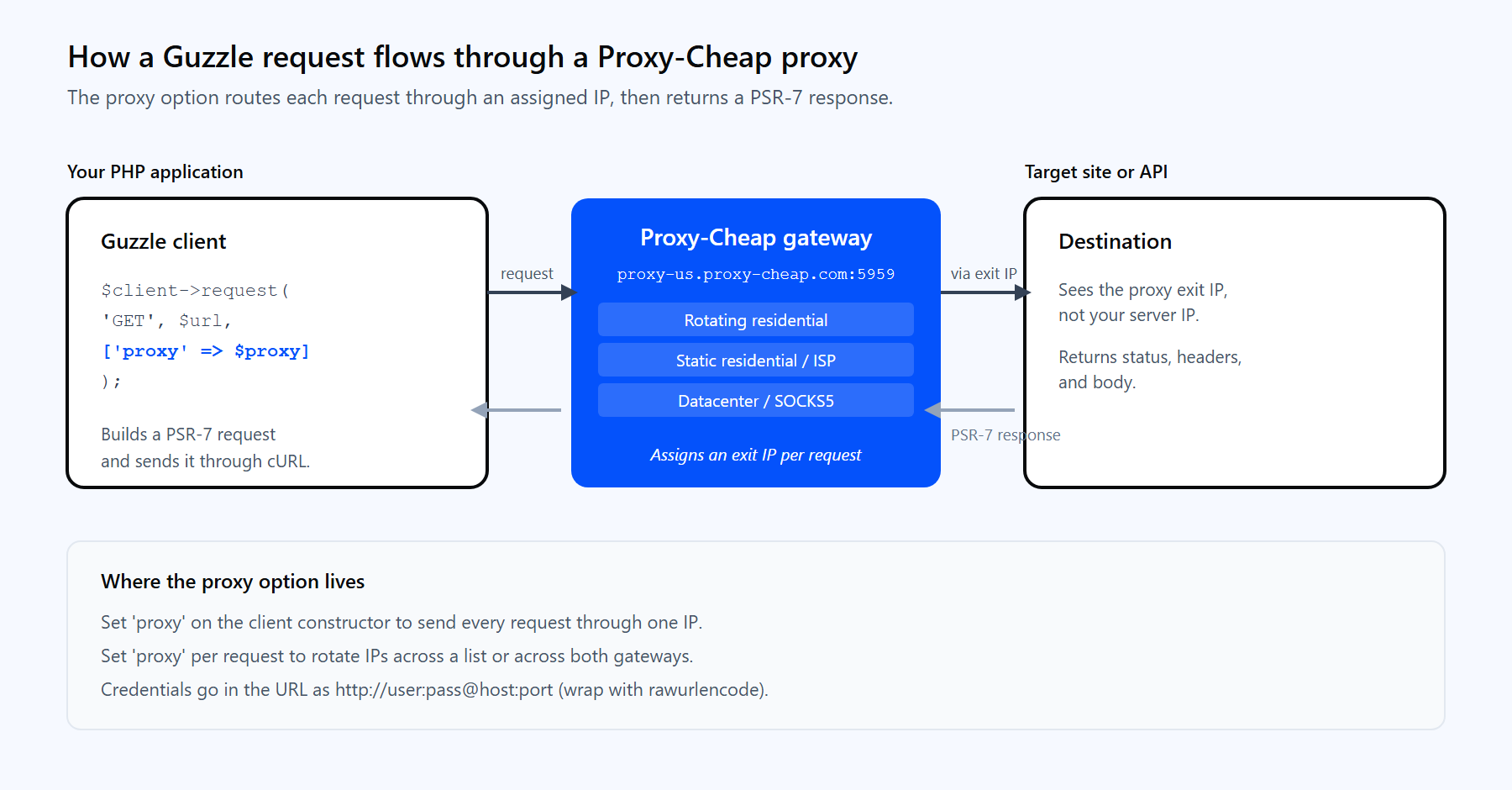
A Guzzle request routes through the Proxy-Cheap gateway, reaches the target through an assigned IP, and returns a standard PSR-7 response.
Before the code, a note on endpoint format, because it differs by product:
Guzzle's proxy option takes a single URL string. The cleanest pattern is to compose that string from named variables so credentials never sit hardcoded inline:
<?php
require 'vendor/autoload.php';

$proxyUser = '<your-proxycheap-username>';
$proxyPass = '<your-proxycheap-password>';
$proxyHost = 'thehub.proxy-cheap.com';
$proxyPort = '8080';

// rawurlencode keeps special characters in credentials from breaking the URL.
$proxy = sprintf('http://%s:%s@%s:%s',
    rawurlencode($proxyUser), rawurlencode($proxyPass), $proxyHost, $proxyPort);

$client = new GuzzleHttp\Client(['timeout' => 20]);

$response = $client->request('GET', 'https://httpbin.org/ip', [
    'proxy' => $proxy,
]);

echo (string) $response->getBody(); // echoes the exit IP assigned to the requestTo send every request from a client through the same proxy, move the option into the constructor:
$client = new GuzzleHttp\Client([
    'proxy'   => $proxy, // applies to every request this client sends
    'timeout' => 20,
]);Guzzle also accepts a per-protocol array. This routes HTTP and HTTPS through different proxies and lets you name hosts that should skip the proxy and connect directly:
$response = $client->request('GET', 'https://httpbin.org/ip', [
    'proxy' => [
        'http'  => $proxy,                     // for http:// targets
        'https' => $proxy,                     // for https:// targets
        'no'    => ['localhost', '127.0.0.1'], // connect directly, no proxy
    ],
]);Three practical notes from real use:
You get rotation in two ways, depending on the product line:
For the second case, a round-robin over a proxy list is all you need. Set the proxy per request so each call can use a different IP:
$proxies = [
    'http://<user>:<pass>@thehub.proxy-cheap.com:8080',
    'http://<user>:<pass>@thehub.proxy-cheap.com:8080',
    // add static IPs and ports from your dashboard here
];

$client = new GuzzleHttp\Client(['timeout' => 20]);

foreach ($urls as $i => $url) {
    $proxy = $proxies[$i % count($proxies)]; // round-robin selection
    $response = $client->request('GET', $url, ['proxy' => $proxy]);
    echo $url . ' -> ' . $response->getStatusCode() . PHP_EOL;
}Swap $proxies[$i % count($proxies)] for $proxies[array_rand($proxies)] if you prefer random selection over strict round-robin. The same per-request pattern applies in any language; the Python IP rotation guide shows the equivalent with Requests and AIOHTTP.
When to use which: reach for rotating residential when you crawl a high volume of geo-specific pages and want a fresh IP per request. Reach for static residential or ISP when a workflow needs the same IP held across a multi-step session, such as a logged-in dashboard.
Fetching pages one at a time wastes most of your wall-clock time waiting on the network. Guzzle's async API and Pool send many requests at once, each through a proxy. Concurrency uses the cURL multi handler, so the cURL extension is required here.
Pool is the right tool for a large, fixed list of URLs sharing one proxy. It caps how many requests run at once and calls a handler as each one settles:
use GuzzleHttp\Client;
use GuzzleHttp\Pool;
use GuzzleHttp\Psr7\Request;

$client = new Client(['timeout' => 20]);
$proxy  = 'http://<user>:<pass>@thehub.proxy-cheap.com:8080';

$requests = function ($urls) {
    foreach ($urls as $url) {
        yield new Request('GET', $url);
    }
};

$pool = new Pool($client, $requests($targetUrls), [
    'concurrency' => 10,                   // requests in flight at once
    'options'     => ['proxy' => $proxy],  // applied to every request in the pool
    'fulfilled'   => function ($response, $i) {
        echo "[$i] " . $response->getStatusCode() . PHP_EOL;
    },
    'rejected'    => function ($reason, $i) {
        echo "[$i] failed: " . $reason->getMessage() . PHP_EOL;
    },
]);

$pool->promise()->wait();When you want concurrency and rotation together, build the promises yourself with getAsync, give each its own proxy, then settle them as a group:
use GuzzleHttp\Client;
use GuzzleHttp\Promise\Utils;

$client  = new Client(['timeout' => 15]);
$proxies = [
    'http://<user>:<pass>@thehub.proxy-cheap.com:8080',
    'http://<user>:<pass>@thehub.proxy-cheap.com:8080',
];

$promises = [];
foreach ($targetUrls as $i => $url) {
    $proxy = $proxies[$i % count($proxies)];
    $promises[$i] = $client->getAsync($url, ['proxy' => $proxy]);
}

$results = Utils::settle($promises)->wait(); // resolves every promise, errors included

foreach ($results as $i => $result) {
    echo "[$i] " . $result['state'] . PHP_EOL; // fulfilled or rejected
}Utils::settle waits for all promises and never throws, so one failed request does not sink the batch. Each entry reports fulfilled with a value or rejected with a reason, which is the right shape for a resilient crawl.
Most Guzzle proxy failures fall into a few buckets. Each has a clear fix.
1. cURL error 7: CONNECT tunnel failed, response 407. The proxy demanded authentication and your credentials were missing or wrong. This is the most common proxy error, and it appears on HTTPS targets because the request tunnels through the proxy with CONNECT. Add credentials to the proxy URL as http://user:pass@host:port and confirm them in the dashboard. On some libcurl versions the same problem shows as cURL error 56: Received HTTP code 407 from proxy after CONNECT.
2. cURL error 7: Failed to connect to ... port. The host or port is wrong, or you pointed an HTTP client at a SOCKS-only port. For rotating residential, use thehub.proxy-cheap.com:8080 with the http:// scheme. For static products, copy the exact host and port from the dashboard.
3. cURL error 60: SSL certificate problem: unable to get local issuer certificate. Your PHP install has no CA bundle configured. Point curl.cainfo in php.ini at a current cacert.pem. Avoid disabling verification in production; turning off TLS checks defeats the purpose of HTTPS.
4. cURL error 28: Connection timed out. The proxy or target did not answer in time. Raise the timeout and connect_timeout options, and retry transient failures rather than failing the whole job (see the retry pattern below).
5. A bad password silently breaks the proxy URL. Special characters such as @, :, and # in a password split the URL in the wrong place. Always wrap credentials in rawurlencode().
6. Catch the right exceptions. Transport failures (a refused proxy, a tunnel error, a timeout) throw GuzzleHttp\Exception\ConnectException. HTTP responses with a 4xx or 5xx status throw GuzzleHttp\Exception\RequestException, which carries the response. Handle them separately, and retry only the transient transport errors:
use GuzzleHttp\HandlerStack;
use GuzzleHttp\Middleware;
use GuzzleHttp\Client;
use GuzzleHttp\Exception\ConnectException;
use Psr\Http\Message\RequestInterface;

$stack = HandlerStack::create();
$stack->push(Middleware::retry(
    function ($retries, RequestInterface $req, $res = null, $err = null) {
        return $retries < 2 && $err instanceof ConnectException; // retry transient connects
    },
    function ($retries) { return 1000 * $retries; } // back off 1s, then 2s
));

$client = new Client(['handler' => $stack, 'timeout' => 20]);This handler stack retries a refused or timed-out proxy connection up to two times before giving up, which smooths over the occasional transient failure on a long job.
For outbound HTTP in PHP, Guzzle is the standard for good reason. It is MIT licensed, the PSR-7 design is clean, the async and concurrency support is genuinely useful, and proxy handling is a first-class option rather than a bolt-on. A few honest trade-offs are worth weighing.
Pros
Cons
For most PHP scraping and API projects, the practical setup is Guzzle for the requests, a small rotation helper for the IPs, and a value-tier proxy provider on pay-as-you-go billing. Proxy-Cheap fits that last piece with residential proxies across 180+ countries, HTTP and SOCKS5 support, and no monthly commitment.