Key takeaways:
changedetection.io is an open-source web page change monitor. You give it a URL, it fetches that page on a schedule, and it tells you when the content changes. The project is maintained by dgtlmoon, released under the Apache 2.0 license, and self-hosted through Docker or pip. The current release at the time of writing is 0.55.7.
Under the hood it stores a snapshot of each page, re-fetches on your chosen interval, and runs a diff. When the diff is non-empty, the watch is marked as changed and your notifications fire. You can narrow what counts as a change with CSS selectors, XPath, JSONPath, or a jq filter, so a price ticker or a stock label triggers an alert while the rest of the page is ignored.
Two design choices make it a good fit for proxy integration. First, it fetches the same pages over and over from one server IP, which is exactly the traffic pattern that runs into rate limits. Second, it has native proxy support built into the settings and a per-watch proxy selector, so routing checks through a proxy network is a first-class feature rather than a workaround.
changedetection.io is used wherever a person needs to know that a specific web page changed without checking it by hand. The most common jobs:
The common thread is repeated, scheduled fetching of public web pages. Once you watch more than a handful of pages, or watch pages that serve different content by country, a proxy stops being optional.
The features that matter for a production monitoring setup:
Yes. changedetection.io is free and open source under the Apache License 2.0. You can run it on your own hardware with no license fee, no API key, and no cap on the number of pages you watch. Commercial use is permitted.
The project also offers a paid hosted plan for people who would rather not self-host. The hosted version and the self-hosted version share the same feature set, including proxy support, so everything in this guide applies either way. Your only real costs when self-hosting are the machine that runs the container and, once you watch pages at scale, a proxy plan.
The fastest path is Docker. Create a docker-compose.yml file and start the service:
# docker-compose.yml
services:
  changedetection:
    image: ghcr.io/dgtlmoon/changedetection.io
    container_name: changedetection
    hostname: changedetection
    volumes:
      - changedetection-data:/datastore
    ports:
      - "5000:5000"
    restart: unless-stopped

volumes:
changedetection-data:# Start it in the background, then open http://localhost:5000
docker compose up -dIf you prefer to run it without Docker, install from PyPI on Python 3.10 or newer:
pip3 install changedetection.io
changedetection.io -d ./datastore -p 5000
# Open http://localhost:5000The -d flag sets the data directory (where snapshots and your proxies.json live) and -p sets the port. Confirm the version you actually installed before copying any configuration from a tutorial, because the proxy file format settled in the 0.39.20 series:
pip3 show changedetection.io | grep VersionOpen the dashboard at http://localhost:5000. Paste a URL into the "Add a new web page to monitor" field and click Watch. changedetection.io fetches the page, stores the first snapshot, and starts checking on the default schedule.
A few things to set on the watch before you walk away:
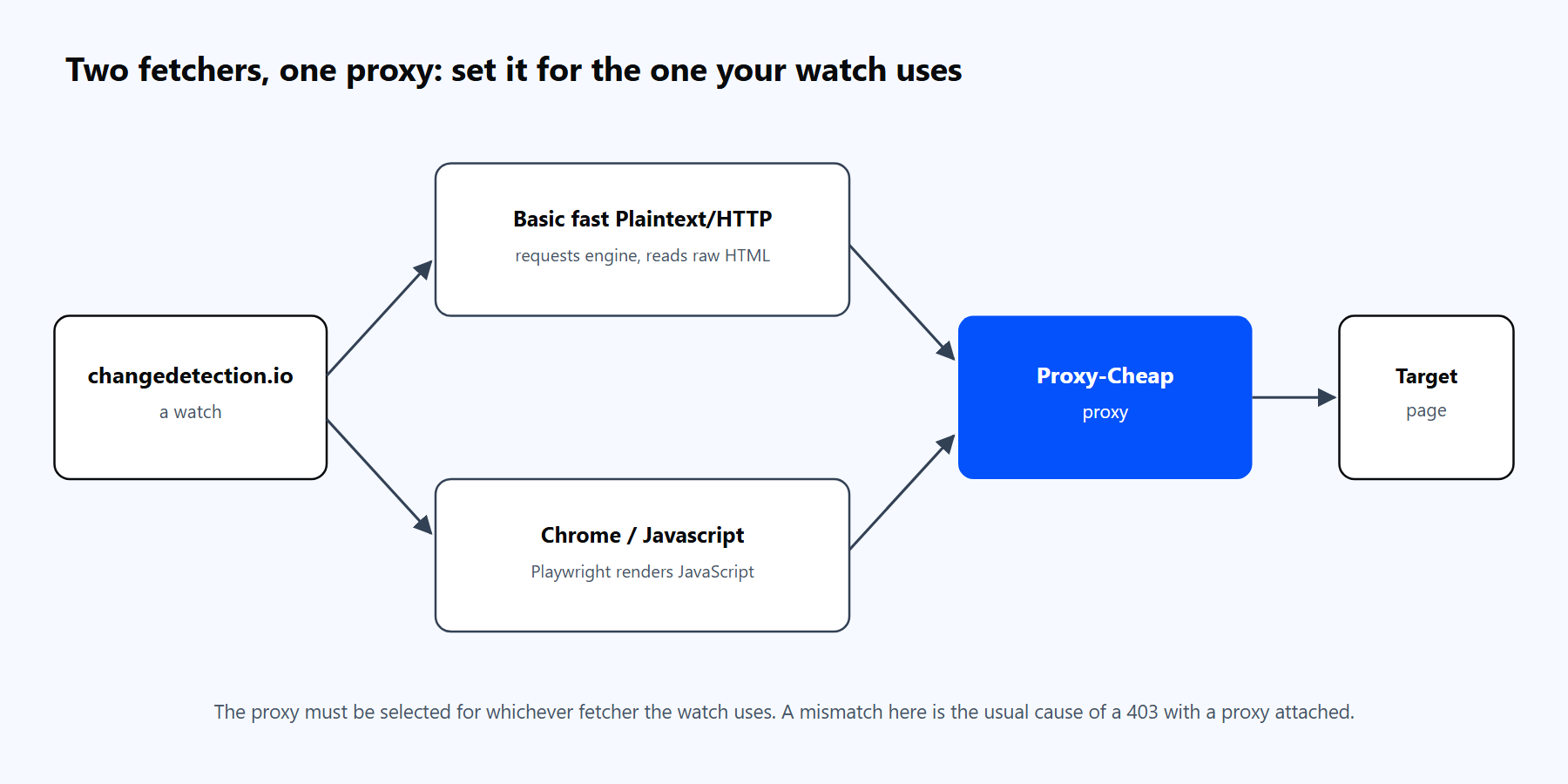
changedetection.io has two fetchers. The proxy you choose has to apply to whichever one the watch uses, which is the single most important thing to get right.
The fetcher choice matters for the rest of this guide. The fast HTTP fetcher uses a Python requests engine and reads the raw HTML. The Chrome fetcher launches a real browser to render JavaScript first. Each takes a proxy, but you configure them in slightly different places, and getting that wrong is the most common proxy problem people hit.
When a re-fetch produces a different snapshot, the watch turns to a "changed" state and changedetection.io surfaces it three ways:
This is why proxies belong in the picture early. If a scheduled fetch returns a 403 response or a rate-limit page instead of the real content, changedetection.io faithfully reports that junk as a "change", and you get a false alert. A stable proxy keeps the fetched content clean, so the diffs you see are real ones.
A direct connection from one server IP is fine for watching a few pages a few times a day. It stops being fine the moment you scale up the number of watches or the check frequency, which is why a serious monitoring setup runs through a residential proxy network. For a broader view of how to pick a provider, the best proxies for web scraping guide covers the selection criteria. Three concrete reasons to put a proxy in front of changedetection.io:
Proxy-Cheap offers four product lines that map cleanly onto changedetection.io workloads:
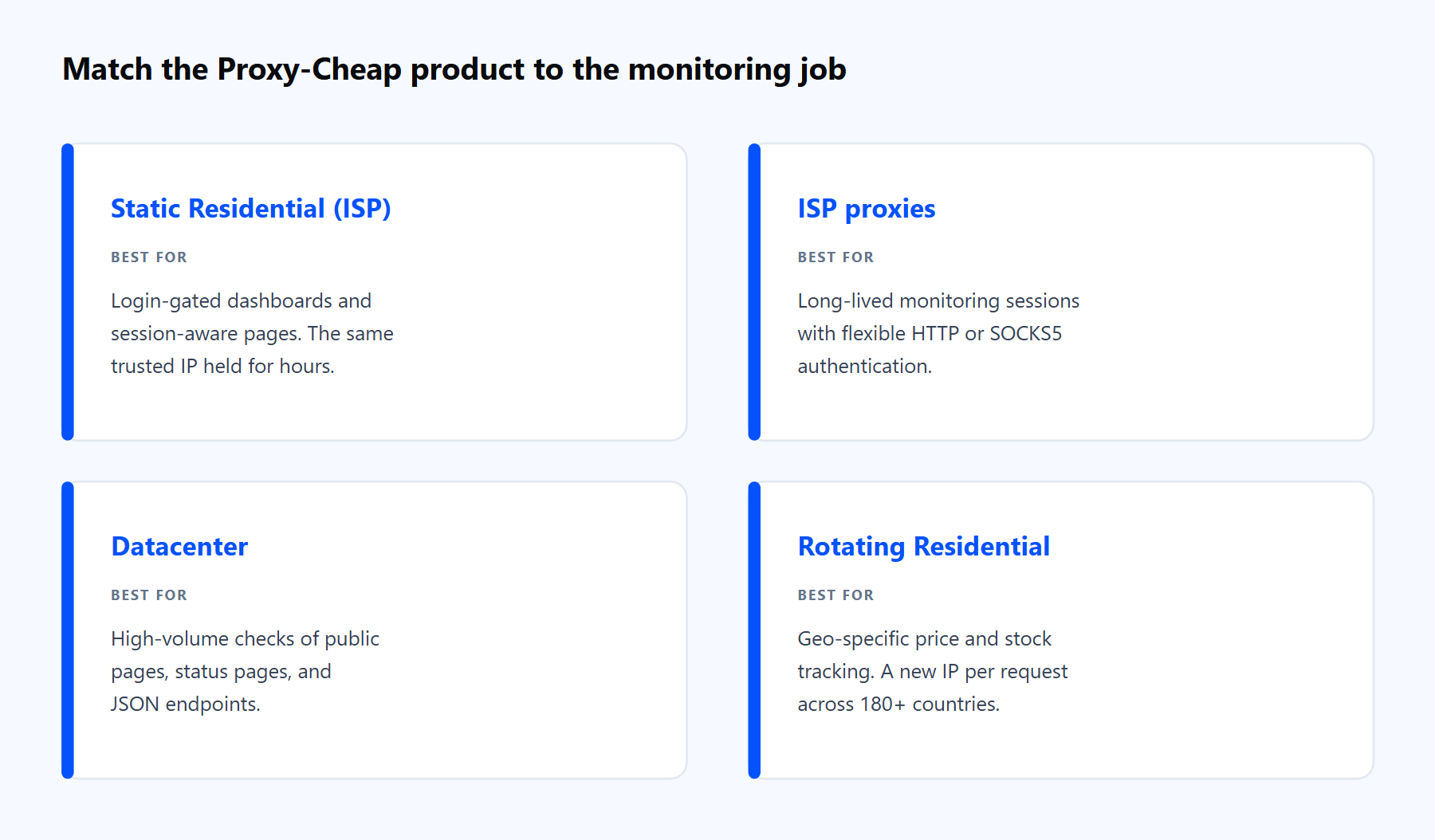
Each product line fits a different shape of monitoring job. The links below match the cards above.
For most monitoring projects the right answer is one of these four, picked by the shape of the target page rather than the size of your budget.
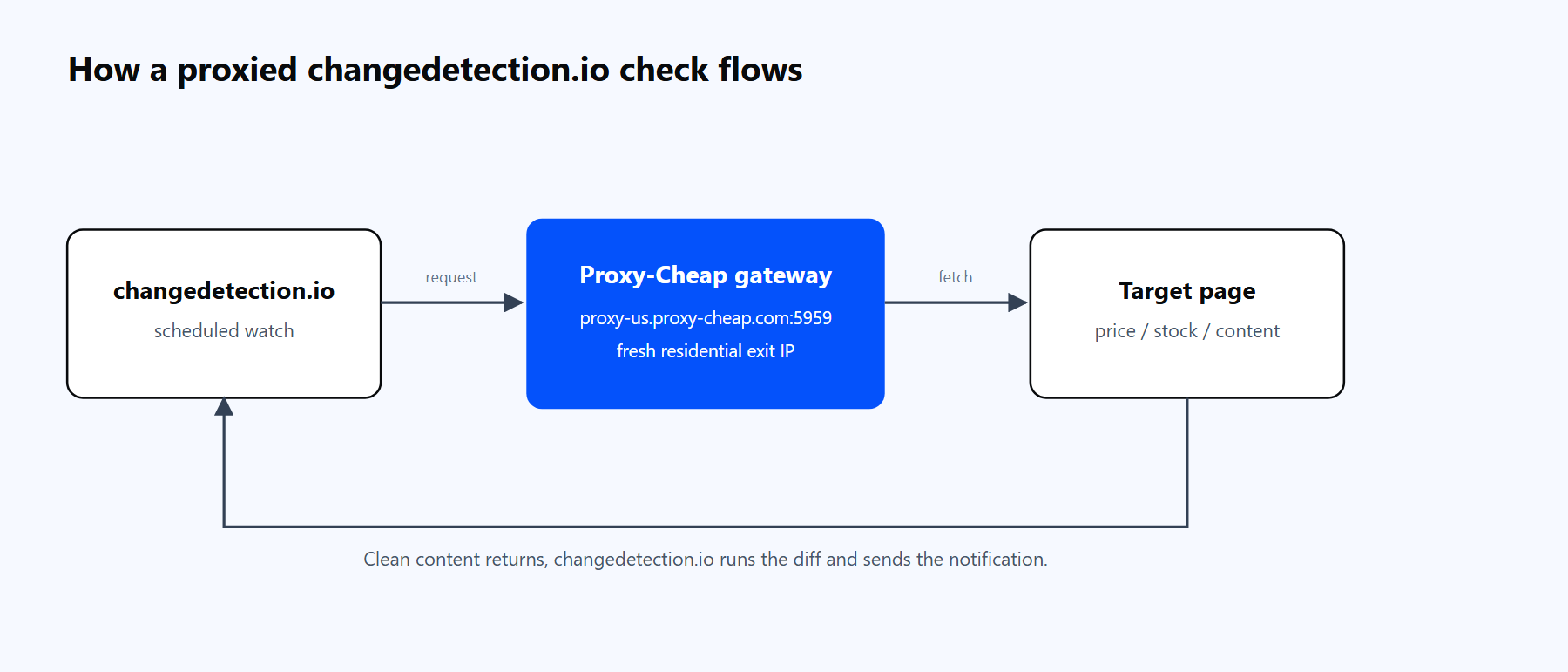
A scheduled changedetection.io check routes through the Proxy-Cheap gateway, fetches the target page through a residential IP, and returns a clean diff plus a notification.
There are two everyday ways to attach a proxy, plus a file-based method covered in the next section. Both use the same Proxy-Cheap credential format, so a quick note on endpoints first:
This is the quickest start for a single proxy.
http://<your-proxycheap-username>:<your-proxycheap-password>@thehub.proxy-cheap.com:8080Unlike some scraping libraries, changedetection.io expects the username and password inside the proxy URL, not in separate fields. That is the format its fetchers understand. Generate the credentials in the Proxy-Cheap dashboard's Setup Credentials panel, and for a fuller walkthrough of residential setup, see the step-by-step guide to using residential proxies.
To route every check (and notifications) through a proxy without touching the UI, add an environment: section to the changedetection service in your compose file. This is the cleanest option for a Docker deployment:
# docker-compose.yml (add to the changedetection service)
    environment:
      - HTTP_PROXY=http://<your-proxycheap-username>:<your-proxycheap-password>@thehub.proxy-cheap.com:8080
      - HTTPS_PROXY=http://<your-proxycheap-username>:<your-proxycheap-password>@thehub.proxy-cheap.com:8080
- NO_PROXY=localhost,127.0.0.1Before you trust a watch to it, confirm the credentials and the gateway from a terminal. A real exit IP in the response means the proxy works end to end:
curl --max-time 6 -x "http://<your-proxycheap-username>:<your-proxycheap-password>@thehub.proxy-cheap.com:8080" https://ipinfo.io/ipIf you get back an IP, you are set. If you see 407 Proxy Authentication Required, the host and port are reachable but the username or password is wrong, so fix the credentials and try again. HTTP is the most compatible scheme here. Proxy-Cheap also supports SOCKS5 across its products: use the socks5h:// scheme and copy the host and port from your dashboard. Note that SOCKS5 support in the requests engine needs the PySocks extra, which the official Docker image already includes.
You get rotation two different ways, depending on the product line.
Rotating residential rotates at the gateway. Point a watch at thehub.proxy-cheap.com:8080 or thehub.proxy-cheap.com:8080 and every check gets a new exit IP with no extra configuration. One entry covers a whole pool, which is ideal for high-frequency geo-specific monitoring.
Static proxies rotate from a list you maintain. For static residential, ISP, or datacenter IPs, add each one to a proxies.json file in your data directory. From version 0.39.20 onward changedetection.io reads this file and shows every entry in the per-watch proxy dropdown:
{
"proxy-cheap-hub": { "label": "Proxy-Cheap rotating residential", "url": "http://<user>:<pass>@thehub.proxy-cheap.com:8080", "reuse_time_minimum": 180 }
}The label is what you see in the dropdown, url is the proxy itself, and reuse_time_minimum is the minimum number of seconds before changedetection.io calls that proxy again, which helps you pace requests and control spend. Assign a different entry to different watches to spread load across IPs and regions.
Which type to choose depends on the watch. Rotating residential is the default for high-volume, geo-sensitive monitoring where a fresh IP per check keeps success rates stable. Static residential or ISP is the right call when a watch needs the same IP to persist, such as a page behind a login. For a deeper comparison, read static vs rotating proxies: which type works better and, if you script your own rotation around the API, how to rotate proxies in Python with Requests and AIOHTTP.
Plenty of the pages worth watching (single-page apps, pages behind a JavaScript check such as Cloudflare's, infinite-scroll catalogs) return almost nothing to the fast HTTP fetcher. For those, switch the watch to the Chrome fetcher and pair it with a residential IP.
First, add a browser container alongside changedetection.io so it has a real Chrome to drive:
# docker-compose.yml (add the browser service)
services:
  changedetection:
    image: ghcr.io/dgtlmoon/changedetection.io
    container_name: changedetection
    volumes:
      - changedetection-data:/datastore
    environment:
      - PLAYWRIGHT_DRIVER_URL=ws://sockpuppetbrowser:3000
    ports:
      - "5000:5000"
    restart: unless-stopped

  sockpuppetbrowser:
    image: dgtlmoon/sockpuppetbrowser:latest
    container_name: sockpuppetbrowser
    cap_add:
      - SYS_ADMIN
    restart: unless-stopped

volumes:
changedetection-data:Then, on the watch, set Fetch method to "Chrome/Javascript" and pick your Proxy-Cheap proxy from the same proxy dropdown. The proxy you selected now routes the browser's traffic, not just the fast fetcher's. For pages that need a login or a cookie click first, open Browser Steps and record the actions; they run inside the proxied browser session before the snapshot is taken. A residential IP is the better choice for these pages because they tend to serve different content based on how trusted the visitor looks.
Most changedetection.io proxy issues fall into a handful of buckets. Each has a clear fix.
1. A watch returns 403 Access denied even though a proxy is set. This almost always means the proxy is configured for one fetcher but the watch uses the other. If the watch uses "Chrome/Javascript", make sure the browser container is running and the proxy is selected on that watch, not only in the global box. The maintainer's own fix for this is to set a non-empty proxy value under Settings, Fetching for the Chrome requests path rather than leaving it on default.
2. The proxy works in "Basic fast" but not in Chrome (or the reverse). The two fetchers read proxy settings independently. Re-select the proxy on the watch's Request tab after switching the fetch method, and confirm the PLAYWRIGHT_DRIVER_URL browser service is up.
3. 407 Proxy Authentication Required. The host and port are reachable but the credentials are wrong or missing. Recheck the username:password in the proxy URL, and for the rotating residential hub use port 8080. Test it in isolation with the curl -x command from the setup section.
4. Connection refused or timeouts on every check. The host or port is wrong, or a firewall is in the way. Verify the exact host and port against the dashboard's Setup Credentials panel, then re-run the curl test before blaming changedetection.io.
5. SOCKS5 proxy does nothing. Use the socks5h:// scheme (not socks5://) so DNS resolves through the proxy, and confirm the PySocks extra is present. The official Docker image includes it; a bare pip install may not.
6. Every check shows the same IP and you still get rate-limited. You are on a single static IP. Switch the watch to the rotating residential gateway, or add several entries to proxies.json and assign them across your watches with a sensible reuse_time_minimum.
7. Notifications stop arriving after adding a proxy. Environment-variable proxies route notification traffic too. Add internal hosts to NO_PROXY, and make sure your notification service is reachable through the proxy or excluded from it.
For self-hosted web page monitoring, changedetection.io is the strongest open-source option available today. It is free under Apache 2.0, the proxy support is genuinely native rather than bolted on, and the maintainer ships updates at a steady pace. A few honest tradeoffs to weigh.
Pros
Cons
The practical setup for most teams: run changedetection.io yourself, start with the fast fetcher and the rotating residential gateway, and add the Chrome container plus static residential IPs only for the watches that need a login or render with JavaScript. That covers the large majority of monitoring jobs without enterprise-tier overhead.