Proxy-Cheap
Proxy-Cheap
Integrations
Screaming Frog proxy setup: a complete integration guide

Screaming Frog Proxy Integration

Run large Screaming Frog crawls without stalls or failed requests by routing them through Proxy-Cheap proxies. Rotate exit IPs at the gateway, capture accurate geo-specific SERP and page data from 180+ countries, and keep success rates steady on every audit.
Get Proxies for Screaming Frog proxy setup: a complete integration guide
Screaming Frog proxy setup: a complete integration guide
What is Screaming Frog?
Screaming Frog SEO Spider is a desktop website crawler for technical SEO audits, covering broken links, redirects, metadata, canonicals, and more. It has a built-in proxy setting, so you can route every crawl through a Proxy-Cheap IP and rotate addresses with a single gateway entry.

Key takeaways:

  • Screaming Frog SEO Spider is a desktop website crawler for technical SEO audits. The free tier crawls up to 500 URLs, and a paid license (around £259 per year) lifts the cap.
  • A proxy keeps large crawls stable by spreading requests across many IPs, and it returns geo-specific SERP and page data that a single office IP cannot.
  • Set the proxy under File > Settings > Proxy: tick Use Proxy Server, enter the host and port, add your username and password, then restart the SEO Spider.
  • Screaming Frog uses one proxy at a time and has no built-in rotation, so point it at a rotating gateway such as thehub.proxy-cheap.com:8080 to rotate exit IPs server side.

Screaming Frog is the crawler most technical SEOs reach for first, and the moment you crawl at scale or audit sites you do not own, a proxy stops being optional. This guide covers what the tool does, how to install and run it, and then the part vendors usually rush: configuring, testing, and rotating proxies the right way.

What is Screaming Frog SEO Spider?

Screaming Frog SEO Spider is a desktop website crawler built for technical SEO audits. You point it at a domain, and it fetches every URL it can reach, then reports status codes, redirects, page titles, meta descriptions, headings, canonical tags, hreflang, duplicate content, broken links, and dozens of other on-page signals. It is made by Screaming Frog, a search marketing agency in the UK, and it has been a standard part of the technical SEO toolkit since 2010.

The application is written in Java and runs on Windows, macOS, and Ubuntu Linux. It installs and runs entirely on your own machine, so your crawl data stays on your computer. The current release is the version 24 series, which added a built-in MCP server so AI assistants can drive crawls in natural language, plus automatic crawl-to-crawl comparison for scheduled jobs.

What is Screaming Frog used for?

Screaming Frog is used wherever someone needs a fast, structured read of how a website is built. The most common jobs:

  • Technical site audits. Find broken links, redirect chains, server errors, and orphan pages across an entire domain.
  • On-page review at scale. Audit titles, meta descriptions, headings, and word counts for every URL in one pass.
  • Indexation and directives. Check canonicals, meta robots, robots.txt rules, hreflang, and XML sitemaps for conflicts.
  • Migration support. Compare crawls before and after a launch to confirm redirects map cleanly and nothing dropped.
  • Data scraping. Pull structured fields from pages with custom XPath, CSS, or regex extraction.
  • International and rank checks. Crawl through an IP in a target market to capture localized titles, prices, and search results.

The last two are where proxies matter most. Auditing a competitor's large site, collecting geo-specific data, or scraping public listings at volume all push past what a single IP can do comfortably.

Key features of Screaming Frog

The features that matter most for day-to-day SEO work:

  • Spider and list modes. Crawl a whole site automatically, or feed a fixed list of URLs for a targeted audit.
  • Deep technical data. Status codes, redirect chains, canonicals, hreflang, directives, page depth, and duplicate detection in sortable tabs.
  • JavaScript rendering. A headless Chromium engine renders single-page apps before extraction (license required).
  • Custom extraction. Scrape any element with XPath, CSS selectors, or regex, then export it as structured data.
  • Integrations. Pull metrics from GA4, Search Console, PageSpeed Insights, Ahrefs, and Majestic directly into the crawl.
  • Automation. Scheduling and a full command-line interface run headless crawls without the desktop window.
  • Built-in proxy support. A native proxy setting under File > Settings > Proxy routes all crawl traffic through your provider.

Is Screaming Frog free to use?

Partly. The lite version is free to download and use with no signup or email capture, and it crawls up to 500 URLs per crawl. That is enough for small sites and quick spot checks.

A paid license costs around £259 per year per user (confirm the current figure on the Screaming Frog pricing page, since it changes). The license lifts the 500-URL cap and enables the features most audits depend on: saving and loading configuration profiles, JavaScript rendering, custom extraction, custom robots.txt, scheduling, the command-line --config option, and the API integrations.

For proxy users, one detail matters: saving a configuration profile needs a license, and a saved profile is how you reuse a proxy setup in scheduled or command-line crawls. The free tier still lets you set a proxy in the interface for manual crawls.

How to install Screaming Frog

Installation takes a few minutes on any supported operating system.

  1. Download the installer for your platform from the official Screaming Frog site (a .exe for Windows, a .dmg for macOS, or a .deb for Ubuntu).
  2. Run the installer and open the application. The lite version works immediately with the 500-URL cap in place.
  3. Optional: open Licence, paste your license key, and the cap and feature locks lift right away.
  4. For large crawls, give the app room. Raise the memory allocation or switch to database storage mode under Configuration > System, so a multi-hundred-thousand-URL crawl does not run out of RAM.

Quickstart: running your first crawl

A first crawl takes seconds to start.

  1. Leave the mode set to Spider (the default).
  2. Type a URL into the bar at the top and click Start.
  3. Watch the tabs fill in real time: Internal, Response Codes, Page Titles, Meta Description, and more.
  4. Use the right-hand Overview and Issues panes to triage problems by category.
  5. Export any tab to CSV or Excel, or use Reports and Bulk Export for larger pulls.

Each row is one URL, with every technical field laid out in columns you can sort and filter. On the free tier the crawl stops at 500 URLs, which is the first sign you may want a license for real audits. Once a crawl runs cleanly against a small site, you are ready to add a proxy for the bigger jobs.

Why you need a proxy with Screaming Frog

A crawl from your office or server IP is fine for a small site you own. It stops being fine the moment you scale up or audit a site you do not control, because a single IP becomes the limiter. That is when a crawl runs better through a residential proxy network. For how to weigh providers before you commit, the best proxies for web scraping guide compares the field.

Three concrete reasons to put a proxy in front of a serious crawl:

  1. Stable crawls at scale. Most sites cap how many concurrent connections they accept from one IP, and an aggressive crawler can start receiving 429 or 503 responses. Routing through a pool of IPs keeps response success rates steady across long crawls.
  2. Accurate geo-specific data. Titles, prices, hreflang targeting, and SERP features change by country. Crawling through an IP in the target market returns what a user there actually sees, which matters for international audits, localization QA, and rank tracking.
  3. Respect for rate limits and site terms. Public-web data collection at scale should stay within each site's rate limits and regional requirements. Country and city targeting lets you gather the data you need while keeping a polite request rate.

Match the Proxy-Cheap product to the shape of the crawl:

  • Datacenter proxies for high-throughput crawling of large sites you own or public content that does not need a residential identity. Fast, with the most affordable per-IP pricing.
  • Static residential (ISP) proxies for a stable, ISP-trusted IP when you audit sites that throttle datacenter ranges or need the same IP for a long session. IP whitelist authentication is available.
  • ISP proxies for static and rotating ISP options with flexible authentication and long-lived crawl sessions.
  • Rotating residential proxies for geo-specific SERP collection and heavy multi-country crawls, with a large pool across 180+ countries and automatic per-request rotation at the gateway.

For a shortlist tuned to search work specifically, see the best SEO proxies comparison.
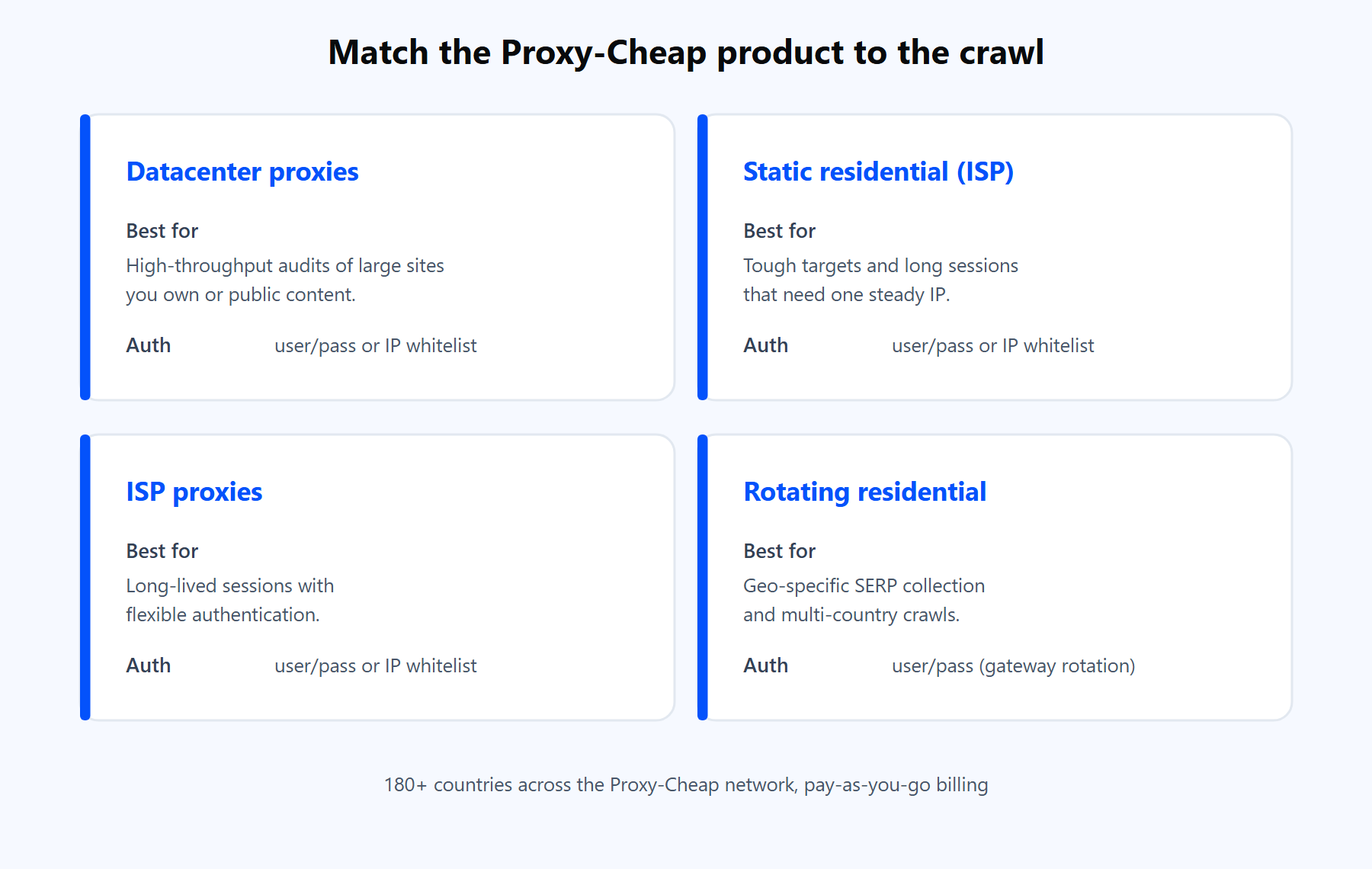
Proxy-Cheap product cards mapping datacenter, static residential, ISP, and rotating residential to Screaming Frog crawl types.

Each Proxy-Cheap product line fits a different shape of crawl. Pick by the target site, not the budget.
How to set up a proxy in Screaming Frog

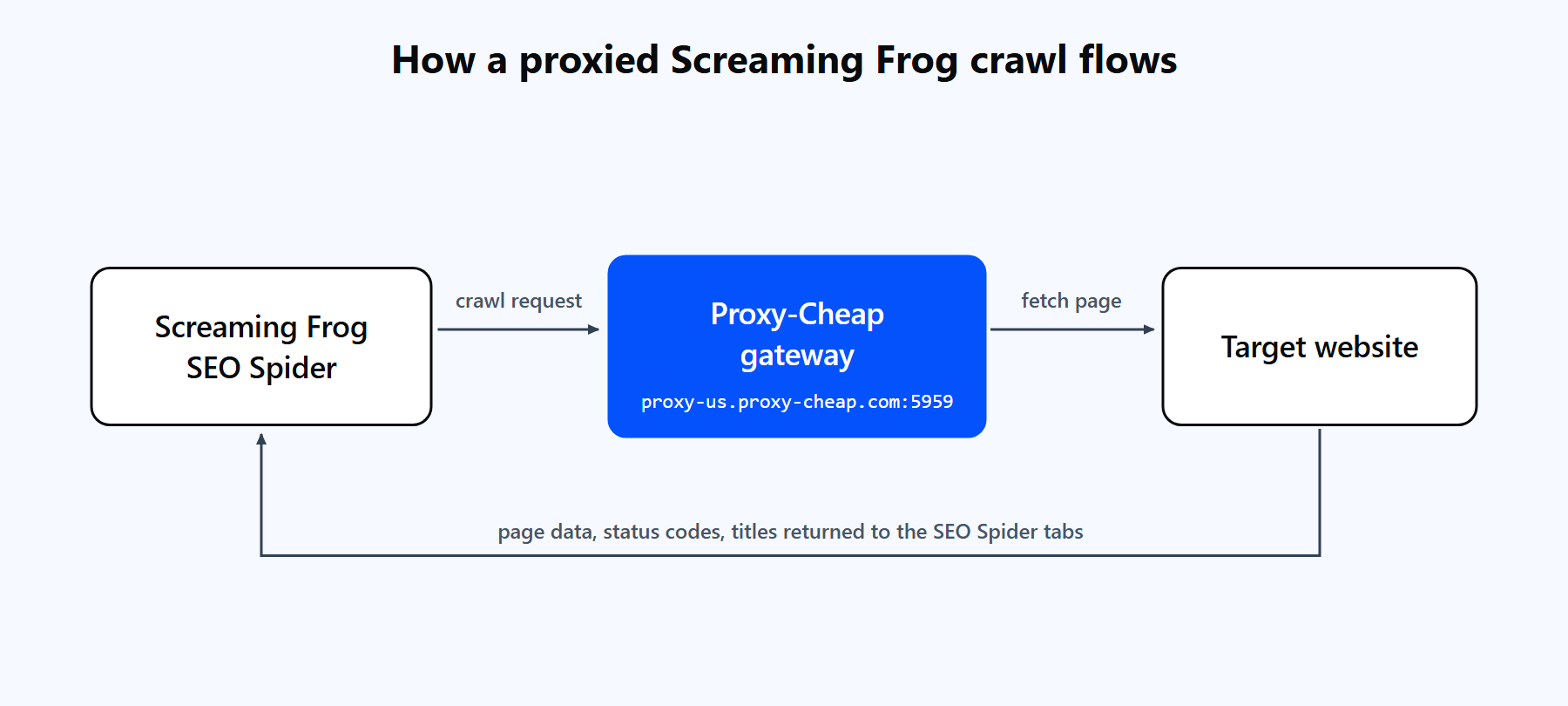
A Screaming Frog crawl request routing through the Proxy-Cheap gateway to a target website and returning page data, status codes, and titles back into the SEO Spider tabs.

A single proxy entry in Screaming Frog sends every crawl request through the Proxy-Cheap gateway, which fetches the target site from a pool IP and returns the data into the SEO Spider.

Screaming Frog has a native proxy setting, so no extra software is needed. The steps:

  1. Open File > Settings > Proxy on Windows and Linux. On macOS, go to Screaming Frog SEO Spider > Settings > Proxy. (Older builds keep it under Configuration > System > Proxy.)
  2. Tick Use Proxy Server. Enter the Address (host) and Port. For the rotating hub, the address is thehub.proxy-cheap.com and the port is 8080.
  3. Tick Use Proxy Credentials and enter your Proxy-Cheap username and password. Some builds prompt for these when the first crawl starts; use the same credentials either way.
  4. Click OK, then close and reopen Screaming Frog. Proxy changes take effect after a restart.
  5. Start a crawl. If pages return data, the proxy is working.

Generate the username and password in the Proxy-Cheap dashboard under the Setup Credentials panel, and copy them into the two fields exactly. For a fuller walkthrough of credential generation, see the step-by-step guide to residential proxies.

A quick note on endpoint formats. Rotating residential uses the shared hub thehub.proxy-cheap.com on port 8080, with the country chosen in the dashboard credential generator. Static residential, ISP, and datacenter give you a unique IP and port per proxy, which you copy from the dashboard. Before you paste anything into Screaming Frog, test the credentials with a one-line curl command so you know the proxy itself works:

# Rotating residential hub (HTTP):
#  thehub.proxy-cheap.com:8080 (country set in the dashboard credential generator)
 
# A JSON response with an IP means the proxy works.
# A 407 means the username or password is wrong.
curl -x http://thehub.proxy-cheap.com:8080 \
  -U "<your-proxycheap-username>:<your-proxycheap-password>" \
  https://httpbin.org/ip

Three practical notes from real setups:

  • Use the HTTP host and port. Screaming Frog's proxy field is built for HTTP and HTTPS proxies, and Proxy-Cheap supports HTTP across every product line, so the HTTP endpoint is the most compatible choice.
  • Keep credentials in the username and password fields, not inside the address. Putting them in the host string is a common cause of authentication errors.
  • IP whitelist is an option on static residential, ISP, datacenter, and mobile. If Screaming Frog runs from a fixed IP, add that IP to the allowlist in the dashboard and leave the credential fields empty.

Rotating proxies with Screaming Frog

Here is the detail most guides skip: Screaming Frog uses one proxy at a time and does not rotate IPs on its own. You still get rotation, in one of two ways.

  • Gateway rotation (recommended). Point the single proxy entry at the rotating residential hub, thehub.proxy-cheap.com:8080 or thehub.proxy-cheap.com:8080. The gateway hands out a fresh exit IP per request, so one entry in Screaming Frog gives you thousands of IPs with no extra configuration. Sticky sessions of around 30 minutes are available when you need the same IP across a sequence of requests.
  • Manual switching. With static residential, ISP, or datacenter, each proxy is a fixed IP. To spread a job across several, run separate crawls (or list-mode segments), change the single proxy entry between them, and restart each time.

For a high-volume, multi-country audit, the rotating gateway is the cleaner answer because the provider handles rotation for you. For a long session that should keep one identity, a static residential or ISP proxy is the better fit. The trade-offs are laid out in static vs rotating proxies.
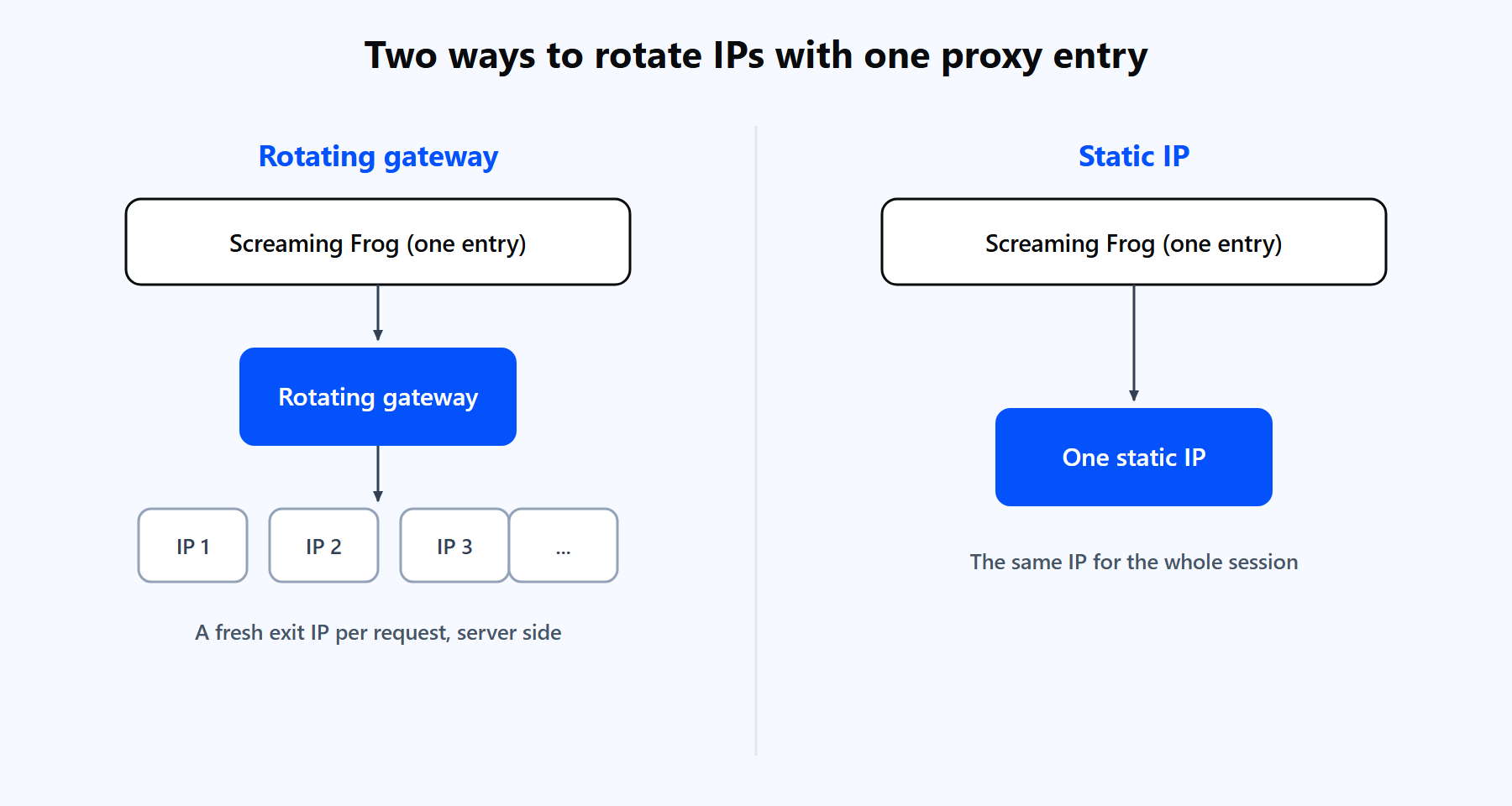
Two rotation models for Screaming Frog: a rotating gateway that cycles exit IPs per request, versus one static IP held for the session.

Screaming Frog holds one proxy entry. A rotating gateway cycles the exit IP for you; a static product keeps one IP for the session.

Advanced: proxied crawls on a schedule and from the command line

Once a proxy works in the interface, you can carry it into automated crawls. The trick is that the proxy lives inside a saved configuration profile, not in the command itself.

Set the proxy in the interface, then save the configuration with File > Configuration > Save As, which writes a .seospiderconfig file. Saving configs needs a license. Scheduled crawls (File > Scheduling) and command-line crawls then load that file, and the proxy travels with it.

On Windows, the command-line executable is ScreamingFrogSEOSpiderCli.exe:

ScreamingFrogSEOSpiderCli.exe ^
  --crawl https://example.com ^
  --headless ^
  --config "C:\configs\proxy.seospiderconfig" ^
  --output-folder "C:\crawls" ^
  --save-crawl ^
  --export-tabs "Internal:All"

On macOS and Linux the executable is screamingfrogseospider:

screamingfrogseospider \
  --crawl https://example.com \
  --headless \
  --config ~/configs/proxy.seospiderconfig \
  --output-folder ~/crawls \
  --save-crawl \
  --export-tabs "Internal:All"

--headless runs the crawl with no window, --config loads the saved profile with your proxy inside it, and --export-tabs writes the data you want straight to the output folder. For very large scheduled crawls, set database storage mode in the saved config so memory does not run short mid-run.

Common errors and how to fix them

Most proxy issues in Screaming Frog come down to a handful of causes.

SymptomLikely causeFix
Connection error or timeout on every site after enabling the proxyWrong host, port, or credentialsRecheck File > Settings > Proxy, test the credentials with the curl command above, and raise the response timeout under Configuration > Spider > Limits for slow targets
407 Proxy Authentication RequiredMissing or mistyped credentialsTick Use Proxy Credentials and re-enter the exact username and password from the dashboard
Settings ignored after you change themThe app was not restartedClick OK, then close and reopen Screaming Frog; proxy changes apply on restart
A large crawl starts returning 403 or 429Too many requests from one IP, or crawl speed too highLower the speed under Configuration > Speed and route through a rotating gateway so requests spread across many IPs
Proxy works in a browser but not in Screaming FrogApp not restarted, or a SOCKS-only endpoint in an HTTP fieldRestart the app and use the HTTP host and port from Proxy-Cheap
Empty pages on JavaScript-heavy sitesRendering turned off, or the free tierEnable JavaScript rendering under Configuration > Spider > Rendering (license required); the render engine uses the same proxy
The crawl stops at 500 URLsFree lite version capEnter a license to lift the 500-URL cap and enable saved configs

If a crawl still struggles after this, slow it down further before anything else. A polite request rate solves more proxy headaches than any single setting.

Is Screaming Frog good? Pros and cons

For technical SEO, Screaming Frog is the default crawler for good reason. It is deep, fast, and runs on your own machine. A few honest trade-offs are worth knowing before a big project.

Pros

  • The industry-standard crawler for technical SEO, with data depth few tools match.
  • Runs locally, so your crawl data stays on your machine.
  • JavaScript rendering and custom extraction handle modern sites and scraping.
  • Scheduling and a full command-line interface automate recurring audits.
  • Integrates GA4, Search Console, PageSpeed Insights, and Ahrefs into the crawl.
  • The version 24 MCP server lets AI assistants run and analyze crawls.
  • Built-in proxy support, so no extra tooling is needed.

Cons

  • A desktop app, so very large crawls need extra RAM or database storage mode.
  • The free tier caps crawls at 500 URLs and locks saved configs, rendering, and extraction.
  • It uses one proxy at a time with no native rotation, so rotation comes from a gateway.
  • Proxy changes need an application restart to take effect.
  • JavaScript rendering is resource-heavy at high concurrency.

The practical takeaway: run Screaming Frog for the audit, and pair it with a value-tier proxy on pay-as-you-go billing. That combination covers large, geo-specific crawls without enterprise-tier cost or overhead.


FAQs

Yes. Screaming Frog has a native proxy setting under File > Settings > Proxy. Tick Use Proxy Server, enter the host and port, add credentials if your provider needs them, and restart the app for the change to take effect.

On Windows and Linux, go to File > Settings > Proxy. On macOS, open Screaming Frog SEO Spider > Settings > Proxy. Some older builds keep the same options under Configuration > System > Proxy.

Screaming Frog's proxy field is built for HTTP and HTTPS proxies, so the HTTP endpoint is the most compatible choice. Proxy-Cheap supports HTTP across every product line, so you can use the HTTP host and port for any product, from datacenter to rotating residential.

Some builds prompt for the proxy username and password at the start of a crawl rather than storing them in settings. Enter the same credentials you generated in the Proxy-Cheap dashboard. If you prefer not to type them each time, static products also support IP whitelist authentication.

For a small site you own and control, no. A proxy earns its place once you crawl at volume, audit sites you do not own, or need geo-specific data from another country. At that point a proxy keeps response rates steady and returns accurate localized results.

The free lite version crawls up to 500 URLs per crawl. A paid license lifts that cap and enables saved configs, JavaScript rendering, custom extraction, scheduling, and API integrations, which are the features most full audits rely on.

Routing adds a little latency, but most slowdowns come from too high a crawl speed against a rate-limited site. Lower the speed under Configuration > Speed, and for heavy jobs use a rotating gateway so requests spread across many IPs instead of hammering one.

It depends on the crawl. Datacenter proxies suit high-throughput audits of sites you own, static residential or ISP proxies suit long sessions and tougher targets, and rotating residential suits geo-specific SERP collection across many countries.

Yes. When JavaScript rendering is enabled (a licensed feature under Configuration > Spider > Rendering), the headless render engine sends its requests through the same proxy you configured. Rendering is heavier on resources, so give the app enough memory for large rendered crawls.