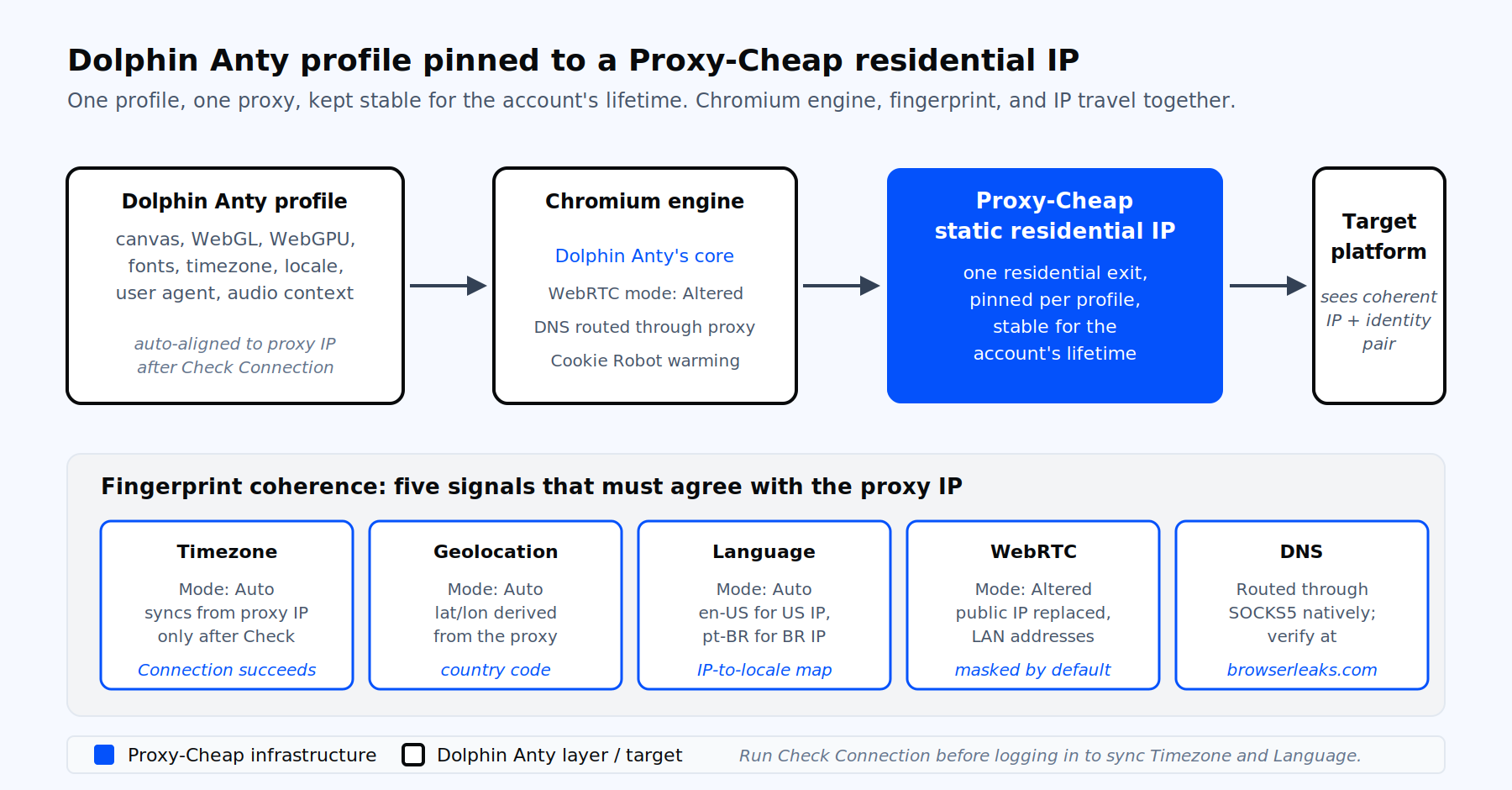
Per-profile pinning of one Proxy-Cheap IP to one Dolphin Anty profile.
Dolphin Anty (also written as Dolphin{anty}) is a Chromium-based antidetect browser for Windows, macOS, and Linux. It runs many isolated browser profiles on one machine. Each profile holds its own cookies, storage, and a unique digital fingerprint covering user agent, canvas, WebGL, WebGPU, audio context, fonts, timezone, language, geolocation, hardware concurrency, screen resolution, and WebRTC behavior. Affiliate marketers, paid-traffic teams, dropshippers, social media managers, e-commerce sellers, and QA testers use it to manage multiple accounts with clean, isolated profiles for privacy and client separation.
A fingerprint that does not match its IP produces inconsistent location signals, which is the most common reason a profile behaves unpredictably across regional tests. Modern scoring services compare the IP geolocation against the browser timezone, the Accept-Language header, the WebRTC public IP, the DNS resolver location, and the time-of-day pattern. The IP and the profile must agree on every one of these signals. That is why Dolphin Anty asks for a proxy on every profile and auto-derives timezone, language, and geolocation from the proxy IP by default.
Dolphin Anty does not sell its own proxy pool. It offers in-app integration with several partner proxy stores through a Get Free Proxies button on the Proxies screen. Bringing your own proxies remains the standard choice when you need predictable country coverage, sticky sessions across many profiles, pay-as-you-go billing, or higher-quality residential and ISP IPs. Proxy-Cheap fits that bill across all six product lines covered later in this guide.
Inside any profile, the Proxy section shows a Type dropdown with four options: HTTP, SOCKS4, SOCKS5, and SSH. The HTTP type carries both HTTP and HTTPS traffic; there is no separate HTTPS entry in the dropdown. The two protocols most users pick are HTTP and SOCKS5. SOCKS5 tunnels DNS through the proxy and supports both TCP and UDP, which usually means cleaner DNS resolution and fewer leak edge cases. Pick HTTP when the provider documents an HTTP-only endpoint or when you need explicit CONNECT semantics for a target.
Dolphin Anty accepts three credential layouts in any input field, plus optional suffixes:
You can also prefix the string with the protocol (socks5://, http://) so Dolphin Anty selects the Type automatically. A trailing :My-Profile-Name sets the saved proxy name, and a trailing [https://rotation-url] in square brackets attaches a rotation endpoint. Stay on one format across an entire bulk paste, because mixed formats break the parser.
For SOCKS5 proxies specifically, the Dolphin Anty Type dropdown maps directly to the protocol field shown in your Proxy-Cheap dashboard. Either copy the full string, or paste host, port, username, and password into the matching fields.
This is the canonical single-profile flow. It takes under two minutes once your endpoint is generated.
If your work is centered on multi-account creation, this single-profile flow is the one you will repeat per account, with a fresh static IP for each profile.
The Proxies tab on the left sidebar is the standalone proxy manager. Use it when you want to import a batch first, then attach proxies to profiles later. Click the + button, then open the Mass Addition panel. Paste one proxy per line in any of the supported formats, keep the format consistent across the list, and click Add.
A typical Mass Addition paste for a Proxy-Cheap workflow:
socks5://<username>:<us-session-1-password>@thehub.proxy-cheap.com:8080:US-IG-01
socks5://<username>:<us-session-2-password>@thehub.proxy-cheap.com:8080:US-IG-02
http://<username>:<gb-session-1-password>@thehub.proxy-cheap.com:8080:GB-FB-01
http://<username>:<gb-session-2-password>@thehub.proxy-cheap.com:8080:GB-FB-02
socks5://<username>:<us-session-3-password>@thehub.proxy-cheap.com:8080:US-TT-01Each line stores as a separate proxy entry with its own name. After import, select multiple profiles, open the bottom action bar, and pick Change Proxy to attach proxies in bulk (manual or random distribution). Bulk operations sit behind the paid tier, so confirm your plan if the buttons appear inactive.
For large-scale runs, pair the Mass Addition workflow with folders and tags. Folders group profiles by client or platform, and tags filter across folders for quick selection.
This is the section most setup guides skip. A working proxy is not enough; the profile fingerprint must reflect the same geo and network the IP claims to live in. Dolphin Anty automates four of these for you, but only after the proxy check has succeeded.
Two more checks need a human eye. DNS resolution should travel through the proxy, which SOCKS5 handles natively and HTTP handles only when the browser is configured to do so. Dolphin Anty pushes DNS through the proxy by default, but a leaky upstream resolver at the provider can still expose the wrong country. The fix is on the proxy side, not the browser side, which is why provider quality matters.
Accept-Language headers should also align with the IP country. Dolphin Anty handles this through the Languages field under the profile’s advanced settings. Leaving it on Auto is the safe default.
The five WebRTC modes are worth knowing by name:
Run this verification once per new profile. Skipping it is the single biggest cause of accounts failing on day two.
Inside the launched profile, open a tab to https://api.ipify.org to confirm the public IP matches the proxy IP from the Check Connection step. Then visit browserleaks.com/ip and browserleaks.com/webrtc to confirm WebRTC reports the proxy IP and no local addresses appear. Open browserleaks.com/dns to confirm DNS resolves in the proxy country. Open whoer.net, pixelscan.net, or iphey.com to confirm the profile presents a consistent, privacy-preserving configuration: the reported location, timezone, and language should all match the proxy region. Consistent geo across these tools means the profile is ready for regional and localization testing.
If anything looks off, return to the profile settings, re-run Check Connection, and confirm the WebRTC mode is Altered. The most common failure is forgetting to run the check, which leaves Timezone and Language unsynced. The second most common failure is a proxy whose country labelling in the IP database lags reality. When that happens, ask your provider for a replacement IP from the correct geo.
One profile equals one identity equals one IP. This is the canonical Dolphin Anty principle for multi-account work. Rotating the IP under a logged-in account triggers session re-verification on most platforms, which is the fastest way to lose access to that account.
Sticky sessions are the right pattern for account profiles. A static residential or static ISP proxy holds the same IP for the lifetime of the account. Dolphin Anty supports this natively: assign the proxy once, and the profile reuses it on every launch. For longer-term Instagram, TikTok, X, LinkedIn, Reddit, Facebook, or marketplace accounts, this is the only stable approach.
Rotating sessions belong to a smaller set of in-browser scraping workflows that happen inside Dolphin Anty. Two patterns work:
The difference between sticky and rotating is covered in depth in our guide to static versus rotating proxies, and the mechanics of session rotation are explained in our IP rotation primer. The short version: sticky for accounts, rotating for collection.
Dolphin Anty exposes a REST API on a paid plan. The cloud endpoint at https://dolphin-anty-api.com handles profile creation, editing, and proxy management. A separate local endpoint at http://localhost:3001/v1.0 handles launching profiles on the same machine that runs the desktop app. Generate your API token from the Dolphin Anty web account, then set it as a Bearer header.
Here is a minimal Python flow that creates a profile with a Proxy-Cheap static residential proxy attached, then launches it locally:
import requests

API_TOKEN = "YOUR_DOLPHIN_API_TOKEN"
CLOUD = "https://dolphin-anty-api.com"
LOCAL = "http://localhost:3001/v1.0"

headers = {
    "Authorization": f"Bearer {API_TOKEN}",
    "Content-Type": "application/json",
}

payload = {
    "name": "PC-Resi-US-01",
    "tags": ["instagram", "proxy-cheap"],
    "platform": "windows",
    "browserType": "anty",
    "useragent":   {"mode": "manual", "value": "Mozilla/5.0 (Windows NT 10.0; Win64; x64) Chrome/140.0.0.0"},
    "webrtc":      {"mode": "altered", "ipAddress": None},
    "canvas":      {"mode": "real"},
    "webgl":       {"mode": "real"},
    "timezone":    {"mode": "auto", "value": None},
    "locale":      {"mode": "auto", "value": None},
    "geolocation": {"mode": "auto"},
    "cpu":         {"mode": "manual", "value": 4},
    "memory":      {"mode": "manual", "value": 8},
    "proxy": {
        "name":     "Proxy-Cheap Static Residential US",
        "type":     "http",
        "host":     "thehub.proxy-cheap.com",
        "port":     "8080",
        "login":    "PC_USERNAME",
        "password": "PC_PASSWORD"
    }
}

r = requests.post(f"{CLOUD}/browser_profiles", headers=headers, json=payload)
r.raise_for_status()
profile_id = r.json()["browserProfileId"]

requests.post(f"{LOCAL}/auth/login-with-token", json={"token": API_TOKEN}, headers={"Content-Type": "application/json"}).raise_for_status()

start = requests.get(
    f"{LOCAL}/browser_profiles/{profile_id}/start",
    params={"automation": 1},
).json()
print("Launched profile:", profile_id, "on port", start["automation"]["port"])The launch response returns a CDP WebSocket endpoint you can attach to with Playwright, Puppeteer, or Selenium for headed automation. Reuse this pattern to spin up dozens of profiles, each pinned to a distinct static residential endpoint, in a few seconds per profile.
Specific errors recur across the Dolphin Anty community. Each has a known cause and a verified fix.
Error checking connection to proxy. Wrong protocol, wrong credentials, ISP filtering, or whitespace in the pasted string. Re-verify the credentials in an external checker, switch networks (mobile hotspot is a quick test), and whitelist Dolphin Anty in your antivirus and firewall. If the credentials contain unusual characters like @ or : in the password, regenerate the password as alphanumeric in your Proxy-Cheap dashboard.
DNS leak shows the wrong country. HTTP proxies do not always tunnel DNS. Switch the profile to a SOCKS5 endpoint or confirm that your HTTP endpoint tunnels DNS through the proxy. Re-test on browserleaks.com/dns.
Timezone or language stays on your local values. Check Connection was not run, or it failed. Re-open the profile, click the arrows next to the proxy line, wait for the green status, and confirm the four Auto fields update.
WebRTC leaks the real IP. Profile is on Real instead of Altered, or a browser extension overrides the WebRTC setting. Set WebRTC to Altered or Without UDP, re-launch the profile, and verify on browserleaks.com/webrtc.
Slow profile launch through a residential proxy. Expected on first launch because of the TLS handshake through the residential network. Pick a proxy geo closer to your physical location or closer to the target, and reduce parallel launches to free bandwidth. Static ISP proxies trade some residential trust for datacenter-grade speed when latency is the bottleneck.
Profile works one day, fails the next. A rotating proxy gave the profile a new IP and country between sessions, invalidating cookies. Move that profile to a sticky session or to a static residential IP. Use the Cookie Robot inside Dolphin Anty to warm new profiles before logging in.
Bulk import only adds some of the proxies. Mixed formats across the paste. Pick one of host:port:login:password or login:password@host:port and apply it across every line, no blank lines, no trailing whitespace.
The proxy product you choose drives almost every other decision. Use this matrix as the starting point.
| Workload | Primary fit | Strong alternative | Why |
|---|---|---|---|
| Long-term account profiles (Facebook, Instagram, X, LinkedIn) | Static residential | ISP | One stable residential-grade IP per profile for the account’s lifetime |
| Social media management at scale | Mobile | Static residential | Carrier-grade IPs carry the highest trust on mobile-first platforms |
| Affiliate and paid-traffic accounts | Mobile | Static residential | Ad platforms scrutinize new accounts heavily; mobile IPs sustain warm-up periods |
| E-commerce seller and dropshipping profiles | Static residential | ISP | A consistent residential IP matching the billing address reduces fraud flags |
| Ad verification and QA across geos | Static residential | Datacenter | Stable IPs in each market for repeatable checks |
| In-browser scraping inside Dolphin Anty | Rotating residential | Mobile | Per-request rotation across a large residential pool collects data at scale |
| Internal QA testing of your own apps | Datacenter | ISP | Fast, predictable IPs when target trust is not a factor |
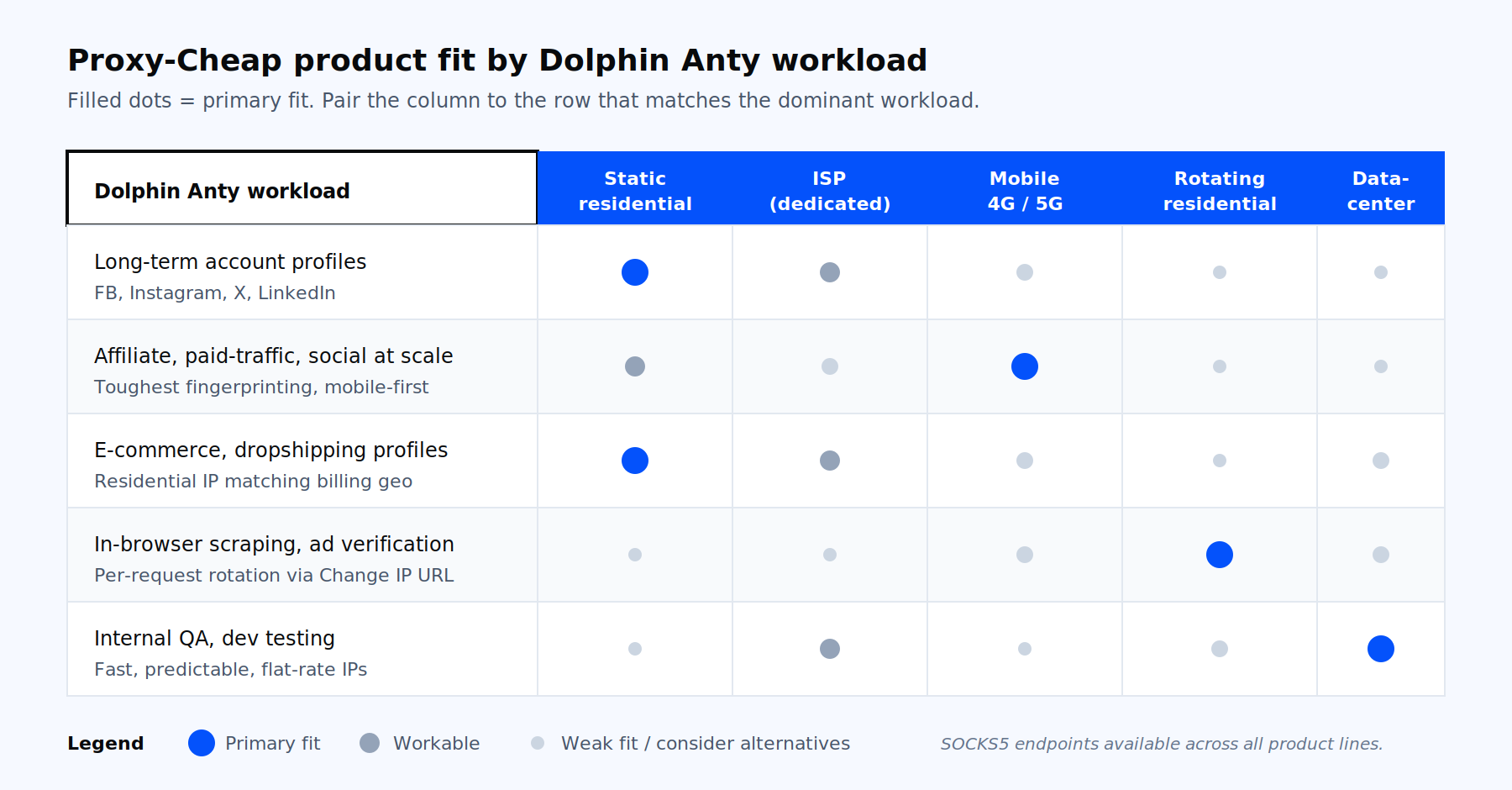
Proxy-Cheap product fit by Dolphin Anty workload.
Static residential proxies are the default recommendation for Dolphin Anty because they pin one residential-grade IP per profile, with stable bandwidth and predictable country coverage. Mobile proxies extend that trust onto carrier networks for the toughest targets, with both rotating and static options. Rotating residential proxies cover the smaller scraping subset with sticky sessions and a large IP pool. Datacenter proxies sit in the QA lane for internal testing inside antidetect profiles. Each line pairs with the social media management use case the Dolphin Anty community runs most. Pick the product line, generate the endpoint, paste it into the profile, run Check Connection, and you are ready to scale.