Key takeaways:
DuoPlus is a cloud phone service. It runs real ARM-based Android devices in a data center and streams them to your browser, so you can operate many separate Android phones from one computer without buying a single handset. The company behind it is DuoPlus PTE. LTD., based in Singapore, and it markets the product as an antidetect cloud phone for multi-account work.
Each cloud phone is its own isolated device. It has a distinct device environment, its own apps, and, most importantly for this guide, its own network connection through a proxy. That separation is the whole point: it lets one operator run dozens or hundreds of independent Android environments side by side, each with a clean, consistent identity.
The cloud phones run remotely (DuoPlus deploys them on servers in Singapore), and you reach them from a desktop or mobile browser. Because the device itself lives in the cloud, the IP it presents to the outside world comes entirely from the proxy you attach. No proxy means no connection.
DuoPlus is built for running many accounts at once without those accounts sharing a device or an IP. The most common jobs:
Every one of these depends on the same foundation: a consistent, location-accurate IP per account. Because DuoPlus is an Android platform, the proxy choice matters as much as the device, which is why operators pair it with proxies for Android chosen for the account type.
The capabilities that matter when you plan a proxy setup:
The location-matching feature is the one to keep in mind throughout this guide. It only works in your favor when the proxy IP genuinely sits in the market you want, which is a product-quality question, not a DuoPlus setting.
DuoPlus offers a free trial. New users get a one-month cloud phone plus a batch of free startup minutes, and those gifted minutes do not expire, so you can test the full proxy workflow before paying anything.
After the trial, pricing follows a usage model: a low per-device monthly fee plus usage-based "startup time" (the minutes a phone is actually powered on), with a flat monthly subscription option for unlimited run time. Exact figures shift, so check the live DuoPlus pricing page before you budget.
One cost is easy to miss: DuoPlus does not sell proxies. You bring your own, and the proxy is a separate line item from the cloud phone itself. That is where a pay-as-you-go provider keeps the total sensible, because you are buying one IP (or a small pool) per phone rather than an enterprise plan.
Getting a cloud phone running is quick, and it sets up everything the proxy steps build on:
That "not initialized" state trips up a lot of first-time users who expect the phone to work like a normal handset on Wi-Fi. It will not. In DuoPlus, the proxy is the connection, so nothing loads until you add one.
A DuoPlus cloud phone has no SIM and no Wi-Fi of its own. The proxy you attach is its entire internet connection, which makes a proxy mandatory rather than optional. Beyond simply getting online, three reasons make the proxy choice the most important decision in the whole setup.
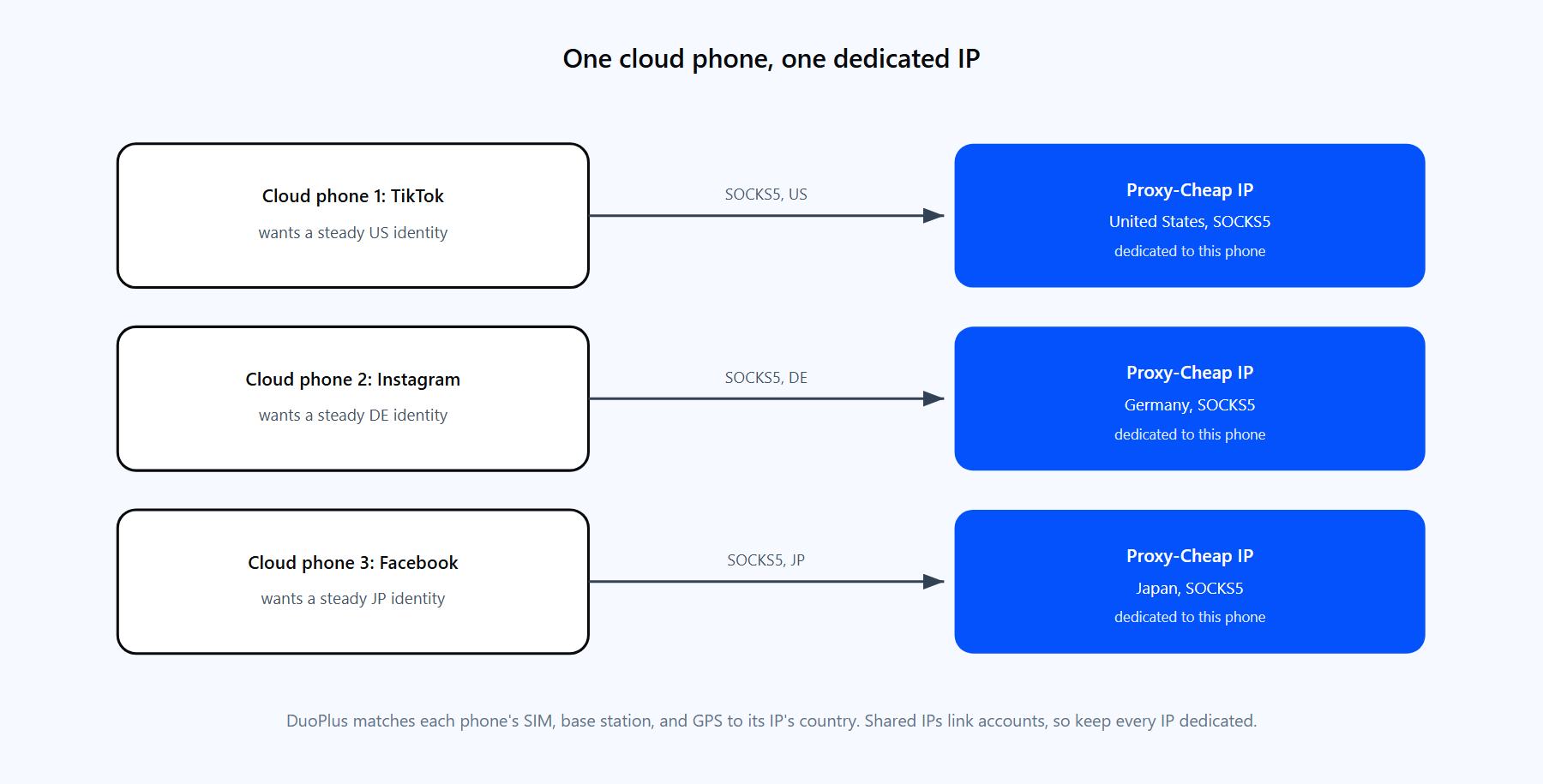
Each cloud phone gets one dedicated SOCKS5 IP. DuoPlus aligns the simulated SIM, base station, and GPS data to that IP's location.
1. One dedicated IP per account. Running several accounts behind a single shared IP is the fastest way to get them associated with each other. Giving every cloud phone its own dedicated IP keeps each account on a separate, consistent identity, which is what platforms expect from an ordinary user.
2. Location accuracy. DuoPlus derives the device's SIM, base station, and GPS signals from the proxy IP's location. If the IP genuinely sits in the target country, the whole device profile lines up. If the IP is mislabeled or sits in the wrong place, the signals conflict, and that mismatch is exactly what you want to avoid. Choosing the right IP type starts with understanding what a mobile proxy is and how it differs from other types.
3. Compliance with platform terms. Managing multiple accounts works best when each one behaves like a real local user: a stable IP, a matching location, and a clean network reputation. A quality proxy network with country-level targeting lets you keep each account in line with the platform's own rules rather than fighting them.
DuoPlus accepts SOCKS5 proxies, and Proxy-Cheap supports SOCKS5 across its product lines, so the question is not whether a product works but which one fits the account. Match the product to how sensitive the account is and how long the cloud phone needs to hold a single identity.
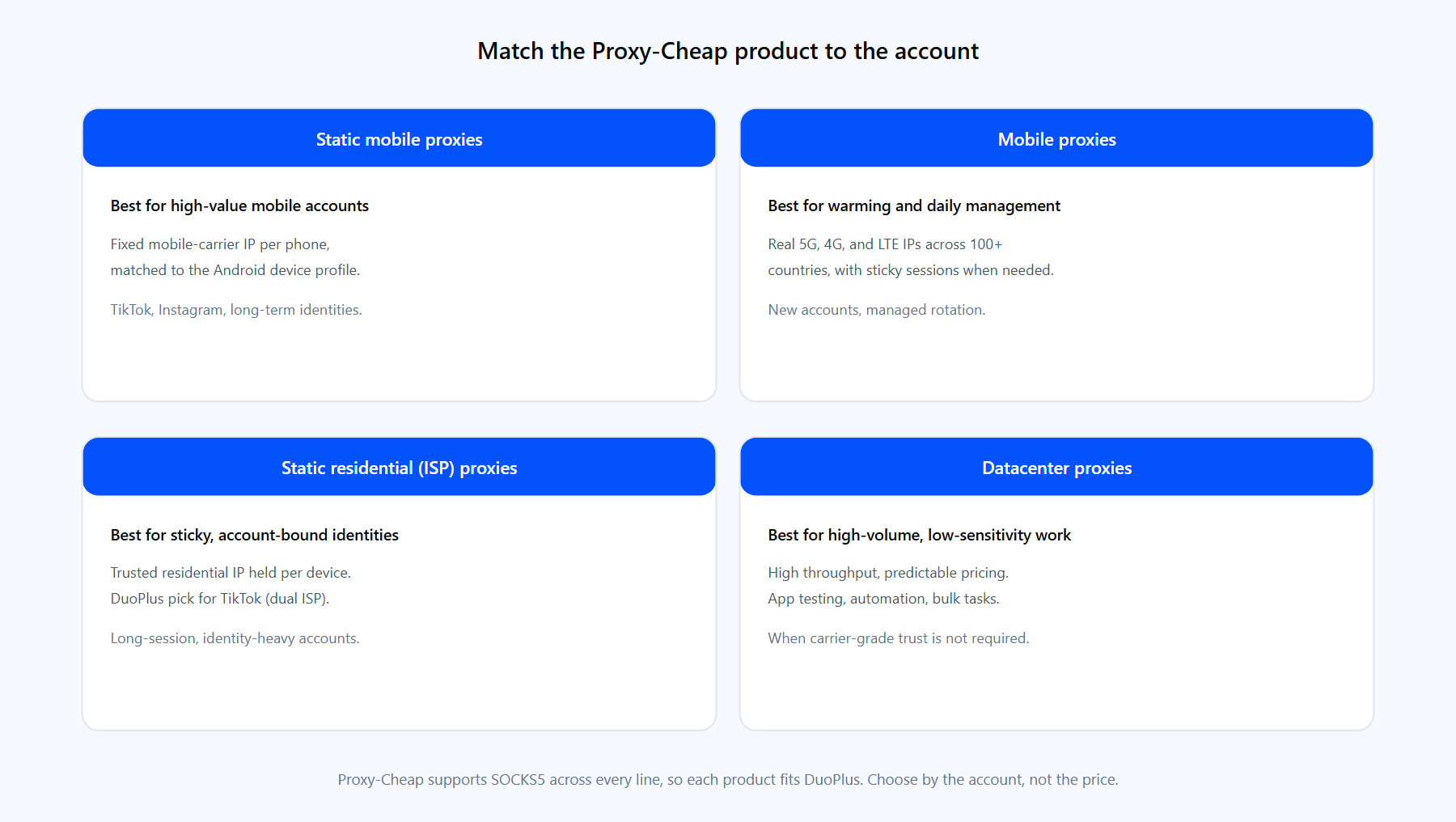
Pick the Proxy-Cheap product by the account's sensitivity and how long each cloud phone holds its identity.
For most DuoPlus operators the answer is mobile or static residential, picked by the value of the account rather than the size of the budget. Reserve datacenter for the work that genuinely does not need a residential or mobile signal.
This is the core integration. The flow is: generate SOCKS5 credentials at Proxy-Cheap, add the proxy in DuoPlus, run the built-in check, then power the phone on.
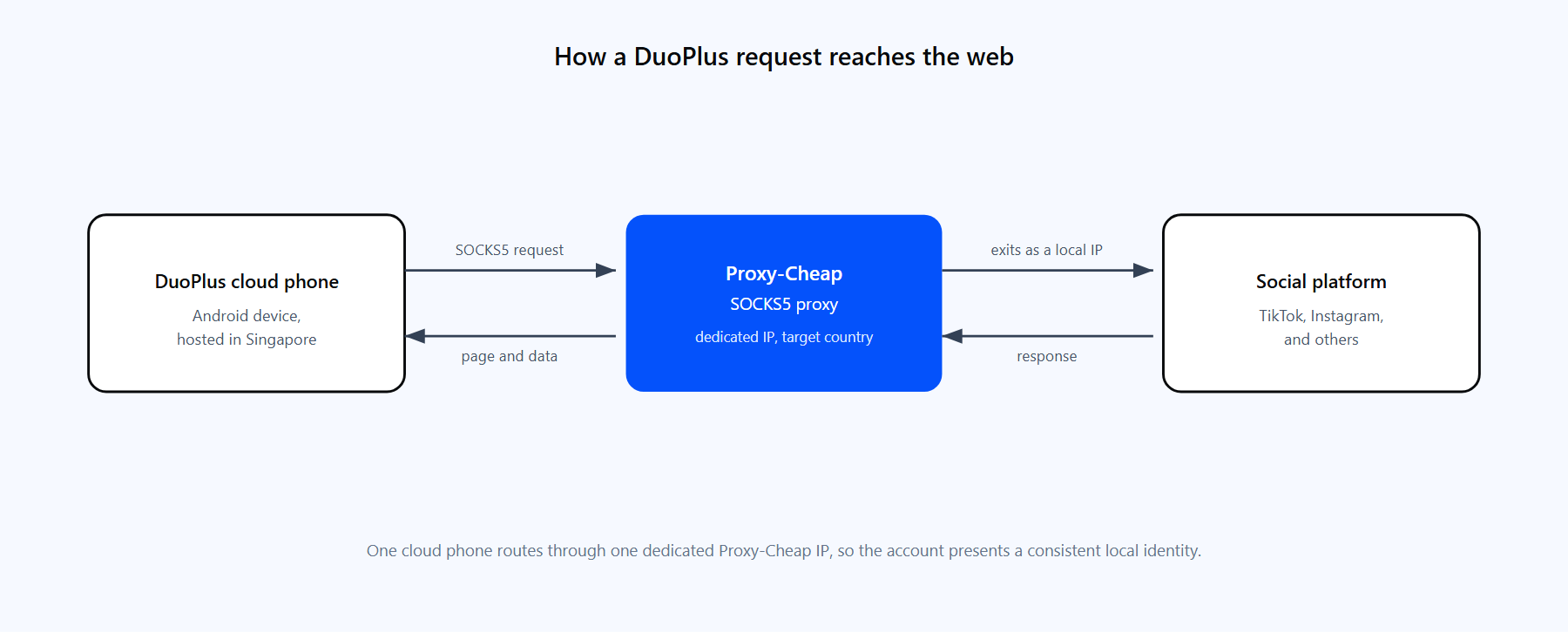
One cloud phone, one dedicated IP. The request leaves DuoPlus, exits through the Proxy-Cheap IP in the target market, and returns.
Step 1: Get your SOCKS5 credentials from Proxy-Cheap. Buy the product that fits the account (see the section above), then open the Proxy-Cheap dashboard and copy four values from the Setup Credentials panel: the host (or IP), the port, your username, and your password. For static products you copy the exact host and port assigned to that proxy. For rotating residential you use the gateway host shown in your dashboard with its SOCKS5 port.
A note on protocol, because it is the single most common reason a DuoPlus setup fails: the platform accepts SOCKS5 only, not HTTP or HTTPS. If you are unsure of the difference, the guide on SOCKS5 and HTTP proxies explains it, but the short version is simple: use the SOCKS5 endpoint everywhere in DuoPlus.
Step 2: Open the proxy configuration in DuoPlus. You have two paths. Either open the "Proxies" page from the sidebar and add the proxy to your library first, or configure it inline while creating a cloud phone, in the Network section. Both reach the same fields.
Step 3: Enter the proxy details. Fill in the four values in their separate fields:
DuoPlus also accepts a single pasted string and splits it into the fields for you. The format it expects is:
socks5://<host-from-dashboard>:<port-from-dashboard>:<your-proxycheap-username>:<your-proxycheap-password>Step 4: Run "Check Proxy." DuoPlus tests the proxy and returns a color: green means success (you will see "Proxy detection passed"), orange means a small mismatch it can correct automatically, and red means the configuration failed. Wait for green before continuing.
Step 5: Power on the phone. Save the configuration and start the cloud phone. The "not initialized" status clears, and the device now reaches the internet through your Proxy-Cheap IP, with its SIM and GPS data matched to that IP's location.
If you want to confirm the exit IP independently, you can test the same SOCKS5 credentials from a terminal before or after binding them:
curl -x socks5://<your-proxycheap-username>:<your-proxycheap-password>@<host>:<port> https://ipinfo.ioThat returns the IP and location the proxy presents, which should match the country you expect for the account.
Running accounts at scale means binding proxies at scale, and DuoPlus handles both halves in batches.
The rule that does not change at scale: keep one dedicated IP per phone. Batch tools make assignment faster, not shared. If you buy a small pool of static IPs, map them one-to-one to your phones rather than pointing several phones at the same address.
DuoPlus binds one proxy per cloud phone, and because each phone usually represents a persistent account, the identity question matters more than raw rotation. The choice between static vs rotating proxies comes down to how long the account needs to hold one IP.
A practical pattern: static IPs for your established, high-value phones, and a mobile product with sticky sessions for the phones doing early-stage warming. Either way, each phone keeps its own IP for the duration of its work.
Once the basics work, the difference between a setup that holds up and one that draws attention is how well each phone's IP matches its intended identity.
Most DuoPlus proxy problems come from the same short list. Each has a direct fix.
1. The proxy fails the check because it is not SOCKS5. This is the number one cause. DuoPlus rejects HTTP and HTTPS proxies (they cannot carry the UDP traffic the cloud phone needs). Fix it by using the SOCKS5 endpoint and port from your Proxy-Cheap dashboard, not the HTTP one.
2. "Not initialized" on the cloud phone. The phone has no working proxy yet. Add a proxy, run "Check Proxy" until it is green, then power on. The status clears once a valid connection is bound.
3. A whitelisted proxy will not connect. If you authenticated by IP whitelist, DuoPlus is connecting from its own servers in Singapore and Hong Kong, so your proxy is refusing those IPs. Add Singapore and Hong Kong to the allowlist, or switch to username and password authentication.
4. Missing or wrong credentials. Almost every paid proxy needs a username and password. If the check fails with an authentication error, re-copy both from the Proxy-Cheap dashboard, watching for trailing spaces, and re-enter them in their separate fields.
5. A local or private IP was entered. Addresses like 127.0.0.1, 192.168.x.x, or 10.x.x.x cannot work, because the cloud phone runs remotely and cannot reach your local network. Use the public host and port from your dashboard.
6. The check fails intermittently. Transient network conditions can fail a single check. Run "Check Proxy" again a couple of times; a proxy that passes on retry is fine to use.
7. The country shows up wrong. If the device location does not match what you expected, the proxy IP is in or labeled for the wrong place. Verify the exit IP with the curl ... ipinfo.io test above, and choose a product with accurate country targeting for that market.
For running many Android accounts from one machine, DuoPlus is a strong, focused tool. It removes the cost and clutter of physical handsets, isolates each account cleanly, and automates the repetitive parts. A few honest tradeoffs are worth weighing before you commit.
Pros
Cons
The takeaway for most teams: DuoPlus handles the devices well, and the outcome rises or falls on the proxies you feed it. Pair it with the right product per account, keep every IP dedicated, and use SOCKS5 throughout, and the integration is reliable.