ClonBrowser is a multi-account fingerprint browser built on Chromium, with a Firefox-based engine available too. It is distributed at clonbrowser.com and has been in development for around eight years, positioning itself now as an automation browser rather than just a profile manager.
Each profile in ClonBrowser, which the app calls a browser environment, runs as a fully isolated space. It carries its own device fingerprint (user agent, WebGL, Canvas, audio, fonts, timezone, WebRTC, resolution, and geolocation), its own cookies and local storage, and its own proxy IP. Because those signals do not overlap between environments, you can operate many accounts side by side on one computer while keeping each one internally consistent and separate from the rest.
That model puts ClonBrowser in the same category as the tools covered in our roundup of the best antidetect browsers for multi-accounting. The proxy is the piece that completes the picture: the fingerprint separates the browser environments, and a dedicated IP per profile separates the network identity.
ClonBrowser is used anywhere one operator needs to run several accounts that each present as a distinct, ordinary user. The most common jobs:
The unifying thread is legitimate multi-account management: many accounts, each kept in good standing under its own consistent fingerprint and IP.
The features that matter most for proxy-backed multi-account work:
Yes. ClonBrowser has a permanent free plan, not a time-limited trial, and it does not ask for a card to start. The free tier includes 10 browser environments and both fingerprint engines, which is enough to run a small account set at no cost.
Paid plans scale the environment and seat counts and add the advanced features. At the time of writing the tiers are roughly:
| Plan | Environments | Seats | Approx. price |
|---|---|---|---|
| Free | 10 | Solo | Free |
| Pro | 50 to 300,000 | 2 | From $6/month |
| Custom | Custom | Custom | Contact sales |
The Pro plan adds encrypted cross-device sync, bulk extension management, advanced proxy protocols, team collaboration, and RPA automation, and annual billing is discounted by around 20 percent. Prices and plan names change often, so confirm the current figures on the ClonBrowser pricing page before you commit. One thing no plan includes is proxies: ClonBrowser is bring-your-own-proxy, which is where a provider like Proxy-Cheap fits in.
ClonBrowser runs on Windows 10 or later and macOS 14 or later, with separate builds for Apple Silicon and Intel Macs. A Linux build for Ubuntu 24 and Debian 13 is available in beta, so Linux users are covered where most rivals are not.
Installation is quick:
Before you add a proxy, create an environment to attach it to. This takes under a minute.
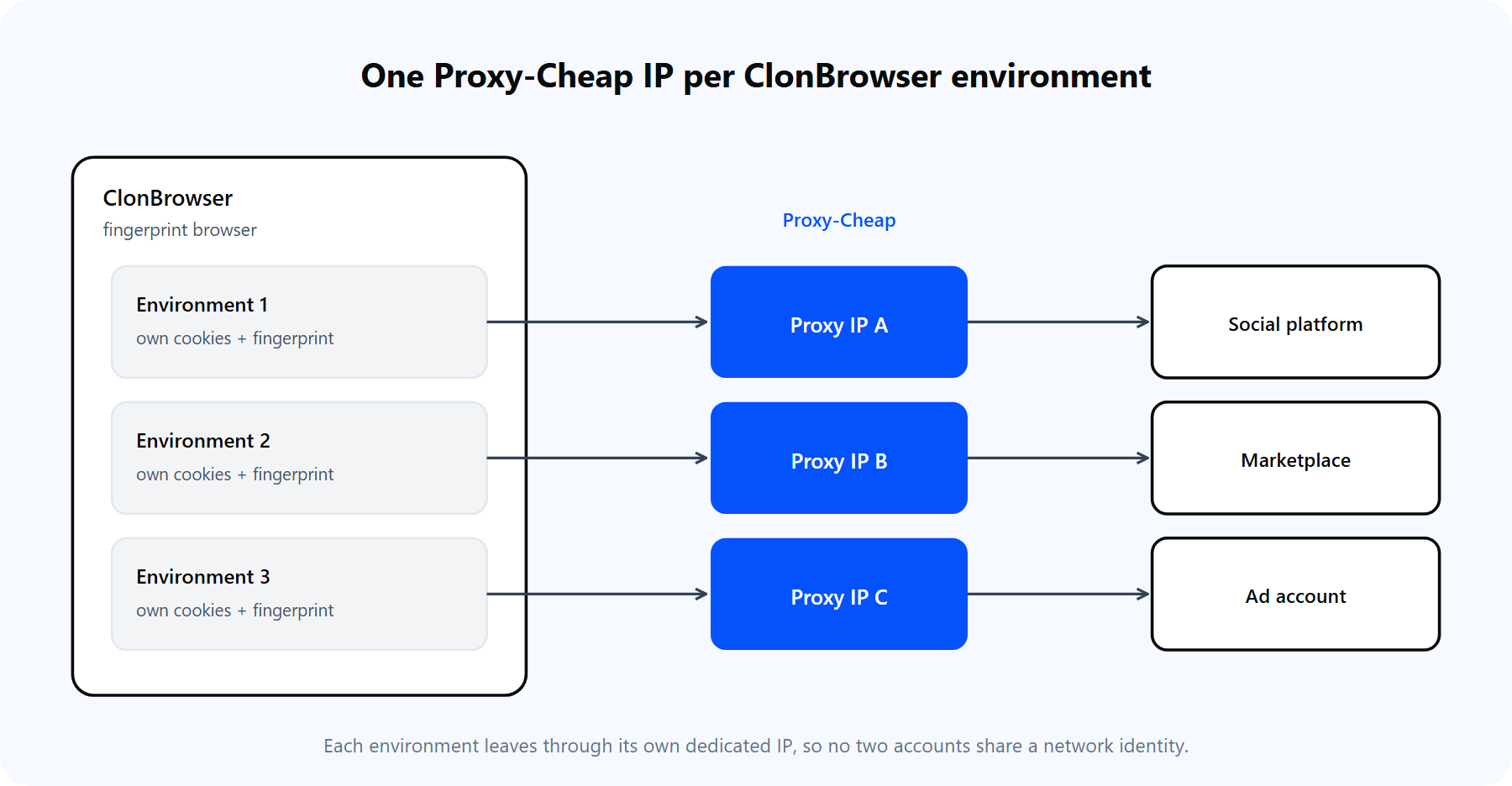
Each ClonBrowser environment is a separate space with its own fingerprint and its own dedicated IP. One profile, one identity, one proxy.
At this point the environment uses your real connection. The next sections add a proxy so each profile has its own IP, which is the part that actually separates the accounts at the network level.
ClonBrowser separates your accounts at the browser level, but every environment still leaves through the same connection until you add a proxy. Two profiles sharing one public IP are easy to associate, no matter how distinct their fingerprints are. Routing each profile through its own IP from a residential proxy network is what makes multi-account management hold up in practice.
Three concrete reasons to put a proxy on every ClonBrowser environment:
Not every profile needs the same kind of proxy. The cards below map Proxy-Cheap product lines to the jobs people actually run in ClonBrowser.
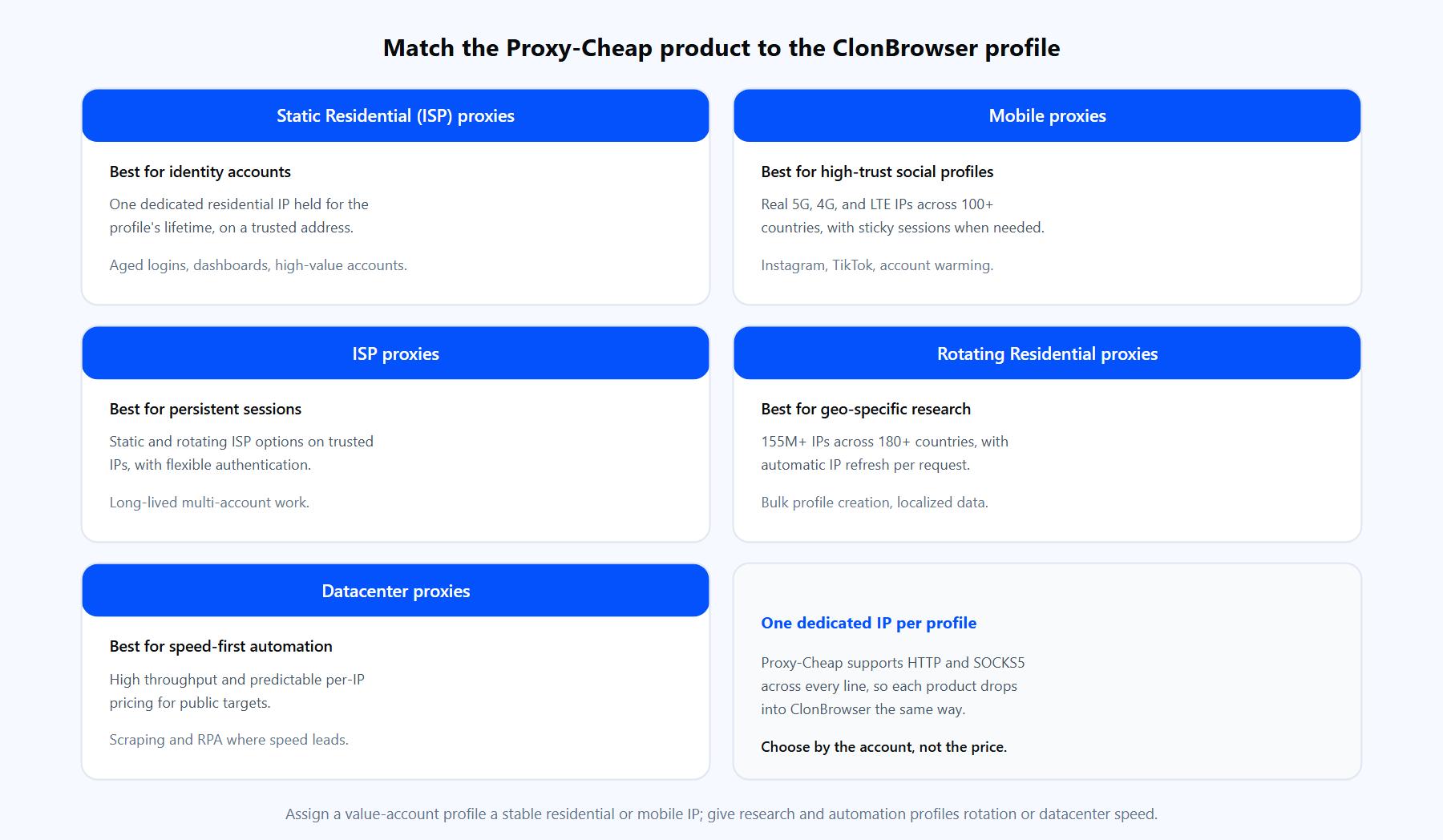
Each product line fits a different profile type. The links below match the cards above.
For most ClonBrowser operators the answer is Static Residential (ISP) or Mobile for the accounts that carry value, and Rotating Residential or Datacenter for research and automation profiles.
Proxies live inside each environment, so you set them when you create or edit a profile. Here is the full path using the Custom method, which is the manual entry option.
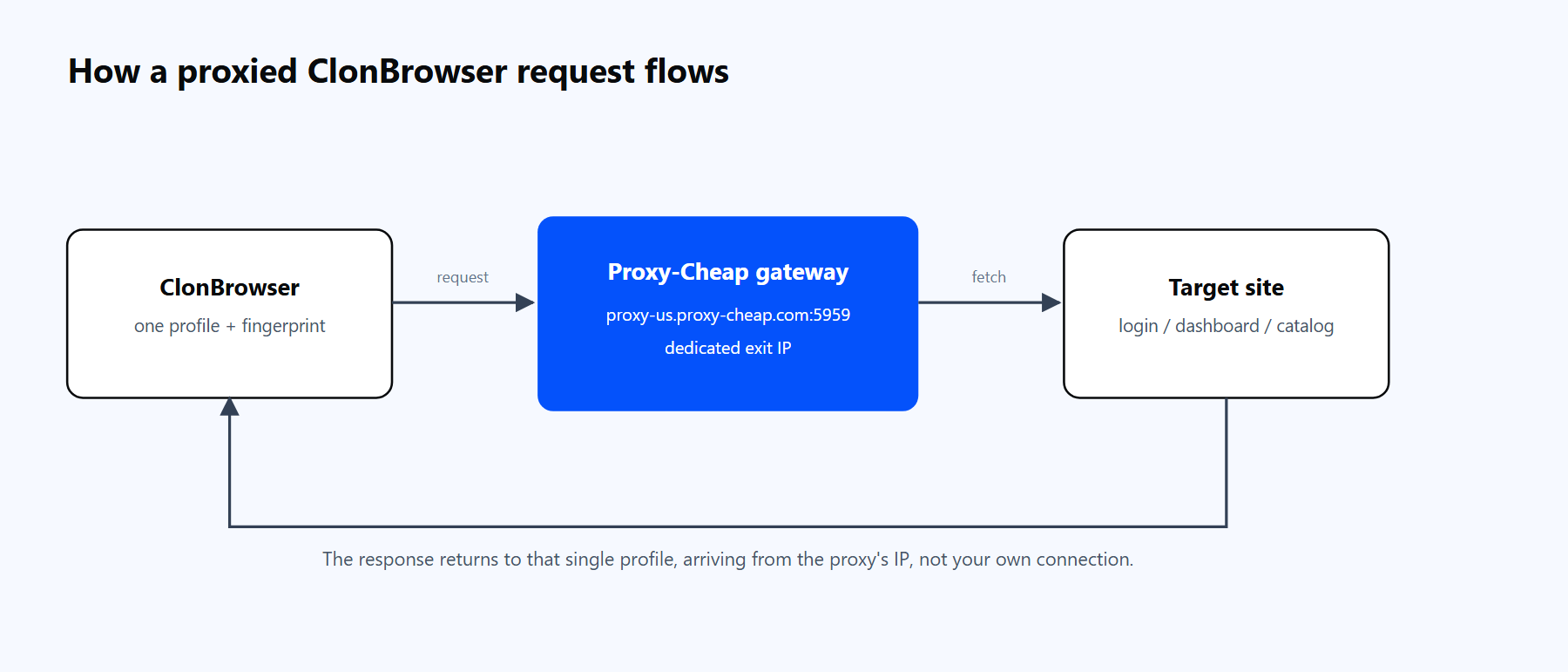
A ClonBrowser environment sends its traffic through the Proxy-Cheap proxy, reaches the target site from the proxy's IP, and returns the response to that single profile.
Proxy-Cheap delivers credentials in exactly this shape. Rotating residential uses a single shared hub, thehub.proxy-cheap.com:8080, with your username and password, and you choose the country in the dashboard credential generator. Static products (residential/ISP, datacenter, and static mobile) assign a unique host and port to each proxy, which you copy from the dashboard. If you are new to the panel, the Proxy-Cheap dashboard guide walks through where those credentials appear.
A quick way to confirm a Proxy-Cheap endpoint works before you paste it into ClonBrowser is a one-line cURL test:
# A 407 (Proxy Authentication Required) still proves the host and port are
# reachable and the tunnel opened. A 200 with a proxy IP means auth passed too.
curl -x http://thehub.proxy-cheap.com:8080 -U "<your-proxycheap-username>:<your-proxycheap-password>" https://ipinfo.io/ipIP whitelist as an alternative to username and password. Static Residential (ISP), datacenter, and static mobile products support IP allowlist authentication. If you prefer not to store credentials in the environment, add your current public IP to the allowlist in the Proxy-Cheap dashboard and leave the username and password fields blank in ClonBrowser. Re-add your IP whenever your own network address changes. Note that IP whitelist is not offered on rotating residential, which uses username and password.
Rotation works one of two ways in ClonBrowser, and the right choice depends on whether the profile needs a steady IP or a fresh one each time.
To assign proxies across many environments at once, open the Proxy page and use Batch import. Paste a list of proxies (one per line, in IP:Port:Username:Password format), let ClonBrowser batch-test the connections, and the saved proxies land in the Proxies tab ready to map one-to-one onto environments so no two accounts share an address.
For a full breakdown of when each type fits, see static vs rotating proxies. The short version for multi-accounting: identity accounts want one steady IP, while research and scraping profiles benefit from rotation.
ClonBrowser ships a Local API, labeled OpenAPI in the app, for driving environments from your own code. It is available on the paid plans and follows the standard antidetect pattern: your code asks the API to open an environment, the API launches the browser with the proxy already bound to that profile, and it returns a debugging endpoint your automation tool attaches to. Because the proxy lives on the profile, your automation code carries no proxy details at all.
A few practical notes before you write against it:
Once you have opened an environment, the API returns a debugging address (and, for Chromium, a matching driver path). Attach Selenium to the already-running browser like this:
import requests
from selenium import webdriver
from selenium.webdriver.chrome.service import Service
from selenium.webdriver.chrome.options import Options

# Base URL, port, endpoint path, and field names all come from ClonBrowser's
# in-app OpenAPI docs (paid plans). Fill them in from there, do not guess.
API = "http://127.0.0.1:<port-from-clonbrowser>"
OPEN_ENDPOINT = "/<open-profile-endpoint>"

# 1. Open the environment. ClonBrowser launches it with the proxy already
#    bound to the profile, so no proxy details go in this code.
res = requests.post(f"{API}{OPEN_ENDPOINT}", json={"id": "<your-environment-id>"}).json()
data = res["data"]

# 2. Attach Selenium to the running Chromium via the returned debugger address.
options = Options()
options.add_experimental_option("debuggerAddress", data["debuggerAddress"])
driver = webdriver.Chrome(service=Service(data["webdriver"]), options=options)

driver.get("https://ipinfo.io/ip")   # echoes the outbound IP
print(driver.page_source)
driver.quit()For Puppeteer or Playwright, connect over the returned WebSocket or CDP endpoint instead of the Selenium debugger address. In every case the traffic leaves through the proxy you set on the environment, and the full field list lives in ClonBrowser's OpenAPI documentation. If you prefer no code at all, the built-in RPA feature runs the same open-and-drive flow through visual templates.
Most proxy problems in ClonBrowser fall into a handful of buckets. Each has a clear fix.
1. Connect Test fails or cannot detect the IP. The test hits the proxy directly, so a failure usually means one field is wrong: a typo in host or port, the username and password swapped, or trailing whitespace pasted from the dashboard. Re-copy each field one at a time straight from the Proxy-Cheap dashboard rather than pasting the whole string into the host box, remove any stray spaces, and run Connect Test again. If it still fails, test the same credentials with the cURL line above to learn whether the proxy or the field mapping is at fault.
2. Wrong proxy type selected. If the Proxy Type dropdown does not match the endpoint (for example SOCKS5 chosen for an HTTP-only gateway), the handshake never completes. HTTP and SOCKS5 usually use different ports, so match the dropdown to the protocol that pairs with the port you pasted, then re-test. If HTTP fails, switch to SOCKS5 (or the reverse) before changing anything else.
3. 407 Proxy Authentication Required. The test passes intermittently but pages return 407, or the profile keeps re-prompting for the proxy login. This means the username or password is being rejected, usually a stale credential cached after a dashboard password change, or a special character in the password that is not URL-encoded. Re-enter the current username and password, relaunch the environment to drop any cached login, and percent-encode reserved characters (@ becomes %40, : becomes %3A). For repeated 407s, switch that endpoint to IP-whitelist authentication so no credentials are sent.
4. IP whitelist authentication is not accepted. Whitelisting authorizes the public IP your traffic actually leaves from. If the address on the allowlist is not your machine's current egress IP (because a home ISP reassigned it, or a VPN sits in the path), the proxy rejects the connection. Open ipinfo.io/ip in a normal, non-proxied browser to read your true egress IP, confirm that exact address is on the Proxy-Cheap allowlist, and turn off any VPN or system proxy first. If your home IP keeps drifting, use username and password instead, which is not tied to a fixed source IP.
5. The proxy connects but the site still shows your real location. The IP looks correct yet the profile leaks through WebRTC or DNS. A plain proxy carries page traffic only, so WebRTC STUN requests and ISP-resolved DNS lookups can still expose the real network. In the environment fingerprint settings, set WebRTC to the Proxy or Replace mode so it reports the proxy IP, and make sure SOCKS5 profiles resolve DNS remotely through the proxy. Verify at browserleaks.com/webrtc and a DNS-leak test inside the launched profile: both must match the proxy exit.
6. Timezone or geolocation does not match the proxy. The exit IP is right, but the profile draws extra verification prompts because its timezone or locale comes from the host machine instead of the proxy country. Anti-fraud systems compare IP geolocation against browser timezone, so a mismatch is a strong signal. Leave ClonBrowser's timezone on the IP-based automatic setting, match the browser language to the proxy country, and set geolocation to prompt or proxy-based. Re-check that IP country, timezone, and language all agree before working in the profile.
7. Connect Test passes but pages will not load. The lightweight test reaches the proxy, yet real traffic times out (ERR_TIMED_OUT). Usually a local firewall or antivirus is filtering the browser's outbound traffic, or a second proxy tool is intercepting the connection. Add ClonBrowser to the security allowlist, shut down any VPN extension or system proxy utility, and reload. If it is only slow, the exit node may be busy, so rotate to a fresh IP or a different country in the dashboard.
8. The IP changes mid-session and logs the account out. A per-request rotating gateway hands out a new IP on every connection, and mid-session changes trigger re-verification or forced logouts. For logged-in work, use a sticky session or a static IP so one profile keeps one IP for the whole session, and only pull a new IP deliberately between sessions. Verify by reloading an IP-check page inside the profile a few times: the address should stay put.
For legitimate multi-account management, ClonBrowser is a capable option in its class. The free plan is genuinely useful, the fingerprint isolation is thorough, and the dual engines plus Local API give you room to grow. A few tradeoffs are worth weighing.
Pros
Cons
The practical setup for most teams: run ClonBrowser for the fingerprint isolation, pair it with a value-tier provider on pay-as-you-go pricing, and assign one dedicated IP per environment. That covers the vast majority of multi-account workflows without enterprise overhead.