Key takeaways:
CapSolver turns a CAPTCHA into a token your scraper can submit, but the token is only as good as the IP that solved it. This guide sets up CapSolver end to end, then shows the part most tutorials skip: how to pass your own proxy so the solve matches the request. Every code sample here was run against CapSolver's live API.
What is CapSolver?
CapSolver is an automated CAPTCHA-solving service. You send it the details of a challenge on a target page, and it returns a solution token that you place into the form or request your automation submits. It solves the token-based challenges (reCAPTCHA, hCaptcha, Turnstile, GeeTest, DataDome, AWS WAF) and runs image and text recognition for simpler CAPTCHAs.
It exposes three surfaces. A REST API at https://api.capsolver.com is the core, an official Python SDK (the capsolver pip package) wraps that API, and a browser extension solves challenges directly inside Chrome or Firefox. The API has no version segment, so the same endpoints have stayed stable while the extension moved to v1.17.0.
Under the hood, CapSolver uses machine-learning models rather than human workers, which is why it returns most tokens in one to ten seconds. Solving happens on CapSolver's infrastructure, so your machine never renders the challenge itself.
What is CapSolver used for?
CapSolver fits anywhere an automated workflow meets a CAPTCHA it has to answer to continue. The common applications:
The through-line is automation continuity. Wherever a CAPTCHA interrupts a script, CapSolver converts it into a value your code can post and move on.
Key features of CapSolver
The features that matter once you move past a single test call:
How much does CapSolver cost?
CapSolver is not free, but it is pay-per-use with no monthly commitment, and new accounts get a small bonus to test with. You are billed per successful solve, priced per 1,000 requests, and unsolvable tasks are not charged. Package plans lower the rate for steady volume.
Approximate rates per 1,000 solves at the time of writing:
| Challenge type | Price per 1,000 |
|---|---|
| Image to text | $0.40 |
| reCAPTCHA v2 | $0.80 |
| hCaptcha | $0.80 |
| reCAPTCHA v3 | $1.00 |
| Cloudflare Turnstile | $1.20 |
| GeeTest | $1.20 |
| AWS WAF | $2.00 |
| DataDome | $2.50 |
| reCAPTCHA v3 Enterprise | $3.00 |
Pricing changes, so confirm the current numbers on the CapSolver pricing page before you budget. One point matters for this guide: a correct proxy and geo match reduces retries, and fewer retries means fewer paid solves. The proxy setup below is a cost lever, not just a success lever.
How to install CapSolver
There are two ways to run CapSolver, and most scraping projects use the API path. Start there, then add the extension only if you drive a real browser.
Install the official Python SDK into a clean virtual environment on Python 3.6.8 or newer:
# Official CapSolver Python SDK (MIT licensed)
pip install -U capsolver
# Confirm the version you actually installed
pip show capsolver
Then get your API key. Sign up at the CapSolver dashboard, and the key appears on the dashboard home panel. That single key works everywhere: as clientKey in raw REST calls, as capsolver.api_key in the SDK, and as apiKey in the extension. Top up your balance in the same dashboard.
If you automate a real browser instead of calling the API, install the extension. Add "Captcha Solver: Auto Captcha solving service" from the Chrome Web Store, or the Firefox add-on, then paste your API key into the extension popup. For automated runs, developers download the ZIP from the CapSolver extension GitHub repo, load it unpacked, and edit /assets/config.js to set apiKey, the per-challenge toggles (enabledForRecaptcha, enabledForRecaptchaV3, and so on), and, when needed, useProxy with the matching proxy fields.
Quickstart: your first CapSolver solve
The simplest working call solves a reCAPTCHA v2 on CapSolver's own IPs. It sets your key, checks your balance, and returns a token. This uses the ProxyLess task type, so no proxy is involved yet.
import capsolver
capsolver.api_key = "<your-capsolver-api-key>"
# Optional sanity check before you spend anything.
print("Balance:", capsolver.balance())
# ReCaptchaV2TaskProxyLess solves on CapSolver's IPs, no proxy needed.
solution = capsolver.solve({
"type": "ReCaptchaV2TaskProxyLess",
"websiteURL": "https://www.google.com/recaptcha/api2/demo",
"websiteKey": "6Le-wvkSAAAAAPBMRTvw0Q4Muexq9bi0DJwx_mJ-",
})
# The token lives under gRecaptchaResponse for reCAPTCHA tasks.
print(solution["gRecaptchaResponse"][:60], "...")
capsolver.solve() does the full cycle for you: it calls createTask, polls getTaskResult until the status is ready, and returns the solution dict. For a reCAPTCHA task, the token sits under gRecaptchaResponse, alongside a userAgent value you should reuse on the request that submits the token. The two fields you must get right are websiteURL (the page holding the challenge) and websiteKey (the site key from that page's CAPTCHA widget).
This call is enough for lenient targets. For anything that scores or geo-checks the request, the proxyless token will underperform, which is where task types come in.
Proxy tasks vs proxyless tasks: which to choose
CapSolver encodes proxy behavior in the task name itself, and this one detail decides whether your token works on a strict site.
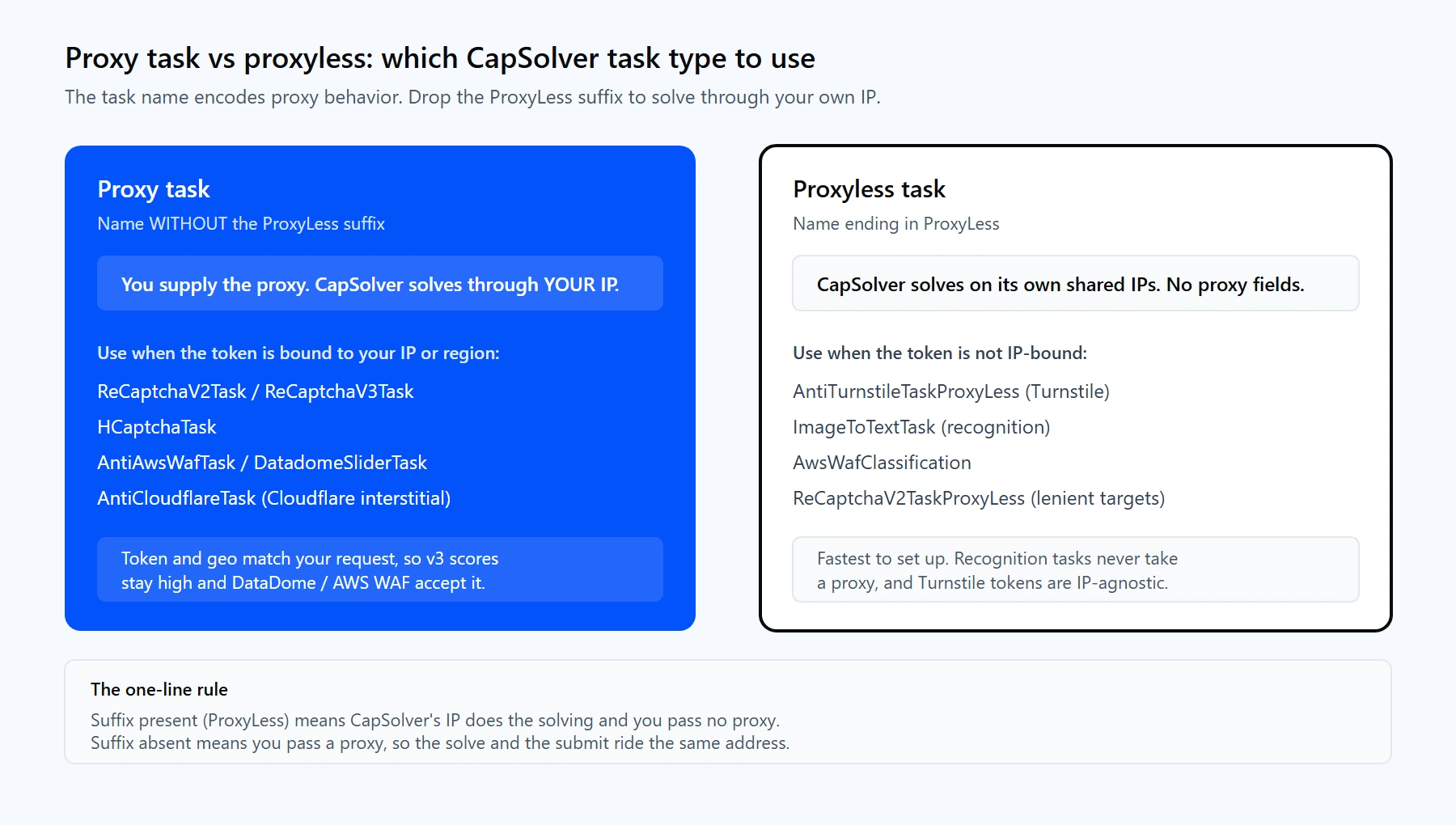
Drop the ProxyLess suffix and pass a proxy when the site ties the token to your IP or region. Keep ProxyLess for Turnstile and image or text recognition.
Why it matters: reCAPTCHA v2/v3, hCaptcha, DataDome, and AWS WAF bind the token to the IP, headers, and fingerprint present during solving. Solve on CapSolver's IP, then submit from yours, and the two do not match. On reCAPTCHA v3 that mismatch lowers the score. On DataDome and AWS WAF it gets the token rejected. Passing your own proxy keeps the solve and the submit on one address.
The rule is short:
Why you need a proxy with CapSolver
A proxy does two jobs in a CapSolver pipeline, and both feed straight into your success rate.
First, token and IP consistency. As covered above, strict challenges tie the token to the solving IP. When CapSolver solves through your proxy and your scraper submits through the same proxy, the target sees one consistent identity. That single alignment is the biggest lever on reCAPTCHA v3 scores and the deciding factor on DataDome and AWS WAF.
Second, geo matching. Many sites serve region-specific content and score requests partly on where they originate. If your target expects a visitor from Germany, solving and requesting from a German IP returns the score and the content a real visitor there would see. Routing through rotating residential proxies with country targeting is how you match the solve to the market.
There is also a quieter benefit. Clean, high-trust IPs get challenged less often in the first place, so choosing the right CAPTCHA proxies reduces how many solves you pay for. CapSolver handles the challenges that still appear; good proxies keep that number down.
Proxy-Cheap offers several product lines, and each fits a different CapSolver workload. The table maps them, and the image restates it visually.
| CapSolver workflow | Rotating residential | Static residential | ISP | Datacenter | Mobile |
|---|---|---|---|---|---|
| High-volume reCAPTCHA solving | Best fit | Also works | Also works | Also works | Not ideal |
| Sticky solve-then-submit handshake | Also works | Best fit | Best fit | Not ideal | Also works |
| Strict reCAPTCHA v3 / DataDome / AWS WAF | Also works | Also works | Also works | Not ideal | Best fit |
| Geo-specific targets (region content) | Best fit | Also works | Also works | Not ideal | Also works |
| High-throughput public pages | Also works | Not ideal | Also works | Best fit | Not ideal |
| Account-bound scraping (one identity) | Not ideal | Best fit | Also works | Not ideal | Also works |
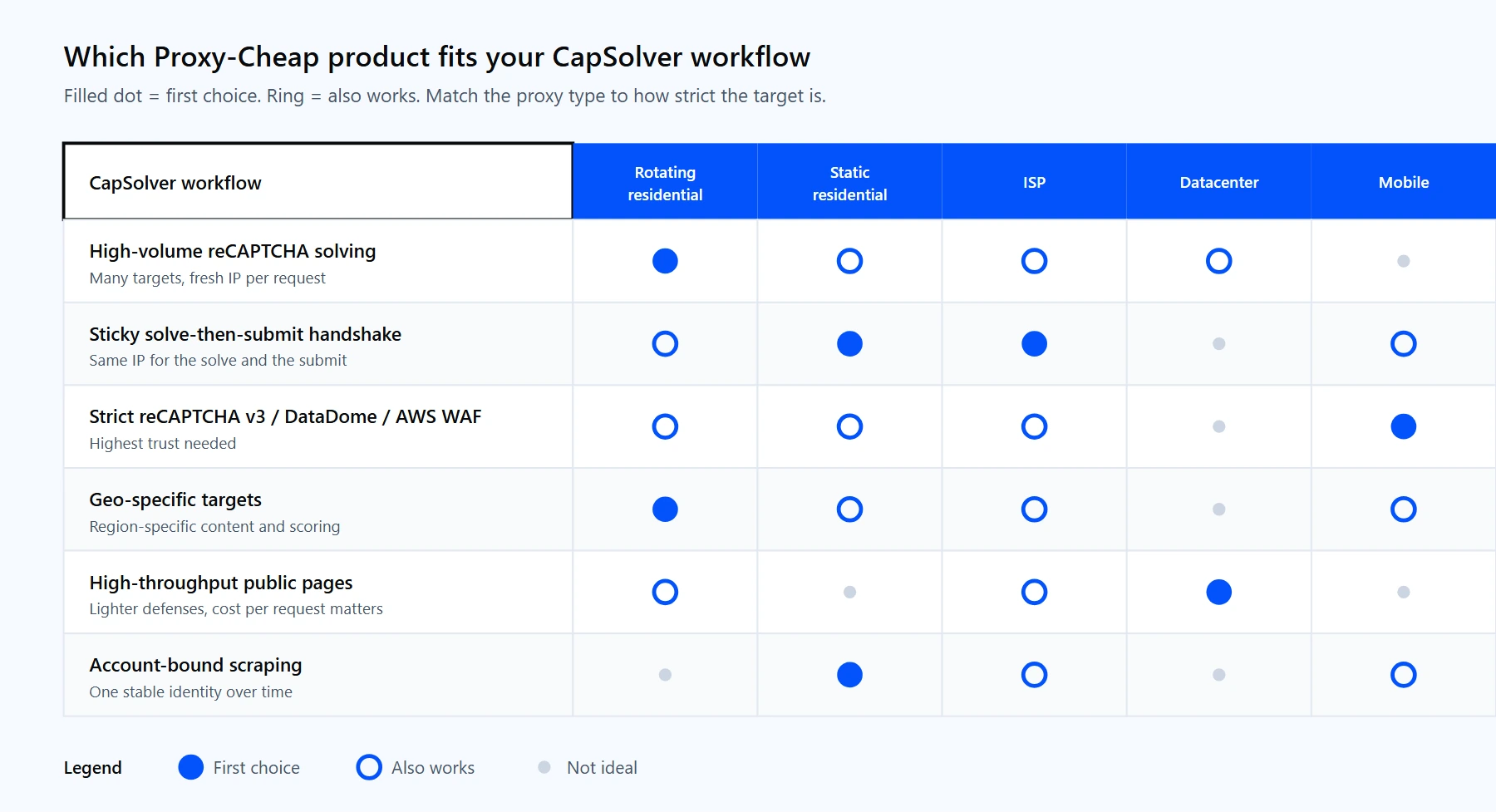
Each Proxy-Cheap line fits a different CapSolver workload. The links below the table match the columns above.
How to set up a proxy with CapSolver
Setup is one change to the quickstart: drop the ProxyLess suffix and add your proxy fields. The recommended form uses five separate fields, which avoids the string-parsing mistakes that cause most setup errors.
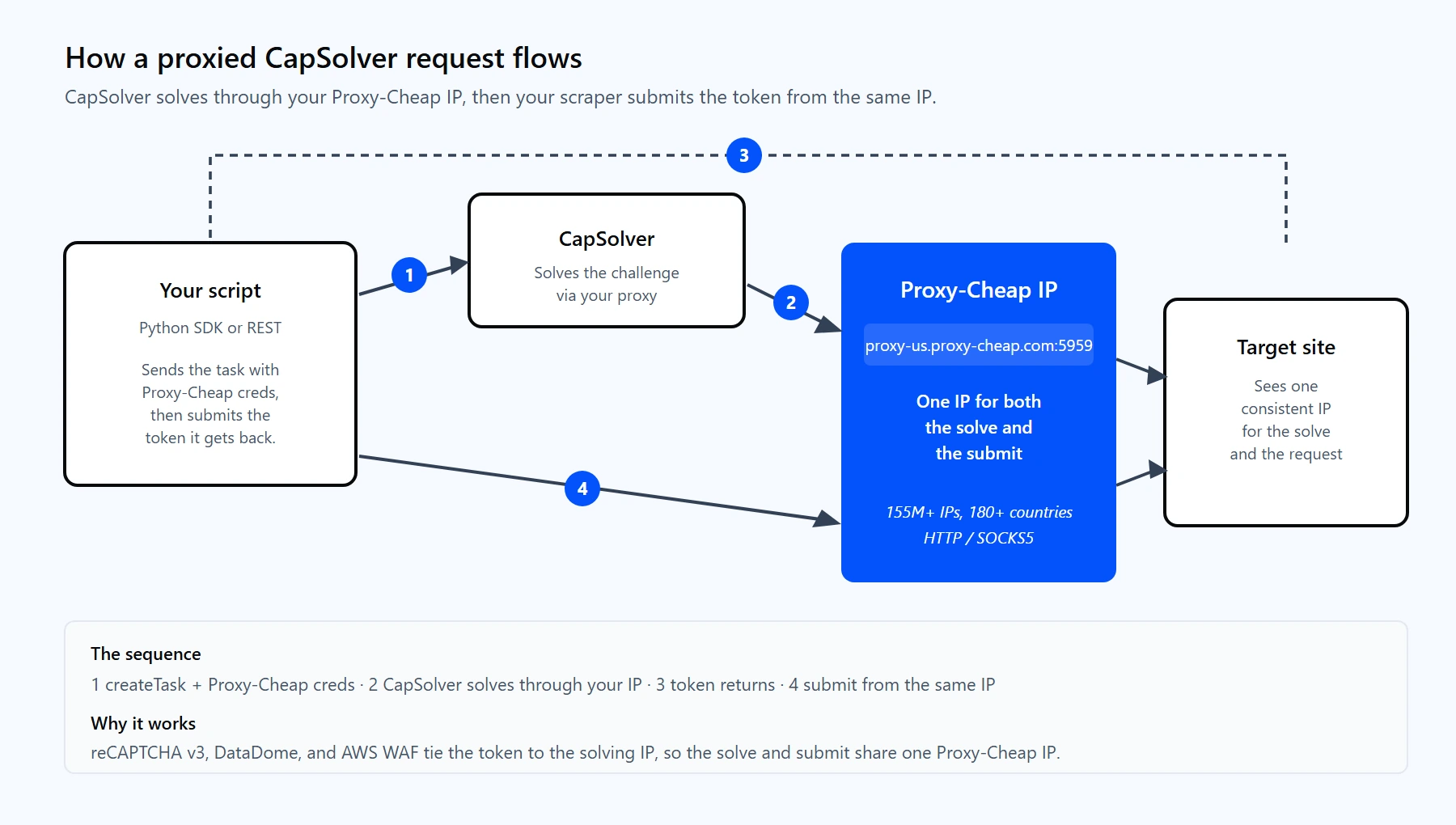
One Proxy-Cheap IP handles both the solve and the submit, so the token and your request share the same address.
import capsolver
capsolver.api_key = "<your-capsolver-api-key>"
# Same challenge as the quickstart, but CapSolver now solves through
# YOUR proxy. The token is generated on the IP your scraper will use.
solution = capsolver.solve({
"type": "ReCaptchaV2Task", # note: no "ProxyLess" suffix
"websiteURL": "https://www.google.com/recaptcha/api2/demo",
"websiteKey": "6Le-wvkSAAAAAPBMRTvw0Q4Muexq9bi0DJwx_mJ-",
"proxyType": "http",
"proxyAddress": "thehub.proxy-cheap.com",
"proxyPort": 8080,
"proxyLogin": "<your-proxycheap-username>",
"proxyPassword": "<your-proxycheap-password>",
})
print(solution["gRecaptchaResponse"][:60], "...")
Where the credentials come from: generate them in the Proxy-Cheap dashboard. Rotating residential now uses one hub for every country: thehub.proxy-cheap.com:8080. You choose the country, the session, and the hold time (TTL) in the dashboard credential generator. Static residential, ISP, datacenter, and mobile products give each proxy a unique host and port that you copy from the dashboard's setup panel.
CapSolver also accepts the proxy through the raw REST API, which is handy for non-Python stacks:
curl -X POST https://api.capsolver.com/createTask \
-H "Content-Type: application/json" \
-d '{
"clientKey": "<your-capsolver-api-key>",
"task": {
"type": "ReCaptchaV2Task",
"websiteURL": "https://www.google.com/recaptcha/api2/demo",
"websiteKey": "6Le-wvkSAAAAAPBMRTvw0Q4Muexq9bi0DJwx_mJ-",
"proxyType": "http",
"proxyAddress": "thehub.proxy-cheap.com",
"proxyPort": 8080,
"proxyLogin": "<your-proxycheap-username>",
"proxyPassword": "<your-proxycheap-password>"
}
}'
Two notes from testing. CapSolver supports http, https, socks4, and socks5 for proxyType, and Proxy-Cheap serves HTTP and SOCKS5 across the product line. The five-field form is the safe default; a single combined proxy string also works ("proxy": "http:host:port:user:pass"), but the structured fields remove any ambiguity about field order.
Rotating proxies with CapSolver
How you rotate depends on the product, and the choice interacts with the token consistency point above.
For a solve-and-submit handshake, do not rotate mid-flow. Solve and submit on the same IP, then rotate for the next target. A sticky session or a static IP is the clean way to hold one address across both calls. For a deeper comparison, read static vs rotating proxies.
The snippet below cycles a proxy pool through CapSolver tasks and retires any proxy that fails, so a dead IP does not stall the run:
import itertools
import capsolver
import capsolver.error
capsolver.api_key = "<your-capsolver-api-key>"
# One entry per region is enough for the rotating gateway; add static
# IPs here if you rotate those yourself.
PROXIES = [
{"proxyType": "http", "proxyAddress": "thehub.proxy-cheap.com",
"proxyPort": 8080, "proxyLogin": "<user>", "proxyPassword": "<pass>"},
]
pool = itertools.cycle(PROXIES)
def solve_recaptcha(website_url, website_key):
for _ in range(len(PROXIES)):
proxy = next(pool)
try:
return capsolver.solve({
"type": "ReCaptchaV2Task",
"websiteURL": website_url,
"websiteKey": website_key,
**proxy,
})
except capsolver.error.CapsolverError as exc:
# Retire a dead or rejected proxy and try the next one.
if "PROXY" in str(exc).upper():
continue
raise
raise RuntimeError("All proxies exhausted")
token = solve_recaptcha(
"https://www.google.com/recaptcha/api2/demo",
"6Le-wvkSAAAAAPBMRTvw0Q4Muexq9bi0DJwx_mJ-",
)
print(token["gRecaptchaResponse"][:60], "...")
If you already manage a rotating pool in your scraper, reuse it here. The pattern for that lives in the guide on how to rotate proxies in Python with Requests and AIOHTTP, and the same list feeds both your fetch layer and CapSolver.
Advanced: reCAPTCHA v3 and Turnstile with proxied requests
Two challenge types deserve their own patterns because they behave differently from a plain reCAPTCHA v2.
reCAPTCHA v3 returns a score, not a checkbox, and the score is where proxy quality shows up. Pass a proxy in the same region as your target, set pageAction to the exact action the site expects (login, submit, and so on), and the score climbs. A mismatched pageAction or an out-of-region IP is the usual reason a returned token still gets rejected server-side.
import capsolver
capsolver.api_key = "<your-capsolver-api-key>"
solution = capsolver.solve({
"type": "ReCaptchaV3Task",
"websiteURL": "https://example.com/login",
"websiteKey": "<site-key-from-the-page>",
"pageAction": "login", # must match the site's action
"proxyType": "http",
"proxyAddress": "thehub.proxy-cheap.com",
"proxyPort": 8080,
"proxyLogin": "<your-proxycheap-username>",
"proxyPassword": "<your-proxycheap-password>",
})
print(solution["gRecaptchaResponse"][:60], "...")
Cloudflare Turnstile is the exception to the proxy rule. Its token is not tied to the solving IP, so CapSolver solves it proxyless with AntiTurnstileTaskProxyLess and no proxy fields. When the page is a full Cloudflare interstitial rather than a bare Turnstile widget, switch to AntiCloudflareTask and supply your proxy, because the interstitial does check the IP.
import capsolver
capsolver.api_key = "<your-capsolver-api-key>"
# Standalone Turnstile widget: proxyless, token is not IP-bound.
solution = capsolver.solve({
"type": "AntiTurnstileTaskProxyLess",
"websiteURL": "https://example.com",
"websiteKey": "<turnstile-site-key>",
})
# Turnstile returns a token plus the userAgent used to solve it.
print(solution["token"][:60], "...")
For Turnstile, submit the returned token with the matching userAgent from the solution. Reusing that user agent on your request keeps the fingerprint aligned, the same principle that makes proxied solving work for reCAPTCHA and DataDome.
Common errors and how to fix them
Most CapSolver failures fall into a handful of buckets, and the proxy-related ones dominate real projects. Each error code below comes straight from the API.
1. `ERROR_KEY_DENIED_ACCESS`. The clientKey does not match your dashboard key, or your balance is empty. Copy the key again with no stray whitespace, and top up if the balance is zero. In the extension, set apiKey in config.js.
2. `ERROR_INVALID_TASK_DATA`. A field is malformed, most often the proxy string. Switch to the five separate fields (proxyType, proxyAddress, proxyPort, proxyLogin, proxyPassword) instead of one combined string, and read errorDescription for the exact field it rejected.
3. `ERROR_PROXY_CONNECT_REFUSED` or `ERROR_PROXY_CONNECT_TIMEOUT`. CapSolver's servers cannot reach your proxy. Confirm the host and port, and test the proxy independently with curl. If the proxy uses IP-allowlist authentication, CapSolver's own servers are not on your allowlist, so switch to username and password, which needs no allowlist.
4. `ERROR_PROXY_BANNED`. The target already rejected that proxy IP. Rotate to a fresh residential or mobile IP rather than reusing a datacenter address the site has seen. High-trust IPs are the fix, not more retries.
5. reCAPTCHA v3 score too low. You solved with ReCaptchaV3TaskProxyLess against a strict site, or your pageAction did not match. Switch to ReCaptchaV3Task with your own residential proxy in the target region, and align pageAction exactly.
6. Cloudflare error `600010` or "verification failed". The token was solved on one IP or user agent and submitted from another, or the task type is wrong for the challenge. Reuse the same proxy IP and user agent for both the solve and the submit, and use AntiCloudflareTask for interstitials rather than AntiTurnstileTaskProxyLess.
7. `ERROR_TASK_TIMEOUT` or `ERROR_CAPTCHA_UNSOLVABLE`. The solve exceeded the 120-second window, often because of a slow proxy. Retry with a faster, stable IP. ERROR_CAPTCHA_UNSOLVABLE is not billed, so it is safe to retry.
8. `ERROR_ZERO_BALANCE`. The account ran dry mid-run. Handle it by pausing rather than looping, top up, and poll capsolver.balance() so you catch it before a batch fails.
9. Rate limiting: `ERROR_RATE_LIMIT` or `ERROR_KEY_TEMP_BLOCKED`. A retry storm from one of the errors above tripped the limit. Add backoff, fix the root cause, and wait out the short auto-reset instead of hammering the API.
10. Extension not solving. In config.js, the apiKey is missing, the relevant enabledFor flag is off, or useProxy is set without valid proxy fields. Set the key, enable the challenge type, and update to the latest extension version.
Is CapSolver good? Pros and cons
For automated CAPTCHA solving, CapSolver is one of the strongest options on price and speed, and its proxy handling is genuinely flexible. A few tradeoffs are worth weighing before you commit.
Pros
Cons
The practical setup for most teams: run CapSolver on the API, pair it with residential or ISP proxies for the challenges that check IPs, and reserve datacenter for high-volume public pages. Proxy-Cheap covers all of those on pay-as-you-go billing, so you can match proxy type to target without over-buying. Start with residential proxies for strict sites and scale from there.