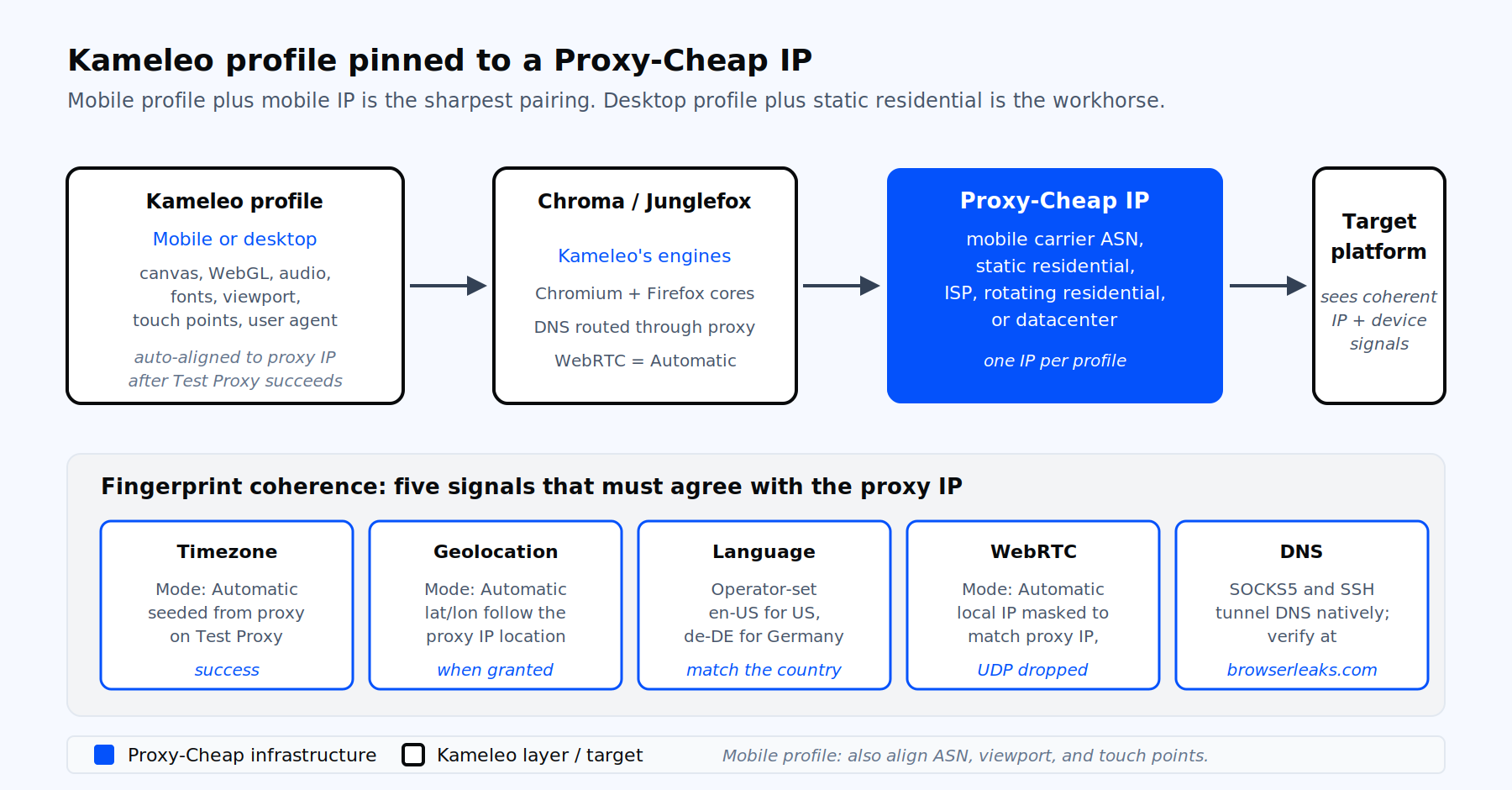
One profile, one Proxy-Cheap IP, one identity. Mobile profile plus mobile IP is the sharpest pairing.
Kameleo is an antidetect browser built on two in-house engines, Chroma (Chromium based) and Junglefox (Firefox based). Each profile carries its own canvas, WebGL, audio, hardware, font, and screen fingerprint. The desktop app for Windows and macOS handles profile creation, the Local API drives automation, and Kameleo’s cloud storage syncs profiles across machines.
Kameleo runs the browser. It does not generate IPs. Every profile still needs an external proxy so the IP, the timezone, the language, and the device fingerprint tell the same story. When the fingerprint and the IP describe the same kind of device and location, the session is internally consistent. When they describe different devices or locations, the setup is incoherent, which undermines the privacy and regional-testing workflows that depend on a consistent profile.
The pairing recommendation is direct. For the best fit, pair a mobile fingerprint with a mobile IP, and a desktop fingerprint with a residential-grade desktop IP. Pairing a datacenter IP with a profile configured as a mobile device creates a mismatch between the IP type and the device the profile presents, which breaks the internal consistency of the setup.
Most antidetect browsers stop at desktop. Kameleo emulates Android Chrome and iOS Safari profiles with real device-level fingerprints, including viewport size, touch points, user agent, and hardware specs. That makes it a natural fit for social media account management, ad verification on mobile placements, and dropshipping workflows that run on mobile placements.
The cleanest possible match in the antidetect category is therefore a Kameleo mobile profile routed through a 4G or 5G mobile proxy. The profile says "iPhone on Verizon." The IP says "AS6167, mobile carrier, United States." Both signals agree.
Kameleo integrates with partner proxy networks inside its app, but it does not run a proxy pool of its own. Bringing your own proxies is the default for any serious operator who needs control over country selection, sticky session length, IP volume, and billing model.
Bringing Proxy-Cheap proxies into Kameleo gives you:
The flow below follows the May 2026 Kameleo build. The order matters. Assign the proxy before the first launch so Kameleo seeds Timezone, Geolocation, and WebRTC from the proxy IP rather than from your machine.
If Test Proxy fails on a proxy you know is healthy, your provider’s allow list may not include the test domains. Whitelist Google, Archive.org, and Wikipedia at the provider side, or run a manual check in a separate browser tab once the profile is open.
Mobile profile setup follows the same Proxy section flow, with two extra checks for fingerprint coherence.
This is the workflow behind most multi-account management setups for TikTok, Instagram, and short-form video that run on Kameleo. The use-case page for multi-account management proxies lists the protocols and rotation options supported on each product line.
When you run more than a handful of profiles, enter proxies once and attach them by reference.
Paste a list in the standard one-per-line format:
192.0.2.10:8000:user1:pass1
192.0.2.11:8000:user2:pass2
gw.example-provider.net:7777:account-zone-uk-sessid-A1B2C3:secret
[2001:db8::1]:8080:user3:pass3
proxy.example.net:1080:user4:p%40sswordFormat rules from Kameleo’s documentation:
Once imported, open any profile, scroll to Proxy, and pick the saved entry from the library dropdown. Attaching a new IP to a profile is a one-click action.
A proxy is not enough on its own. Session consistency depends on whether the IP and the browser fingerprint describe the same device and location. Kameleo handles most of the heavy lifting automatically, but the operator owns the review.
For mobile profiles, add three more checks. Confirm the carrier ASN matches the device. Confirm the viewport matches the chosen device model. Confirm the touch points value stays at the device default (usually 5 for modern phones).
Run two checks every time you launch a fresh profile. Kameleo’s Test Proxy confirms connectivity, latency, country, IP, and ASN before the browser opens. After the browser opens, load a public IP echo as a second pass.
If the WebRTC IP on browserleaks differs from the api.ipify result, stop. The profile has a leak. Close, reopen the profile with the proxy already attached, and recheck. Never log into an account through a profile that shows two different public IPs.
The rule inside Kameleo is one profile, one identity, one IP for as long as the account lives. A consistent IP across sessions keeps the profile coherent for account management and testing. An IP that jumps between cities and ASNs from session to session breaks that consistency, even when each individual IP is clean.
Two patterns cover almost every Kameleo workflow.
Never swap proxies mid-session on a logged-in profile. Stop the profile first, change the proxy in profile settings, then restart. For a deeper read on when to use which pattern, see this guide to static vs rotating proxies.
| Symptom | Most likely cause | Fix |
|---|---|---|
| "Could not connect to proxy" | Wrong protocol selected for the plan, or provider allow list missing test domains | Match the protocol your dashboard documents. Allow Google, Archive.org, and Wikipedia at the provider side, or whitelist your local IP. |
| Browser starts but Test Proxy fails | Special characters in password broke parsing | Enter Username and Password in the dedicated fields instead of one string, or URL encode @, :, #, $. |
| DNS leak shown on browserleaks | Profile launched before the proxy was assigned | Stop the profile. Assign the proxy in the Proxy section. Relaunch. SOCKS5 routes DNS through the tunnel by default. |
| WebRTC shows real IP | WebRTC not restricted to the proxied path'. | Confirm Automatic on WebRTC. Force webrtc.ip_handling_policy = disable_non_proxied_udp on Chroma profiles. |
| Timezone differs from proxy country | Manual override left in place from a previous edit | Set Timezone, Geolocation, and WebRTC back to Automatic. Re-run Test Proxy to reseed values. |
| Slow first launch through residential | Cold TLS handshake, residential pool selection | Warm a pool of pre-tested proxies and reuse them. First launches on residential are typically 1 to 3 seconds slower than ISP. |
| Profile worked yesterday, fails today | Rotating gateway issued a different exit IP or city | Switch to a sticky session token, or move that profile to a static residential or ISP endpoint. |
| Mobile profile presents inconsistently on a social platform | Datacenter or non-carrier ASN paired with the mobile fingerprint | Move the profile to a mobile proxy whose ASN belongs to a real carrier in the profile’s country. |
Kameleo exposes a local REST API at http://localhost:5050 once the CLI or desktop app is running. The official SDKs cover Python, JavaScript, TypeScript, and C#. The pattern below provisions a desktop profile, attaches a SOCKS5 endpoint, and starts the profile.
from kameleo.local_api_client import KameleoLocalApiClient
from kameleo.local_api_client.models import (
    CreateProfileRequest,
    ProxyChoice,
    Server,
)

client = KameleoLocalApiClient(endpoint="http://localhost:5050")

# Pick a desktop Chrome fingerprint
fingerprints = client.fingerprint.search_fingerprints(
    device_type="desktop",
    browser_product="chrome",
    language="en-us",
)

# Attach a Proxy-Cheap SOCKS5 endpoint
proxy = ProxyChoice(
    value="socks5",
    extra=Server(
        host="resi.proxy-cheap.example",
        port=7777,
        id="your_username",
        secret="your_password",
    ),
)

profile = client.profile.create_profile(
    CreateProfileRequest(
        fingerprint_id=fingerprints[0].id,
        name="kameleo-proxy-cheap-demo",
        proxy=proxy,
    )
)

client.profile.start_profile(profile.id)A few notes for production runs. Stop the profile before calling update_profile if you need to swap the proxy. Pass proxy=None to remove the proxy. Wrap fingerprint search in retries when iterating across many regions, since the index is large.
For wider patterns on rotating, sticky, and per-request proxy switching across different toolchains, the roundup on the best proxies for web scraping covers code-side approaches that pair well with the Local API.
Three operational habits separate a five-profile setup from a five-hundred-profile one.
For multi-account management across Instagram, TikTok, Facebook, X, and YouTube, the social media proxies use case page documents which protocol and rotation pattern fits which platform.
The right Proxy-Cheap product depends on what the Kameleo profile is doing. The table below summarizes the fit. Mobile profiles get pride of place because mobile-on-mobile is the cleanest match available in the antidetect category.
| Kameleo workflow | Primary fit | Strong alternative | Notes |
|---|---|---|---|
| Mobile profile for social media account management | Mobile proxies (rotating with sticky session) | Static residential when carrier match is not required | Match the carrier ASN’s country to the profile Language. |
| Desktop profile for long-lived account ownership | Static residential proxies | ISP proxies | One IP per profile for the account’s lifetime. |
| Desktop profile fleet at high parallelism | ISP proxies | Static residential | Datacenter-grade speed with residential-grade trust. |
| Data collection inside Kameleo on publicly available content | Rotating residential proxies | Mobile proxies for cellular-heavy targets | Use a rotating gateway URL as the proxy host. |
| QA, internal testing, market-specific page checks | Datacenter proxies | ISP proxies | Lowest cost per IP, full Kameleo compatibility. |
| Any of the above on SOCKS5 | SOCKS5 across product lines | n/a | DNS travels through the tunnel by default. |
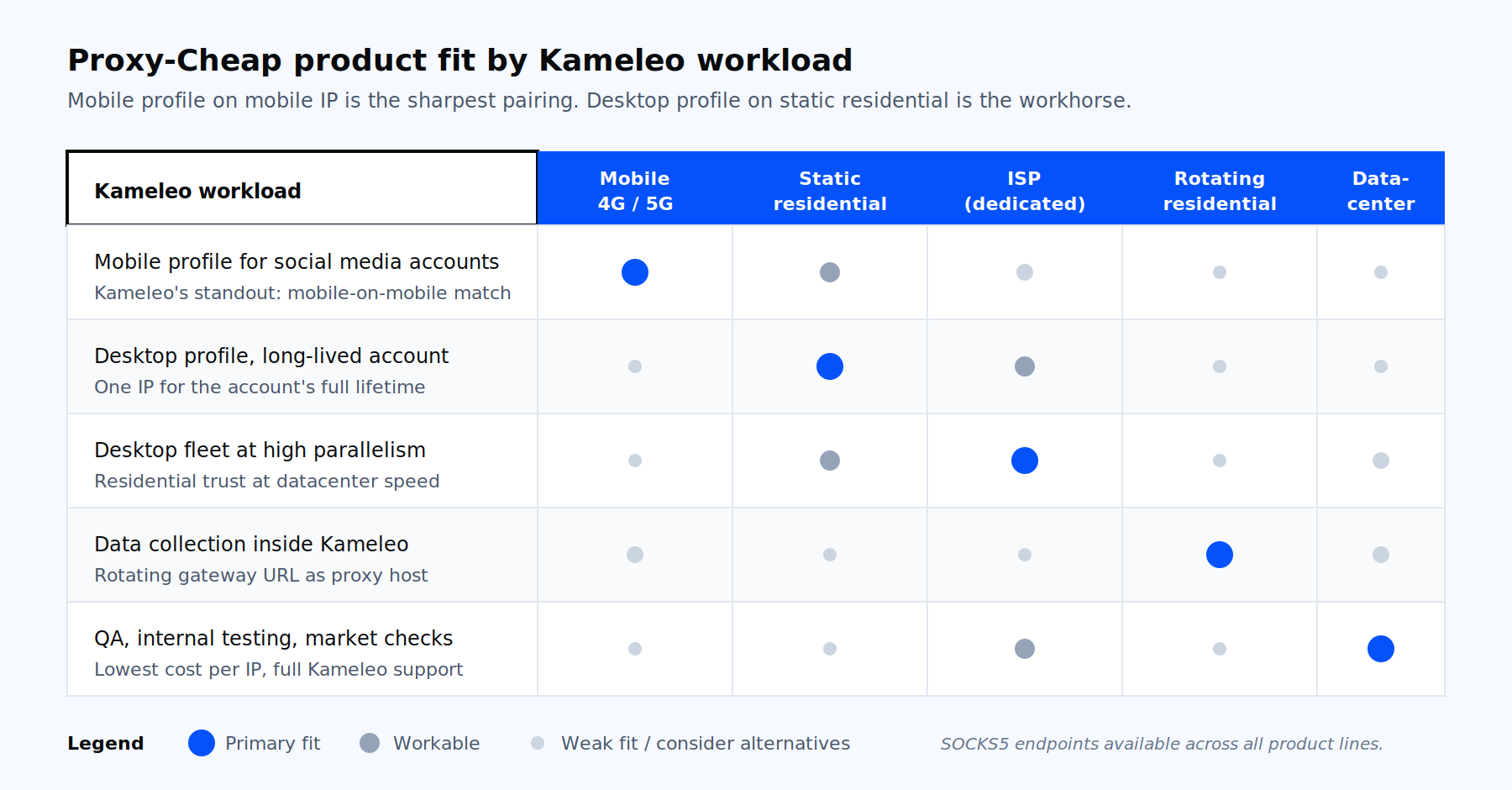
Pick the Proxy-Cheap product line that matches what the Kameleo profile is doing, not the other way round.
The shortest path to a working Kameleo setup is to pick the product line that matches your profile type, generate the endpoint in the matching product dashboard, then paste it into the Proxy section of a new profile. From there the patterns above carry every workflow from one profile to a thousand.