
Python web scraping libraries are easiest to compare by the job each one does in web scraping: fetching web pages, parsing HTML, executing JavaScript, or managing a large crawl. Requests and HTTPX handle HTTP requests, BeautifulSoup and selectolax parse HTML and XML documents into a parse tree, Playwright handles JavaScript rendering, and Scrapy manages the crawl across multiple pages. There is no single best library. The right one depends on your target, your scale, and where the data is going.
Libraries are layers, not rivals. Most scrapers pair a fetcher (Requests, HTTPX) with an HTML parser (BeautifulSoup, selectolax), and browser automation tools and frameworks sit on top for harder jobs.
The page type decides the tool. Static HTML routes to an HTTP client plus a parser, JavaScript-rendered pages and modern web apps need a browser tool like Playwright, large or recurring crawls call for a framework such as Scrapy or Crawlee, and data bound for an LLM suits an AI extractor like Crawl4AI or ScrapeGraphAI.
The IP layer is the one job no library covers, and it is what determines your success rate once you run at volume.
There is no single best library. Use the decision tree below to match a stack to your target, scale, and destination.
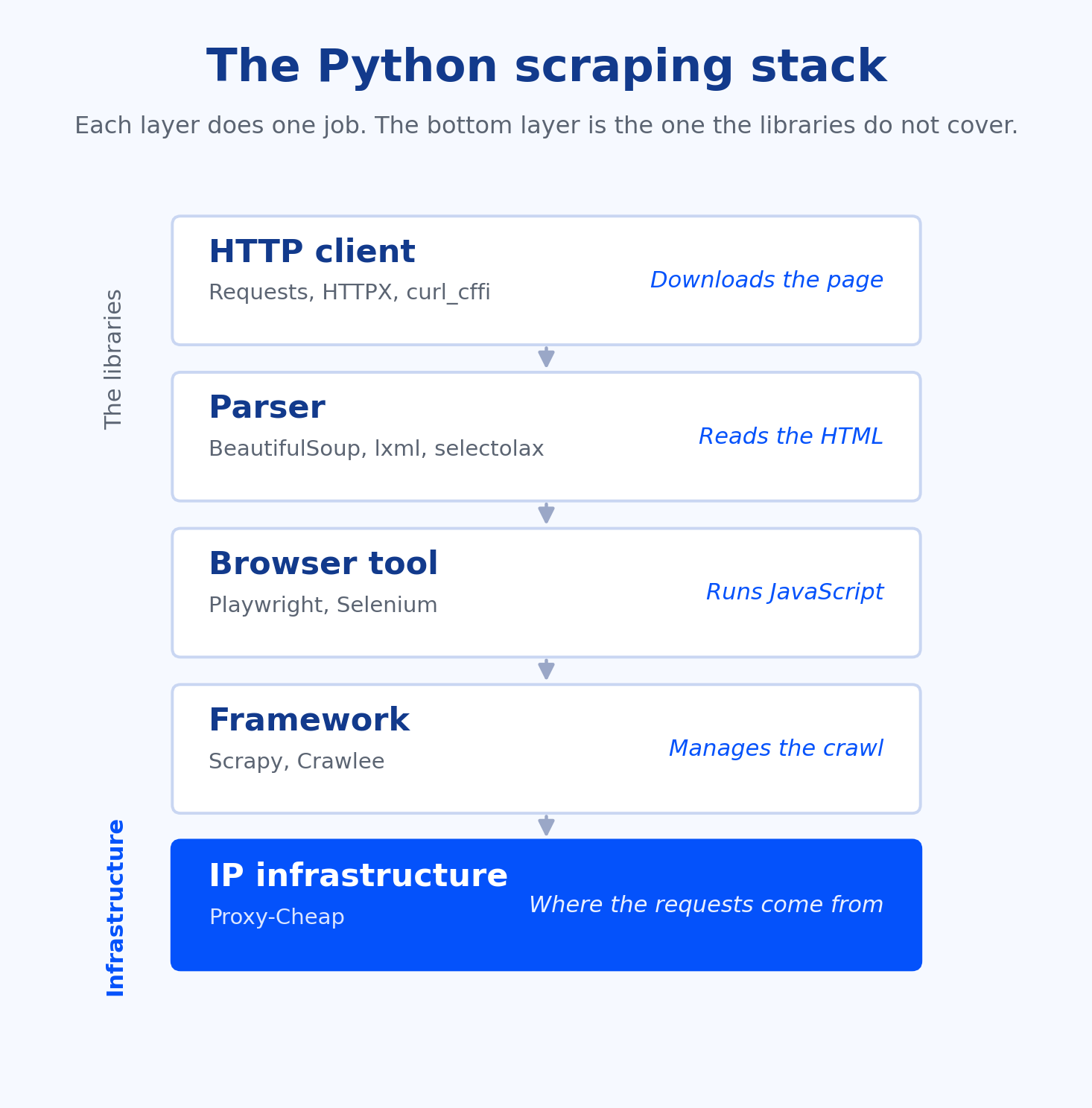
A web scraping library handles one part of getting data off a page. Group these Python libraries by the job they do and four categories of scraping tools appear. An HTTP client (Requests, HTTPX, curl_cffi) downloads the raw page. A parser (BeautifulSoup, lxml, selectolax) reads that HTML and pulls out the HTML elements and fields you want, the core of data extraction. A browser tool (Playwright, Selenium) automates a real browser when the content only appears after JavaScript runs. A framework (Scrapy, Crawlee) wraps fetching, parsing, queuing, and exporting data into one system for scraping projects that span many pages.
The split that trips up most beginners is the first two. A parser is not a fetcher. BeautifulSoup does not download anything on its own. You fetch the page's HTML with Requests or HTTPX, then hand it to BeautifulSoup, which builds a parse tree you can read even from malformed HTML. Pairing one fetcher with one parser is the standard shape of a small scraper, and it covers a large share of real projects.
There is a fifth layer that none of these libraries provide: the IP infrastructure your requests travel through. A framework can bundle the first four roles, but the address your traffic comes from sits underneath all of them. We cover that layer in detail later, because it is the part that decides whether a scraper that works on your laptop keeps working at scale. For the wider picture of how scraped data feeds analytics, monitoring, and research, see how teams structure their web data collection workflows.
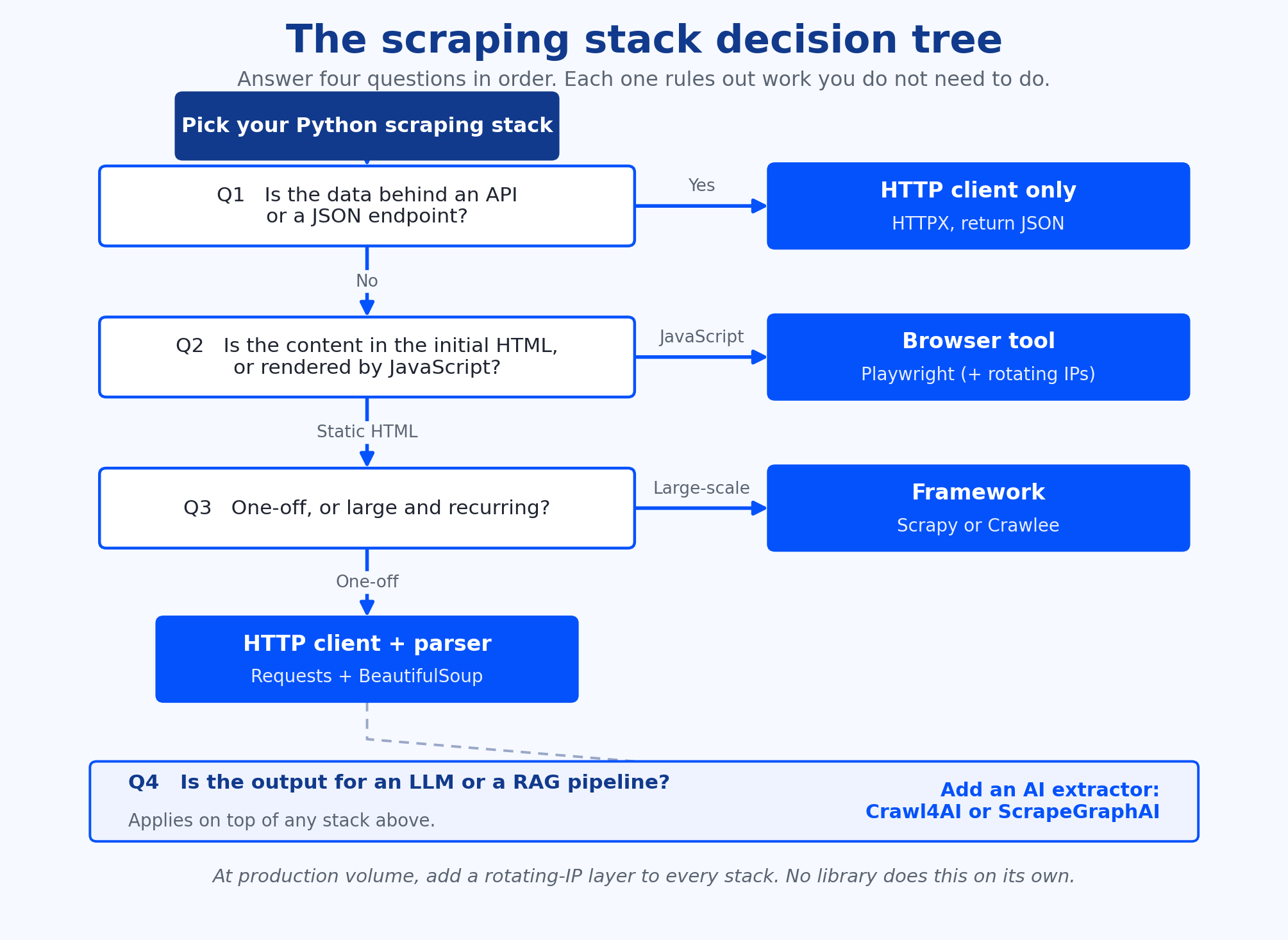
Pick your stack by answering four questions in order. Each one rules out work you do not need to do.
Question 1: Can you get the data without scraping HTML at all? Before you parse a single tag, check the browser network tab for a public API, an embedded JSON payload (often in a <script> tag or a state variable), or an XHR or fetch endpoint the page calls. Many sites expose web APIs that return the same data their web servers render into HTML. If one exists, request it directly with an HTTP client and return clean JSON. This is faster and steadier than reading the rendered page.
Question 2: Is the content in the initial HTML, or rendered by JavaScript? Fetch the URL with an HTTP client and look at the response. If your data is already in those static web pages, use an HTTP client plus an HTML parser, for example HTTPX with selectolax. If the data only appears after JavaScript rendering on dynamic web pages, you need a browser tool such as Playwright.
Question 3: Is this one-off, recurring, or large-scale? A single script is the right size for a one-time pull. Once you need scheduling, retries, concurrency limits, and exporting data across thousands of pages, move to a framework built for scalable web scraping such as Scrapy or Crawlee. That is the shape of large-scale scraping projects.
Question 4: Where is the data going, analysis or an LLM? For a spreadsheet, a database, or a dashboard, a normal parser is enough. For a retrieval pipeline or an LLM, an AI-oriented extractor like Crawl4AI or ScrapeGraphAI returns clean Markdown or schema-shaped JSON, extracting data in the shape your pipeline wants and saving you a cleanup step.
Whatever stack the tree points you to, one rule holds at production volume: add a rotating-IP layer. Success rate at scale depends on spreading requests across many addresses, which no library does on its own.
This table lines up the top Python scraping libraries side by side, so you can compare the best Python web scraping options for scraping data at a glance.
| Library | Category | Handles JavaScript | Best for |
|---|---|---|---|
| Requests | HTTP client | No | Simple one-off scripts on static pages |
| HTTPX | HTTP client | No | High-throughput async fetching of static pages |
| curl_cffi | HTTP client | No | Fetches that need a browser-consistent TLS fingerprint |
| BeautifulSoup | Parser | No | Readable parsing of messy HTML |
| lxml | Parser | No | Fast parsing with XPath support |
| selectolax | Parser | No | Highest-volume HTML parsing |
| Playwright | Browser tool | Yes | JavaScript-rendered pages and new builds |
| Selenium | Browser tool | Yes | JavaScript pages in legacy or broad-browser setups |
| Scrapy | Framework | Via plugin | Large recurring HTML crawls |
| Crawlee | Framework | Yes (Playwright) | Unified HTTP and browser crawls with retries built in |
| Crawl4AI | AI extractor | Yes (Playwright) | LLM-ready Markdown and JSON output for RAG |
| ScrapeGraphAI | AI extractor | Yes | Schema-led extraction described in plain language |
| Scrapling | Adaptive framework | Yes (dynamic fetcher) | Parsing that adapts when page structure changes |
Numbers in this section are measured on a documented run, not estimated. We publish them only after the test completes, so the table below shows the method and the cells we fill in.
The method is fixed so anyone can repeat it. We point four stacks at the same target set: 100 static product pages plus one JavaScript-rendered single-page app. The four stacks are Requests with BeautifulSoup, HTTPX with selectolax, Playwright, and Scrapy. For each stack we record four metrics: pages per minute, success rate, peak memory, and lines of code to reach a working scraper.
We then run each stack twice at volume, once through a single IP and once through rotating residential IPs, and report the difference in success rate between the two. The environment (Python version, machine specification, library versions, and run date) is documented alongside the table so the results are reproducible.
| Stack | Pages per minute | Success rate (single IP) | Success rate (rotating IPs) | Peak memory | Lines of code |
|---|---|---|---|---|---|
| Requests + BeautifulSoup | Pending run | Pending run | Pending run | Pending run | Pending run |
| HTTPX + selectolax | Pending run | Pending run | Pending run | Pending run | Pending run |
| Playwright | Pending run | Pending run | Pending run | Pending run | Pending run |
| Scrapy | Pending run | Pending run | Pending run | Pending run | Pending run |
Requests with BeautifulSoup is the standard first stack, and for good reason. The Requests library sends a clean HTTP request with very little code, and BeautifulSoup, known as Beautiful Soup in its own documentation, reads the returned HTML content in a forgiving way, so a missing tag or malformed HTML rarely stops you. The pairing is well documented and easy to debug, which matters more than raw speed when you are learning.
The example code below fetches the page, parses it with CSS selectors, and pulls one field from the HTML:
import requests
from bs4 import BeautifulSoup response = requests.get("https://example.com/product")
response.raise_for_status()
soup = BeautifulSoup(response.text, "html.parser")
title = soup.select_one("h2.title").get_text(strip=True)
print(title)
The limits here are about fit, not quality. Requests fetches the HTML as the server first sends it, so content that a browser builds with JavaScript will not be in response.text. And a single script handles one job well rather than a recurring crawl across the thousands of HTML pages of larger static sites. When you hit either edge, the decision tree points you to the next tool. See the Requests documentation and the BeautifulSoup documentation for the full API.
All three are HTTP clients that handle HTTP requests. They download bytes from web servers and do not parse HTML or run JavaScript, so each one pairs with an HTML parser.
Requests is synchronous and simple. It is the right call for small jobs and quick scripts where one request follows another. HTTPX is the modern default for higher throughput: it supports async, so asynchronous scraping can issue multiple requests at once on a single thread, and it offers HTTP/2 (Requests does not). For a large list of static pages, async fetching with HTTPX is the practical upgrade. The HTTPX documentation covers the async client and HTTP/2 setup.
curl_cffi is the specialist. It can send the same TLS fingerprint as a real browser, so its connection handshake matches what a browser produces rather than what a default Python client sends. Some servers run bot detection that flags requests whose handshake does not resemble a real browser's, and curl_cffi keeps a familiar, intuitive Requests-style API while sending a browser-consistent one, along with async support and HTTP/2 and HTTP/3. The curl_cffi documentation lists the supported fingerprints.
Fast clients pulling many static HTML pages pair naturally with cheap, high-speed datacenter proxies, which give you throughput per dollar on public, unprotected targets.
Once you have the HTML, an HTML parser turns the markup into a parse tree you can query with CSS selectors. The three common HTML parsers trade readability for speed.
BeautifulSoup is the most readable and the most forgiving with messy or broken HTML, which makes it the easiest to learn and maintain. lxml is faster and supports XPath, so it suits projects that need precise, expression-based selection across large HTML documents and XML documents. selectolax is the fastest of the three: it is a Cython binding to the Lexbor engine and is built for high-volume parsing, where it can run many times faster than BeautifulSoup on the same pages.
One rule keeps this simple: optimise the parser only when profiling shows it is the bottleneck. For most scrapers the network is the slow part, not the parse, so reach for selectolax when you are genuinely parsing at high volume and stay with BeautifulSoup while readability matters more. The lxml documentation covers its XPath support.
When the data you need is rendered by JavaScript on modern web apps and other JavaScript-heavy websites, static-only tools return empty results, because the field simply is not in the first HTML response. Scraping dynamic web pages like these means using browser automation to drive a real browser instance that can execute JavaScript, so JavaScript execution finishes before you read the page.
Playwright is the modern choice for browser automation. It has a clean, intuitive async API, auto-waits for elements before acting (which removes a whole class of timing bugs), drives multiple browsers (Chromium, Firefox, and WebKit) through one interface for genuine cross-browser support, and can run each as a headless browser, so it is the better starting point for new builds. Both tools also let you simulate user actions, from filling forms to clicking through a flow, so browser interactions a plain script could not reach become scriptable.
The Playwright for Python docs cover the sync and async APIs. Selenium is the long-standing standard: it supports the widest range of different browser environments, including legacy ones, and the largest set of programming languages, which is why it is common in older test suites. The Selenium documentation covers the WebDriver API.
Browsers use far more memory and run slower than an HTTP client, so use them only when the page genuinely needs JavaScript. Scraping dynamic websites and other JavaScript-heavy sites this way is best reserved for scraping dynamic content the first HTML response does not already contain. Where the target is a mobile-first app, route the browser through rotating mobile proxies so requests come from the kind of mobile-network connection the app expects.
A framework earns its place when one script is no longer enough. It adds scheduling, concurrency control, automatic retries, processing pipelines, and structured export, so you stop rebuilding the same plumbing on every project.
Scrapy is the mature option: it is asynchronous, battle-tested, and built for large recurring HTML crawls, with one of the deepest plugin ecosystems in the Python ecosystem. Crawlee for Python is newer, from the Apify team, and gives you a unified, intuitive API across HTTP and headless-browser crawling, full type hints, automatic retries, session management, and an adaptive crawler that can decide when to render JavaScript. A framework is overkill for a one-off pull of a handful of pages; that is still a script.
At this scale, request success rate depends on the IP layer as much as the code. For crawls that need a stable, long-lived address (logins or account-based sessions), static residential proxies hold one IP for the session, and ISP proxies pair that residential identity with datacenter-grade speed. The Scrapy documentation and Crawlee for Python cover both frameworks in full.
A newer group of libraries targets pulling data that feeds an LLM, where you want clean structured output rather than raw HTML.
Crawl4AI is an open-source async crawler that renders JavaScript through Playwright and returns clean Markdown and JSON, with chunking built in for retrieval pipelines, so the output drops straight into a RAG workflow. The Crawl4AI docs cover its extraction strategies. ScrapeGraphAI takes a schema-first, model-led approach: you describe the fields you want in plain language, optionally with a schema, and a language model navigates the page and returns structured JSON, which holds up better than fixed selectors when layouts shift.
See ScrapeGraphAI for its provider options. Scrapling tackles the same maintenance problem a different way: its adaptive parser fingerprints an element on first scrape and relocates it by similarity when the page structure changes, so selectors survive small redesigns. The Scrapling docs cover its fetchers and adaptive mode.
These tools are powerful and current, but they add cost and dependency. Model-led extraction means an LLM call per page and the token bill that comes with it, and they are not always needed. If fixed selectors and a fast parser already do the job, start there and add an AI extractor only when layout changes or unstructured content make it worth the overhead.
Every library above stops at the same edge of the scraping process. A scraper that runs cleanly from your laptop can return empty or partial responses once it sends thousands of requests from a single address, because many requests from one IP push your success rate down. This is the works-locally, struggles-at-volume problem, and no parser or framework solves it. The fix is the IP layer: spread requests across many addresses in the right markets so each one carries a normal share of the load.
Different proxy types fit different jobs, and matching them is most of the work:
| Proxy type | Best-fit scraping job | Billing model |
|---|---|---|
| Rotating residential | Broad coverage across many markets, wide crawls, prototyping | Pay-as-you-go ($/GB) |
| Datacenter | Speed and low cost on public, unprotected pages | Per-IP monthly |
| Static residential / ISP | Stable, long-lived sessions such as logins | Per-IP monthly |
| Mobile | Mobile-network targets like apps and mobile-first sites | Pay-as-you-go or per-IP |
The cost model can follow your build. Prototype on pay-as-you-go rotating residential proxies while you are testing, then scale onto static residential or datacenter IPs without changing vendor as the job settles. Proxy-Cheap runs on pay-as-you-go pricing with no monthly commitment, no set-up costs, and cancel anytime, so you size the IP layer to the project rather than the contract.
This is also where the benchmark's single-IP versus rotating-IP comparison shows its value: the same code, run across many IPs in the right markets, holds a much higher success rate than the same code on one address. For a fuller breakdown of each option, see proxy types explained.
Of the many Python tools available, there is no single best web scraping library, but three worked stacks show how the decision tree resolves in practice, each naming the library layers and the IP layer that fits.
The starter stack: Requests plus BeautifulSoup on rotating residential. Static pages, a one-off or light recurring pull, data headed for a spreadsheet. This answers the tree as static (Question 2), one-off (Question 3), analysis (Question 4), and you had no API to hit (Question 1). Pay-as-you-go rotating residential keeps the success rate up if the job grows, without a commitment.
The scale stack: Scrapy plus selectolax on datacenter or ISP IPs. A large recurring crawl of static catalogue pages, for example monitoring prices across market research targets. Static (Question 2), large-scale (Question 3), analysis (Question 4). Fast datacenter IPs give throughput per dollar on unprotected pages, and ISP proxies add a stable residential identity where sessions need it.
The dynamic stack: Playwright plus an AI extractor on mobile or rotating residential. A JavaScript-rendered app whose output feeds an LLM. JavaScript (Question 2), and LLM-bound (Question 4), so a browser tool plus Crawl4AI or ScrapeGraphAI does the extraction. Route through mobile or rotating residential IPs to match the kind of connection the target expects. When you wire any of these into a pipeline, a proxy API gives you programmatic control over the IP layer from your own code.