
A proxy that connects is not the same as a proxy that works for your task. It can be online but slow, return the wrong country, pass your real IP in a header, or fail on the one site you care about. The eight methods below run from a 10 second browser check to a Python script that tests a full list, so you can verify any proxy before it reaches production.
Testing a proxy means confirming it does the job you bought it for. That breaks down into a handful of measurable checks across the main proxy types:
A quick online checker covers the first three in seconds. The rest need a request you control, which is where curl and Python come in.
You need four things to test a proxy properly:
One rule throughout: keep credentials in their own field, not baked into a shared URL you might paste somewhere public.
The fastest scriptable test is one curl command. The -x flag sets the proxy, --proxy-user passes credentials in their own field, and https://httpbin.org/ip echoes the exit IP back to you.
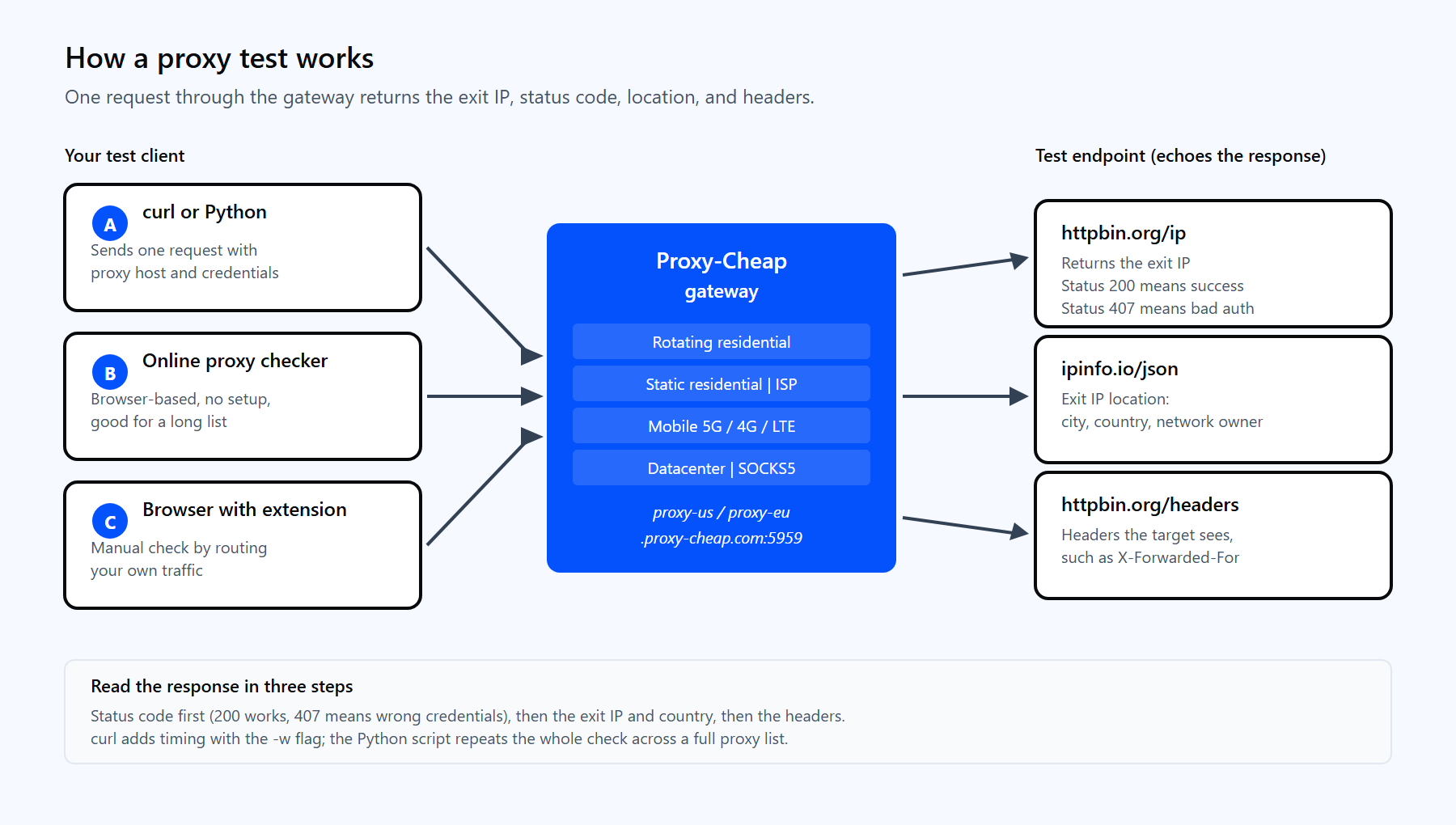
A proxy test sends one request through the Proxy-Cheap gateway to a check endpoint like httpbin.org/ip, then reads the exit IP, status code, and response time from what comes back.
# Send one request through the proxy and print the exit IP. # Credentials go in --proxy-user, never inside the target URL. curl -x http://proxy-us.proxy-cheap.com:5959 \ --proxy-user <your-proxycheap-username>:<your-proxycheap-password> \ https://httpbin.org/ip |
A working proxy returns the IP it routed through:
{ "origin": "188.74.xxx.xxx" } |
If that IP differs from your own, the proxy is alive and routing traffic. To read the status code on its own, send the body to nowhere and print only the code:
# Print only the HTTP status code. 200 means success. # On Windows, use NUL in place of /dev/null. curl -x http://proxy-us.proxy-cheap.com:5959 \ --proxy-user <your-proxycheap-username>:<your-proxycheap-password> \ -s -o /dev/null -w "%{http_code}\n" \ https://httpbin.org/ip |
A 200 confirms a clean round trip. If you do not get a 200, the most common cause is a credential problem, which Method 7 covers in detail. For a deeper walkthrough of the syntax, see how to use curl with a proxy.
A proxy that connects can still return the wrong country. For any geo-specific job, ad verification, localized pricing, or rank tracking, you have to confirm the exit location matches what you ordered.
ipinfo.io/json returns the IP plus its city, region, country, and network owner in one call:
# Show the exit IP along with its city, country, and network owner. curl -x http://proxy-us.proxy-cheap.com:5959 \ --proxy-user <your-proxycheap-username>:<your-proxycheap-password> \ https://ipinfo.io/json |
{ "ip": "188.74.xxx.xxx", "city": "New York", "region": "New York", "country": "US", "org": "AS12345 Example ISP", "timezone": "America/New_York" } |
Check three fields. The country should match your target market. The org line tells you the network type: a residential or mobile carrier name points to a rotating residential or mobile IP, while a hosting company name points to a datacenter IP. The timezone is a quick sanity check that the location is internally consistent.
For a no-setup version of this check, paste the proxy into a browser-based checker, covered next.
When you do not want to touch a terminal, an online proxy checker does the same job in the browser. You paste a list of proxies, the tool routes a request through each one, and it reports which are alive, how fast they responded, the country, and the protocol (HTTP or SOCKS). It is the fastest option for a long list, for non-developers, or for a second opinion that does not depend on your local setup.
Most checkers accept the common formats: ip:port, user:pass@ip:port, and ip:port:user:pass. The tradeoff is depth: a browser checker reports status, speed, and location, but it will not test your real target site or show you the full request headers. Use it as a first filter, then verify the survivors with curl or Python. You can also test a proxy manually by setting it in your browser or OS network settings, then opening ipinfo.io to confirm the IP and country change as expected.
A proxy can be alive and still too slow to be useful. curl exposes precise timing through its -w write-out variables, so you can measure connect time and total time with no extra tooling:
# Measure connect time, total time, and download speed through the proxy. curl -x http://proxy-us.proxy-cheap.com:5959 \ --proxy-user <your-proxycheap-username>:<your-proxycheap-password> \ -s -o /dev/null \ -w "connect: %{time_connect}s total: %{time_total}s speed: %{speed_download} B/s\n" \ https://httpbin.org/ip |
| connect: 0.41s total: 0.93s speed: 1380 B/s |
Two numbers matter. time_connect is how long it took to reach the proxy and open the tunnel, which reflects network distance and proxy load. time_total is the full round trip. Run the same command three to five times and watch the spread. A stable proxy returns consistent numbers; a flaky one swings widely. For a fair comparison, test every proxy against the same endpoint from the same machine.
Residential IPs naturally run a little slower than datacenter proxies because traffic routes through a real consumer connection. That is the expected tradeoff: datacenter IPs deliver high throughput for public, unprotected targets, while residential IPs return the most accurate results on sites that vary their content by visitor.
When you route a request through a proxy, the target server sees a set of request headers. Some proxies add headers that carry your original IP; others pass nothing extra. Checking this tells you how much the proxy reveals about the connection behind it.
httpbin.org/headers echoes back exactly what the server receives:
# Show the request headers the target server actually sees. curl -x http://proxy-us.proxy-cheap.com:5959 \ --proxy-user <your-proxycheap-username>:<your-proxycheap-password> \ https://httpbin.org/headers |
Look for two headers in the response, X-Forwarded-For and Via. They sort the proxy into one of three behaviors:
On a clean, direct connection the target sees only standard headers like Host, User-Agent, and Accept, with no X-Forwarded-For. A quality residential or mobile IP behaves the same way through the proxy, which is what you want for privacy-sensitive and location-accurate work.
A proxy is only doing its job if every part of the request goes through it. A leak happens when some traffic, often DNS lookups or browser WebRTC requests, slips out over your own connection instead, so a test can look fine while quietly exposing your real IP.
Three checks catch the common leaks:
# Resolve DNS through the SOCKS5 proxy, not locally. curl --socks5-hostname proxy-us.proxy-cheap.com:5959 \ --proxy-user <your-proxycheap-username>:<your-proxycheap-password> \ https://httpbin.org/ip |
Run the IP consistency check across a dozen requests. A proxy that returns its own IP every time, with no trace of yours, has passed the leak test.
Two proxy features deserve their own test: authentication and rotation.
Authentication. The cleanest signal is the proxy’s own response. Run curl with -v and watch the handshake, or let Python surface the error for you:
import requests
proxies = { "http": "http://<user>:<pass>@proxy-us.proxy-cheap.com:5959", "https": "http://<user>:<pass>@proxy-us.proxy-cheap.com:5959", } try: r = requests.get("https://httpbin.org/ip", proxies=proxies, timeout=12) print("OK", r.status_code, r.json()) except requests.exceptions.ProxyError as exc: # Wrong credentials surface here as: # Tunnel connection failed: 407 Proxy Authentication Required print("Auth or connection problem:", exc) |
A clean JSON result means the credentials work. A 407 Proxy Authentication Required means the proxy is reachable but the username or password is wrong, or the request came from an IP that is not on the allowlist. If you use IP allowlisting, test from the exact machine whose IP you added in the dashboard, because a 407 there almost always means the sending IP does not match the one on file.
Rotation. Rotating residential and mobile proxies hand out a new exit IP per request through the gateway. To confirm rotation is working, send several requests and watch the IP change:
# Hit the gateway five times and watch the exit IP rotate. for i in 1 2 3 4 5; do curl -s -x http://proxy-us.proxy-cheap.com:5959 \ --proxy-user <your-proxycheap-username>:<your-proxycheap-password> \ https://httpbin.org/ip done |
Each line should show a different origin IP. If the IP never changes, you are likely on a static product or a sticky session, which holds one IP for around 30 minutes by design. For rotation inside a script, see how to rotate proxies in Python.
For more than a handful of proxies, a script is the only practical option. The function below sends one request through a proxy, measures the round trip, and returns the status, exit IP, and latency, or the error type if it failed. It uses the requests library (pip install requests).
import time import requests
# Endpoint that echoes the exit IP back to us. TEST_URL = "https://httpbin.org/ip"
def test_proxy(proxy_url, timeout=12): """Return status, exit IP, and latency in ms, or the error type.""" proxies = {"http": proxy_url, "https": proxy_url} start = time.perf_counter() try: resp = requests.get(TEST_URL, proxies=proxies, timeout=timeout) latency_ms = round((time.perf_counter() - start) * 1000) return { "ok": resp.ok, "status": resp.status_code, "ip": resp.json().get("origin"), "ms": latency_ms, } except requests.exceptions.RequestException as exc: return {"ok": False, "error": type(exc).__name__}
# One proxy per line, in the form http://user:pass@host:port proxy_list = [ "http://<user>:<pass>@proxy-us.proxy-cheap.com:5959", "http://<user>:<pass>@proxy-eu.proxy-cheap.com:5959", ]
for proxy in proxy_list: print(test_proxy(proxy)) |
A passing proxy prints a clean result:
| {'ok': True, 'status': 200, 'ip': '188.74.xxx.xxx', 'ms': 612} |
A failing one returns the exception name, usually ProxyError for a bad credential or unreachable proxy, or ConnectTimeout for one too slow to answer. From here you can scale the function: load a list from a file, run it across threads with concurrent.futures, and write results to CSV to sort by latency and success rate. That is the practical version of the "custom software" other guides mention but rarely show.
When a test fails, the symptom usually points straight to the cause:
The pattern across all of these: read the status code first, then the exit IP, then the headers. Those three signals locate almost every proxy problem in under a minute.
The test methods are the same across products, but the result you should expect depends on the proxy type. Match the product to the job before you test:
| Use case | Best fit | Why |
|---|---|---|
| High-volume web scraping | Rotating residential | New IP per request keeps success rates stable across long jobs |
| Account-bound or session work | Static residential (ISP) | Same trusted IP held for the full session |
| Long-lived sessions, flexible auth | ISP proxies | Static or rotating, with username and password or IP allowlist |
| High-throughput public content | Datacenter | Fast, predictable per-IP cost for documentation and catalogs |
| Social and mobile-first platforms | Mobile | Real carrier IPs for mobile-network tasks |
| Sustained, bandwidth-heavy jobs | Unlimited bandwidth | Unmetered transfer across many locations |
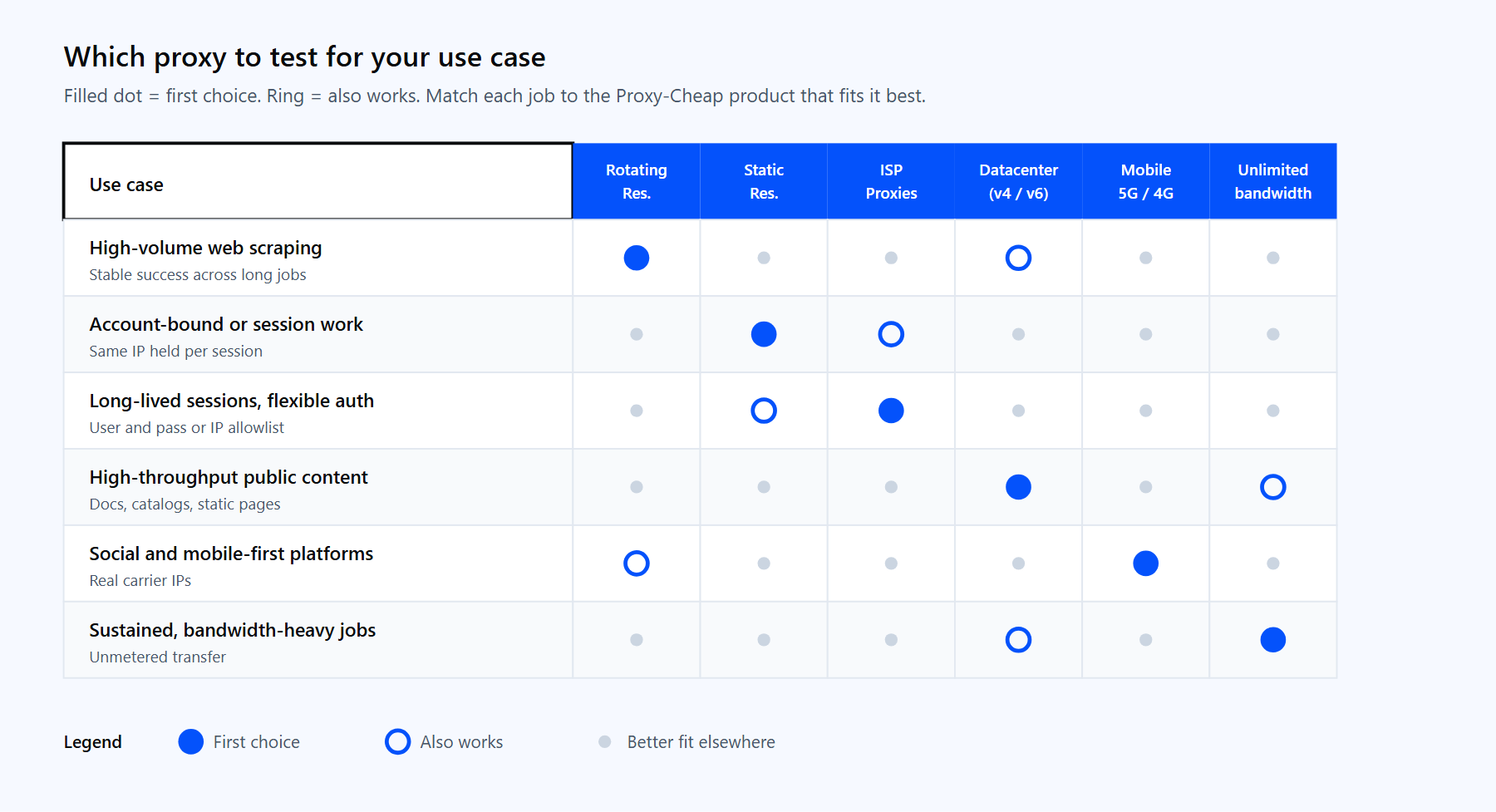
Match the proxy type to the job before testing: rotating residential for volume, static residential or ISP for stable sessions, datacenter for throughput, mobile for carrier IPs.
A quick way to choose: if the target varies content by visitor or location, test a residential or mobile IP. If the target is public and you care most about speed and volume, test a datacenter IP. If you need the same IP to persist, test a static residential or ISP proxy.
Proxy-Cheap covers all of these on pay-as-you-go and per-IP plans, with no setup costs and cancel anytime. Whether you run a one-off check or test thousands of mobile and unlimited bandwidth proxies in a script, every product is testable with the exact methods in this guide. Pick the type that matches your target, generate credentials in the dashboard, and run the curl or Python test before you commit it to a production job.