
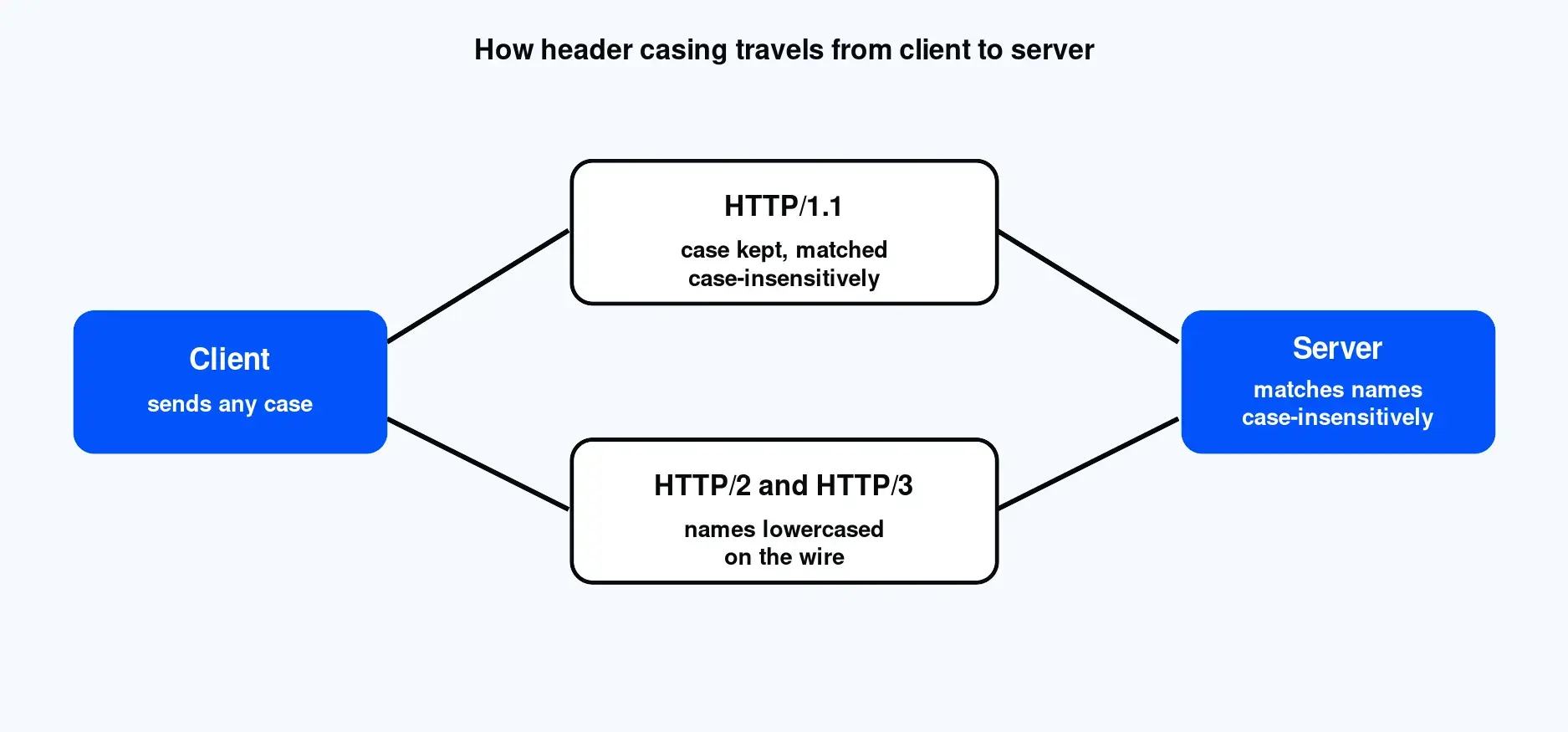
Header names are case-insensitive, so casing does not change which field a name refers to. Header values depend on the specific header. Content types and directive tokens ignore case, while cookies, ETags, and credentials do not. HTTP/1.1 accepts any casing on names. HTTP/2 and HTTP/3 require lowercase names on the wire. When in doubt, keep casing consistent everywhere.
That is the whole rule in three parts. Names are case-insensitive. Values are case-sensitive only for some headers. The protocol version determines the casing sent over the wire.
| Axis | Rule |
|---|---|
| Header names | Case-insensitive |
| Header values | Depends on the header |
| Names in HTTP/2 and HTTP/3 | Must be lowercase on the wire |
No. HTTP header field names are case-insensitive by specification. RFC 9110, the current HTTP semantics standard, defines field names as case-insensitive tokens, so User-Agent, user-agent, and USER-AGENT are the same field. The rule is not new: RFC 2616 stated it in section 4.2 back in 1999, and RFC 7230 restated it. A server that reads names case-sensitively is not following the standard.
The current source of truth is RFC 9110, published in June 2022. It defines a field name as a case-insensitive token, which means the lookup a server performs on a header name must ignore case. This has been consistent across every revision of HTTP. RFC 2616 said the same thing in 1999, and RFC 7230 repeated it. So this is a long-standing rule, not a recent change.
Title-Case with hyphens, such as Cache-Control or Content-Type, is a readability convention only. It is easy to read, so most tools and documentation use it, but the specification does not require it. You can send content-type or CONTENT-TYPE, and a compliant server treats them identically.
The caveat is real-world implementations. Some servers still read names case-sensitively against the spec, which produces hard-to-spot bugs. One documented case involved a server that read content-length case-sensitively and returned an error when the name did not match its expected casing. The request was valid; the server was wrong. Bugs like this are why consistent casing is worth the small effort.
Rules are easier to trust when you can see them. We sent the same headers with deliberately mixed casing, first over HTTP/1.1 and then over HTTP/2, and captured the actual header lines each protocol put on the wire. Here are the two commands:
bash # HTTP/1.1: the casing you type is preserved on the wire curl --http1.1 -v -H "X-Test-Header: value" -H "content-type: application/json" https://example.com -o /dev/null # HTTP/2: names are lowercased on the wire curl --http2 -v -H "X-Test-Header: value" -H "content-type: application/json" https://example.com -o /dev/null
Over HTTP/1.1, the verbose request lines came back exactly as typed:
text > X-Test-Header: value > content-type: application/json
Over HTTP/2, the same request went out with every name lowercased, and the request opened with colon-prefixed pseudo-headers:
text > :method: GET > :path: / > :scheme: https > :authority: example.com > x-test-header: value > content-type: application/json
The casing you write in your code is not always the casing that travels on the wire. HTTP/1.1 keeps it; HTTP/2 lowercases it. You can confirm this against an HTTP echo endpoint that returns the headers it received, which is a quick way to check your own data collection workflows. Routing the same request through a residential or datacenter proxy for location-accurate testing adds one more layer, and that intermediary may normalize the casing again before it reaches the origin.
| Header as typed | On the wire (HTTP/1.1) | On the wire (HTTP/2) | Through a proxy |
|---|---|---|---|
| X-Test-Header | X-Test-Header | x-test-header | May be normalized |
| content-type | content-type | content-type | May be normalized |
It depends on the header. Media types and directive tokens are case-insensitive, so Content-Type: text/html equals TEXT/HTML, and Cache-Control: no-cache equals NO-CACHE. Other values are case-sensitive and must match exactly: cookie names and values, ETags, Authorization credentials and tokens, base64-encoded data, and the path portion of a URL. When a value is an opaque identifier, treat it as case-sensitive.
The table below is the practical reference. It separates the values that ignore case from the ones that do not.
| Header or value type | Case-sensitive? | Notes |
|---|---|---|
| Field names (all headers) | No | Case-insensitive per RFC 9110 |
| Content-Type media type (text/html) | No | Type, subtype, and parameter names are case-insensitive |
| Cache-Control and Connection directives (no-cache, keep-alive) | No | Directive tokens are case-insensitive |
| Cookie names and values (Set-Cookie, Cookie) | Yes | Treated as opaque octets (RFC 6265) |
| ETag values | Yes | Opaque, compared byte for byte |
| Authorization credentials and tokens | Scheme no, credentials yes | Bearer vs bearer is fine; the token after it is case-sensitive |
| base64-encoded values | Yes | The base64 alphabet is case-sensitive |
| URL in Location or path segments | Path yes, host no | Hostnames are case-insensitive; the path is case-sensitive |
The underlying principle is simple. Values that are human-readable tokens defined by the spec are usually case-insensitive. Values that are opaque identifiers or encoded data are case-sensitive because software on both ends compares them byte for byte. This causes a common problem: a token or cookie looks right but fails because one character differs in case. If you build against the Proxy-Cheap API, the same rule applies to its authentication headers, where the key and secret values must match exactly.
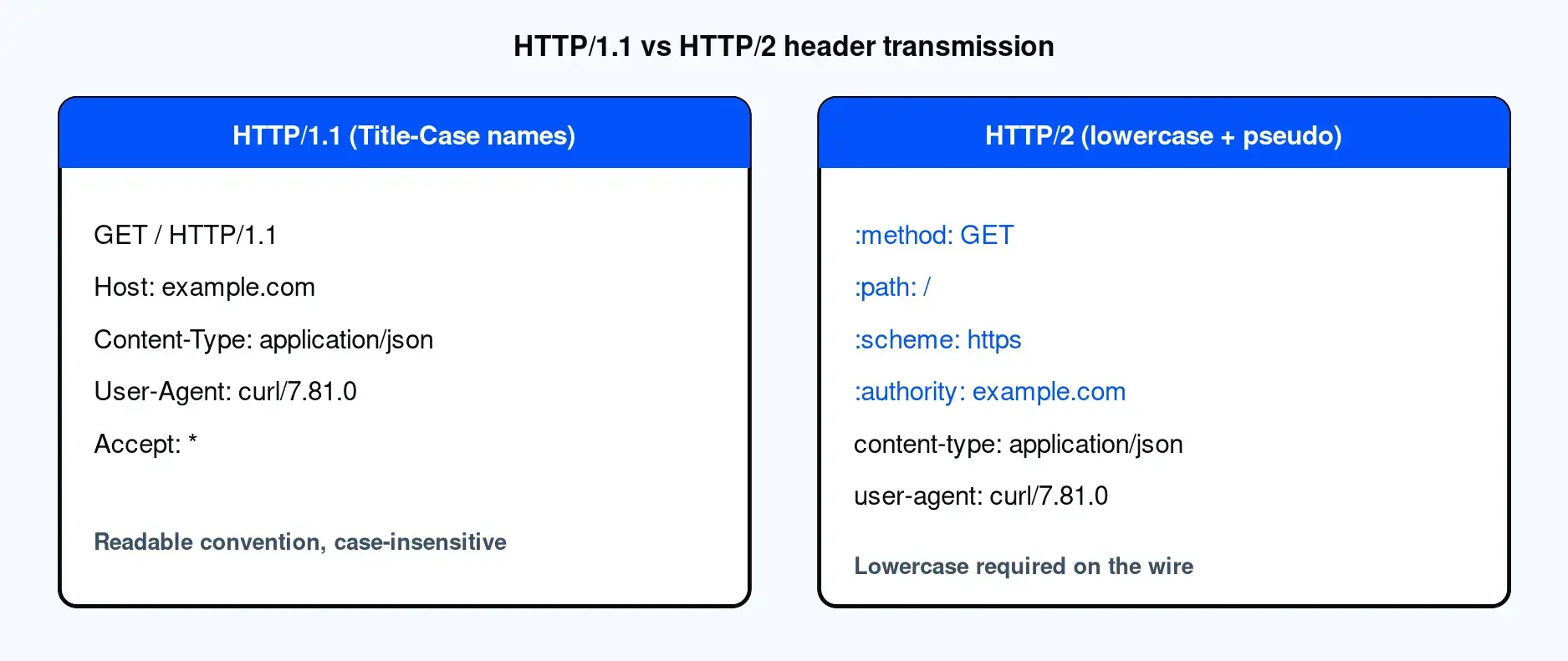
HTTP/2 and HTTP/3 keep names case-insensitive in meaning but require them to be lowercase on the wire. RFC 9113 section 8.2 states field names must be converted to lowercase, and a message with an uppercase name is treated as malformed. HTTP/2 also adds pseudo-headers, prefixed with a colon (:method, :path, :scheme, :authority, :status), which are always lowercase.
RFC 9113, section 8.2 is explicit: a field name must not contain uppercase characters, and a request or response that carries one is malformed. The pseudo-headers are the other HTTP/2 addition. Requests carry :method, :path, :scheme, and :authority; responses carry :status. They are colon-prefixed, always lowercase, and sent before the regular fields, as our tested output showed above.
In practice, this rarely affects your code. A compliant HTTP/2 or HTTP/3 library lowercases names for you, so writing Content-Type in your source still works exactly as expected. The only place the rule bites is manual byte-level comparison, where you read raw header keys yourself. The MDN HTTP headers reference reflects this too, displaying names in lowercase for HTTP/2. As of 2025, some APIs have started advertising lowercase names directly, which is a housekeeping change rather than a new requirement.
A request often passes through several layers before reaching the server: a client library, a proxy, and sometimes middleware. Each layer may normalize, reorder, or rewrite header casing independently. This is why the same code can produce different casing on the wire in different environments. The fix is not clever casing but consistent casing across every layer of your stack.
The path is usually library, then proxy, then middleware, then server. Any of these can normalize casing before passing the request along. The common symptom is confusing: headers look one way in your code and another when captured on the wire. This slows debugging. The remedy is to standardize on a single casing convention across the stack and capture the wire output once during setup so you know exactly what gets sent.
This matters most when reliability is the goal. When you route requests through datacenter proxies or static residential proxies for location-accurate testing, QA, or SEO and SERP data collection across regions, consistent header handling keeps those requests predictable. Datacenter proxies suit high-throughput crawls of documentation and public content. Static residential proxies suit location-accurate testing that needs a consistent identity. In both cases, consistent casing removes one variable from your debugging.
Most libraries normalize header names for you, so you rarely think about casing unless you read or compare header keys by hand. The table below summarizes how common tools behave. Verify each row against the current library documentation before you rely on it, since defaults change across versions.
| Library or tool | Casing behavior on names | HTTP/2 |
|---|---|---|
| Python requests | Title-Cases names, case-insensitive access | Depends on the transport (urllib3) |
| Python httpx | Lowercases names, case-insensitive access | Supported |
| Python aiohttp | Case-insensitive multidict access | Supported |
| Node.js fetch / node-fetch | Lowercases names in the Headers API | Supported |
| Scrapy | Preserves the casing you set | Adjust when targeting HTTP/2 |
| Java HttpClient | Case-insensitive access | Supported |
| Go net/http | Canonicalizes names to Title-Case (CanonicalMIMEHeaderKey) | Supported |
| cURL | Preserves case on HTTP/1.1, lowercases on HTTP/2 | Supported |
The practical takeaway is that the library handles the wire format, so your Title-Case names stay valid regardless of protocol. The one gotcha is your own code. If you compare raw header keys with a case-sensitive match, you can miss a header that arrived in a different case, which is where these bugs appear. Picking the right tooling starts with choosing the right proxy type and pairs well with the Chrome proxy extension for quick manual checks.
A short checklist keeps casing from ever becoming a problem:
Reliable, consistent requests matter most when you route through proxies for QA or localization testing. Proxy-Cheap offers residential, ISP, and datacenter proxies on pay-as-you-go and per-IP plans for that kind of testing, so you can start small and scale as a project needs it. See Proxy-Cheap for the current product lineup.