
A proxy is an intermediary server that forwards your HTTP requests. Instead of connecting straight to a target site, your Ruby code sends the request to the proxy, the proxy forwards it from its own IP address, and the response returns the same way. The target site sees the proxy's IP, not the IP of the machine running your script.
Ruby has no global proxy setting the way a desktop browser does. You configure the proxy on the HTTP client that makes the request. Every mainstream Ruby HTTP client accepts proxy settings: the built-in Net::HTTP and open-uri, plus popular gems like HTTParty, Faraday, and Typhoeus. The option names differ between them, but the inputs are always the same four values: proxy host, port, username, and password.
That is the whole idea behind Ruby proxy integration. You take the credentials your proxy provider gives you and pass them to your HTTP client of choice. The rest of this guide shows the exact syntax for each client, then adds rotation, SOCKS5, and the error fixes that the thin tutorials leave out.
A Ruby proxy is used wherever a script needs to send many requests, or requests from a specific location, without every one of them originating from a single server IP. The most common applications:
The common thread is volume and location. A single IP sending hundreds of requests a minute gets rate-limited fast, and it always sees the same regional content. A pool of proxy IPs keeps response success rates stable across long jobs and returns the data a real user in the target market would see.
Ruby gives you several HTTP clients, and each one attaches the proxy in a slightly different place. Picking the right client is the first decision in any integration.
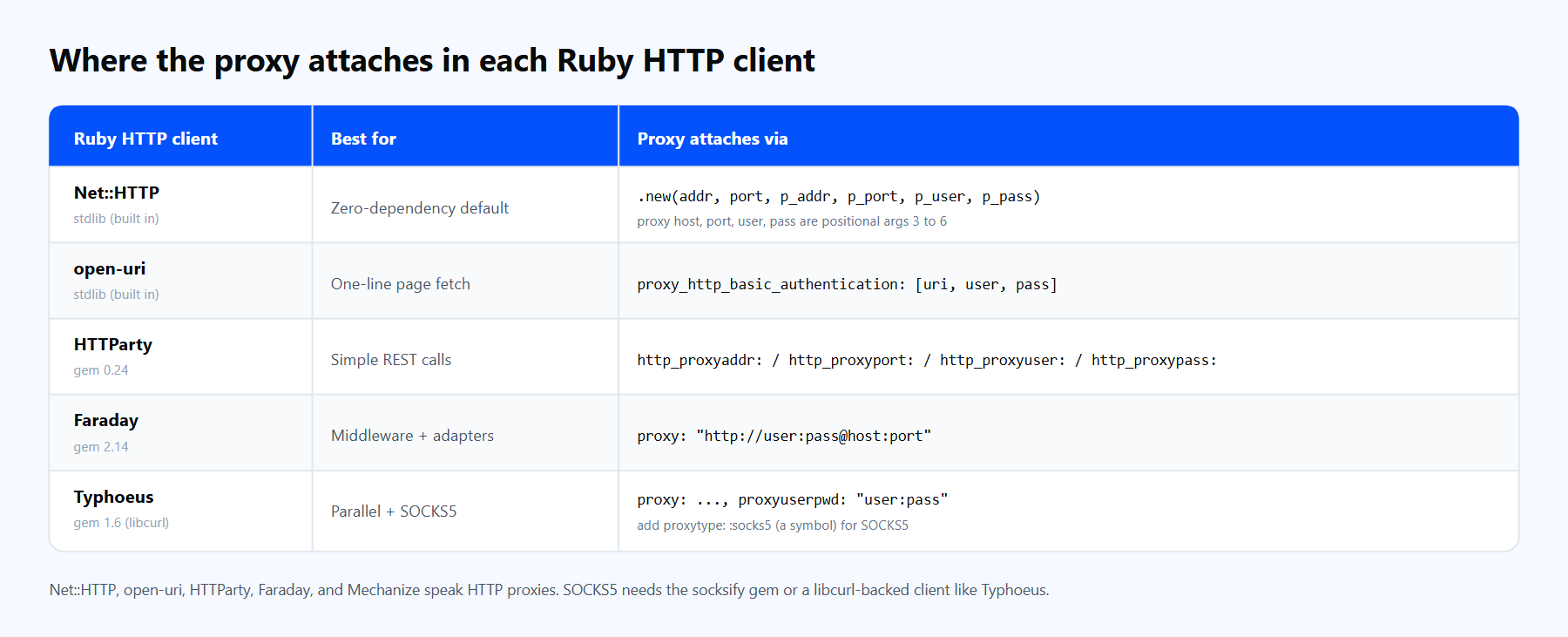
Every mainstream Ruby HTTP client accepts a proxy. The option name changes, but the four inputs (host, port, user, pass) stay the same.
Mechanize, a scraping-focused client that also wraps Net::HTTP, rounds out the list with agent.set_proxy(host, port, user, pass). If you are unsure, start with Net::HTTP and move to Faraday or Typhoeus when you need middleware or concurrency.
You need Ruby installed first. The current stable release is Ruby 4.0.5, and everything in this guide runs on Ruby 3.0 or newer. Check your version:
ruby --versionNet::HTTP and open-uri are part of Ruby's standard library, so they need no installation. You just require them. The other clients are gems. Install the ones you plan to use:
gem install httparty faraday typhoeus mechanize socksifyFor a project, add them to a Gemfile and let Bundler lock the versions:
# Gemfile
source 'https://rubygems.org'

gem 'httparty', '~> 0.24'
gem 'faraday',  '~> 2.14'
gem 'typhoeus', '~> 1.6'   # needs libcurl on the system
gem 'socksify', '~> 1.8' # SOCKS5 support for Net::HTTPThen run bundle install. One note on Typhoeus: it binds to the system libcurl library, which is present by default on most Linux and macOS machines. On Windows you may need to install a libcurl build separately.
Here is the smallest working example. It uses the built-in Net::HTTP and the Proxy-Cheap rotating residential hub to fetch your outbound IP, which is the quickest way to prove the proxy is live.
require 'net/http'
require 'uri'

uri = URI('https://httpbin.org/ip')

# Arguments 3 to 6 of Net::HTTP.new are the proxy: host, port, user, pass.
http = Net::HTTP.new(uri.host, uri.port,
                     'thehub.proxy-cheap.com', 8080,
                     '<your-proxycheap-username>', '<your-proxycheap-password>')

http.use_ssl = (uri.scheme == 'https')   # required for HTTPS through a proxy

response = http.get(uri.request_uri)
puts response.code    # 200 with valid credentials
puts response.body # {"origin": "the proxy exit IP"}With real credentials this prints 200 and a JSON body showing the proxy exit IP instead of your own. With placeholder credentials the gateway answers 407 Proxy Authentication Required, which itself confirms your request reached the proxy and the configuration is correct. That 407 is the signal to swap in your dashboard credentials.
The one line people miss is http.use_ssl = true. On a proxied Net::HTTP object, the SSL flag is not inferred from the URL. Without it, Ruby never opens the secure tunnel to an HTTPS site and the request fails. Set it from the URL scheme every time.
A direct connection from one server IP is fine for a handful of requests. It stops being fine the moment you scale to a real workload, which is why serious Ruby scraping runs through a residential proxy network. Three concrete reasons:
Proxy-Cheap offers four product lines that map cleanly onto Ruby workloads.
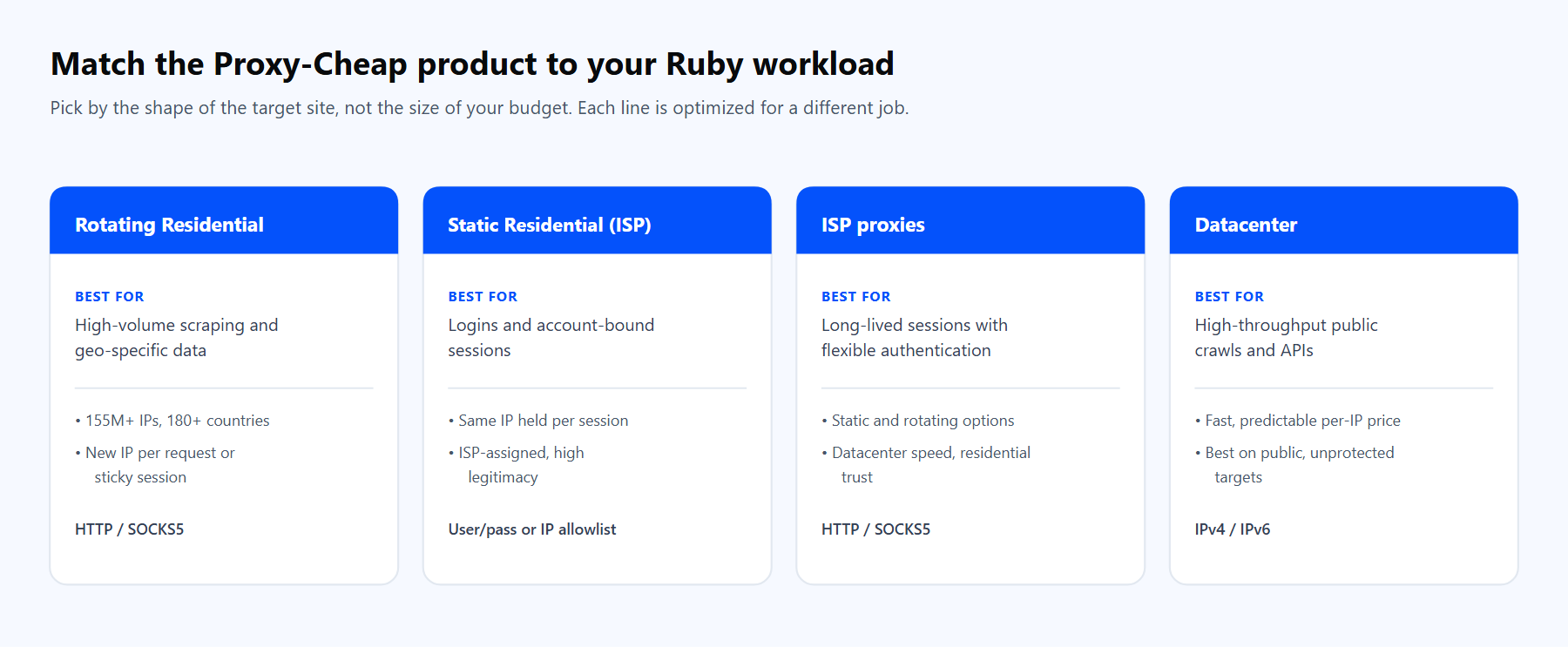
Pick the product by the shape of the target site. The links below match the cards above.
For most Ruby projects the answer is one of these four, chosen by the target site rather than the budget.
Every request follows the same path: your Ruby client sends the request to the Proxy-Cheap gateway, the gateway forwards it through an exit IP, and the response returns to your code.
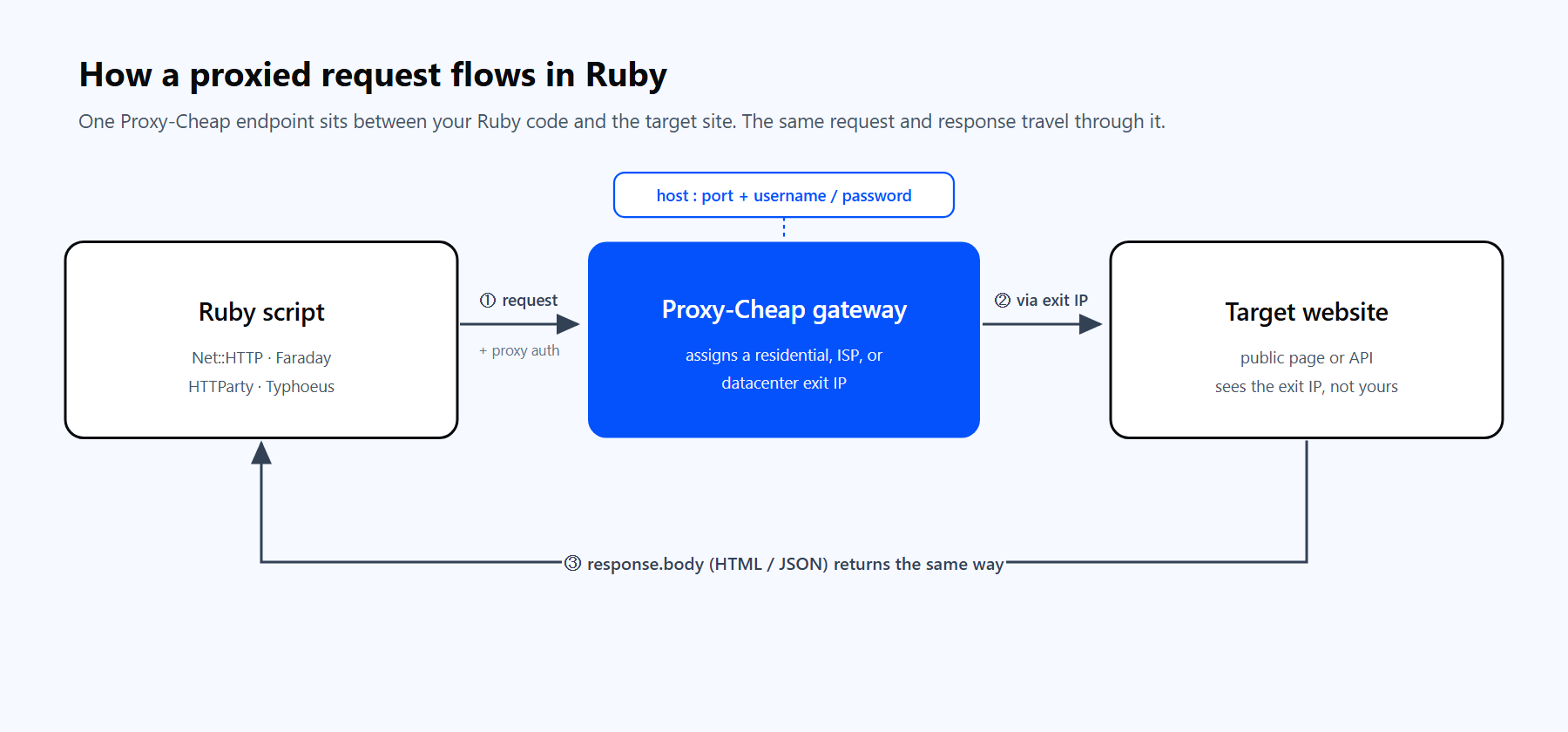
One Proxy-Cheap endpoint sits between your Ruby code and the target site. The same request and response travel through it.
Before the code, a quick note on the Proxy-Cheap endpoint format, because it differs by product:
Below is the same request through each client. Keep your credentials out of source control by reading them from environment variables.
Net::HTTP (built in). The full form with timeouts and SSL:
require 'net/http'
require 'uri'

uri  = URI('https://httpbin.org/ip')
user = ENV.fetch('PROXY_USER')
pass = ENV.fetch('PROXY_PASS')

http = Net::HTTP.new(uri.host, uri.port, 'thehub.proxy-cheap.com', 8080, user, pass)
http.use_ssl      = (uri.scheme == 'https')
http.open_timeout = 10
http.read_timeout = 20

response = http.get(uri.request_uri)
puts response.codeopen-uri (built in). A one-line read with basic proxy authentication:
require 'open-uri'

body = URI.open('https://httpbin.org/ip',
  proxy_http_basic_authentication: [
    'http://thehub.proxy-cheap.com:8080',
    ENV.fetch('PROXY_USER'),
    ENV.fetch('PROXY_PASS')
  ]).read

puts bodyPass either :proxy or :proxy_http_basic_authentication, never both. Passing both raises ArgumentError: multiple proxy options specified.
HTTParty. Four discrete options, credentials in their own fields:
require 'httparty'

response = HTTParty.get('https://httpbin.org/ip',
  http_proxyaddr: 'thehub.proxy-cheap.com',
  http_proxyport: 8080,
  http_proxyuser: ENV.fetch('PROXY_USER'),
  http_proxypass: ENV.fetch('PROXY_PASS'))

puts response.codeFaraday. Faraday takes the proxy as a URL, with the credentials in the userinfo:
require 'faraday'
require 'cgi'

user = CGI.escape(ENV.fetch('PROXY_USER'))   # percent-encode in case of special characters
pass = CGI.escape(ENV.fetch('PROXY_PASS'))

conn = Faraday.new(
  url:   'https://httpbin.org',
  proxy: "http://#{user}:#{pass}@thehub.proxy-cheap.com:8080"
)

response = conn.get('/ip')
puts response.statusIf you prefer to keep the credentials out of the URL, Faraday also accepts a hash with :uri, :user, and :password:
conn = Faraday.new(url: 'https://httpbin.org', proxy: {
  uri:      'http://thehub.proxy-cheap.com:8080',
  user:     ENV.fetch('PROXY_USER'),
  password: ENV.fetch('PROXY_PASS')
})Proxy-Cheap delivers credentials in standard host:port plus username:password form, which maps directly onto every example above. For a full walkthrough of generating them, see the step-by-step guide to residential proxies.
You get rotation in two different ways, depending on the product:
Here is a round-robin over a pool that works for both cases. The key detail is that a fresh Net::HTTP object opens a new TCP connection, and a new connection is what triggers a new exit IP on a rotating gateway:
require 'net/http'
require 'uri'

# For static residential, ISP, or datacenter proxies, list the host:port pairs
# from your dashboard. For the rotating hub, a single entry is enough.
PROXIES = [
  ['thehub.proxy-cheap.com', 8080]
]
USER = ENV.fetch('PROXY_USER')
PASS = ENV.fetch('PROXY_PASS')

def fetch(url, proxy_host, proxy_port)
  uri  = URI(url)
  # A new object per call means a new TCP connection, and a new exit IP.
  http = Net::HTTP.new(uri.host, uri.port, proxy_host, proxy_port, USER, PASS)
  http.use_ssl      = (uri.scheme == 'https')
  http.open_timeout = 10
  http.read_timeout = 20
  http.get(uri.request_uri)
end

10.times do |i|
  host, port = PROXIES[i % PROXIES.size]   # round-robin; use PROXIES.sample for random
  response = fetch('https://httpbin.org/ip', host, port)
  puts "[#{i}] via #{host}: #{response.code}"
endRotation logic lives in your code, not inside the library. That matters for one common surprise: if you wrap many requests in a single persistent connection, a rotating gateway can hand you the same IP each time, because the socket is reused. Open a fresh connection when you want a fresh IP.
When to use rotating versus static depends on the workload. Rotating residential is the default for high-volume scraping, where a new IP per request keeps success rates stable. Static residential holds one IP for hours, which suits account-bound sessions and stateful dashboards. For a deeper comparison, read static vs rotating proxies. The pattern here mirrors other languages too, as in how to rotate proxies in Python with Requests and AIOHTTP.
Two capabilities separate a basic integration from a production one: SOCKS5 support and concurrency.
SOCKS5 with socksify. Net::HTTP speaks HTTP proxies only, so SOCKS5 needs help. The socksify gem adds it. Copy the SOCKS host and port from your dashboard, since the :8080 gateway is for HTTP:
require 'socksify/http'
require 'uri'

uri = URI('https://httpbin.org/ip')

Net::HTTP.socks_proxy('socks-host-from-dashboard', 1080,
                      username: ENV.fetch('PROXY_USER'),
                      password: ENV.fetch('PROXY_PASS'))
        .start(uri.host, uri.port, use_ssl: uri.scheme == 'https') do |http|
  response = http.get(uri.request_uri)
  puts response.body
endsocksify resolves the hostname through the proxy rather than locally, which is the behavior you want for accurate geo-specific results. If you want to learn how the protocol differs from HTTP, see what is a SOCKS proxy.
SOCKS5 with Typhoeus. Because Typhoeus rides libcurl, it supports SOCKS5 directly. One trap: proxytype must be a symbol. Passing the string 'socks5' is silently ignored:
require 'typhoeus'

response = Typhoeus.get('https://httpbin.org/ip',
  proxy:        'socks-host-from-dashboard:1080',
  proxytype:    :socks5,   # a symbol, not the string 'socks5'
  proxyuserpwd: "#{ENV.fetch('PROXY_USER')}:#{ENV.fetch('PROXY_PASS')}")

puts response.codeParallel requests with Typhoeus Hydra. For throughput, Typhoeus runs many requests at once through Hydra, each carrying the proxy:
require 'typhoeus'

hydra = Typhoeus::Hydra.new(max_concurrency: 5)
creds = "#{ENV.fetch('PROXY_USER')}:#{ENV.fetch('PROXY_PASS')}"

urls = ['https://httpbin.org/ip'] * 10
requests = urls.map do |url|
  req = Typhoeus::Request.new(url,
    proxy:        'http://thehub.proxy-cheap.com:8080',
    proxyuserpwd: creds,
    timeout:      20)
  hydra.queue(req)
  req
end

hydra.run   # runs the whole batch in parallel

requests.each { |r| puts r.response.code }Hydra caps concurrency at max_concurrency and runs the batch together, which is far faster than looping one request at a time when you have hundreds of URLs.
Most Ruby proxy failures fall into a handful of buckets. Each has a simple fix.
1. The proxy is ignored and the request goes direct. You called a class method like Net::HTTP.get(uri). Those shortcuts skip proxy handling entirely, including the http_proxy environment variable. Build an instance instead: http = Net::HTTP.new(host, port, proxy_host, proxy_port); http.get(path).
2. The proxy arguments land in the wrong slots. The signature is Net::HTTP.new(address, port, p_addr, p_port, p_user, p_pass). The target host and port are arguments 1 and 2, the proxy host and port are 3 and 4, and the credentials are 5 and 6. Passing the proxy host as argument 1 is the most common mistake.
3. HTTPS fails with an SSL error through the proxy. On a proxied object, use_ssl is not set from the URL. Add http.use_ssl = (uri.scheme == 'https') so Ruby opens the secure tunnel and verifies the certificate. Do not disable verification to silence the error; if the certificate store is missing, point SSL_CERT_FILE at a valid CA bundle instead.
4. 407 Proxy Authentication Required. The credentials are missing or in the wrong place. For Net::HTTP they are arguments 5 and 6, for HTTParty they are http_proxyuser and http_proxypass, and for Faraday they go in the proxy URL. A 407 against the gateway with correct credentials means the account or IP allowlist needs attention.
5. Still 407 even though the credentials are correct. The password contains a reserved character such as @, :, or #, and it is breaking the proxy URL. Percent-encode each credential with CGI.escape before putting it in a URL, or pass the credentials as separate arguments (Net::HTTP, HTTParty) to skip URL parsing entirely.
6. Faraday ignores the proxy. Set the proxy at connection creation in Faraday.new, not per request. Faraday also reads http_proxy and https_proxy from the environment, so an env var can override an explicit setting. Pass proxy: nil to ignore the environment, and pin a current Faraday 2.x version.
7. A rotating proxy returns the same IP every time. A persistent or reused connection keeps the same exit IP because the gateway assigns the IP per TCP connection. Open a fresh Net::HTTP object per request, or send Connection: close, so each request gets a new connection and a new IP.
8. SOCKS5 will not work with Net::HTTP. There is no native SOCKS support in the standard library. Use the socksify gem or a libcurl-backed client like Typhoeus, as shown above. For hostname privacy and accurate geo results, let the proxy resolve DNS (the socks5h behavior), which socksify does by default.
A few habits keep a Ruby proxy integration reliable as it grows:
Get the client and the product right, and Ruby proxy integration comes down to four values passed to one HTTP call. Everything after that (rotation, SOCKS5, concurrency) builds on the same foundation.