
Screen scraping is how you pull data off a screen when it does not live in a page's code, only in what the interface displays. It reads the rendered output, usually with OCR, and turns visual content like charts, images, and PDFs into structured data you can actually work with.
This article explains what screen scraping is and how it differs from web scraping, walks through the three-stage capture, OCR, and structure pipeline, and gives you a clear rule for choosing between screen scraping and plain HTML parsing based on where the data lives. From there it covers the common use cases, a working Python example with OCR, the proxy setup that keeps collection reliable and location-accurate, and the legal questions worth checking before you start. A FAQ at the end handles the specific questions that come up most.
Screen scraping extracts data from what is displayed on a screen, the rendered UI, rather than from a page's underlying HTML or an API.
It usually relies on OCR (Optical Character Recognition) to turn visual content like images, charts, and PDFs into machine-readable text.
Reach for screen scraping only when the data is not available through HTML parsing or an API, for example legacy systems, dynamic visual content, or documents.
For reliable, location-accurate collection of publicly available content, screen scraping pairs with rotating residential or datacenter proxies.
Screen scraping is the practice of collecting data from what is shown on a screen, the rendered user interface of a web page, desktop program, or document, rather than from the underlying HTML or an API. A screen scraper captures the visual output and uses OCR (Optical Character Recognition) to convert images, charts, and text into structured, machine-readable data such as CSV or JSON.
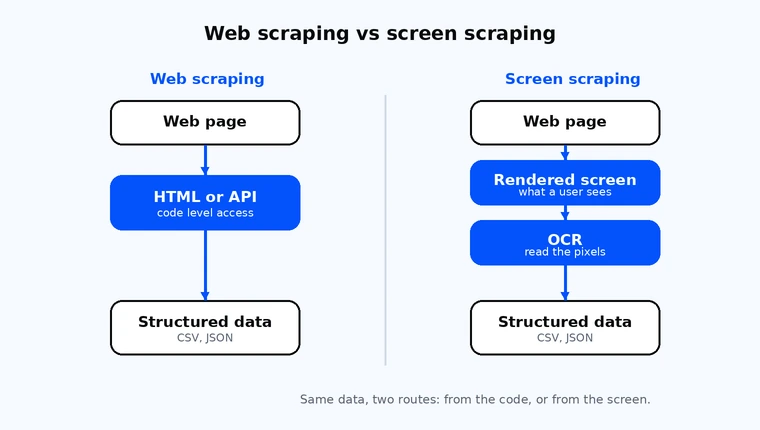
The difference is the data source. Both are forms of web data extraction, but they read from different layers. Web scraping reads a page's underlying HTML or calls one of its application programming interfaces (APIs), working at the code level. Unlike screen scraping, web scraping tools never read the rendered display; they parse the markup a web server sends back. Screen scraping reads the visual output, what a user sees on screen, and often uses OCR to extract it. Web scraping is the right default for most websites. Screen scraping is for cases where the data only exists visually or no code-level access is available.
That distinction matters because it decides how much work the job takes. When you scrape HTML, the data already arrives structured: tags, attributes, and values you can select and store directly. When you scrape data from the screen, it arrives as pixels. You have to render it, photograph it, and then read the text back out with OCR before you have anything a program can use. More steps means more places for the pipeline to drift, which is why HTML parsing is the default and screen scraping is the fallback.
The two are not rivals, and plenty of real projects use both. A crawler might pull most of a page from HTML, then fall back to OCR for one chart or one embedded image that holds a number the HTML never exposes. Knowing which tool fits each part of a page, and picking the right proxy type for it, is most of the skill.
| Dimension | Web scraping | Screen scraping |
|---|---|---|
| Data source | Page HTML, DOM, or an API | The rendered display, what a user sees |
| Typical input | Markup and JSON responses | Screenshots, images, charts, PDFs |
| Output | Structured data, directly | Visual text turned into structured data by OCR |
| Best for | Most websites with code-level access | Visual-only data and interfaces with no API |
| Maintenance load | Tied to markup changes | Tied to visual layout changes |
Screen scraping works in three stages. First, the scraper navigates the interface and captures the rendered screen, often as a screenshot or a region of interest. At this stage the displayed data is only bitmap data, a grid of pixels with visual elements like charts and badges but no structure a program can read. Second, it runs OCR to convert any visual text, including images, charts, and PDFs, into machine-readable characters. Third, the data extraction step parses and saves the result into a usable format such as CSV, JSON, or a database for later use.
Capturing a specific region of interest is far more efficient than photographing a whole page. If the number you need sits in one panel, grab that panel. Smaller, tighter captures give the OCR engine less noise to read through and produce cleaner output, which is the single biggest lever on accuracy.
OCR is the engine that makes screen scraping possible. It takes an image of text and returns the characters as data. A screen scraping tool chains capture, OCR, and parsing into one run, and most screen scraping software lets you tune each step for the source you are reading.
The most common open-source choice is Tesseract, which reads dozens of languages and runs locally without a paid API. Commercial OCR services exist too, but for most data-collection work a well-fed Tesseract pipeline does the job. The quality of the result depends almost entirely on the quality of the input: sharp, high-contrast text reads cleanly, while small, faint, or skewed text introduces errors.
A lot of web content does not exist in the first HTML response. Single-page web applications and dynamic dashboards build their visible content in the browser after the page loads, so a plain HTTP request to the web server returns an empty shell. Many modern applications work this way. To capture what a user actually sees, you render the page in a headless browser first, then take the screenshot and run OCR on it.
This is the case the term screen scraping was made for: the data is on the screen, just not in the source. When the page does expose the data through HTML or an official API, use that instead, since it skips the rendering and OCR steps entirely.
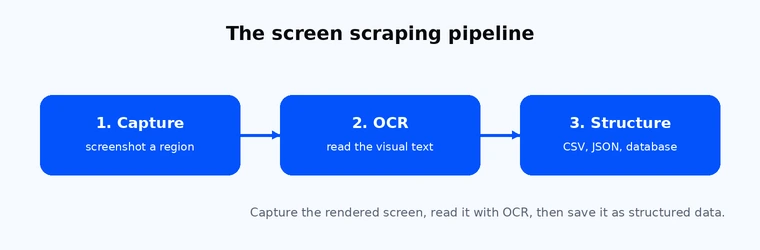
The screen scraping pipeline in three stages: capture, OCR, and structure.
Choose your method by where the data lives, not by habit. If the data is in the page's HTML or an API, parse it directly, that is faster and more stable. If it only exists visually, inside an image, chart, PDF, or a legacy interface with no code-level access, screen scraping with OCR is the right tool. Match the infrastructure to the source: lightweight requests for HTML, rendering plus capture for visual data.
The useful way to think about this is three linked questions: where does the data live, which method fits that source, and what infrastructure does that method need. Different scraping techniques suit different sources, so treat the choice as a matching problem rather than a habit. Answer the questions in order and the right approach falls out. Most teams skip the first question and reach for whatever they used last time, which is how an OCR pipeline ends up bolted onto a site that served the same data as clean JSON the whole time.
| Where the data lives | Recommended method | Why | Infrastructure |
|---|---|---|---|
| Structured HTML or an API | HTML or DOM parsing | Data arrives structured; fewest moving parts | Simple HTTP requests plus a proxy |
| JavaScript-rendered SPA | Render, then parse or capture | Content is built in the browser after load | Headless browser plus a proxy |
| Image, chart, or PDF | Screen scraping with OCR | The text exists only as pixels | Capture step plus an OCR engine |
| Legacy GUI or terminal, no API | Screen scraping | No code-level access exists | UI automation on the rendered interface |
To put it plainly: HTML parsing is the default, and screen scraping is the deliberate exception you choose when the data leaves you no other route. That framing keeps projects lean, because it stops you paying the OCR tax on data you could have read directly. When the work does span many sources and methods, organizing it as repeatable data collection workflows keeps the pipeline maintainable as pages change.
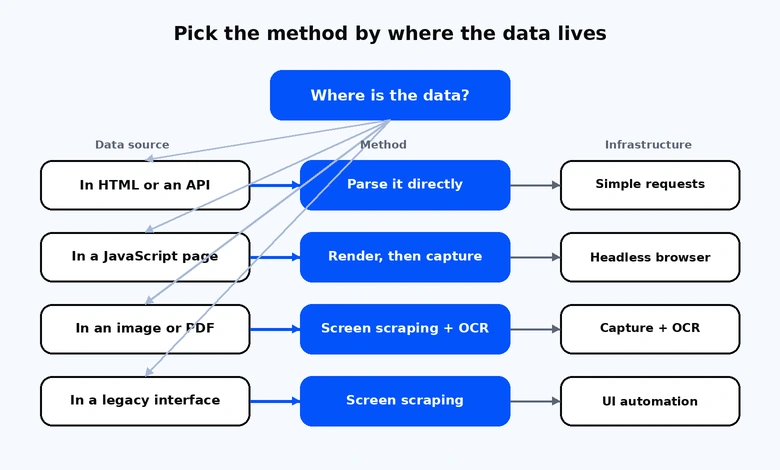
Pick the method by where the data lives, then match the infrastructure to it.
Screen scraping earns its place in a handful of recurring scenarios, mostly where the data is visual or locked inside an older system.
Price and availability monitoring is the most common. Retailers often render prices, badges, and stock counts as images or inside dynamic widgets, so capturing the rendered panel and reading it with OCR is sometimes the only reliable route to a clean number. The same approach supports price monitoring across regional storefronts, where teams compare prices and the figure you want depends on the location you view it from.
Market and competitor research is the next. Teams doing market research track how rivals present pricing, promotions, and positioning across markets, and how those choices shape user behavior. Some of that lives in image-based creatives or interactive charts that never appear in the HTML. Real-estate and travel listing analysis falls in the same bucket: listing cards, map overlays, and fare graphics are frequently visual.
Legacy-system and mainframe data migration is the classic case the technique was built for. Many organizations still run business logic on terminal interfaces such as IBM 3270 green-screen systems that expose no modern API. Screen scraping reads the rendered terminal output so that data can be moved into current systems. Because terminal output is already plain text, this is often the simplest form of the technique, with no OCR required. Workflow automation is a close relative: robotic process automation bots operate legacy interfaces and other applications directly, handling repetitive tasks such as form submissions and then reading the result back off the screen.
Document and chart extraction rounds out the list. Invoices, reports, scanned PDFs, and embedded charts all hold data as pixels, and OCR turns that back into text you can analyze. The same skill supports localization and QA work, including SEO research that checks how localized pages render for users and appear in search engines across different markets. Banking and fintech are a frequent context for these discussions too, though for reasons covered in the legality section below, credential-based access to account data is a documented risk rather than a recommended method.
Here is a minimal pipeline that captures a visual from a public page, reads it with Tesseract OCR, and writes the result as structured rows ready for further use. It routes the request through rotating residential proxies so that collection of publicly available content stays reliable and location-accurate across a longer run.
Rotating residential proxies use username and password authentication, so the configuration loads credentials from environment variables rather than hardcoding them.
import os import requests import pytesseract from PIL import Image from io import BytesIO # Rotating residential proxy, username and password authentication. # Load credentials from the environment, never hardcode them in shared code. proxy_user = os.environ["PROXY_USER"] proxy_pass = os.environ["PROXY_PASS"] gateway = "proxy-us.proxy-cheap.com:5959" proxy_url = f"http://{proxy_user}:{proxy_pass}@{gateway}" proxies = {"http": proxy_url, "https": proxy_url} # 1. Capture: fetch the rendered visual (a chart, a scanned page, a price # graphic) from a public URL, routed through the proxy for stable, # location-accurate access across the run. image_url = "https://example.com/public/pricing-chart.png" response = requests.get(image_url, proxies=proxies, timeout=30) response.raise_for_status() image = Image.open(BytesIO(response.content)) # 2. OCR: convert the visual text into machine-readable characters. text = pytesseract.image_to_string(image) # 3. Structure: keep the non-empty lines and save them for analysis. rows = [line.strip() for line in text.splitlines() if line.strip()] for row in rows: print(row)
For a JavaScript-rendered page, add a headless browser step before the capture: load the page, wait for the visible content to render, take a screenshot, then pass that screenshot into the same OCR and structuring steps. The rest of the pipeline stays the same. Tested with Python 3.12, pytesseract 0.3.13, Pillow 12.1.1, and Tesseract 5.3.4.
The right proxy depends on what you are collecting and how long each session needs to stay consistent. Match the type to the scenario rather than defaulting to one for everything.
Rotating and static residential proxies route through real residential networks, which gives you location-accurate rendering of publicly available content. They are the fit when regional pricing or localized pages need to look exactly as a user in that market would see them. Datacenter proxies deliver high throughput and speed, which suits large crawls of public catalogs and documentation where raw volume matters more than residential origin. Static residential proxies hold the same IP across a longer capture run, which is what you want when a session needs a consistent identity from start to finish, for example a multi-step capture against a dashboard.
For budget-sensitive, project-based work, pay-as-you-go billing fits the shape of the job: you pay for what a run actually uses, with no monthly commitment and the freedom to cancel anytime. Pricing and plan details change, so confirm the current numbers on the live product page before you commit. To match a type to your own workflow, see which proxy fits your collection run on the relevant service page.
Screen scraping is generally lawful when it collects publicly available data, but legality depends on the data, the jurisdiction, and the site's terms of service. In hiQ Labs v. LinkedIn, US courts indicated that accessing publicly available data is unlikely to violate the Computer Fraud and Abuse Act. Scraping data that sits behind a login, or sharing account credentials to reach it, raises clear legal and privacy concerns. The same capability can be abused outright: screen-scraping malware can steal data by quietly capturing whatever a logged-in user sees, which is one reason security teams watch for unexpected screen capture.
The same case is a useful caution against reading "public data is fine" too broadly. The Ninth Circuit held that collecting publicly available data is unlikely to breach the CFAA, but the dispute did not end there. In November 2022, the district court found that hiQ had still breached LinkedIn's user agreement, and the parties settled with a $500,000 judgment and a permanent agreement that hiQ would stop scraping LinkedIn and delete the data it had collected. The lesson is that the CFAA is only one layer: a site's terms of service can create separate liability even for public data, and using fake accounts to reach login-gated pages is a different and riskier activity.
Banking is the clearest example of the field moving away from credential-based screen scraping.
For years, some financial apps, a budgeting app being the typical case, read bank account data by having customers hand over their banking login so a third-party system could collect that consumer data from the screen. That approach weakened security, because handing full login access to an outside party exposes an account that financial institutions’ own security measures were built to protect.
Financial institutions and regulators have pushed toward permissioned APIs instead, the model usually called open banking. These APIs enable access to customer data with the account holder’s consent and without exposing passwords, giving consumers more control over their own financial data.
In the US, the Consumer Financial Protection Bureau finalized its Personal Financial Data Rights rule under Section 1033 of the Dodd-Frank Act in October 2024 to formalize that shift toward secure APIs. As of mid-2026, the rule is enjoined and under reconsideration, so its final form is unsettled. Still, the market has moved toward APIs regardless, with several major financial institutions asking aggregators to stop credential-based collection.
The direction of travel is consistent even while the rulebook is in flux. None of this makes screen scraping inherently unlawful, but it does mean you should check the data, the jurisdiction, and the terms before you start, and never treat credential sharing as a shortcut.
Screen scraping is powerful, but it carries costs that HTML parsing does not, and planning for them up front saves a lot of rework.
The biggest is maintenance. Because the technique reads the visual layout, any change to that layout can break the capture. A redesigned panel, a moved chart, or a new font can all throw off a region capture or confuse the OCR step, so a screen scraper needs more upkeep than a code-level parser. Capturing tight regions of interest rather than whole screens reduces how often small visual changes break the job.
OCR accuracy is the second. It varies a lot with image quality, and the failure mode is sneakier than a low score suggests. In a quick test with Tesseract 5.3.4, clean rendered text read at 100 percent character accuracy, but degraded captures fell off fast, and the errors landed in exactly the wrong places.
| Capture condition | Character accuracy | What it got wrong |
|---|---|---|
| Clean text, normal size | 100% | Nothing |
| Low-resolution downscale | 96% | Read a price of 1299.00 as 2299.00 |
| Heavy blur | 95% | Turned a 4.6 rating into 46 |
| Thumbnail-grade capture | 45% | Most fields unreadable |
The headline number hides the risk. A result that looks 96 percent accurate had still flipped a single digit in a price, which is the kind of error that quietly corrupts a dataset. So when using screen scraping, validate OCR output against expected formats, especially for numbers, rather than trusting the raw text.
The third cost is performance. Rendering a page and capturing it is heavier than firing a lightweight HTTP request, so a screen scraping run uses more compute and time per record than HTML parsing. Budget for that when you size a job. Finally, reliable access to public content across many sessions takes sensible infrastructure: routing requests through residential or datacenter proxies, with sensible rotation, keeps access stable and location-accurate across a longer run. For more on the products and approach behind that, see Proxy-Cheap.