
Playwright and Puppeteer both control headless browsers. Playwright, built by Microsoft, supports Chromium, Firefox, and WebKit with official Python, Java, and .NET clients plus built-in auto-waiting. Puppeteer, built by Google, focuses on Chromium and JavaScript and has a mature stealth plugin ecosystem.
For most new scraping projects in 2026, Playwright is the default; Puppeteer fits Chromium-only JavaScript stacks.
Playwright supports multiple browsers (Chromium, Firefox, and WebKit) and four official programming languages; Puppeteer is Chromium-first and JavaScript-native, with more limited browser support.
Performance is close in most workloads. Playwright's built-in auto-waiting cuts flaky scripts on dynamic pages without manual sleep logic.
Both accept proxies. Playwright sets them per browser context with username and password auth; Puppeteer uses --proxy-server plus page.authenticate().
For reliable data collection at scale, the proxy type matters more than the library: rotating residential for sticky, location-accurate scraping; datacenter for high-throughput public crawls.
The table below summarizes the key differences between Playwright and Puppeteer. The sections that follow go deeper on web scraping, proxy setup, and the proxy type that fits each workload.
| Dimension | Playwright | Puppeteer |
|---|---|---|
| Developer / owner | Microsoft | Google (Chrome DevTools team) |
| First release | January 2020 | 2017 |
| Browser engines | Chromium, Firefox, WebKit | Chromium (experimental Firefox) |
| Languages | JavaScript, TypeScript, Python, Java, .NET | JavaScript, TypeScript |
| Auto-waiting | Built in on actions | Manual waits (waitForSelector, waitForNavigation) |
| Built-in test runner | Yes (@playwright/test) | No (pair with an external runner) |
| Proxy config | Global or per browser context, with username and password auth | Browser level via --proxy-server, auth via page.authenticate() |
| Extra plugin ecosystem | playwright-extra | puppeteer-extra (long established) |
| Best fit | Cross-browser projects, non-JS teams, dynamic sites | Chromium-only JavaScript stacks, DevTools-deep control |
For new web scraping projects in 2026, Playwright is the stronger default. Its cross-browser support, multi-language clients, and built-in auto-waiting reduce flaky scripts on dynamic sites. Puppeteer remains a strong fit when your stack is already JavaScript and Chromium-only, where the puppeteer-extra stealth plugins are more established. Both pair with residential or datacenter proxies to collect publicly available data reliably at scale.
The split between the two is straightforward. For a greenfield web scraping project, start with Playwright. Its Locator model is a user friendly API, and auto-waiting handles the moving parts of modern web applications, so each step waits for an element to be ready instead of relying on fixed sleep timers. That alone removes a common source of flaky runs.
Puppeteer earns its place when you are working exclusively in JavaScript and Chromium. The puppeteer-extra plugin ecosystem has been around longer, which helps on sites that apply strict bot detection. Teams that want deep browser integration through the Chrome DevTools Protocol tend to prefer it.
The choice of library matters less than people expect once you scale. The real constraint on large web data scraping jobs is how the target treats automated traffic, not which API you call. That is a proxy decision. Pairing either library with rotating residential proxies gives you IPs that match real consumer markets, which keeps sessions stable and your data location accurate. The proxy-type choice is covered in detail below.
Yes, both libraries accept proxy settings. Playwright sets proxies at launch or per browser context, including username and password authentication, which suits rotating residential pools. Puppeteer passes a proxy through the --proxy-server launch argument and handles credentials with page.authenticate(). Either approach works with Proxy-Cheap rotating residential, static residential, datacenter, or mobile IPs for location-accurate, compliant data collection.
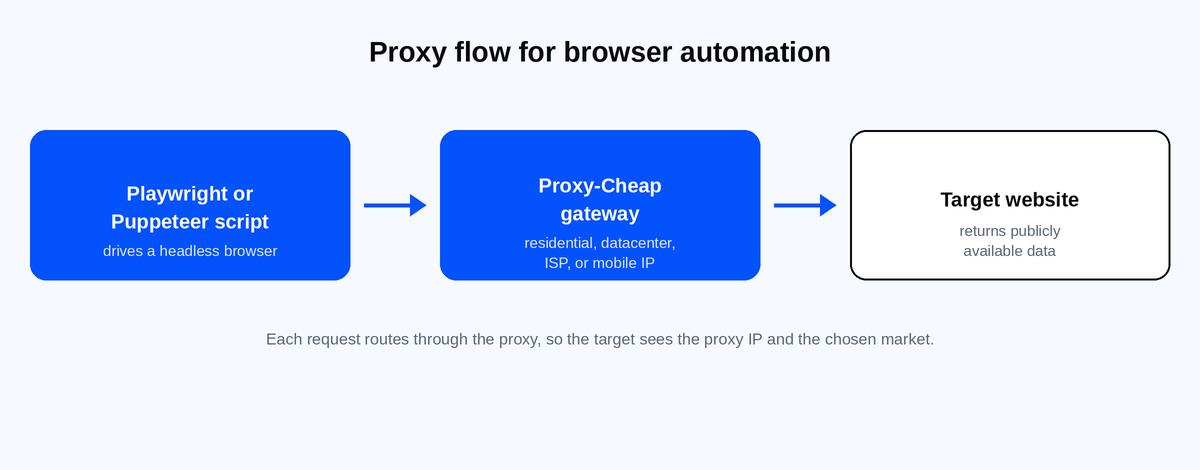
Playwright accepts a proxy at launch or, more usefully for scraping, on each of its browser contexts. A per-context proxy lets each worker drive multiple pages on a different IP, which is handy when you parallelize a crawl. The shape is documented in the Playwright network docs.
const { chromium } = require('playwright'); (async () => { const browser = await chromium.launch(); // Get the gateway host, port, username, and password // from your Proxy-Cheap dashboard credentials generator. const context = await browser.newContext({ proxy: { server: 'http://YOUR_GATEWAY_HOST:PORT', username: 'YOUR_USERNAME', password: 'YOUR_PASSWORD', }, }); const page = await context.newPage(); await page.goto('https://httpbin.org/ip'); console.log(await page.textContent('body')); await browser.close(); })();
Puppeteer sets the proxy with the --proxy-server launch flag, which applies to the whole browser. Credentials go through page.authenticate(), shown in the Puppeteer API reference, and you must call it before page.goto().
const puppeteer = require('puppeteer'); (async () => { // Use your Proxy-Cheap gateway host and port here. const browser = await puppeteer.launch({ args: ['--proxy-server=http://YOUR_GATEWAY_HOST:PORT'], }); const page = await browser.newPage(); // Authenticate before navigating, or the first request fails. await page.authenticate({ username: 'YOUR_USERNAME', password: 'YOUR_PASSWORD', }); await page.goto('https://httpbin.org/ip'); console.log(await page.evaluate(() => document.body.innerText)); await browser.close(); })();
A few practical notes. Chromium does not read a username and password from the proxy URL, so page.authenticate() is the supported route for Puppeteer. Authenticated proxies run over HTTP or HTTPS, since Chromium does not handle credentials over SOCKS5; Proxy-Cheap rotating residential uses HTTP, so it pairs cleanly with both libraries. Puppeteer applies one proxy per browser, so to rotate per worker you launch a separate browser or route through a rotating gateway. Playwright's per-context proxies give you that separation inside a single browser.
Whichever library you pick, the proxy product carries the load. For account-bound sessions and QA that need a fixed IP, static residential proxies keep the same address across requests. For high-throughput crawls of public pages, datacenter proxies deliver speed at a low cost. If you drive proxies programmatically, the proxy API handles credential generation and rotation from your own code.
The library decides how you drive the browser. The proxy type decides how reliably you collect data, and it is the more important call at scale. Match the type to the workload.
Rotating residential fits location-accurate scraping of dynamic consumer sites. The IP pool draws on real consumer connections, billed pay-as-you-go by the gigabyte, with country-level targeting. You can run random IPs that change each request or sticky sessions that hold an IP for about 30 minutes, which suits multi-step flows like search and pagination.
Datacenter is built for high-throughput crawls of public, unprotected pages. It is the fastest and most cost-effective option per request, so it works well for parsing reference data or content you are cleared to collect in volume.
Static residential and ISP proxies give you a fixed address that persists across requests. That stability matters for account-bound workflows and quality assurance, where the same IP needs to stay constant. The static residential line covers 27+ countries across 29 ISPs.
Mobile. Rotating mobile proxies route through real 4G and 5G carrier IPs. Reserve them for mobile-first targets and the strictest endpoints, where a carrier IP is the closest match to a typical end-user environment.
For search-focused work like rank tracking and SEO data collection, residential IPs that match the target market return the same results a regular user in that location would see.

Playwright is an open-source browser automation library from Microsoft, released in January 2020. The team that built it had previously worked on Puppeteer at Google, then rebuilt the idea to drive multiple browsers from the start, going beyond the single-engine model of older tools like Selenium WebDriver. The project is open source under the Apache 2.0 license and ships frequent releases. You can track it on Playwright on GitHub.
It drives the Chromium, Firefox, and WebKit web browsers through one API, so the same script runs across all three engines, which is what makes cross-browser testing practical. Official clients cover several programming languages (JavaScript and TypeScript, Python, Java, and .NET), and that multi-language support, including first-class Python support, makes it a fit for teams that are not JavaScript-first.
Two features stand out for day-to-day work. The Locator API gives you retryable, readable selectors built around roles and labels, and Playwright's auto-waiting holds each action until the element is ready. That combination removes most manual sleep logic. More advanced features round it out: a built-in test runner (@playwright/test) with parallel execution, Codegen for fast test creation by recording actions, and a trace viewer among its debugging tools.

Puppeteer is a Node.js library from Google's Chrome DevTools team, released in 2017. It controls Chromium-based browsers through the Chrome DevTools Protocol, which gives it direct, low-overhead access to the browser. It remains widely used and is backed by a large community: the project has more than 94,000 stars on Puppeteer on GitHub as of mid 2026, with active community support and releases from the Chrome team on a roughly monthly cadence that tracks Chrome.
Puppeteer is Chromium-first, which means more limited browser support than Playwright. It offers experimental Firefox support and does not target WebKit, so Safari coverage is out of scope, and it is not built for testing across different browsers. The API is native to JavaScript and TypeScript; the older community Python port (pyppeteer) is no longer actively maintained.
Puppeteer is a strong choice for Chrome-focused automation workflows: web scraping, generating PDFs, taking screenshots, automating form submissions, and running in headless mode to execute JavaScript on a page. Its smaller surface area and direct DevTools access are the core of Puppeteer's simplicity, appealing to developers who want less abstraction between the code and the browser. The puppeteer-extra plugin ecosystem extends it for projects that need to handle sites with stricter automation controls.
The right choice between Playwright and Puppeteer depends less on raw speed and more on browser coverage, language support, waiting behavior, and tooling. Here are the main differences to consider before choosing one for scraping, automation, or testing.
Browser engines. Playwright drives Chromium, Firefox, and WebKit as first-class targets. Puppeteer focuses on Chromium, with experimental Firefox and no WebKit. If you need Safari coverage, cross-browser testing, or cross-browser automation across engines, Playwright is the only option of the two.
Language clients. Playwright maintains official clients for JavaScript and TypeScript, Python, Java, and .NET. Puppeteer is JavaScript and TypeScript only. For a Python or .NET team, that difference in language support usually settles the choice.
Waiting and selectors. Playwright auto-waits on actions and centers its API on the Locator model, which retries until an element is ready. Puppeteer leans on manual waits such as waitForSelector and waitForNavigation. On dynamic single-page apps, auto-waiting removes a common cause of flaky scripts.
Network interception. Both libraries can intercept and modify requests and responses, which is useful for skipping heavy assets like images and fonts to speed up a crawl, or for inspecting network events. Playwright applies route handlers per context; Puppeteer uses request interception on the page.
Performance. In most workloads the performance differences are small, and they come down to subtle differences in how each library starts and drives the browser rather than a wide gap. The slow part of a scrape is usually the network and the page itself, not the library, so connection quality and proxy choice move the needle more than the API. Memory footprint is similar too. For an apples-to-apples comparison, benchmark both on your own target and hardware rather than relying on a single published number.
Test runner and debugging. Playwright ships a test runner with parallel execution, retries, and a trace viewer among its debugging tools. Puppeteer's lack of a built-in runner means you pair it with a separate framework. For an end-to-end suite, the built-in tooling saves real setup time.
Migration. Puppeteer's and Playwright's APIs look similar on purpose, so porting a Puppeteer script to Playwright is usually straightforward. The main changes are the launch options, the move to the Locator API, and recalibrating waits.
If you are still mapping out which proxy fits which engine and workload, our guide to proxy types explained breaks down the trade-offs.
Choose Playwright when you are starting fresh, when you need to run across different browsers like Chromium, Firefox, and WebKit, when you have teams working in Python or .NET, or when the target is a dynamic site where auto-waiting earns its keep. The built-in test runner and trace viewer make it the stronger pick for maintained end-to-end suites.
Choose Puppeteer when your codebase is already JavaScript and Chromium only, when you want direct Chrome DevTools control with a small dependency, or when the puppeteer-extra plugins fit a specific target you already work with. For a single-purpose Chrome script, screenshot service, or PDF pipeline, its narrower scope is a strength.
Between these two browser automation tools, there is no single clear winner. The right pick depends on your specific needs: your language, your browser coverage, and the automation workflows you run. Both projects are rapidly growing and actively maintained, so make an informed decision on those factors rather than on popularity alone.
For either library, plan the proxy side early. High-volume crawls run cheaper on metered-free connections, so unlimited bandwidth SOCKS5 proxies suit heavy, sustained jobs. And when you need the full proxy line under one account, residential through datacenter, Proxy-Cheap covers it with pay-as-you-go billing and no monthly commitment.