
Learn how to scrape Google Maps in 2026 with no-code tools, the Places API, or a Python script, plus what data is legal to collect and how to set up proxies. There are three real ways to do it: a no-code scraper, the official Google Maps API, or a custom Python build, and the right one depends on your skill level and how much data you need.
Three real methods exist: no-code tools, the official Places API, and a custom Python build. Pick by skill level and volume.
Google Maps data is publicly visible business information, and collecting it at scale needs careful request pacing.
Courts have treated scraping of publicly available data differently from Google’s Terms of Service. Personal data brings GDPR into scope.
High-volume runs rely on rotating residential proxies to distribute requests across many IPs.
Google Maps lists publicly visible business data: business name, full address, phone number, website, category, opening hours, average rating, review count, individual reviews, photos, and map coordinates. This information is commonly used for lead generation, local market research, competitor analysis, and SEO. It is the same data any visitor sees on a listing, collected in a structured, exportable format.
Each business listing on the Google Maps website holds more detail than most people collect by hand. Beyond the core fields, a single place can expose category tags, a price level, a menu link for restaurants, photos, and granular service attributes.
For a restaurant, that often includes options like “dine in” and “accepts reservations”, menu descriptors such as “small plates”, “comfort food”, or “healthy options”, and payment options like “debit cards”. Every place also carries a unique identifier, its place ID, which you use to remove duplicates when you merge search results.
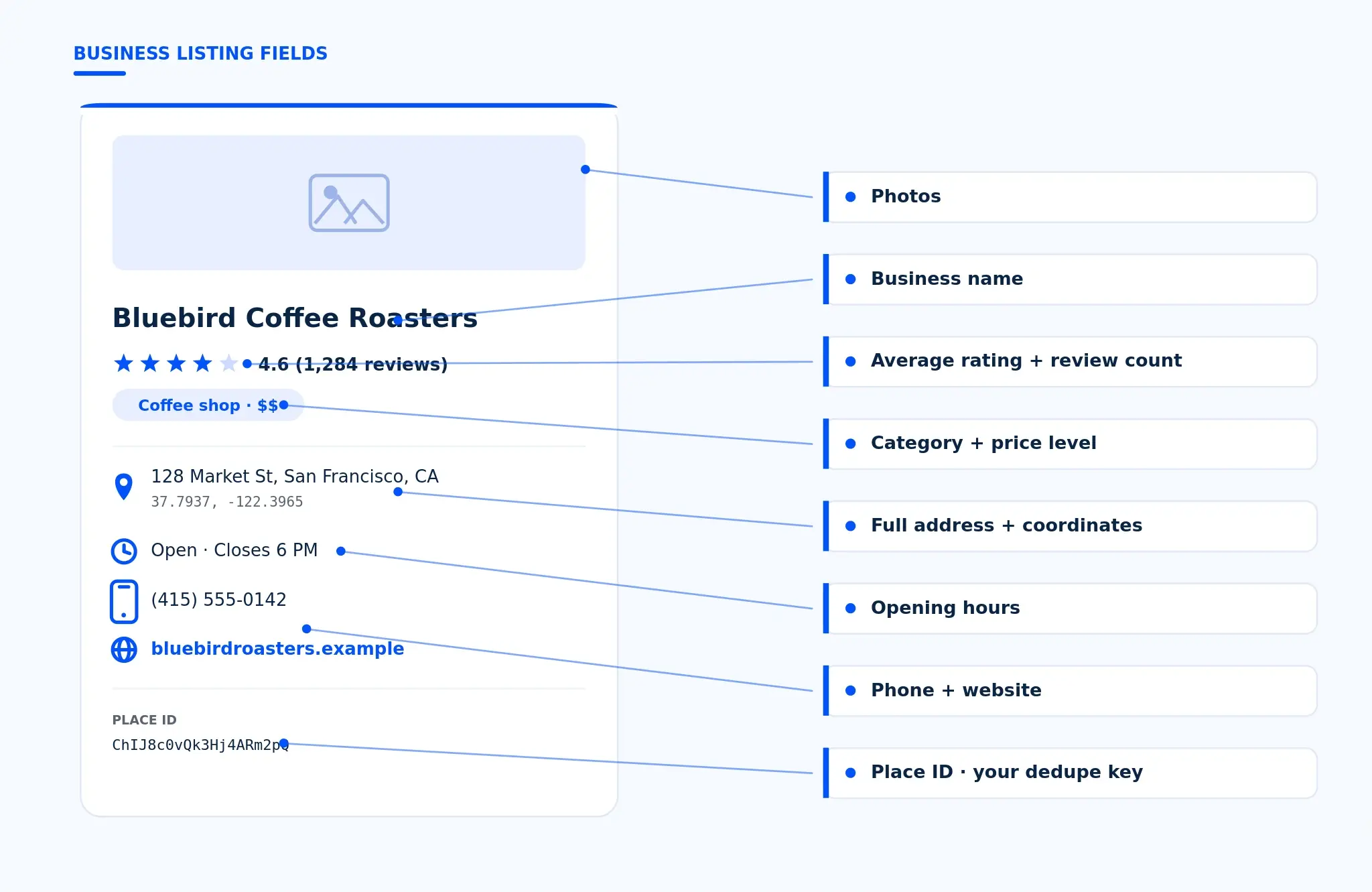
This business data drives several workflows: lead generation workflows for sales teams, local market research before entering a new area, and competitor analysis across an entire category. One honest limit to set up front: email addresses and named decision-maker contacts are not part of a Maps listing.
Maps gives you the business name, phone number, address, and website, so finding potential clients by email usually means visiting the business websites afterward. Knowing which specific data fields you need keeps you from collecting more than the use case requires.
Collecting publicly available data from Google Maps is treated differently in law than in Google’s Terms of Service. Google’s terms prohibit automated extraction, which is a contract matter, not a criminal one. In hiQ Labs v. LinkedIn the US Ninth Circuit ruled that scraping public data is not a Computer Fraud and Abuse Act violation, a position reaffirmed in 2022. Collecting personal data still falls under GDPR.
Two separate questions sit behind “is it legal to scrape Google Maps”, and mixing them up is where most articles go wrong. The first is contract. Google’s Terms of Service do not permit automated extraction of its content, so collecting Google Maps data at scale can put your Google account standing at risk. That is a private agreement between you and Google, enforced through account action, not a criminal matter.
The second question is computer-access law. In hiQ Labs v. LinkedIn, the US Ninth Circuit held that scraping publicly available data is not access “without authorization” under the Computer Fraud and Abuse Act, because a public page has no login gate to cross. The court first ruled this way in 2019 and reaffirmed it in April 2022 after the case returned from the Supreme Court. Later in 2022, though, a district court found that hiQ had still breached LinkedIn’s user agreement, which is the contract point above in action.
Personal data adds a third layer. If you collect data about named individuals, such as the people who wrote a place’s reviews, GDPR and similar privacy rules apply to how you store and use it. The practical takeaway is simple: collect only publicly visible data, respect robots.txt and posted rate limits, and keep only what your use case needs. If you want zero ambiguity, the official Google Places API is the route Google supports directly, which is the next method below.
Before you pick a tool, match the method to the job. A one-off list of 50 businesses is a different problem from pulling every business in a metro area, and the three methods below trade off skill, scale, and cost in different ways. A no-code Google Maps scraper is the fastest start, the Places API is the sanctioned middle path, and a Python build gives you the most control for large scale scraping. Use the table to find your starting point, then read the section that matches.
| Method | Best for | Skill needed | Scale | Cost shape |
|---|---|---|---|---|
| No-code scraper or extension | Quick one-off business lists | None | Low to medium | Per-tool subscription or credits |
| Official Places API | Sanctioned, structured fields | Low to medium (API key) | Medium | Google quota plus per-call pricing |
| Custom Python build | Full control, custom fields, scale | Developer | High | Your infrastructure plus proxy usage |
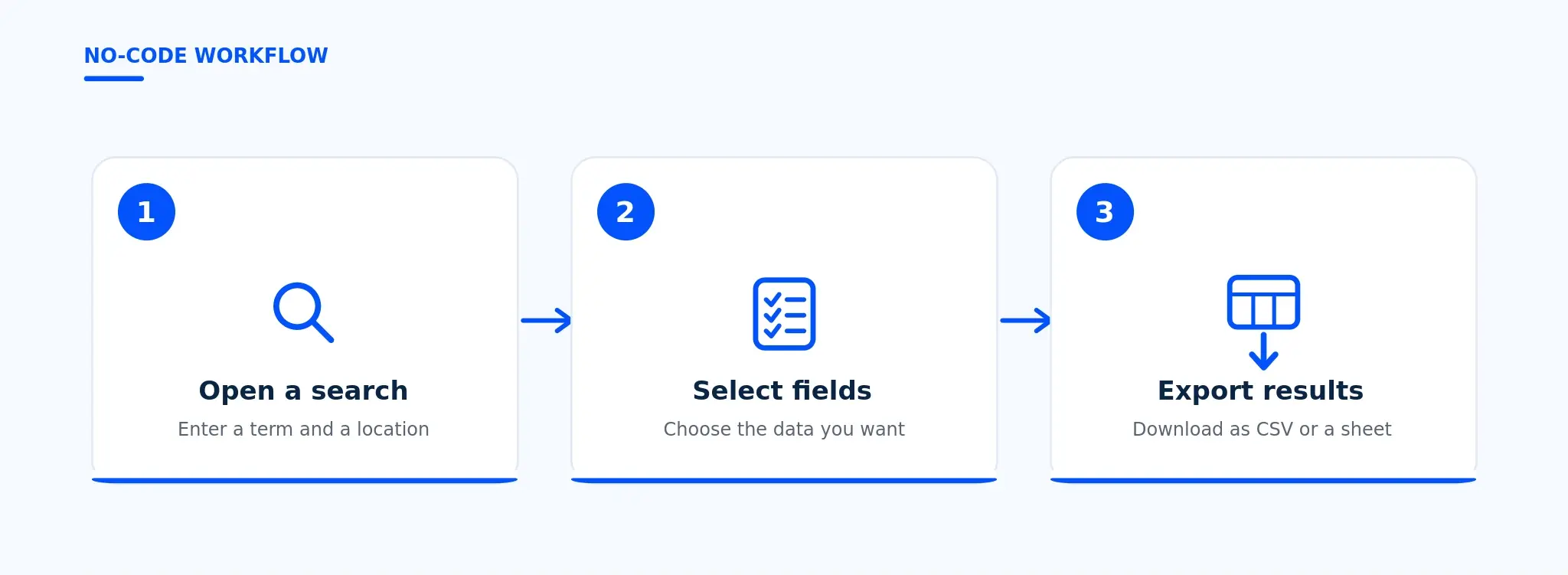
No-code scrapers are the fastest way to scrape Google Maps without writing a line of code. Most run as a browser extension: you open a Google Maps search, click the extension, choose the fields you want, and export the scraped results to CSV files or a spreadsheet. Some standalone web tools work the same way from a dashboard, where you enter a search term and a location and download the data when the run finishes.
This path fits non-developers and small, occasional jobs: a single neighborhood, one category, a few hundred records to find businesses for outreach.
Two limits are worth planning around. First, most tools cap free usage and then charge per credit or per export, so a large pull adds up. Second, Google Maps shows only about 120 results per search regardless of how broad the query is, so a single “restaurants in Chicago” run will not return every restaurant. Good tools work around this by splitting the area into smaller searches and merging the results.
A newer option sits alongside extensions: a Google Maps MCP server, which lets an AI agent query Maps data through a standard interface rather than a point-and-click tool. If a no-code tool supports importing proxies, you can route it through Proxy-Cheap’s browser extensions for centralized proxy management. The Chrome proxy extension handles HTTP and SOCKS5 import and profile switching, which keeps a multi-location run organized.
The official Google Maps API for business data is the Places API, part of Google Maps Platform. It is the route Google supports directly: instead of reading the Google Maps website, your code asks Google’s servers for structured place details and gets back clean fields, usually as a JSON file, that you can drop straight into a database.
To use it, create a project in Google Cloud, enable the Places API, and generate an API key. You also have to turn on billing, because pricing is pay-as-you-go and SKU-based. Since March 2025, Google replaced the old flat monthly credit with a free monthly cap per SKU: 10,000 calls a month on Essentials-tier endpoints, 5,000 on Pro, and 1,000 on Enterprise, with new accounts also getting a $300 trial credit. Past those caps you pay per call, and the rate depends on which fields you request, so a field mask that asks only for the data you need keeps the bill down.
A trimmed Places API response has a clean data structure:
{ "displayName": { "text": "Blue Bottle Coffee" }, "formattedAddress": "1 Ferry Building, San Francisco, CA", "nationalPhoneNumber": "(510) 555-0100", "websiteUri": "https://example.com", "rating": 4.5, "userRatingCount": 1280 }
The tradeoffs are real. Text Search returns up to 20 results per page and caps at 60 per query, and the Place Details endpoint returns at most five of a place’s reviews unless you own the listing. The official Google Maps scraper API also returns fewer fields than the public listing shows.
To cover a whole city you still split the work, just as you would when scraping: query smaller areas, then merge the results by place ID. For the exact request and response format, the Google Places API documentation is the reference to keep open. The Places API fits best when you want sanctioned, structured fields and predictable behavior and can live with per-call billing and tighter limits.
Building your own Google Maps scraper in Python gives you full control: the exact fields you want, your own data structure, and a pipeline you can run on a schedule. The catch is that the Google Maps website is a JavaScript-heavy single-page app, so a simple HTML request returns almost nothing. You need a browser automation tool that renders the page. Playwright and Selenium both work; the example below uses Playwright in headless mode.
The flow has six steps:
Launch a headless browser and point it at a Google Maps search URL of the form https://www.google.com/maps/search/your+search+term.
Accept the consent screen if Google shows one.
Handle infinite scroll. Maps loads listings into a container with role="feed", and more appear only as you scroll. Scroll the feed until the listing count stops growing.
Extract fields from each result card. The business name sits in the card link’s aria-label, and the rating sits in a nested element with role="img".
Export the scraped results to a JSON file or CSV files.
Route requests through proxies so a large run distributes across many IPs.
Step three is the part beginners miss. If you read the page once without scrolling, you get a handful of listings and stop. The loop below keeps scrolling the same place in the feed until no new cards load, then reads the visible fields. It also shows where the proxy layer plugs in: Playwright accepts a proxy with username and password auth directly in the launch call, which is exactly how Proxy-Cheap rotating residential credentials are passed.
import asyncio import json import os from urllib.parse import quote_plus from playwright.async_api import async_playwright # Read proxy credentials from environment variables. Never hardcode credentials # in a script. Copy your gateway host, port, username, and password from the # Proxy-Cheap dashboard at app.proxy-cheap.com. PROXY_SERVER = os.environ["PC_PROXY_SERVER"] # e.g. "http://gateway-host:port" PROXY_USERNAME = os.environ["PC_PROXY_USERNAME"] PROXY_PASSWORD = os.environ["PC_PROXY_PASSWORD"] async def scrape_google_maps(search_term: str, location: str, max_results: int = 40): """Collect publicly visible business listings for one Google Maps search. Routes every request through a Proxy-Cheap rotating residential proxy so a high-volume run distributes requests across many residential IPs instead of sending all traffic from one address (which leads to rate limiting and failed requests). """ query = quote_plus(f"{search_term} {location}") url = f"https://www.google.com/maps/search/{query}" async with async_playwright() as p: browser = await p.chromium.launch( headless=True, proxy={ "server": PROXY_SERVER, "username": PROXY_USERNAME, "password": PROXY_PASSWORD, }, ) page = await browser.new_page() await page.goto(url, wait_until="domcontentloaded") # Google may show a consent screen first. Accept it if it appears so the # results feed can load. The button label varies by region. try: await page.click("button:has-text('Accept all')", timeout=5000) except Exception: pass # The results panel is an element with role="feed". Wait for it to render # before reading any listings, because Maps loads results with JavaScript. feed = page.locator('div[role="feed"]') await feed.wait_for(timeout=15000) # Maps uses infinite scroll: more listings load as you scroll the feed. # Scroll until the listing count stops growing or the target is reached. seen = 0 stable_rounds = 0 while seen < max_results and stable_rounds < 3: await feed.evaluate("el => el.scrollTo(0, el.scrollHeight)") await page.wait_for_timeout(2000) cards = page.locator('div[role="feed"] a[href*="/maps/place/"]') count = await cards.count() if count == seen: stable_rounds += 1 else: stable_rounds = 0 seen = count # Read the fields visible on each result card. The card link carries the # business name in its aria-label; the rating sits in a nested element # with role="img". Phone, website, and full hours live on the individual # place page, so open each place if you need those fields. results = [] cards = page.locator('div[role="feed"] a[href*="/maps/place/"]') total = min(await cards.count(), max_results) for i in range(total): card = cards.nth(i) name = await card.get_attribute("aria-label") href = await card.get_attribute("href") rating = None rating_el = card.locator('xpath=..').locator('[role="img"][aria-label*="star"]') if await rating_el.count(): rating = await rating_el.first.get_attribute("aria-label") results.append({ "business_name": name, "rating": rating, "google_maps_url": href, }) await browser.close() return results if name == "__main__": data = asyncio.run( scrape_google_maps("coffee shops", "Austin, TX", max_results=40) ) with open("results.json", "w", encoding="utf-8") as f: json.dump(data, f, indent=2, ensure_ascii=False) print(f"Collected {len(data)} listings, saved to results.json")
To go further and pull a phone number, website, full business hours, or a place’s reviews, open each result by its URL and read the place details page, then add those fields to the same record. For a deeper breakdown of which proxy type to use for this kind of work, see our guide on which proxy type to use. Once the scrape loop is stable, scaling is mostly a proxy and pacing problem, which the next section covers.
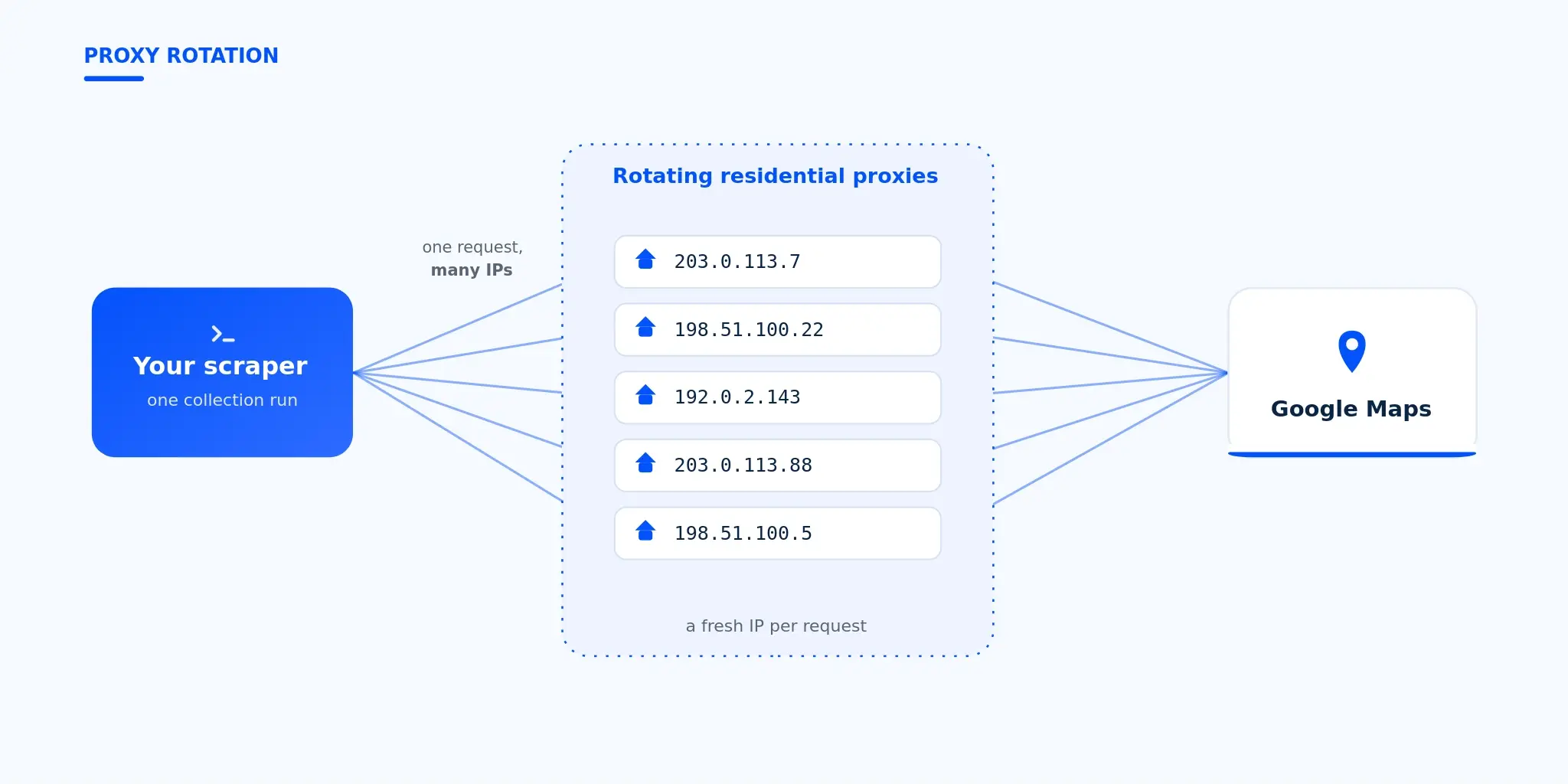
Large Google Maps collection runs send many requests, and sending them all from one IP leads to rate limiting and failed requests. Rotating residential proxies route each request through a different residential IP, distributing volume across a large pool so collection stays reliable. Residential IPs fit public-data collection because requests originate from real consumer connections; datacenter proxies suit speed-sensitive runs on less defended targets.
Every method above breaks at the same place when you scale: the network underneath. Send thousands of requests from one IP and you hit rate limiting and failed requests fast, which is the most common reason a Google Maps scraping run stalls.
The fix is to distribute requests across many IPs. Rotating residential proxies assign a fresh residential IP per request from a large pool, so volume spreads out and collection stays reliable. They are the natural fit for high-volume Maps work, and Proxy-Cheap offers them pay-as-you-go with no monthly commitment, so a one-week project does not lock you into a contract. Residential IPs come from real consumer connections, which is why they suit public-data collection across many Google Maps locations.
Different jobs fit different products. The broader pool of residential proxies covers country-level targeting across more than 100 countries for geo-specific collection. Datacenter proxies are purpose-built for speed-sensitive runs and high throughput on less defended public targets. When you need to hold one stable IP across a multi-step session, ISP proxies combine a fixed residential address with datacenter-grade speed.
Pacing matters as much as the proxy. Add short delays between requests, rotate user agents, and keep the request volume per session reasonable rather than running as fast as the script allows. Proxy-Cheap secures traffic with 256-bit SSL and self-serve credentials you generate yourself in the dashboard, so you can wire the location data straight into the Python build above and start a controlled run in minutes.
Reliable collection and responsible collection are the same discipline: the runs that respect a target also fail least, because they look like ordinary traffic and stay within reasonable limits.
A short checklist covers most of it. Collect only publicly visible business data, the same fields any visitor sees. Read the site’s robots.txt and honor posted rate limits. Pace your requests and rotate IPs so your volume stays reasonable instead of spiking. Practice data minimization: pull only the specific data fields your use case needs, not everything you can reach. These habits apply across most data scraping work, from price monitoring to local SEO, and you can see how they map to specific jobs on our data scraping use cases page.
Personal data deserves extra care. Business name, address, and phone number are ordinary business information, but the names of people who wrote reviews are personal data, and GDPR and similar rules govern how you store and use it. If a field is about an identifiable person and you do not need it, leave it out.
Two workflows lean on this data heavily. Market research teams use it to size a category and map competitors before entering a market, and SEO teams use it to audit local listings at scale; our SEO research page covers that angle. If you want a route with no ambiguity about Google’s terms at all, the official Places API remains the sanctioned option, at the cost of tighter limits and per-call billing. For everything else, publicly available data, careful pacing, and rotating residential IPs keep a Google Maps scraping pipeline both compliant and dependable.