

Tutorials
March 2, 2026
10 min

How to remove a proxy in Chrome in 2026 (all platforms)

Emma Caldwell
Emma Caldwell
Proxy & Privacy Enthusiast
How to remove a proxy in Chrome in 2026 (all platforms)
概要
Quick guide to disable proxy in Chrome and solve connection problems across all major operating systems.

Key takeaways:

  • Chrome has no proxy switch of its own on desktop. It uses your operating system's network settings, so you remove a proxy in Windows, macOS, or Linux, not inside Chrome.
  • On Android and iPhone, Chrome follows the active Wi-Fi network's proxy setting, so set that network's proxy to none.
  • A proxy can also come from a Chrome extension or a managed device policy. Check chrome://extensions and run a verification step to confirm it is fully off.
  • To set a proxy on purpose, enter the host and port in the same panel or use a Chrome proxy extension, then pick a reliable provider for stable connections.

On the desktop, Chrome routes through your computer's proxy settings rather than its own. That is why there is no on and off button in the browser itself. The fastest path is always the same: open Chrome's proxy shortcut, which lands you in the operating system panel, then turn the proxy off there. The steps below cover every platform, plus how to confirm the change and how to set a proxy again if you want one.
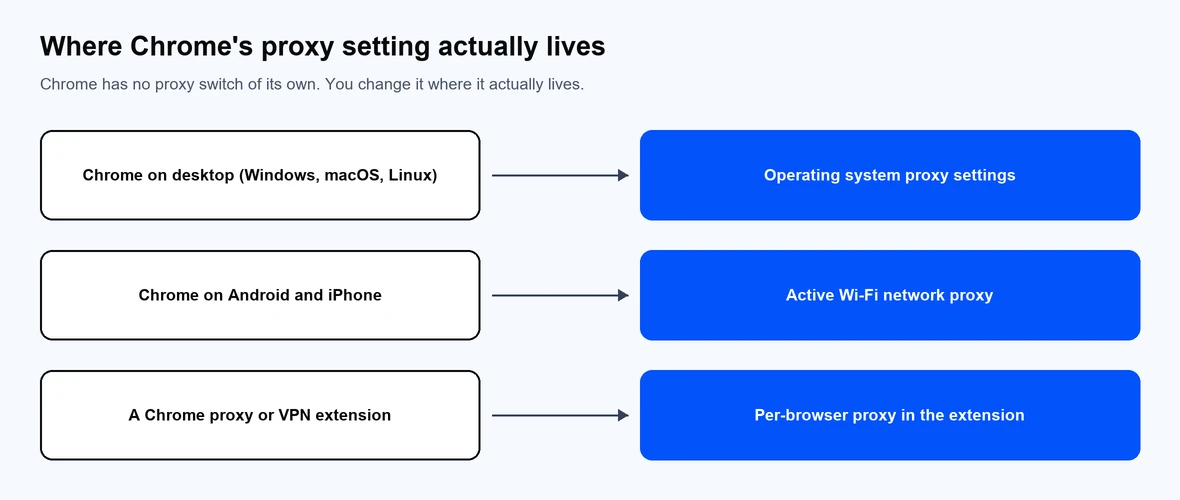
Chrome reads its proxy from the system, the Wi-Fi network, or an extension.

How to remove a proxy in Chrome on Windows (10 and 11)

  1. Open Chrome and click the three-dot menu in the top right, then choose Settings.
  2. In the left sidebar, select System, then click Open your computer's proxy settings. Chrome opens the Windows proxy panel.
  3. Under Automatic proxy setup, turn off Automatically detect settings.
  4. Under Manual proxy setup, turn off Use a proxy server, then click Save.
  5. Restart Chrome so the change takes effect.

In short: go to the Chrome menu > Settings > System > Open your computer's proxy settings > Network & Internet > Proxy and deselect "Automatically detect settings". If your network uses the older panel, open Internet Properties > Connections > LAN settings and clear Use a proxy server for your LAN.

How to remove a proxy in Chrome on macOS

  1. Open Chrome, click the three-dot menu, and choose Settings.
  2. Select System, then Open your computer's proxy settings. Chrome opens macOS network settings.
  3. Select your active connection (for example Wi-Fi), then click Details (or Advanced on older versions).
  4. Open the Proxies tab and deselect every checked protocol, such as Web Proxy (HTTP) and Secure Web Proxy (HTTPS).
  5. Click OK, then Apply, and restart Chrome.

How to remove a proxy in Chrome on Linux

Chrome on Linux reads the desktop network settings. On GNOME, open Settings > Network > Network Proxy and set it to Off (Disabled). You can do the same from a terminal:

# Turn off the GNOME system proxy

gsettings set org.gnome.system.proxy mode 'none'


# Clear proxy variables in the current shell session

unset http_proxy https_proxy ftp_proxy all_proxy


To launch a single Chrome session with no proxy, see the command-line flag in the troubleshooting section below.

How to remove a proxy in Chrome on Android and iPhone

Chrome on mobile does not have its own proxy control. It uses the proxy set on the Wi-Fi network you are connected to, so you change it in the device settings.

Android:

  1. Open Settings > Network & internet > Wi-Fi (labels vary slightly by manufacturer).
  2. Tap the connected network, then open its Advanced or Proxy options.
  3. Set Proxy to None and save.

iPhone and iPad:

  1. Open Settings > Wi-Fi and tap the i icon next to your network.
  2. Scroll to Configure Proxy and set it to Off.
  3. Tap Save.

Mobile data connections do not use a manual proxy, so switching off Wi-Fi also stops a Wi-Fi proxy from applying.

How to remove a proxy added by a Chrome extension

If Chrome shows a notice that an extension is controlling your proxy, the setting is coming from an add-on, not your system.

  1. Type chrome://extensions in the address bar and press Enter.
  2. Find any proxy or VPN extension.
  3. Toggle it off, or click Remove to delete it.
  4. Restart Chrome and check the proxy notice is gone.

Extensions can reapply a proxy each time Chrome starts, so removing the extension is the reliable fix if a system change keeps reverting.
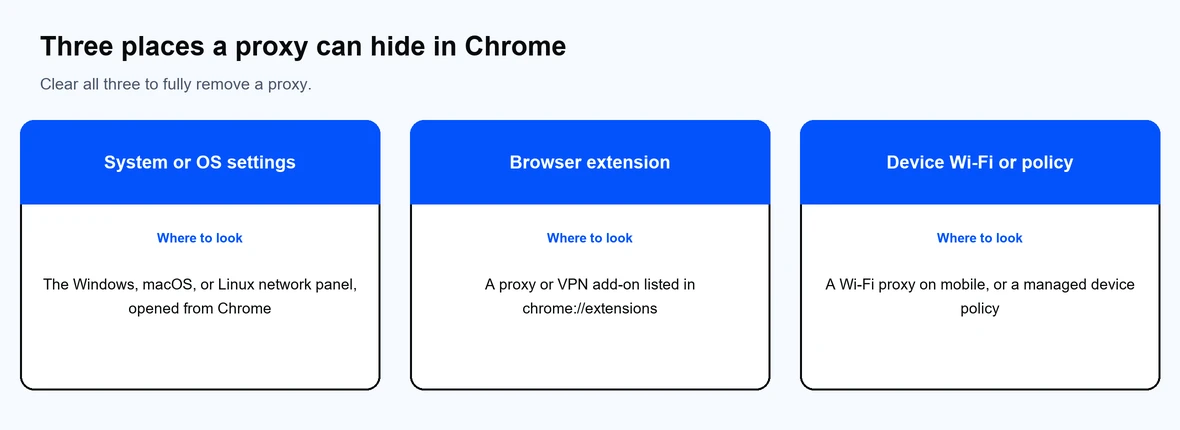
Clear all three to be sure the proxy is fully removed.

How to check that the proxy is off

Confirm the change instead of assuming it worked.

  • Visit any "what is my IP" page and check the IP and location match your real connection.
  • In Chrome, open chrome://net-internals/#proxy to see the effective proxy configuration.
  • On Windows, run this read-only command to view the system proxy:

netsh winhttp show proxy


When no proxy is set, Windows returns "Direct access (no proxy server)." If a value still shows after you cleared the GUI setting, an extension or a device policy is likely applying it.
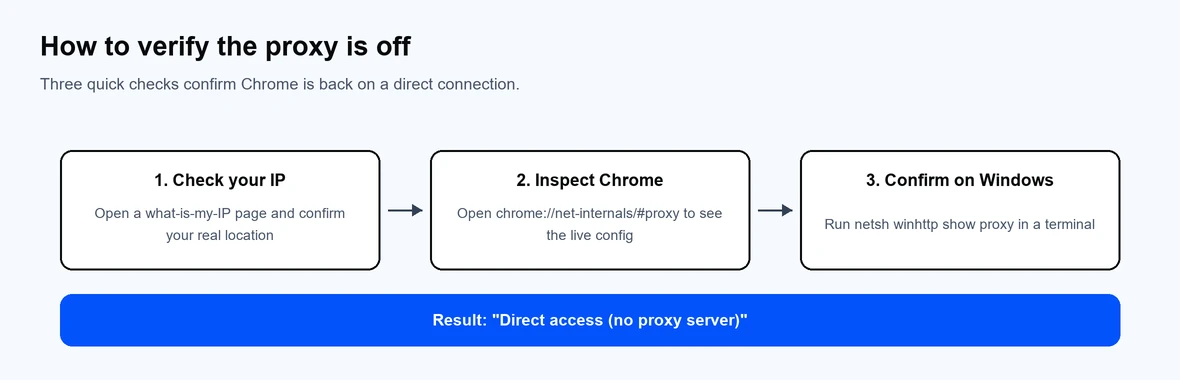
Three quick checks confirm Chrome is back on a direct connection.

How to set a proxy in Chrome after removing one

The same panels let you set a proxy, not just remove one. Open your operating system proxy settings through Chrome, turn on the manual proxy option, then enter the host and port from your provider, plus a username and password if prompted. For the full walkthrough across desktop, Chromebook, and mobile, see how to change proxy settings in Google Chrome.

For per-browser control without touching system settings, the Chrome proxy extension lets you switch proxies and profiles inside Chrome. If you are choosing a service, Proxy-Cheap offers residential proxiesdatacenter proxies, and ISP proxies on pay-as-you-go and per-IP plans. Decide whether you need SOCKS5 or HTTP, keep your proxy server address handy, and compare options in our roundup of the best proxy providers.

Common Chrome proxy errors and how to fix them

  • "Chrome is using proxy settings from your administrator." A device policy is setting the proxy. On a personal computer, check for an unwanted policy or extension, then remove it. On a work device, the proxy is managed by your IT team.
  • ERR_PROXY_CONNECTION_FAILED. Chrome cannot reach the proxy. Remove the proxy using the steps above, or correct the host and port if you still want to use it.
  • Chrome keeps asking for a proxy username and password. The proxy requires authentication. Either remove the proxy or enter valid credentials from your provider.
  • Launch Chrome once with no proxy. Start the browser with the --no-proxy-server flag to ignore the system proxy for that session:

# Windows

chrome.exe --no-proxy-server


# macOS

open -a "Google Chrome" --args --no-proxy-server


# Linux

google-chrome --no-proxy-server

Why disable a proxy in Chrome

A proxy is useful for data collection, testing, and privacy, but there are times to turn it off. You may be troubleshooting a slow or failed connection, switching from a misconfigured proxy, or you set one up for a one-time task and no longer need it. Removing the proxy returns Chrome to a direct connection so you can confirm whether the proxy was the cause. When you do need one again, a reliable paid service is more stable than a free public proxy, which often drops connections and raises privacy concerns.

常见问题解答

On desktop, Chrome shares the operating system's network configuration instead of keeping a separate one. The in-browser shortcut simply opens the Windows, macOS, or Linux proxy panel. That keeps one source of truth for every app on the computer.

Chrome on Android and iPhone uses the Wi-Fi network's proxy. Open your Wi-Fi settings, select the active network, and set the proxy to None (Android) or Off (iPhone). There is no separate proxy control inside the mobile Chrome app.

A proxy routes a specific app or browser's traffic through another IP, while a VPN routes your whole device through an encrypted tunnel. For a full breakdown, see our guide on proxy versus a VPN. Many people use a proxy for targeted tasks and a VPN for device-wide privacy.

Open chrome://net-internals/#proxy to view the effective configuration, or run netsh winhttp show proxy on Windows. You can also load a "what is my IP" page and confirm the IP matches your real location. If a proxy still shows, check your extensions.

An installed extension has taken control of the proxy setting. Open chrome://extensions, then disable or remove the proxy or VPN extension. After a restart, the notice should disappear and your system setting will apply again.

Yes. Removing a proxy returns Chrome to a normal direct connection and does not harm your browser or data. If the proxy was set by your workplace or school, check with your administrator before changing it.

Yes. Use the same operating system panel to enter a new host and port, or manage proxies inside the browser with a Chrome proxy extension. Enter any required username and password from your provider, then verify the new IP.

A returning proxy is usually set by an extension or a device policy. Remove the extension from chrome://extensions, then clear the system setting again. On a managed device, the policy will reapply the proxy until your administrator changes it.