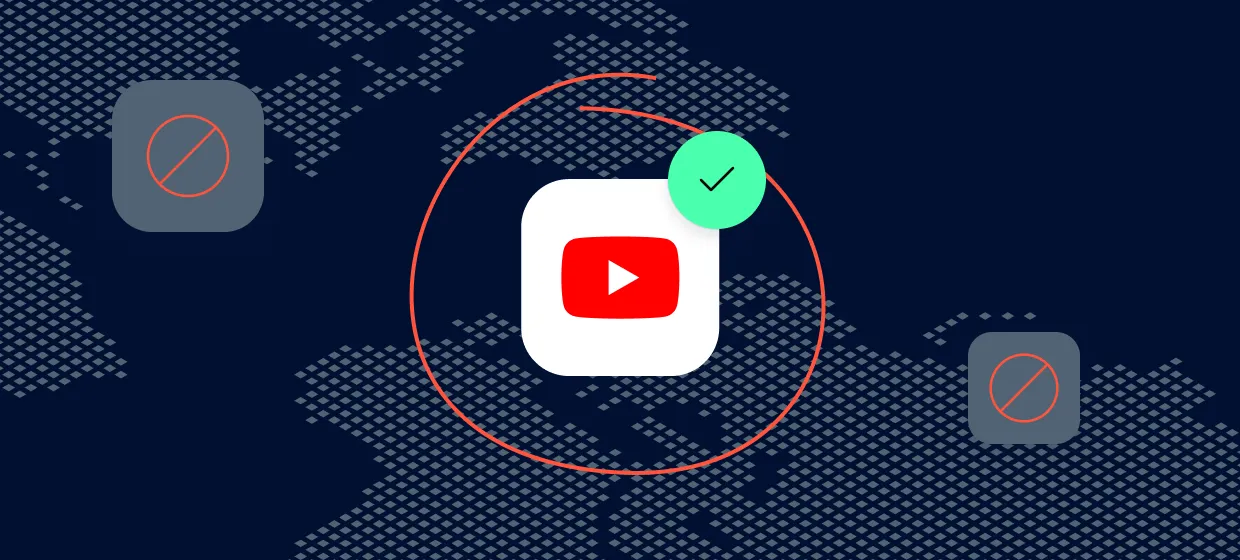

YouTube is the second largest property on the public internet, and the way a video, an ad, or a recommendation surface renders to a viewer in Tokyo is not the way it renders to a viewer in São Paulo. That single fact drives almost every real reason a marketer, researcher, or developer puts a proxy in front of YouTube. This guide explains what a YouTube proxy actually is, the use cases that justify buying one, the proxy types that fit each workload, how Proxy-Cheap and the main alternative vendors compare, and how to set one up in a browser or a scraping script.
A YouTube proxy is not a separate product category. It is any HTTP, HTTPS, or SOCKS5 proxy that sits between your client (a browser, a headless browser, a yt-dlp call, a Python script) and youtube.com, googlevideo.com, and the related ad and recommendation endpoints. When you send a request through it, YouTube sees the proxy’s IP as the origin instead of your own.
That single substitution changes three things at once. First, YouTube’s edge servers route you to the CDN node closest to the proxy IP, which is why a Brazilian residential proxy returns a different set of trending videos than a German one. Second, the YouTube Ads stack decides which creatives to render based on the IP’s geolocation, language headers, and a few other signals. Third, the recommendation algorithm and search ranker localize results to that IP’s country and language.
For business work, the value comes from the first and second points. You are not trying to make YouTube think you are someone you are not. You are running a request from an IP in a specific market so you can see what a real viewer in that market sees, or so you can collect publicly visible data from that market at scale without all of it coming from a single office IP.
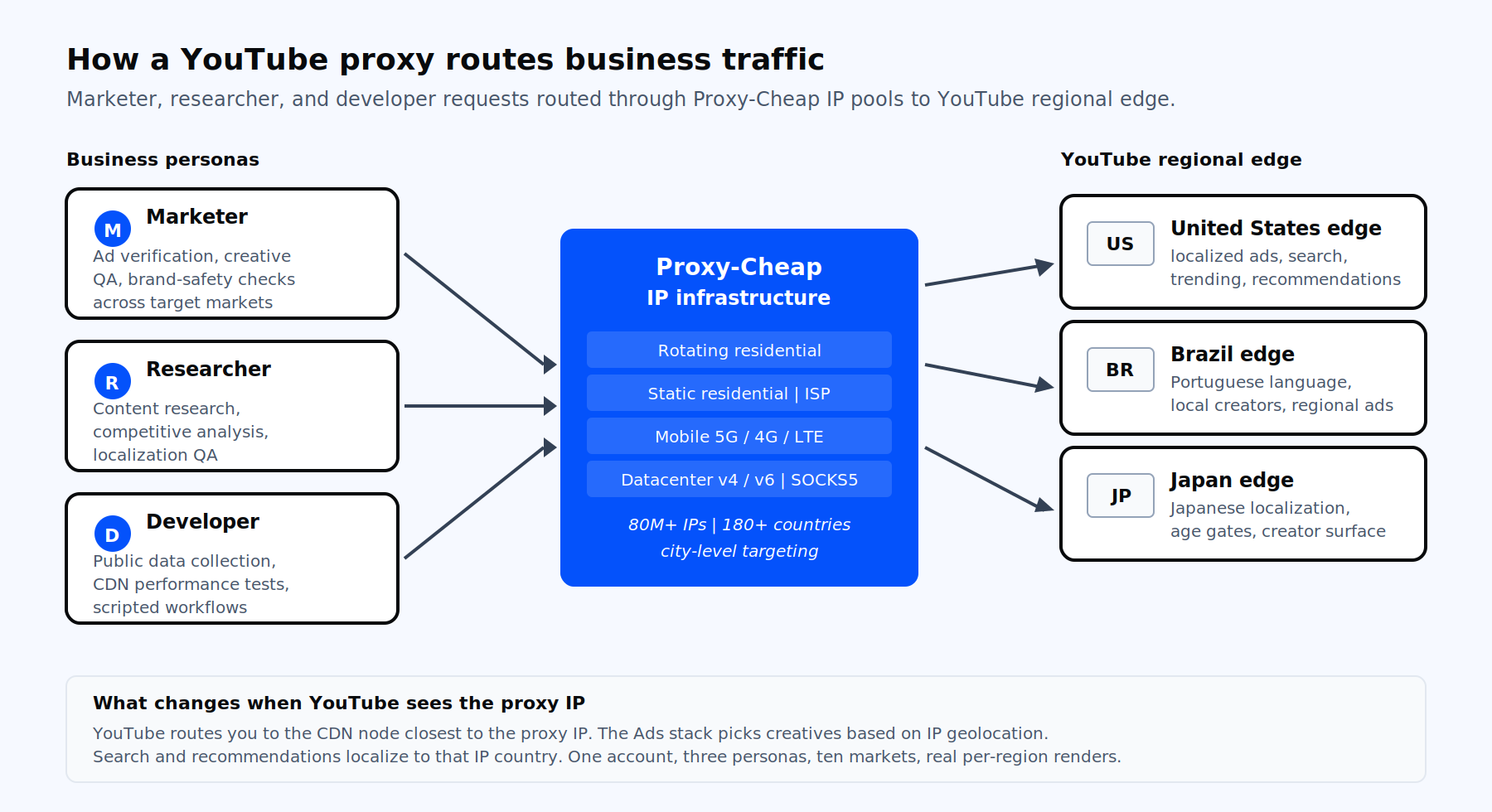
The reason this product exists is not casual viewing. It is a short list of workflows where running a request from the wrong IP gives you the wrong answer.
Performance marketers need to confirm that the creative running on a YouTube campaign in France actually renders as expected, that the redirect chain on a click works, that the frequency cap holds, and that the ad is not being served next to brand-unsafe content. With residential IPs in each target country, an ad-ops team can pull a real preroll or in-feed render the way a French viewer would see it. Proxy-Cheap’s rotating residential proxies and the dedicated ad verification use case cover this workflow.
Search results, autoplay recommendations, and the trending tab on YouTube are localized per IP country. A consumer brand running a launch in Mexico wants to know which creators dominate the relevant query in Mexico, not which ones dominate it in the US office. Routing your research browser through an IP in the target market gives you the same search ranker and recommendation surface that local viewers see.
Public video metadata, channel statistics, public comment threads, transcripts, and view counts are commonly pulled for research, sentiment analysis, market sizing, and LLM training datasets. The YouTube Data API has tight quota limits, which is why most teams running real volume use yt-dlp, Playwright, or a custom scraper through a proxy pool. Proxy-Cheap’s datacenter proxies handle the high-volume side; residential and ISP IPs cover the requests that need higher trust signals. The data scraping use case page goes into more detail on how the rotation and country targeting work for collection workloads.
If you ship a player, run a video CDN, or are responsible for playback quality, you need to measure first-frame time, buffering events, and HLS or DASH manifest delivery from the actual countries your users live in. A proxy pool with broad geographic coverage is the cheapest way to script that test from a CI runner instead of paying for a synthetic monitoring product per region.
Creator agencies, multi-brand advertisers, and large publishers often run dozens of legitimate YouTube channels they own. Assigning each channel a dedicated, persistent IP makes channel management cleaner. Static residential proxies and ISP proxies are the right fit because the session needs to stay on the same IP for weeks or months, with residential-grade trust signals.
Publishers that distribute video to multiple regions need to verify that subtitles render in the right language, that age-gating triggers correctly in countries with stricter rules, and that thumbnails localized via YouTube’s experiments feature show up to the right audience. This is straightforward QA work that requires a real IP in each target country.
A significant share of YouTube watch time and ad inventory is on mobile, and the mobile app surface is not identical to the web one. Verifying how a creative renders inside the YouTube mobile app from a carrier IP in the target country requires a mobile proxy rather than a residential or datacenter one.
The right tool depends on the workflow, but the same five criteria apply across all of them.
IP type. Residential and mobile IPs carry the strongest trust signals for viewer-facing tasks like ad rendering, recommendation QA, and channel management. ISP IPs sit in the middle, with residential-grade trust but datacenter speed. Datacenter IPs are the cheapest and the fastest, and they fit high-volume public metadata collection where speed beats trust.
Country coverage. YouTube’s largest markets by watch time are the US, India, Brazil, Indonesia, Japan, Mexico, the UK, Germany, and a long tail. A provider with 180+ countries and city-level targeting in the top markets is the baseline for any serious workload. Country count alone is a vanity metric; what matters is real pool depth in the countries you actually need.
Session control and rotation. For ad verification, you usually want a fresh IP per check, so rotating residential pools fit. For channel management, you want a sticky session on one IP for as long as possible. For scraping, you want both options on the same account so you can match rotation behavior to the target endpoint. Sticky session length and rotation triggers are worth checking before you commit.
Protocol and integration. HTTP and HTTPS cover most browser and scraper use. SOCKS5 is useful for non-HTTP traffic, custom clients, and lower latency on long-lived TCP sessions. Username and password authentication is easier for short scripts; IP allowlisting is easier inside a fixed CI environment. Both should be available.
Pricing model and entry point. Per-GB pricing is normal for residential and mobile. Per-IP pricing is normal for datacenter and ISP. Beware of monthly minimums that force you to commit before you know your real bandwidth. A real pay-as-you-go option, with non-expiring credits, is the right entry point for any team still scoping their YouTube workload. Proxy legality varies by jurisdiction and use case, so confirm your workflow respects YouTube’s terms and your local laws before scaling up.
Below is the short list of vendors that either market YouTube use cases directly or are credible alternatives based on IP pool quality and product breadth. All pricing is the list price visible on each vendor’s own site at the time of writing.
Proxy-Cheap is a self-serve proxy provider based in Vilnius, Lithuania, with the broadest product line on this list at the lowest entry prices. The catalog covers rotating residential ($4.99/GB), static residential and ISP from $1.99 per proxy, mobile rotating from $5.99/GB, dedicated datacenter IPv4 from $1.49 per month, datacenter IPv6 from $0.15 per month, and SOCKS5 across all proxy types. The residential pool is 80M+ IPs across 180+ countries with city-level targeting. HTTP, HTTPS, and SOCKS5 are supported on every product line. Pay-as-you-go billing means you can start with a small bandwidth balance, and crypto, card, and PayPal payments are all accepted.
For YouTube specifically, the product breadth is the differentiator. A single account covers ad verification (rotating residential), channel management (static residential or ISP), public data collection (datacenter or residential depending on the endpoint), mobile-app QA (mobile rotating), and IPv6 endpoints for sites that support it. There is no KYC gate on entry plans, so the time from signup to first request is measured in minutes.
Webshare is a US-based vendor with a popular free tier (10 datacenter proxies plus 1 GB of monthly bandwidth, no card required), which is rare in this category. Residential is listed at $7.00/GB with a long-running 50% promo bringing entry plans to $3.50/GB. The residential pool is 80M+ IPs across 195 countries. Webshare publishes a dedicated YouTube proxies help article with yt-dlp integration examples and is officially recommended by the youtube-transcript-api Python library, which makes it a natural fit for transcript collection workloads. There is no mobile product.
Decodo, rebranded from Smartproxy in April 2025, runs a 125M+ IP pool covering 195+ locations. Residential entry is $3.75/GB on the smallest monthly plan, with mobile starting at $3.75/GB on a current promo and $8/GB at list. Decodo has a dedicated YouTube proxies product page, a YouTube Scraper API, and a YouTube Downloader for video and audio at scale. The dashboard combines proxies, scraping APIs, and a web unlocker in one place, which suits teams that want a single vendor for both proxy infrastructure and pre-built scrapers.
IPRoyal runs a 32M+ residential pool and 4.5M+ mobile pool, with 500K+ ISP IPs in 31+ countries. Residential is $7/GB at the smallest plan and drops to roughly $1.75/GB at bulk volume. The defining feature is non-expiring traffic: residential GBs do not reset month over month, which suits low-frequency but long-running YouTube research projects. IPRoyal publishes a “Best Proxies for YouTube” hub and explicit landing pages for YouTube channel growth and metadata scraping.
DataImpulse is the cheapest reputable entry point on the list, with residential from $1.00/GB, datacenter at $0.50/GB, and mobile at $2.00/GB. The residential pool is 90M+ IPs across 195 countries, sourced through their TraffMonetizer SDK. Traffic does not expire and there is no subscription requirement. DataImpulse does not have a dedicated YouTube product page, but the general residential and mobile pools work for the same use cases the named YouTube vendors target. The gap is static ISP coverage, which DataImpulse does not offer.
Oxylabs is the enterprise option, with the largest publicly disclosed residential pool on this list at 175M+ IPs across 195 countries, plus 2M+ datacenter IPs and 20M+ mobile IPs. Residential PAYG is from $4/GB and tiered plans drop to roughly $2.50/GB at 1TB. Oxylabs ships a dedicated YouTube Scraper API with endpoints for youtube_search, youtube_metadata, youtube_downloader, and youtube_transcript, plus High-Bandwidth Proxies on port 60000 positioned for yt-dlp and AI training dataset collection. Residential and mobile require KYC verification before activation, which adds onboarding time.
Bright Data sits in the same enterprise tier as Oxylabs, with a 150M+ residential pool (the social-media proxies page claims 400M+ monthly real residential IPs) and a full product ecosystem including a YouTube Scraper API for channels, videos, comments, and transcripts, a Web Unlocker with success-only billing, and pre-built YouTube datasets. Residential is $5.88/GB on the official page, with PAYG often cited between $4.20 and $8.40/GB depending on promo. KYC is required for residential and mobile, and billing cycles align to the 1st of the month.
NodeMaven runs a 30M+ residential pool and 295K+ mobile pool across 190+ countries with ZIP-level targeting. Residential entry is $2.20/GB, and mobile is included on the same balance as residential rather than billed separately. The defining feature is a real-time IP Quality Filter that screens each IP before assignment, with sticky sessions up to 7 days and a financial quality guarantee that returns $1 in bonus traffic per flagged IP. NodeMaven has a dedicated YouTube proxies page and is well suited to long-session creator account work.
The setup depends on whether you are running a browser-driven workflow (ad verification, content research, QA) or a script-driven one (data collection, performance testing).
For a one-off verification check, a system-level proxy is fine. On macOS or Windows, paste the proxy host, port, username, and password into the OS network settings and load YouTube. For ongoing work, use a per-profile proxy extension like FoxyProxy in Firefox or any equivalent Chromium extension. That keeps the proxy scoped to one browser profile so your other tabs are not routed through it.
For multi-market work, set up one browser profile per target country, each bound to a residential or ISP IP in that country. Verify your IP geolocation at ipinfo.io before you start the actual QA pass. Clear cookies and storage between sessions so YouTube’s localization signals come from the IP and the Accept-Language header rather than a cached previous session.
For Python, the requests library accepts a proxies dict, and playwright and pyppeteer accept a proxy in the launch options. For yt-dlp, the --proxy flag points the entire download at your proxy endpoint. Use rotating residential or rotating datacenter for high-volume metadata pulls, and switch to sticky residential when a target endpoint rate-limits rapid IP changes.
import requests
proxies = { "http": "http://user:[email protected]:31112", "https": "http://user:[email protected]:31112", }
r = requests.get( "https://www.youtube.com/results?search_query=...", proxies=proxies, headers={"Accept-Language": "pt-BR,pt;q=0.9"}, ) |
Set a request timeout, handle 429 responses with exponential backoff, and respect YouTube’s terms of service and robots.txt for any collection work.
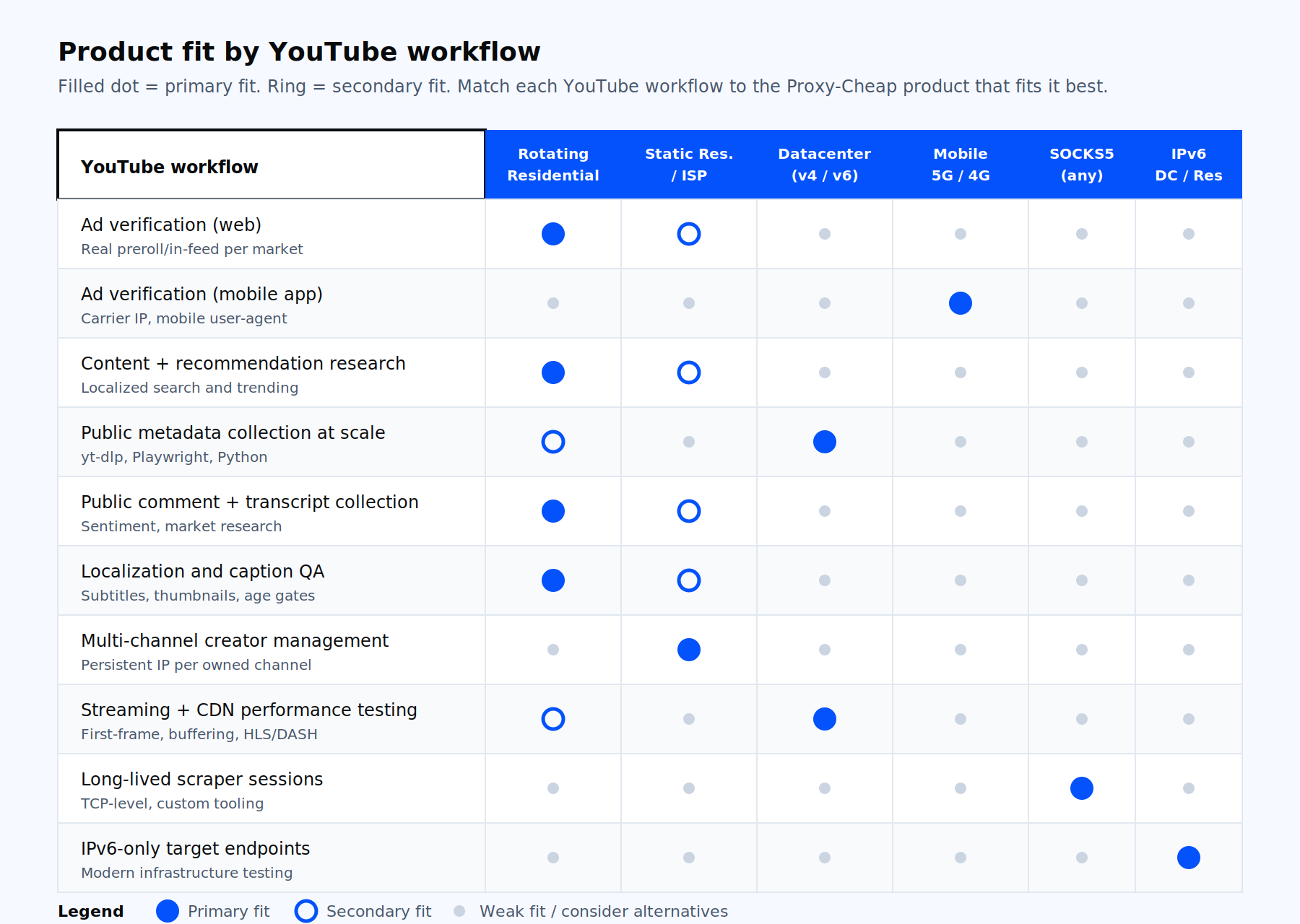
The right product depends on the workflow. The matrix below maps the use cases above to the Proxy-Cheap product lines that fit them.
| Use case | Primary fit | Secondary fit |
|---|---|---|
| YouTube ad verification (web) | Rotating residential | ISP |
| YouTube ad verification (mobile app) | Rotating mobile | Static mobile |
| Content and recommendation research | Rotating residential | ISP |
| Public metadata collection at scale | Datacenter IPv4 | Rotating residential |
| Public comment and transcript collection | Rotating residential | ISP |
| Localization and caption QA | Rotating residential | Static residential |
| Multi-channel creator management | Static residential | ISP |
| Streaming and CDN performance testing | Datacenter IPv4 | Rotating residential |
| Long-lived scraper sessions over SOCKS5 | SOCKS5 (DC) | SOCKS5 (residential) |
| IPv6-only target endpoints | Datacenter IPv6 | Static residential IPv6 |
For most teams reading this, the right starting move is to open a Proxy-Cheap account, top up a small balance, and start with rotating residential for verification work or datacenter IPv4 for collection work. The single account scales to every other workflow above without changing vendors. For a deeper read on which proxy type fits your endpoint, see Proxy-Cheap’s datacenter vs residential proxies comparison.