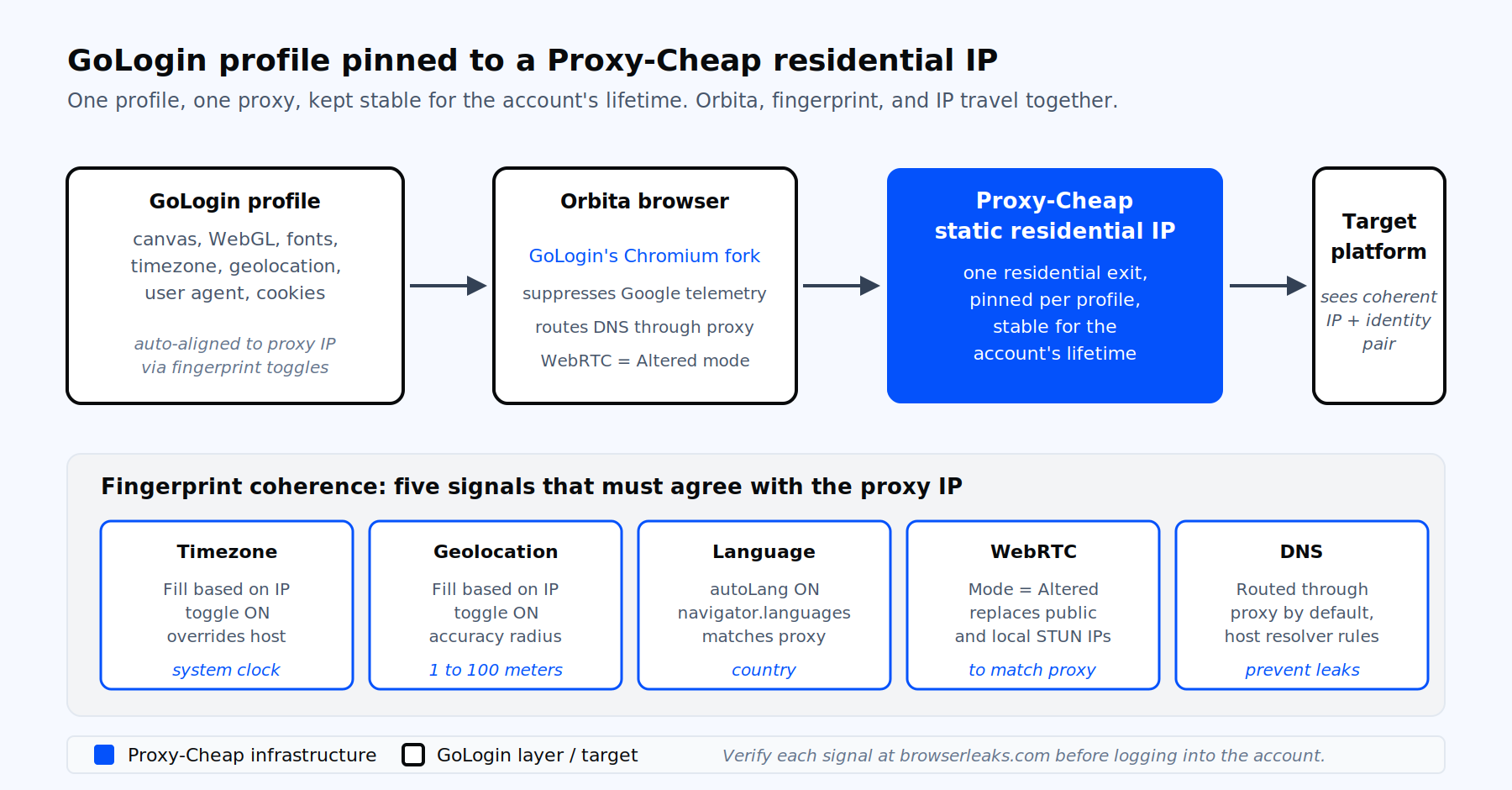
GoLogin pins one proxy per profile. The Orbita browser, fingerprint, and outbound IP travel together for the life of the account.
GoLogin is an antidetect browser used by affiliate marketers, e-commerce sellers, ad-verification teams, social media managers, and QA engineers who need to keep many web identities cleanly separated. Each profile carries its own canvas, WebGL renderer, fonts, timezone, geolocation, user-agent, screen resolution, hardware concurrency, and audio context. Behind those settings, Orbita is GoLogin's Chromium fork that gives each profile its own isolated set of fingerprint values.
The proxy is the foundation that holds the rest of the profile together. Fingerprinting and analytics services read the IP, the timezone, the navigator language array, and the WebRTC handshake as one consistent signal. If the IP is in Frankfurt but the system clock and language are set to New York, that mismatch is easy to spot. Aligning them keeps each profile coherent for regional testing and multi-account work. A clean, geographically aligned IP turns a strong fingerprint into a usable session. A reused or flagged IP collapses every other setting.
Proxy-Cheap’s use case page for multi-account work explicitly supports GoLogin profiles, which is the most common workflow we see across affiliate, dropshipping, and agency teams.
GoLogin ships with two built-in proxy paths inside the profile editor. The first is the free shared pool, which is a good way to try the workflow. Because it is shared across many users, it is best kept for testing and low-sensitivity tasks rather than long-lived accounts. The second is GoLogin's own paid proxy service. GoLogin provides residential, mobile, and datacenter proxies, plus dedicated IPs, directly in the app, and every paid plan includes 2 GB of monthly residential and mobile traffic with more available to buy. That covers a lot of standard multi-account work on its own. Bringing your own proxy is about matching a specific IP type, location, or billing model to each profile.
Many teams still bring their own proxy from a provider such as Proxy-Cheap once they scale past the included traffic. The reasons are practical: pay-as-you-go billing per GB, a dedicated IP kept for the full lifetime of each account, sticky sessions that persist for as long as the session needs, and the flexibility to mix residential, mobile, datacenter, and ISP IPs across the same profile fleet under one account. You get pay-as-you-go billing, residential-grade IPs dedicated to your account, sticky sessions that persist for the account’s full lifetime, and the ability to mix proxy types across the same profile fleet.
The procedure below is identical between the Desktop App and the Web App at app.gologin.com. Profiles sync between them, so you can start the setup in one and finish it in the other.
When the browser opens, load https://api.ipify.org and https://browserleaks.com/ip to confirm the IP the site sees matches the Proxy-Cheap IP you assigned. Repeat with https://browserleaks.com/webrtc to confirm WebRTC reports the proxy IP and not your real address.
GoLogin supports three bulk paths. Pick the one that fits the volume you are spinning up.
For a small batch on the All profiles page, copy a list of proxies to your clipboard in any of GoLogin’s accepted formats, then press Ctrl-V or Cmd-V, or click "Paste proxies". GoLogin parses each line into its own proxy entry and links it to a profile in order.
For a dedicated import flow, open the top-right menu, choose Proxies, then Import proxies, paste the list, and click "Import proxies". This loads the proxies into your library so you can attach them to profiles afterwards.
For reassigning proxies to many existing profiles at once, select the profiles in the All profiles list, click "Proxy" in the bulk-actions row, paste your list, and click "Update proxy".
GoLogin accepts every line in any of the following formats, which means you can mix HTTP and SOCKS5 in one paste:
192.168.0.1:8000:login:password
http://192.168.0.1:8000:login:password:name
socks5://login:[email protected]:8000:name
socks5://login:[email protected]:8000[https://change-my-ip.com]:name
http://192.168.0.1:8000:myproxy:pass[https://change-my-ip.com]:name4The bracketed segment is the Change IP URL. The trailing :name is an optional label that shows up in your proxy library. For a primer on the rotation patterns this enables, our explainer on IP rotation is a useful sidebar read.
This is the section most GoLogin guides skip, and the one that decides whether each profile stays consistent and usable over time. Fingerprint coherence means every part of the profile points at the same country as the proxy. Five fields drive that coherence inside GoLogin.
Timezone. The Timezone tab has a "Fill timezone based on the external IP" toggle. Leave it on. If the proxy resolves to Madrid and the profile claims New York time, every modern detection engine notices in the first page load.
Geolocation. The Geolocation tab has a "Fill geolocation based on the external IP" toggle. Leave it on. Sites that ask the browser for coordinates will receive a lat-lon pair that matches the proxy IP, with an accuracy radius you can tune from 1 to 100 meters.
Language. GoLogin auto-fills the navigator language array from the proxy country when autoLang is on. Override only when you have a specific reason, for example operating an English-language store from a German IP.
WebRTC. Open the WebRTC settings and set the mode to Based on IP, which aligns the public IP reported over WebRTC with your proxy IP. The alternative is Off, where WebRTC is not filled from the proxy and you either enter the public IP manually or leave it disabled. Based on IP is the recommended setting whenever a proxy is assigned, so the reported IP matches the proxy country.
DNS. GoLogin routes DNS through the proxy by default and applies host resolver rules to prevent DNS leaks. You can pin a custom DNS resolver per profile using the dns field in the API if you need a specific upstream resolver.
After you set the proxy, verify everything together by launching the profile and loading https://browserleaks.com/ip, https://browserleaks.com/webrtc, and a timezone reflector such as https://browserleaks.com/javascript. All three should agree with the proxy country.
For teams running hundreds of profiles, the GoLogin REST API at https://api.gologin.com does in seconds what the GUI does in minutes. Generate an API token under Settings, then Use POST /browser/custom only when you need to pass specific fingerprint parameters (as in the sample below). For a standard profile, GoLogin's current default is POST /browser/quick, after which you attach the proxy with PATCH /browser/{id}/proxy. The official Node and Python SDKs expose helpers (createProfileRandomFingerprint / createProfileWithCustomParams, and changeProfileProxy / addGologinProxyToProfile) for the same flow. Free and trial tiers allow 300 requests per minute. Paid tiers raise that to 1200.
The example below creates a Windows 11 profile assigned to a Proxy-Cheap HTTP proxy, with timezone, geolocation, language, and WebRTC all set to follow the proxy IP. Replace the proxy fields and the bearer token with your own values.
import os import requests TOKEN = os.environ["GOLOGIN_TOKEN"] profile = { "name": "ops-profile-001", "notes": "Customer support QA, US East", "autoLang": True, "os": "win", "osSpec": "win11", "navigator": { "userAgent": ( "Mozilla/5.0 (Windows NT 10.0; Win64; x64) " "AppleWebKit/537.36 (KHTML, like Gecko) " "Chrome/134.0.6998.36 Safari/537.36" ), "resolution": "1920x1080", "language": "en-US", "platform": "Win32", "hardwareConcurrency": 8, "deviceMemory": 8, "maxTouchPoints": 0, }, "proxy": { "mode": "http", "host": "your-host.proxy-cheap.com", "port": 8000, "username": "your-username", "password": "your-password", }, "timezone": {"enabled": True, "fillBasedOnIp": True}, "geolocation": {"mode": "prompt", "fillBasedOnIp": True}, "webRTC": {"enabled": True, "fillBasedOnIp": True}, # maps to the profile UI "Based on IP" - confirm exact key against the live API reference and re-test in sandbox before publish } response = requests.post( "https://api.gologin.com/browser/custom", headers={ "Authorization": f"Bearer {TOKEN}", "Content-Type": "application/json", }, json=profile, timeout=30, ) response.raise_for_status() print(response.json()["id"]) |
To swap the proxy on an existing profile without rebuilding it, send a PATCH to /browser/{id}/proxy with the same proxy configuration. To attach a proxy to many profiles in a single request, use PATCH /browser/proxy/many/v2 with the list of profile IDs in the body. For higher-throughput scraping that calls these endpoints in tight loops, pair the API with rotating residential proxies and a session token to keep each scraping job sticky to one IP for the duration it needs.
GoLogin surfaces error strings verbatim from the proxy connection layer. Here are the eight you will actually see and the fix that works each time.
"Proxy error. Proxy connection timed out" and "Proxy server doesn’t respond." The proxy is unreachable from GoLogin’s checker. Re-test the credentials in your Proxy-Cheap dashboard, confirm the proxy IP is not on a whitelist that excludes GoLogin’s checker, and try again from a phone hotspot to rule out a local network filter.
"Response code 407 Proxy Authentication Required." Wrong username or password, or a special character mis-parsed by the single-field paste shortcut. Fill the four fields manually, then re-run Check Proxy. If you authenticate by IP whitelist, switch to username and password so GoLogin’s checker can authenticate on your behalf.
"Received invalid Socks5 initial handshake." Wrong protocol selected. The provider is responding with HTTP or SOCKS4 when you asked for SOCKS5. Switch the Connection type dropdown to HTTP and retest.
"Certificate has expired" and "write EPROTO OPENSSL_internal." A TLS issue on the proxy. Toggle the connection type, retest, and contact support if the proxy is yours.
"EACCESS the IP and port." Something on the local machine, usually antivirus or a corporate VPN, is intercepting the outbound port. Disable the antivirus proxy filter, exit any host VPN, and retry.
DNS leak detected or real IP visible via WebRTC. Set the proxy on the profile before the first launch, confirm WebRTC is set to Based on IP, then relaunch. If the leak persists, your Orbita build is out of date. GoLogin shipped a SOCKS5 real-IP leak fix in early 2026, so an outdated client can keep leaking.
Wrong proxy location showing in GoLogin. Re-run Check Proxy after assigning the proxy and confirm the Timezone, Geolocation, and language toggles are all set to follow the IP. If the country still shows wrong, the provider may be routing your IP through a different region. Verify the IP at https://www.iplocation.net and pick a different endpoint if needed.
Slow profile launch through a residential proxy. Expected on the first launch, when Orbita is downloading or doing a TLS handshake to a new endpoint. If it persists, switch to ISP for the speed-trust trade-off or place a closer geographic endpoint.
Three patterns separate teams that run 10 profiles from teams that run 1,000.
First, treat one profile as one identity as one IP, for the account’s lifetime. Never share an IP across profiles that own logged-in accounts, and never rotate the IP on a profile that is logged into the same account it was created with. Mid-session IP changes break session cookies on every modern platform.
Second, tag profiles by product line, geography, and use case inside GoLogin’s folder system. A clean taxonomy makes the bulk proxy update flow safe at scale, because you can select all "US Instagram" profiles in one click and reassign their proxies in one paste.
Third, automate the boring parts. Use the GoLogin API to create, clone, and reassign proxies, and use your Proxy-Cheap dashboard to generate fresh credentials per cohort. The static versus rotating proxies breakdown is worth a read before you decide which pattern to wire into your automation.
GoLogin is overwhelmingly used for multi-account work, so the proxy-type decision should start with the question "does this profile own a long-lived account, or does it scrape something publicly available?" The matrix below maps each common GoLogin workload to the right Proxy-Cheap product.
| GoLogin workload | Best fit | Why |
|---|---|---|
| Long-lived social media or marketplace account | Static residential proxies | One stable, ISP-sourced IP per profile, kept for the account’s full lifetime |
| High-trust targets (social media, ad accounts, payment platforms) | Mobile proxies | Carrier-grade 3G/4G/5G IPs carry the highest trust for sensitive account verification and location-accurate testing |
| Volume account creation with speed | ISP proxies | Residential-grade reputation with datacenter speed and a 99.9% success rate on the ISP line |
| Rotation-style scraping inside a profile | Rotating residential proxies | Wide IP pool, country and city targeting, sticky or per-request sessions |
| QA, internal testing, low-sensitivity automation | Datacenter proxies | Fast, predictable, dedicated IPv4 or IPv6 fit for non-sensitive checks |
| Workloads needing TCP or UDP support | SOCKS5 proxies | GoLogin reads SOCKS5 natively from the Connection type dropdown; Proxy-Cheap SOCKS5 handles both TCP and UDP across static residential, datacenter, and mobile lines |
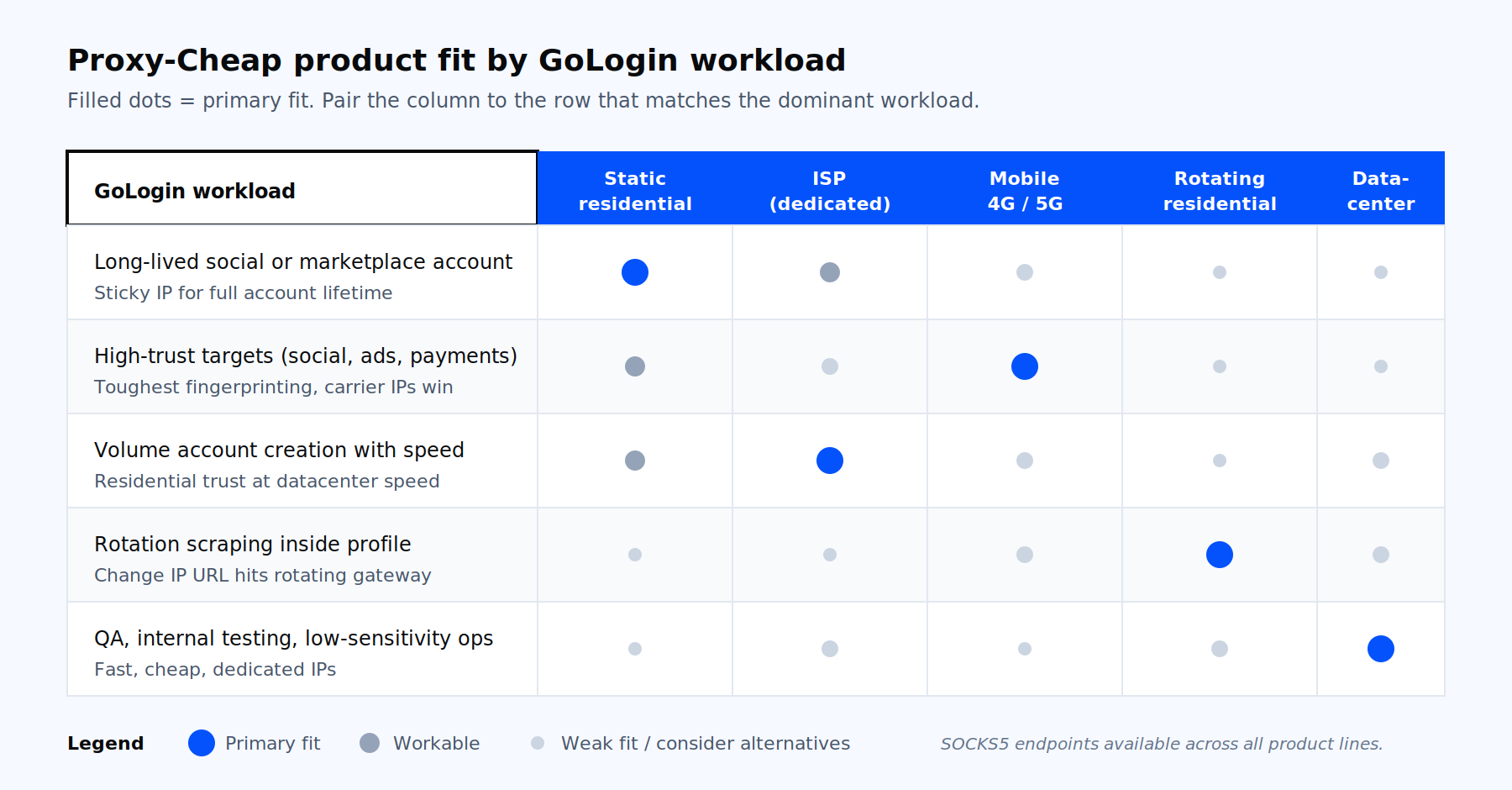
Which Proxy-Cheap product fits which GoLogin workload.
A short way to think about it: account management workloads pin one residential or ISP IP per profile and never rotate. Scraping workloads attach a rotating gateway as the proxy hostname and let it rotate per request. Pick the product that matches the dominant pattern of your work, then mix in others where specific profiles need a different trust tier.
For agency-style teams, the same setup underwrites our social media management proxy stack, where you can spin up a country-matched profile in under a minute. Open a Proxy-Cheap account, generate your first endpoint, paste the credentials into the GoLogin proxy fields, and your next profile is ready in the next ten minutes.