aiohttp proxy: HTTP, HTTPS, SOCKS5, and rotation in Python
Key takeaways
aiohttp is the most widely used async HTTP client in Python. It powers crawlers, API gateways, and high-throughput scrapers that need to fan out thousands of concurrent requests on a single event loop. As soon as your crawler hits real targets, a proxy stops being optional: rate limits, geographic differences, and infrastructure isolation all require routing traffic through external IPs. This guide covers every proxy configuration aiohttp supports in the current 3.13.x stable release, the practical workarounds for the rough edges, and the production patterns that the typical Stack Overflow answer skips. Every snippet was tested against aiohttp==3.13.5 and aiohttp-socks==0.11.0 on Python 3.12.
What aiohttp's proxy support actually covers
The current stable release supports four transport scenarios cleanly, plus one with caveats. The matrix below summarises what the library handles natively versus what needs the third-party aiohttp-socks package.
| Proxy type | HTTP target | HTTPS target |
|---|---|---|
| HTTP proxy | Native | Native via CONNECT |
| HTTPS proxy (TLS to the proxy) | Native | Limited; needs workaround |
| SOCKS4 / SOCKS5 / SOCKS5h | Via aiohttp-socks | Via aiohttp-socks |
| HTTP CONNECT as a Connector | Via aiohttp-socks | Via aiohttp-socks |
Two things to internalise from this table. First, an http:// proxy URL can still tunnel an https:// target: aiohttp issues an HTTP CONNECT and then performs TLS end to end with the target site. Second, a fully TLS-encrypted hop to the proxy (an https:// proxy URL) is a different scenario. asyncio's default transport disables TLS-in-TLS, which is why aiohttp prints a runtime warning when it detects that pattern. The fix is covered later in this article.
Install aiohttp and aiohttp-socks
aiohttp itself ships no SOCKS extras, so if you need anything beyond HTTP or HTTPS proxies you install both packages.
pip install "aiohttp==3.13.5" "aiohttp-socks==0.11.0"
Pinning versions matters for two reasons. aiohttp 3.8 introduced WebSocket proxy env vars (WS_PROXY, WSS_PROXY) and TLS-in-TLS code, and aiohttp 3.9 added BasicAuth support to .netrc. aiohttp-socks 0.11 patched a connector exception-swallowing bug present in older releases. Verify the installation with:
python -c "import aiohttp, aiohttp_socks; print(aiohttp.__version__, aiohttp_socks.__version__)"
You should see 3.13.5 0.11.0 printed back.
Quickstart: a single request through an HTTP proxy
The minimal working example uses one keyword argument on the call site. No extra connector, no configuration object.
import asyncio
import aiohttp
async def main():
async with aiohttp.ClientSession() as session:
async with session.get(
"https://httpbin.org/ip",
proxy="http://203.0.113.45:8080",
) as resp:
print(resp.status, await resp.json())
asyncio.run(main())
aiohttp opens a TCP socket to 203.0.113.45:8080, sends a CONNECT httpbin.org:443 line because the target is HTTPS, then performs a normal TLS handshake with httpbin.org once the proxy returns 200 Connection Established. The httpbin.org/ip endpoint will echo the proxy's exit IP back in the JSON body, which is the easiest way to confirm the configuration is wired correctly.
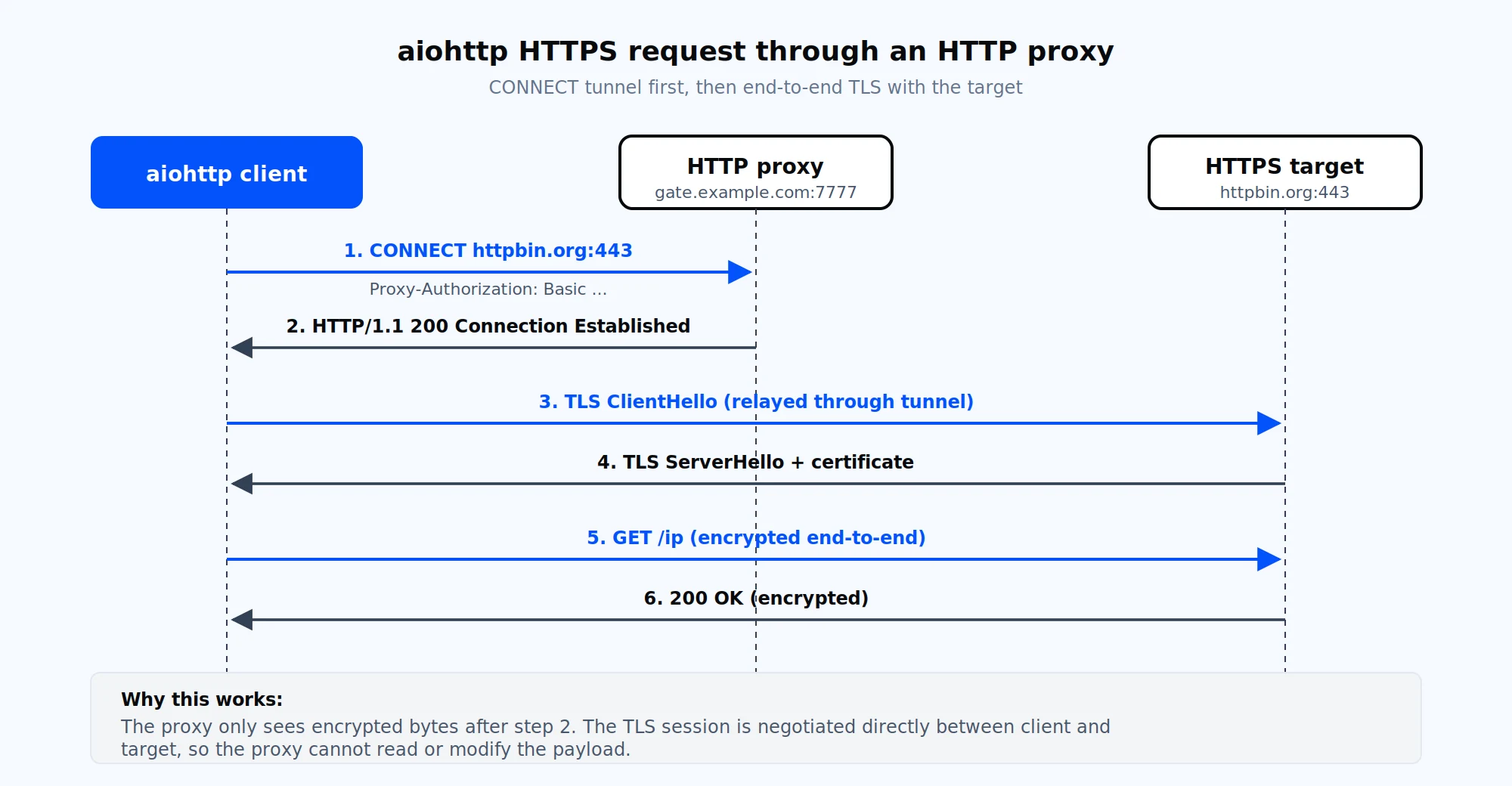
How aiohttp routes an HTTPS request through an http:// proxy: the CONNECT verb establishes a tunnel, then TLS is negotiated end to end with the target.
Authenticating to a proxy with aiohttp.BasicAuth
Almost every paid proxy requires credentials. aiohttp gives you three ways to provide them, all of which produce the same outcome on the wire.
import aiohttp
# 1. URL-embedded credentials. Special characters must be percent-encoded.
proxy = "http://user:p%[email protected]:7777"
# 2. BasicAuth object. Preferred when the password contains special characters.
auth = aiohttp.BasicAuth("user", "p@ssword")
async with aiohttp.ClientSession() as session:
async with session.get(
"https://httpbin.org/ip",
proxy="http://gate.example.com:7777",
proxy_auth=auth,
) as resp:
print(await resp.json())
The third option is environment variables. Set trust_env=True on ClientSession, then export HTTP_PROXY and HTTPS_PROXY (the library reads both lowercase and uppercase names) and optionally a ~/.netrc entry. Credentials in .netrc work for both proxy authentication and HTTP basic auth on the target since aiohttp 3.9. Avoid the legacy proxy_auth=("user", "pass") tuple form that older Stack Overflow answers suggest; aiohttp expects a BasicAuth instance.
Session-level versus per-request proxies
If every request in a session uses the same proxy, declare it on the session constructor and let the per-request calls inherit it.
async with aiohttp.ClientSession(
proxy="http://gate.example.com:7777",
proxy_auth=aiohttp.BasicAuth("user", "pass"),
) as session:
async with session.get("https://httpbin.org/ip") as resp:
print(await resp.json())
If a single session needs to talk through many proxies (the common scraping pattern), keep the session shared and pass a different proxy= to each call. A per-call value always overrides the session default. The internal connection pool keys connections by the tuple (host, port, is_ssl, proxy, proxy_auth), so connections through different proxies are kept separate and do not interfere with each other.
HTTPS proxies, TLS in TLS, and the asyncio gap
When the proxy URL itself starts with https://, the first hop from your client to the proxy must be TLS-encrypted, and a TLS-encrypted target adds a second TLS layer on top of it. asyncio's default _SSLProtocolTransport disables this, so aiohttp prints:
An HTTPS request is being sent through an HTTPS proxy. This support for TLS in TLS is known to be disabled in the stdlib asyncio.
You have three options, in order of preference:
import asyncio
setattr(
asyncio.sslproto._SSLProtocolTransport,
"_start_tls_compatible",
True,
)
import ssl, certifi
ctx = ssl.create_default_context(cafile=certifi.where())
connector = aiohttp.TCPConnector(ssl=ctx)
One final gotcha: aiohttp 3.8.x can emit the TLS-in-TLS warning even when you are using a plain http:// proxy, because the start_tls() code path is touched during pool setup. The warning is harmless in that scenario and can be filtered with warnings.filterwarnings("ignore", message=".*TLS in TLS.*").
Using SOCKS5 proxies with aiohttp-socks
aiohttp does not understand socks5:// URLs. Passing one to proxy= raises AssertionError: Only http proxies are supported. The maintained replacement is the aiohttp-socks package, which exposes a custom connector that speaks SOCKS4, SOCKS5, SOCKS5h, and HTTP CONNECT. For a deeper comparison of the two protocols at the network layer, see SOCKS versus HTTP proxy.
import aiohttp
from aiohttp_socks import ProxyConnector
connector = ProxyConnector.from_url(
"socks5://user:[email protected]:1080",
rdns=True, # resolve DNS at the proxy (SOCKS5h behaviour)
)
async with aiohttp.ClientSession(connector=connector) as session:
async with session.get("https://httpbin.org/ip") as resp:
print(await resp.json())
rdns=True matters when the proxy sits in a different geography than your client: DNS is resolved at the proxy so the target sees a resolution from the exit IP's location, not your machine's resolver. For chained proxies, use ChainProxyConnector.from_urls([...]) to stack two or more hops in a single connector. Mobile, residential, and ISP networks all expose SOCKS5 proxies, and the same connector code works against any of them.
One important behavioural difference: when a session uses a ProxyConnector, the connector itself is pinned to one upstream proxy. To rotate SOCKS5 proxies per request, create one session per proxy or rebuild the connector. The HTTP-proxy path is more flexible because per-request proxy= keeps the pool keyed correctly.
Rotating proxies and sticky sessions
Rotation has two interpretations. Per-request rotation picks a new exit IP for every HTTP call, which is useful for fan-out crawls where each request hits a different page. Sticky sessions hold a single exit IP for a configurable interval so a multi-step login flow or shopping-cart checkout stays on one identity. For a primer on the concept itself, see what IP rotation is and the deeper comparison in static vs rotating proxies.
The simplest per-request rotation reads from a list and tracks per-proxy failures so unhealthy IPs drop out of the pool.
import asyncio, random, aiohttp
from collections import defaultdict
PROXIES = [
"http://user:[email protected]:7777",
"http://user:[email protected]:7777",
"http://user:[email protected]:7777",
]
failures = defaultdict(int)
MAX_FAIL = 3
def pick_proxy():
healthy = [p for p in PROXIES if failures[p] < MAX_FAIL]
return random.choice(healthy or PROXIES)
async def fetch(session, url, sem):
async with sem:
proxy = pick_proxy()
try:
async with session.get(url, proxy=proxy, timeout=aiohttp.ClientTimeout(total=15)) as resp:
return await resp.text()
except (aiohttp.ClientProxyConnectionError, aiohttp.ClientConnectorError, asyncio.TimeoutError):
failures[proxy] += 1
return None
async def main(urls):
connector = aiohttp.TCPConnector(limit=100, limit_per_host=10)
sem = asyncio.Semaphore(50)
async with aiohttp.ClientSession(connector=connector) as session:
return await asyncio.gather(*(fetch(session, u, sem) for u in urls))
For sticky sessions, gateway-style proxies expose a session token in the username field. Rotating residential proxies at Proxy-Cheap give each generated credential a fixed exit IP for around 30 minutes when you select the Session IP mode in the dashboard. The aiohttp configuration does not change; you simply use the credentials the dashboard generates and hold them for the duration you need. A longer write-up of the same pattern across the requests library and aiohttp lives in how to rotate proxies in Python.
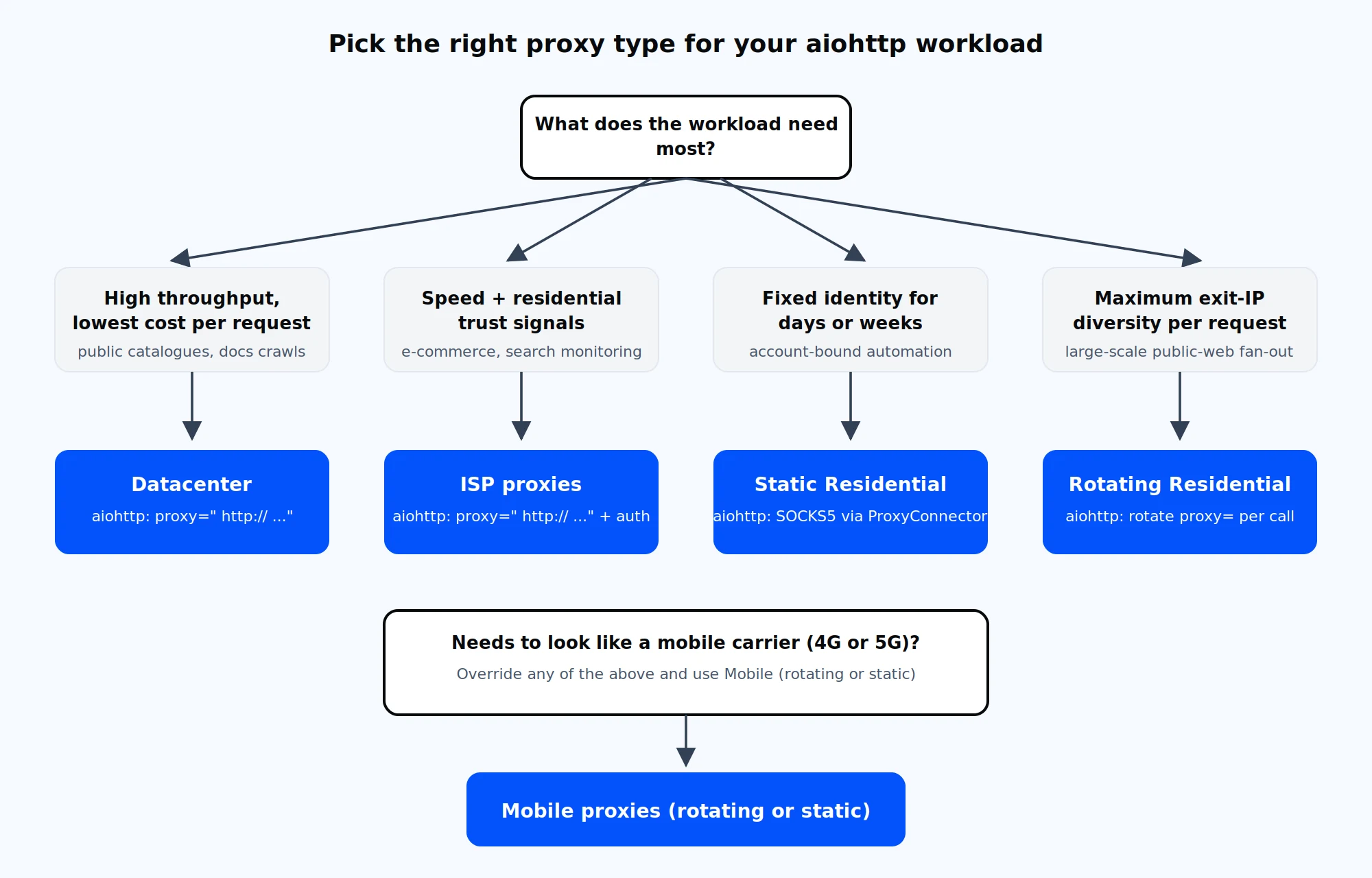
Decision tree for picking a proxy type based on the workload aiohttp is driving.
Tuning the connection pool and timeouts
A common failure mode under high concurrency is connection exhaustion. The default TCPConnector(limit=100, limit_per_host=0) allows 100 concurrent connections in total and unlimited per host, which sounds generous until you realise that limit_per_host is keyed on the proxy host when a proxy is in use. If 50 concurrent requests share one gateway proxy, all 50 connections count against the same host bucket.
connector = aiohttp.TCPConnector(
limit=200, # total connections in the pool
limit_per_host=20, # per (host, port) pair, including the proxy
ttl_dns_cache=300, # cache DNS for 5 minutes
enable_cleanup_closed=True,
)
timeout = aiohttp.ClientTimeout(
total=30,
connect=10,
sock_read=20,
)
async with aiohttp.ClientSession(connector=connector, timeout=timeout) as session:
...
Three guidelines for sizing the pool:
Common aiohttp proxy errors and how to fix them
The error messages aiohttp emits during proxy work are specific. Match the message against the table below and skip the generic stack-overflow advice.
| Error | Most common cause | Fix |
|---|---|---|
| ClientProxyConnectionError | Proxy host unreachable, port closed, or firewall prevents egress | Verify with curl -x http://user:pass@host:port https://httpbin.org/ip. If curl works and aiohttp does not, check trust_env and the proxy URL scheme. |
| ClientHttpProxyError: 407 | Missing or invalid proxy_auth | Pass aiohttp.BasicAuth(user, pass). aiohttp does not retry CONNECT with credentials on a 407. |
| ClientConnectorCertificateError | Custom SSLContext does not trust the proxy or target chain | Build the context with cafile=certifi.where() and confirm system CAs include the relevant roots. |
| ServerTimeoutError | Proxy or target slow to respond under load | Tune ClientTimeout(connect=, sock_read=) and add exponential backoff with jitter. |
| ClientConnectionError: Cannot initialize a TLS-in-TLS connection | https:// proxy URL plus HTTPS target on Python < 3.11 | Switch to http:// proxy URL, upgrade Python, or apply the monkey-patch from the HTTPS proxy section. |
| RuntimeError: Event loop is closed after a proxy call on Windows | ProactorEventLoop teardown ordering | asyncio.set_event_loop_policy(asyncio.WindowsSelectorEventLoopPolicy()) before asyncio.run(). |
A defensive retry wrapper handles the transient failures without blowing up your event loop:
import asyncio, random, aiohttp
async def fetch_with_retry(session, url, proxy, retries=3, base=0.5):
for attempt in range(retries + 1):
try:
async with session.get(url, proxy=proxy, timeout=aiohttp.ClientTimeout(total=20)) as resp:
if resp.status == 429:
raise aiohttp.ClientResponseError(resp.request_info, resp.history, status=429)
resp.raise_for_status()
return await resp.text()
except (
aiohttp.ClientProxyConnectionError,
aiohttp.ClientConnectorError,
aiohttp.ServerTimeoutError,
aiohttp.ClientResponseError,
asyncio.TimeoutError,
) as exc:
if attempt == retries:
raise
await asyncio.sleep(base * (2 ** attempt) + random.uniform(0, base))
The exponential backoff with jitter is essential: synchronised retries from many coroutines create thundering-herd patterns against the proxy that look like a self-inflicted denial-of-service.
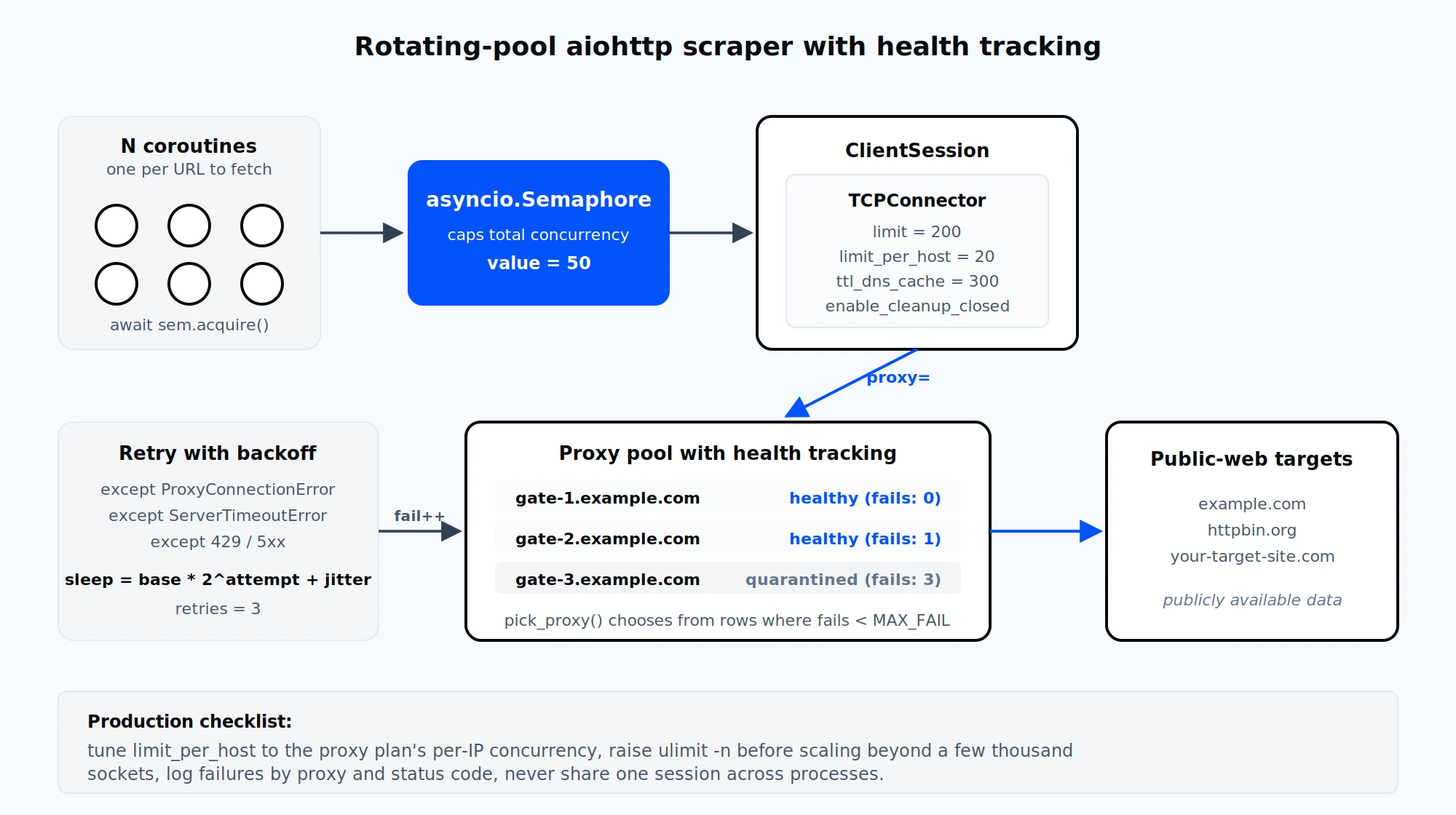
A production-ready aiohttp scraper combines a semaphore, a tuned TCPConnector, per-proxy health tracking, and retry with backoff.
Picking the right proxy type for your aiohttp workload
The choice of proxy product matters more than the aiohttp configuration once the basics are in place. A high-throughput crawl of a public catalogue does not need the same IP type as a checkout automation that has to maintain a session for fifteen minutes. The decision matrix below maps typical aiohttp use cases to the Proxy-Cheap product line that fits each one.
| Use case | Recommended type | Why |
|---|---|---|
| High-throughput documentation or public-catalogue crawl | Datacenter proxies | High bandwidth per IP, lowest cost per request, ideal for proxy for web scraping workloads where authenticity is secondary. |
| Account-bound automation needing a fixed identity for days or weeks | Static residential proxies | Fixed IPs sourced from real residential ISP allocations; long-lived session quality. |
| Speed plus residential trust | ISP proxies | Datacenter speed with residential trust signals; suited to e-commerce monitoring at scale. |
| Large per-request fan-out with maximum exit-IP diversity | Rotating residential | Pay-as-you-go GB billing; built-in per-request rotation, no rotation logic on the client. |
| Workloads that require mobile-network identity | Mobile proxies | Real 4G and 5G IPs from carrier ranges. |
A reasonable default for a new aiohttp scraper is to start on datacenter or ISP for cost reasons, profile success rates against your real targets, then upgrade to rotating residential or mobile only on the routes where success rates fall below your threshold. The dashboard issues credentials and per-credential endpoints for each product; copy the host, port, username, and password from the Setup Credentials panel and drop them into the snippets above. As the company name suggests, Proxy-Cheap delivers premium quality at an affordable price across every product line, with pay-as-you-go billing, no setup costs, and the option to cancel anytime; start with the ISP proxies tier if you want a balance of speed and trust signals for an aiohttp project.