وكيل رخيص
التكاملات
How to set up a ParseHub proxy: full step-by-step guide

ParseHub Proxy Integration

Learn how to set up a ParseHub proxy step by step: turn on IP rotation, add custom residential proxies in project settings, and route runs through Proxy-Cheap.
احصل على بروكسيات لـ How to set up a ParseHub proxy: full step-by-step guide
How to set up a ParseHub proxy: full step-by-step guide
What is ParseHub?
ParseHub is a visual, no-code web scraper that turns websites into structured data by recording clicks in a built-in browser, then running the project on ParseHub's own cloud servers. It handles JavaScript-heavy pages, pagination, and infinite scroll without writing code. Custom proxies and IP rotation are paid-plan features, and pairing ParseHub with a Proxy-Cheap residential or datacenter IP gives you control over location, pool size, and rotation.

Key takeaways

  • ParseHub is a visual, no-code web scraper. Custom proxies and IP rotation are paid-plan features set per project, not part of the free plan.
  • To add a proxy, open your project Settings, turn on the IP rotation option, paste your proxy as username:password@host:port in the Custom Proxy box, then save and test it.
  • For automatic rotation, paste one Proxy-Cheap rotating residential gateway line. For static IPs, paste several lines and ParseHub picks one per run.
  • Match the product to the job: rotating residential for geo-specific and high-volume scraping, static residential or ISP for account-bound runs, datacenter for high-throughput public pages.

ParseHub runs your scraping projects on its own cloud servers, so the IP that reaches the target site is the one you set in the project. Adding your own proxy gives you control over location, rotation, and pool quality. This guide covers what ParseHub is, why a proxy helps, and the exact steps to connect Proxy-Cheap proxies, rotate them, and fix the errors people hit most.

What is ParseHub?

ParseHub is a visual web scraper that turns websites into structured data without code. You click the elements you want in a built-in browser, and ParseHub records the pattern, then repeats it across pages. It ships as a desktop app for Windows, macOS, and Linux, and it runs finished projects on ParseHub's cloud.

Because it drives a real browser, ParseHub renders JavaScript and handles AJAX, infinite scroll, dropdowns, pagination, and basic login steps. That makes it a fit for dynamic sites that a plain HTTP request cannot read. You build a project once, then export the results as JSON, CSV, or Excel, or pull them through the REST API on paid plans.

The tool sits in the no-code scraping category, aimed at analysts, marketers, and developers who want data without maintaining a scraping codebase. You design the project locally, then let ParseHub execute the run and store the result in the cloud.

What is ParseHub used for?

ParseHub is used wherever someone needs web data but does not want to write and maintain a scraper. The common jobs:

  • E-commerce price and stock monitoring across large product catalogs.
  • Market and competitive research at scale, including reviews and ratings.
  • Lead lists pulled from directories, listings, and public profiles.
  • Real estate, travel, and job aggregation from search and listing pages.
  • SEO and brand tracking, including public search results and localized pages.
  • One-off data pulls for analysts, journalists, and researchers.

The thread that ties these together is structured output from messy pages. Most of these jobs also need a proxy once you move past a handful of pages, which is the next section.

Key features of ParseHub

The features that matter for real scraping work:

  • Point-and-click selection in a built-in browser, with relative select for nested fields.
  • JavaScript rendering for dynamic, single-page, and AJAX-heavy sites.
  • Navigation controls for pagination, infinite scroll, hovers, dropdowns, and forms.
  • Conditional logic and templates for multi-step crawls.
  • Scheduled cloud runs on paid plans, so projects refresh on a timer.
  • Exports to JSON, CSV, and Excel, plus delivery to Google Sheets, Dropbox, and Amazon S3.
  • REST API to start runs and fetch data programmatically.
  • IP rotation and custom proxy support on paid plans, which is the focus of this guide.

Is ParseHub free to use?

ParseHub has a free plan, with limits. The free tier covers up to 200 pages per run, a small number of public projects, shorter run windows, and limited data history. It does not include the API, scheduling, or any proxy features.

Custom proxies and IP rotation live on the paid plans. So to route ParseHub through your own residential or datacenter proxies, you need a paid subscription, and you need custom proxies enabled on your account. ParseHub turns the feature on per account, so you contact its support team once and they switch it on. For current page-per-run limits and prices on each tier, check ParseHub's pricing page, since the numbers change.

Why you need a proxy with ParseHub

ParseHub includes its own pool of IPs, but that pool covers a limited set of locations and is shared across users. Bringing your own proxy gives you a larger pool, country-level choice, and residential IPs that match real user networks. For a wider view of what to look for, the best proxies for web scraping guide compares the main options.

Three concrete reasons to put a proxy in front of every serious ParseHub run:
  1. Reliable connectivity and stable sessions. Many sites throttle or rate-limit repeated requests from a single IP. A residential proxy network spreads requests across many IPs, which keeps run success rates steady on long jobs.
  2. Accurate geo-specific data. Prices, listings, and search results change by country and city. Routing through an IP in the target market is the only way to capture what a local user sees, which matters for pricing research, ad checks, and localization testing.
  3. Compliance with site terms and rate limits. Public-web data collection at scale should respect each site's rate limits and regional rules. Country and city targeting lets you stay inside those limits while still gathering the data you need.

How to set up a proxy with ParseHub

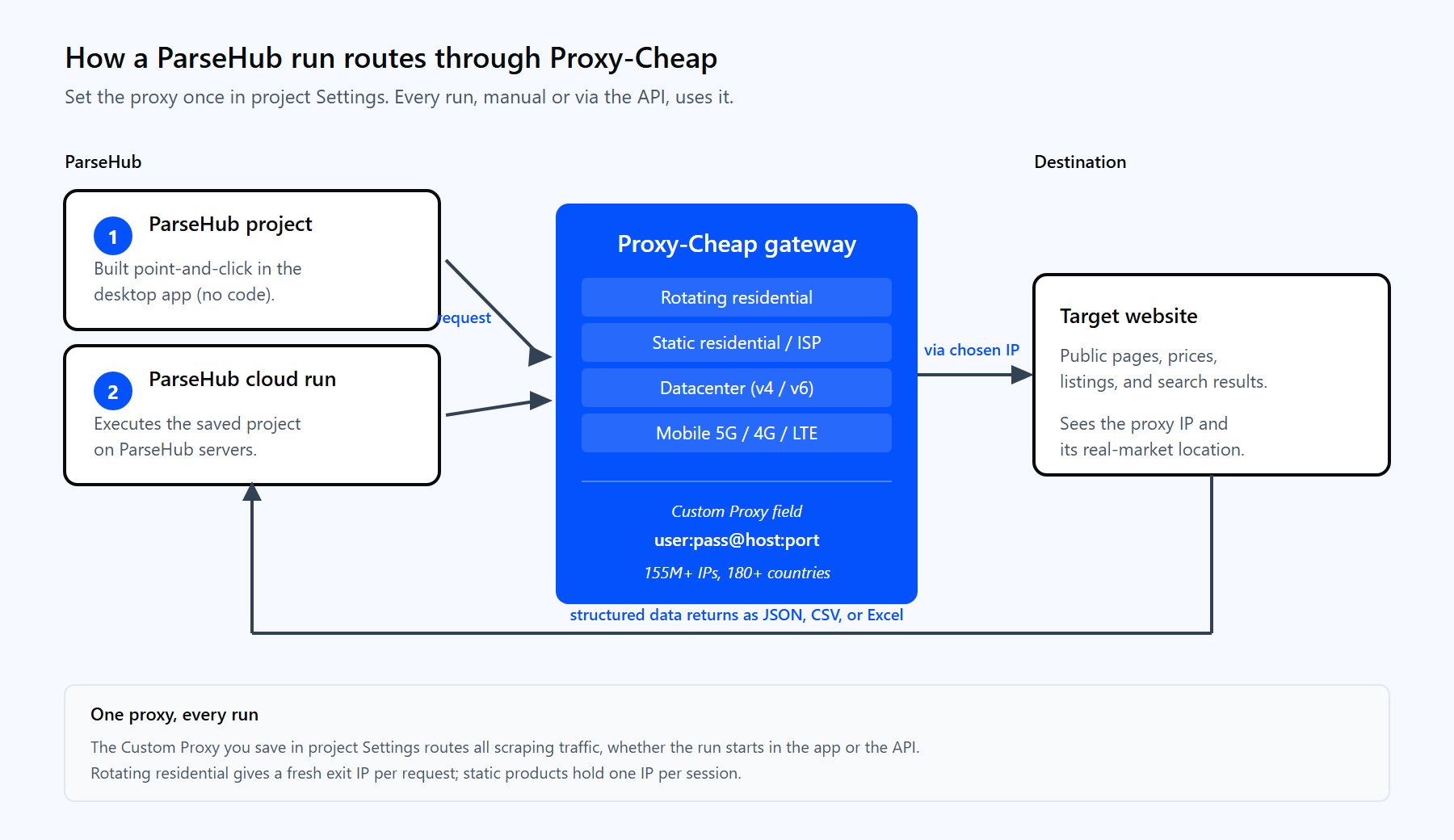
Diagram of a ParseHub project routing a run through the Proxy-Cheap gateway to a target site and returning structured JSON and CSV data to ParseHub.

One ParseHub run routes through the Proxy-Cheap gateway, fetches the target through a residential IP, and returns structured data.

ParseHub sets proxies per project, inside the project Settings. The control that turns on custom proxies is the IP rotation option. Follow these steps in order.

  1. Enable custom proxies on your account. Custom proxies are a paid-plan feature that ParseHub switches on per account. Ask the ParseHub support team to enable custom proxies for your account first.
  2. Generate your Proxy-Cheap credentials. In your Proxy-Cheap dashboard, open the Setup Credentials panel in the dashboard and copy the host, port, username, and password for your product. Rotating residential uses a shared gateway, while static products give you a unique IP and port.
  3. Open the project Settings. In ParseHub, open the project you want to proxy and go to its Settings.
  4. Turn on IP rotation. Tick the Rotate IP Address option. A Custom Proxy text box appears beneath it.
  5. Paste your proxy. ParseHub expects the format username:password@host:port. Paste a single Proxy-Cheap rotating residential gateway line, or one static proxy per line for a list.
  6. Save the settings. Click Save Settings so the project keeps the proxy on every run.
  7. Test the proxy. Point the project at a My IP style page, run it, and confirm the IP it reports matches your proxy. If it does, the proxy is live.

A rotating residential gateway in ParseHub's format looks like this:

<your-proxycheap-username>:<your-proxycheap-password>@thehub.proxy-cheap.com:8080

The rotating hub serves every country from the same address; you pick the country in the dashboard credential generator rather than by changing the host. If you authenticate by IP allowlist instead of a password, use the shorter host:port form. HTTP with username and password is the most compatible choice, because ParseHub and its browser handle HTTP proxy authentication cleanly.

Rotating proxies with ParseHub

You get IP rotation in two ways, depending on the Proxy-Cheap product you use.
  • Rotating residential, one line. Paste a single gateway line. The Proxy-Cheap gateway hands out a new exit IP for each request automatically, so one entry gives you rotation across a large pool. This is the simplest setup for high-volume scraping.
  • Static IPs, a list. Static residential, ISP, and datacenter products give you fixed IPs. Paste each one on its own line in the Custom Proxy box, and ParseHub picks one from the list for each run.

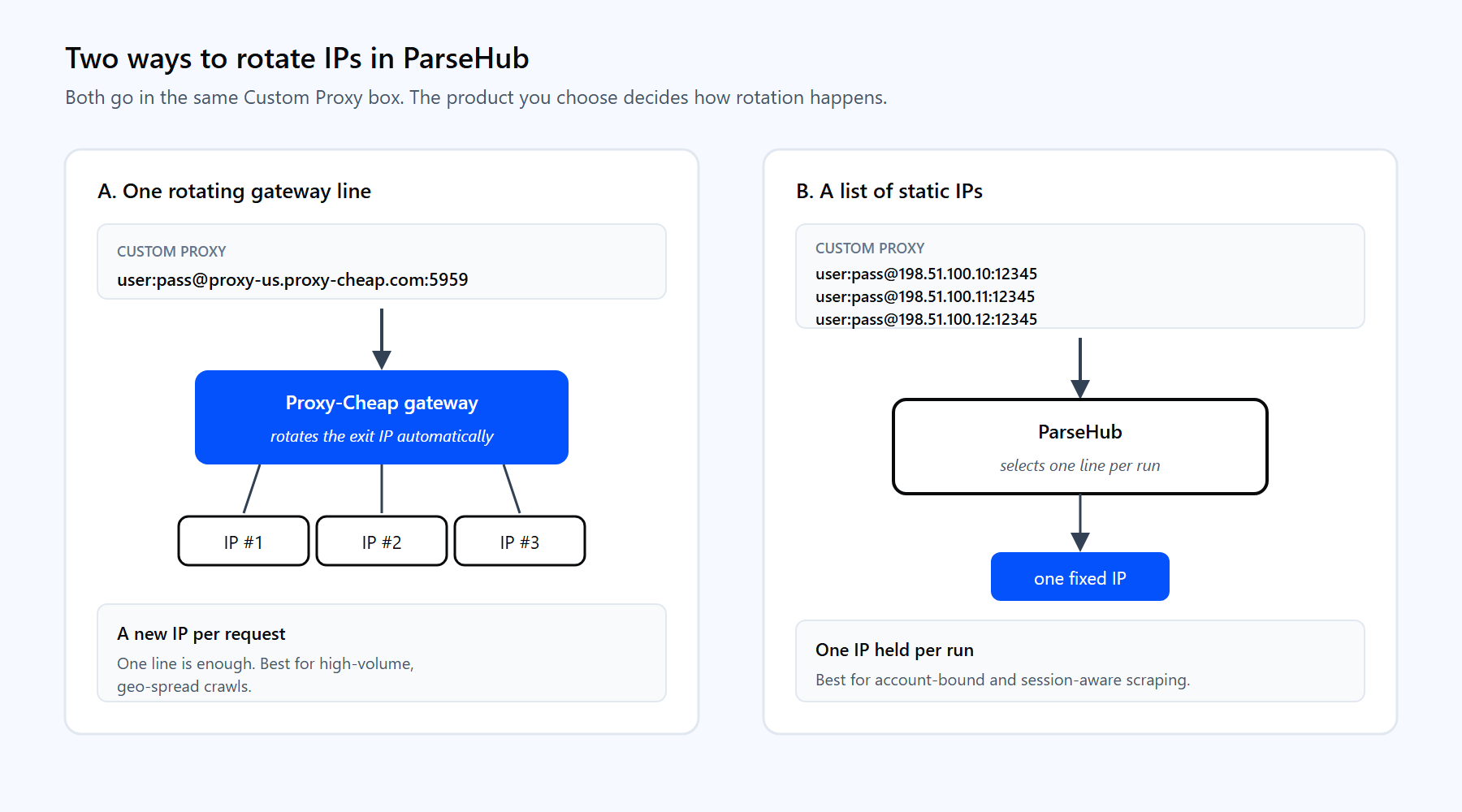
Two ParseHub IP rotation setups side by side: one rotating residential gateway line for automatic per-request rotation, or a list of static proxies ParseHub cycles through.

Use one rotating gateway line for automatic rotation, or paste several static proxies and let ParseHub pick one per run.

A list of static proxies looks like this, one proxy per line:

<your-proxycheap-username>:<your-proxycheap-password>@198.51.100.10:12345
<your-proxycheap-username>:<your-proxycheap-password>@198.51.100.11:12345
<your-proxycheap-username>:<your-proxycheap-password>@198.51.100.12:12345

Which approach fits depends on the job. Rotating residential is the default for large, geo-spread crawls where a fresh IP per request keeps success rates steady. Static residential or ISP is better when you need the same IP to persist across a session, such as account-bound scraping. For a deeper comparison, read static vs rotating proxies and the primer on how IP rotation works. When you mostly need consistent sessions, static residential (ISP) proxies hold one IP for the full run.

Run proxied ParseHub projects with the API

Once a project has a proxy saved in its Settings, every run uses that proxy, including runs you start through the API. The proxy lives with the project, not with the API call, so you configure it once and automate from there. The API is available on paid plans.

Start a run with a POST request:

curl "https://www.parsehub.com/api/v2/projects/{PROJECT_TOKEN}/run" \
  -X POST \
  -d api_key={YOUR_API_KEY} \
  -d start_url=https%3A%2F%2Fexample.com

Fetch the latest finished run as JSON or CSV:

curl --compressed -X GET \
  "https://www.parsehub.com/api/v2/projects/{PROJECT_TOKEN}/last_ready_run/data?api_key={YOUR_API_KEY}&format=json"

ParseHub gzip-encodes API responses, so --compressed lets curl decode them for you. Because the proxy is attached to the project, the data that comes back was gathered through your Proxy-Cheap IPs, with no proxy details in the request itself.

Common ParseHub proxy errors and how to fix them

Most proxy problems fall into a few buckets. Each has a quick fix.

  1. The Custom Proxy box never appears. Custom proxies are a paid-plan feature that ParseHub enables per account. If the box is missing after you tick Rotate IP Address, contact ParseHub support and ask them to switch custom proxies on.
  2. Authentication fails. The proxy string format is wrong. Use username:password@host:port exactly, with no extra spaces, and paste the credentials straight from your Proxy-Cheap dashboard.
  3. The run still shows your own IP. The proxy did not apply. Confirm you saved the settings, that IP rotation is ticked, and that you re-ran the project rather than viewing a cached run. Verify with a My IP test page.
  4. Some proxies in the list fail mid-run. One or more lines are dead or mistyped. Keep only working, responsive proxies in the list, since ParseHub selects from every line you enter.
  5. The geo data looks wrong. The exit IP is in the wrong country. Pick a Proxy-Cheap location that matches your target market, or use a rotating gateway scoped to that region.
  6. Runs are slow on heavy pages. Browser-rendered pages are heavy by nature. Use datacenter IPs for high-throughput public targets, and reserve residential IPs for pages that need a real consumer network.

Choosing the right Proxy-Cheap proxy for ParseHub

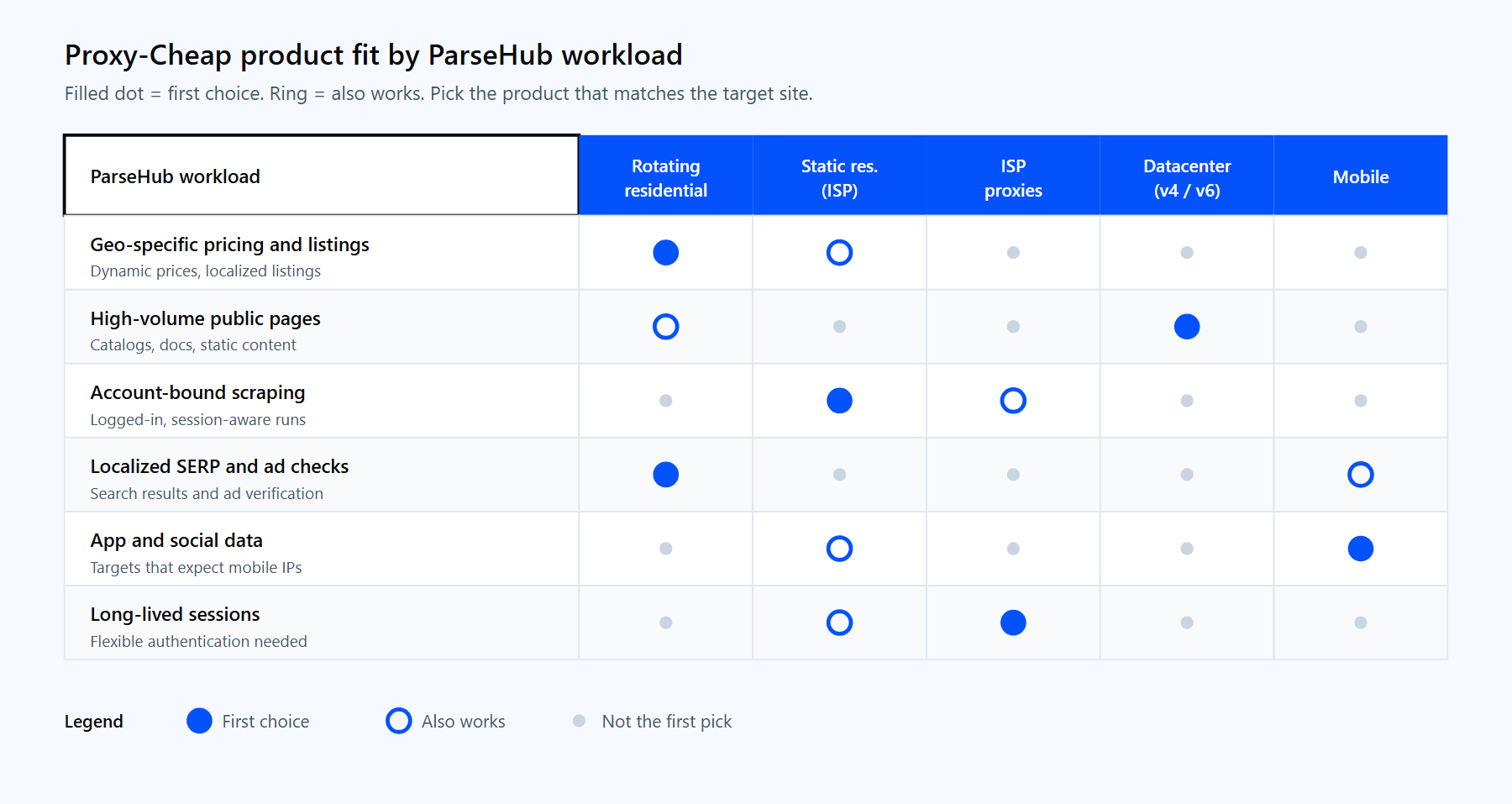
The right product depends on the shape of the target site, not the size of your budget. The table maps common ParseHub workloads to the Proxy-Cheap product that fits first, with a workable second choice.

ParseHub workloadFirst choiceAlso works
Geo-specific pricing and listingsRotating ResidentialStatic Residential (ISP)
High-volume public pagesDatacenterRotating Residential
Account-bound or session-aware scrapingStatic Residential (ISP)ISP proxies
Localized SERP and ad checksRotating ResidentialMobile
App and social data that expects mobile IPsMobileStatic Residential (ISP)
Long-lived sessions with flexible authISP proxiesStatic Residential (ISP)

Matrix matching ParseHub scraping workloads to Proxy-Cheap proxy types: rotating residential, static residential, ISP, datacenter, and mobile.

Match the Proxy-Cheap product to the shape of your ParseHub workload.

For high-throughput crawls of public catalogs and documentation, datacenter proxies deliver speed at a low per-IP price. For trusted, long-lived sessions, ISP proxies pair residential legitimacy with flexible authentication. If you are weighing the two networks, the datacenter vs residential proxies guide breaks down the tradeoffs.

Most ParseHub projects start well with rotating residential proxies: paste one gateway line, turn on IP rotation, and you get geo-accurate data on pay-as-you-go pricing with no monthly commitment. Add static residential or datacenter IPs as specific jobs call for them.


الأسئلة الشائعة

Yes, on paid plans. Open the project Settings, tick the IP rotation option, and paste your proxy as username:password@host:port in the Custom Proxy box. The free plan does not include custom proxies, and ParseHub enables the feature per account on request.

It depends on the target. Residential IPs fit consumer sites, geo-specific pricing, and pages that expect a real user network. Datacenter IPs fit high-volume crawls of public catalogs and documentation, where speed and a low per-IP price matter more than a consumer network.

Yes. You build projects by clicking elements in ParseHub's browser, and the tool records the pattern. Code only enters the picture if you use the REST API to start runs or pull data, and even then the scraping logic stays visual.

ParseHub's Custom Proxy field expects username:password@host:port for authenticated proxies, or host:port when you authenticate by IP allowlist. Enter one proxy per line to build a list that ParseHub rotates through.

Proxy-Cheap supports HTTP and SOCKS5 across its products. For ParseHub, HTTP with username and password is the most compatible choice, because the tool and its browser handle HTTP proxy authentication cleanly. Static products also support IP allowlist authentication.

You can paste as many as you need, one per line, and ParseHub selects one for each run. With a Proxy-Cheap rotating residential gateway you only need one line, because the gateway rotates the exit IP for you on every request.

No. Custom proxies and IP rotation are paid-plan features. The free plan covers a capped number of pages per run and a few public projects, but it has no proxy support, no scheduling, and no API access.

Collecting publicly available data is generally allowed, but you are responsible for each site's terms, local rules, and rate limits. Use country and city targeting to respect regional requirements, and keep request rates reasonable so your runs stay inside each site's limits.