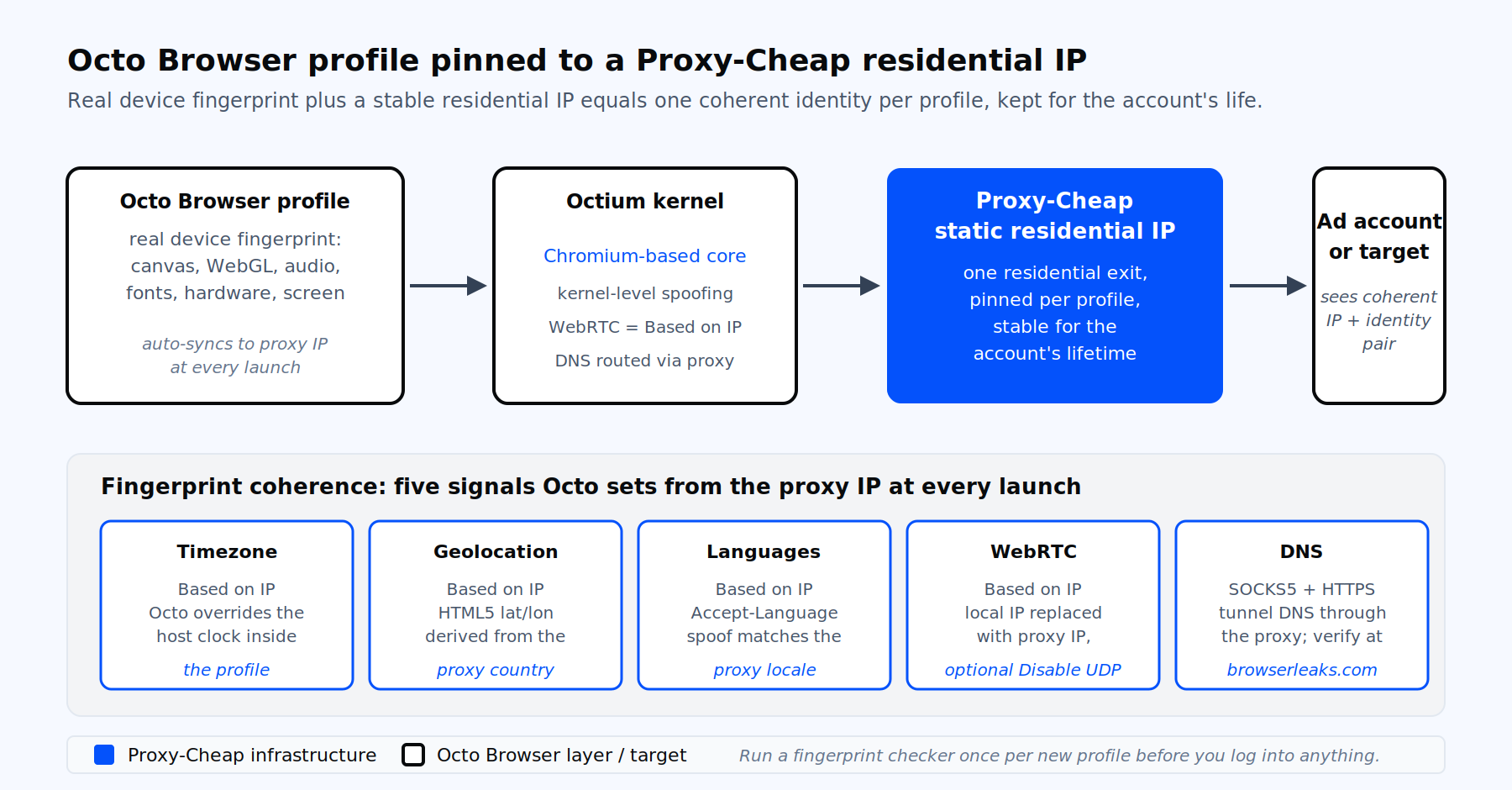
Per-profile pinning: one Octo Browser profile, one Proxy-Cheap IP, one identity. Octo Browser locks the fingerprint to the proxy’s geolocation at every launch.
Octo Browser is a paid antidetect browser built on a Chromium-based kernel with real device fingerprints sourced from production hardware. The fingerprint spoofing happens inside the kernel itself, not via an extension, which keeps the profile’s identity consistent across canvas, WebGL, audio context, WebRTC, fonts, and hardware signals.
The user base is concentrated in four workflows. Affiliate marketers and traffic arbitrage teams run dozens or hundreds of ad accounts on Facebook, Google Ads, and TikTok. E-commerce sellers and dropshippers manage stores across Amazon, eBay, Alibaba, and Shopify. Social media managers and digital agencies keep client accounts isolated. Crypto, ticketing, and bonus-hunting operators keep wallet, account, or registration identities separated.
All of these workflows share one rule: one profile equals one identity equals one IP, kept stable for the lifetime of the account. That rule shapes every step below.
Octo Browser ships 64-bit only. 32-bit Windows is not supported. The recommended baseline is 8 GB of RAM, a CPU released in 2011 or later, an SSD, and a dedicated GPU.
The 2026 supported operating systems are:
The Octo Browser installer may run on other versions, but only the list above is officially validated. The browser stores profile data in encrypted cloud storage, so the same workspace works across multiple devices on every plan.
Open the Octo Browser website, click Sign Up, enter an active email, set a password of at least 8 characters, and provide a Telegram handle for support. Confirm the activation link sent by email, then return to the site.
Plans as of 2026 (monthly, with annual discounts down to 30%):
| Tier | Price/month | Profiles | Team seats | API |
|---|---|---|---|---|
| Lite | €10 | 3 | 1 | No |
| Starter | €29 | 10 (up to 30) | 1 | No |
| Base | €79 | 100 (up to 200) | 1 | 50 RPM / 500 RPH |
| Team | €169 | 350 (up to 600) | 3 (up to 6) | 100 RPM / 1,500 RPH |
| Advanced | €329 | 1,200 (up to 100,000) | 8 (up to unlimited) | 200 RPM / 3,000 RPH |
Pick Base if you plan to automate with the API. Pick Team or Advanced if you share profiles with colleagues or outsourced operators, because team workspace permissions are available only at those tiers.
After signing up, download the installer for your OS from the official download page.
Windows. Run the installer as Administrator and accept the default path C:\Program Files\Octo Browser. Do not change the path; Octo requires the default folder for correct operation. The installer needs Microsoft Edge WebView2 Runtime and .NET Runtime. For unattended deployment across machines, run a silent install in PowerShell:
& '.\Octo_Browser_latest_win.exe' /qnmacOS. Open the downloaded DMG and drag the Octo Browser icon into the Applications folder. If macOS reports that the developer could not be verified, open Terminal and run:
xattr -rc /Applications/Octo\ Browser.app/Linux. Extract the tarball and run the AppImage. Both Intel and Apple Silicon Macs have dedicated builds; download the correct one.
On first launch, log in with your account. Octo will download the Octium kernel components. Wait for that download to finish before you start creating profiles. If your antivirus quarantines components, add the Octo Browser folder to its exclusion list, then re-trigger the component update from Account Settings → Additional.
Octo Browser does include a built-in Proxy Shop offering rotating residential IPs from third-party pools, sold by traffic volume. That is fine for ad-hoc tests. For production multi-account work, you want proxies you control: stable IPs you can pin to a profile for months, generated from a dashboard you can audit, with consistent ASN and geolocation.
That is where Proxy-Cheap fits. The endpoint format is predictable, the credentials are yours to rotate on your schedule, and you can move the same IP across team members without re-issuing through a marketplace. Use the Proxy-Cheap multi-account management use case page as a starting reference for which product class fits which platform.
Octo Browser supports four connection types: HTTP, HTTPS, SOCKS5, and SSH. IPv6 is supported via bracketed host syntax ([host]:port:login:password).
Inside the Octo Browser client, the left rail lists Profiles, Proxies, Templates, Tags, and Settings. On the Profiles screen, click Create Profile for a manual build. (The one-click Quick Profile option works for fast tests, but production accounts need a manual review of every field.)
Walk through the General Settings tab top to bottom:
Below General Settings, the fingerprint section exposes the user agent, operating system, OS version, screen resolution, fonts, languages, timezone, geolocation, and WebRTC. By default, languages, timezone, geolocation, and WebRTC are set to Based on IP. Leave them on that setting. Octo will detect the proxy’s external IP at every launch and adjust the four signals to match.
Hardware Settings (Windows and macOS only) cover CPU cores, RAM size, GPU renderer, and noise toggles for WebGL, Canvas, Audio, and Client Rects. The defaults are calibrated to look like a real device. Edit only when you have a specific reason.
This is the section most operators rush. Do not.
After launch, verify the result on a fingerprint checker like Pixelscan, BrowserLeaks, Whoer, or CreepJS. Confirm no DNS leak, no WebRTC IP leak, and that the Accept-Language header matches the proxy country.
For team workspaces, build the proxy library once and attach by reference rather than re-pasting credentials into every profile.
Open the Proxies section in the left rail and click Bulk Add. The accepted format covers four equivalent variants. Paste one entry per line:
http://login:[email protected]:8000
http://login:password:198.51.100.11:8000
http://198.51.100.12:8000:login:password
socks5://login:[email protected]:1080IPv6 hosts use bracketed syntax:
http://login:password@[2001:db8::1]:8000Add a name prefix if you want, then save. Each saved proxy now lives in the Proxy Manager with columns for proxy title, the number of profiles using it, protocol, host and port, login, password, country, timezone, and live status. To attach a saved proxy to a new profile, open the profile editor, click the Proxy field, and pick from the Proxy Manager list. No re-typing of credentials, no leaked passwords to operators who only need launch access.
A profile fails platform detection when the IP signals and the browser signals disagree. Octo Browser handles the heavy lifting, but you still need to verify four things on every profile.
Timezone must match the proxy country. Octo sets this from the external IP automatically. If your Windows or macOS clock is in a different country, that is fine; Octo overrides it inside the profile. Do not switch the Timezone field to "Real".
WebRTC must not leak. Leave WebRTC on Based on IP. Octo replaces the local IP with the proxy’s external IP at the WebRTC layer. The optional "Disable UDP" toggle adds a second guard for properties that probe via UDP.
DNS must resolve through the proxy. For SOCKS5 and HTTP(S), Octo routes DNS through the proxy by default. Leave the DNS field in Additional Settings empty unless your proxy provider gives you a specific resolver.
Accept-Language must match the proxy country. Octo derives this from the Languages spoof, which is itself auto-set from the proxy IP. A US static residential IP yields en-US; a German IP yields de-DE. Do not hand-edit the Languages field unless you are deliberately running an English-language account from a non-English IP and you accept the inconsistency.
Run every new profile through a checker once before you log in. Five minutes here saves a week of account recovery later.
Two patterns cover almost every Octo Browser workflow.
Pin one IP per profile. This is the default for ad accounts, social media accounts, marketplaces, and any logged-in identity. Use static residential or ISP IPs and keep them assigned for the account’s lifetime. Never swap the IP on a warm account; platforms read that as a takeover attempt.
Rotate per session for scraping workloads. If you are using Octo Browser for QA testing or for collecting publicly available content across many geographies, paste a rotating gateway hostname into the Proxy field. Each profile launch gets a fresh exit IP from the pool. For a deeper comparison of pinned versus rotating workflows, the Proxy-Cheap explainer on static versus rotating proxies is the right next read.
One hard rule: never rotate IP mid-session on a logged-in account.
Octo Browser’s team workspace (available on Team and Advanced) replaces named roles with a per-resource permissions matrix. The master account owner invites team members from Settings → Team → Invite and toggles access rights per member.
For each member, grant or deny:
Two practical recommendations. First, set a per-profile password on every account-handling profile. Operators can launch the profile without seeing the password, which keeps credentials out of the workspace. Second, deny the "Passwords" permission to outsourced operators. They can run the profile, log into the target site (since cookies persist), and stop the profile, without ever seeing the underlying account password.
The shared Proxy Manager works the same way: assign tags to proxies, grant tag access per member, and operators get the IPs they need without the full library. The Proxy-Cheap social media management use case page lays out the typical agency setup at scale.
Empty profiles look suspicious. Cookie Robot, included on every Octo Browser plan, opens a list of sites in headless mode and collects cookies and tracking pixels before you log in.
Select a profile, click the three-dot menu, choose Cookie Robot, paste 20 to 50 URLs relevant to the persona (news sites, e-commerce stores, social networks, search engines for the target country), and click Confirm. The robot opens links in parallel, skips invalid ones, and writes the cookies into the profile. Inspect collected cookies at chrome://settings/content/all inside the profile.
Cookie Robot cannot be triggered through the public API. For API-driven warming, drive a launched profile with Puppeteer, Playwright, or Selenium.
The Octo Browser REST API has a base URL of https://app.octobrowser.net/api/v2/. Authentication uses a per-account token in the X-Octo-Api-Token header, available from Account Settings → Additional on the master account only. API access starts at the Base tier with 50 requests per minute.
A minimal example: create a profile, attach a Proxy-Cheap proxy, and launch it for automation. The launch response returns a ws_endpoint you can hand to Puppeteer or Playwright.
import requests

API = "https://app.octobrowser.net/api/v2"
HEADERS = {"X-Octo-Api-Token": "YOUR_OCTO_TOKEN", "Content-Type": "application/json"}

payload = {
    "title": "fb-ads-us-001",
    "fingerprint": {"os": "win", "os_version": "11"},
    "proxy": {
        "type": "socks5",
        "host": "residential.example-pc.net",
        "port": 9000,
        "login": "pc_user",
        "password": "pc_pass"
    },
    "tags": ["facebook", "us", "operator_a"]
}

created = requests.post(f"{API}/automation/profiles", json=payload, headers=HEADERS).json()
profile_uuid = created["data"]["uuid"]

launched = requests.post(
    f"http://localhost:58888/api/profiles/start",
    json={"uuid": profile_uuid, "debug_port": True},
    headers=HEADERS
).json()

print("WebSocket endpoint:", launched["ws_endpoint"])The local API on http://localhost:58888 controls running profiles on the same machine. Pair it with Playwright’s connectOverCDP, Puppeteer’s connect, or Selenium’s WebDriver for full automation. For background on how rotation logic affects API-driven workloads, see the Proxy-Cheap guide to IP rotation.
"Failed to get proxy data" or "Proxy connection failed". Test the proxy outside Octo first with curl: curl -x socks5h://host:port -U login:password https://app.octobrowser.net/api/v3/health. Confirm the protocol matches. In Account Settings → Additional, set Client server to Auto. Check that the proxy is paid, active, and that no IP allowlist is excluding your location.
Proxy shows "Unavailable" after working previously. A sticky session expired or rotated. Close the profile before changing the proxy. Re-generate the endpoint in your dashboard and update the profile.
Profile launches in default browser but not in Octo. Almost always a credentials format issue. Paste the proxy line into the Octo paste field, which forces the parser. Confirm SOCKS5 versus HTTP. Reset the password in the provider dashboard, since some endpoints re-issue credentials when the geo changes.
DNS leak detected on a fingerprint checker. Leave the DNS field in profile Additional Settings empty. Avoid proxy endpoints with remote DNS limits. SSH proxies ignore custom DNS, which is expected.
Timezone or Accept-Language mismatch. Confirm Languages, Timezone, Geolocation, and WebRTC are all set to Based on IP. Do not revert any of them to "Real".
Slow startup on residential proxies. Pick a proxy region closer to your machine, switch to ISP for lower latency, or run profiles in smaller parallel batches. Disable any VPN stacked on top of the proxy.
macOS "developer could not be verified". Run xattr -rc /Applications/Octo\ Browser.app/ once.
Windows "Component not found" or repeated install failure. Verify Edge WebView2 and .NET Runtime are installed, and add the Octo Browser folder to antivirus exclusions.
The five Proxy-Cheap product lines map cleanly onto the five most common Octo Browser workloads. Pick by workload first, then by budget.
| Octo Browser workload | Primary fit | Secondary fit | Why |
|---|---|---|---|
| Affiliate marketing, paid traffic arbitrage | Static residential | ISP, mobile | One stable residential-grade IP per ad account, kept for the account’s lifetime. ISP for parallel scale. Mobile for the hardest fingerprinting targets. |
| Social media multi-account management | Static residential | Mobile | Same IP per account, with mobile reserved for high-trust platforms. |
| E-commerce, dropshipping seller accounts | Static residential | ISP | Marketplaces flag IP changes on logged-in stores. Pinning matters more than throughput. |
| Ad verification and competitive monitoring | Static residential | Rotating residential | One IP per geo for repeat checks, rotating pool for breadth. |
| QA, testing, scraping inside an antidetect profile | Datacenter | Rotating residential | High speed, low cost, predictable IPs. Rotating residential when target sites probe origin. |
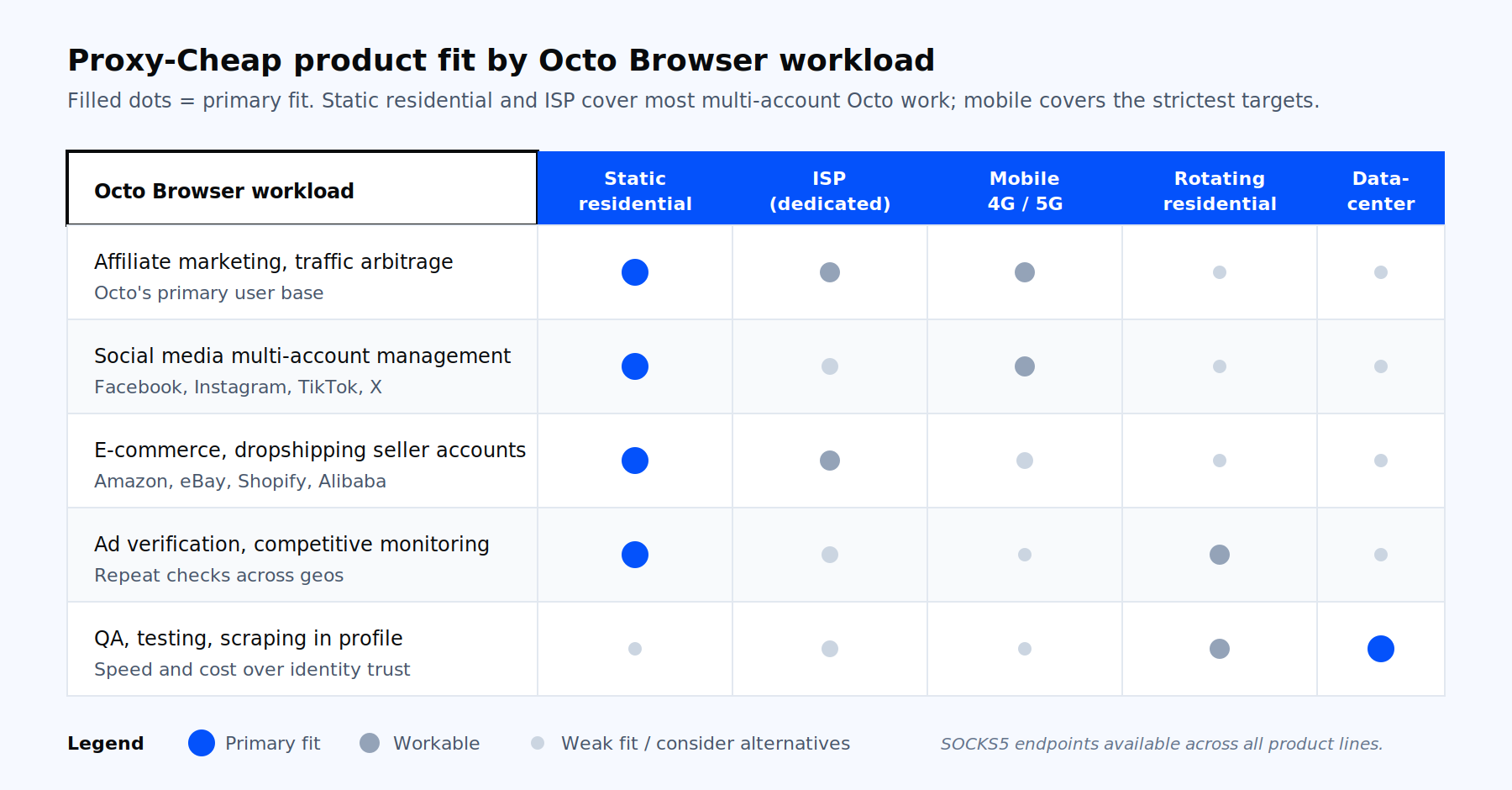
Pick the proxy class by workload first. Static residential and ISP cover most multi-account Octo Browser work; mobile covers the strictest targets; datacenter and rotating residential cover QA and scraping inside the antidetect profile.
For paid traffic arbitrage and affiliate workflows, static residential proxies are the primary fit because each IP behaves like a real home connection while staying assigned to your account for its lifetime. When you need to parallelize across hundreds of profiles with lower latency, ISP proxies give you residential-grade trust on datacenter infrastructure. For the strictest fingerprinting targets on Facebook, TikTok, and Instagram, mobile proxies carry the carrier-grade trust signals that paid social verification expects. For rotation-style scraping inside Octo Browser, rotating residential proxies cover sticky sessions and per-request rotation across many countries. For QA and high-volume publicly available data work, datacenter proxies keep cost per request low.
Start a Proxy-Cheap account, generate your first static residential endpoint, paste it into your first Octo Browser profile, and run a fingerprint check before you log into anything. That single discipline, repeated per profile, is what separates ad accounts that live for years from accounts that die in a week.