
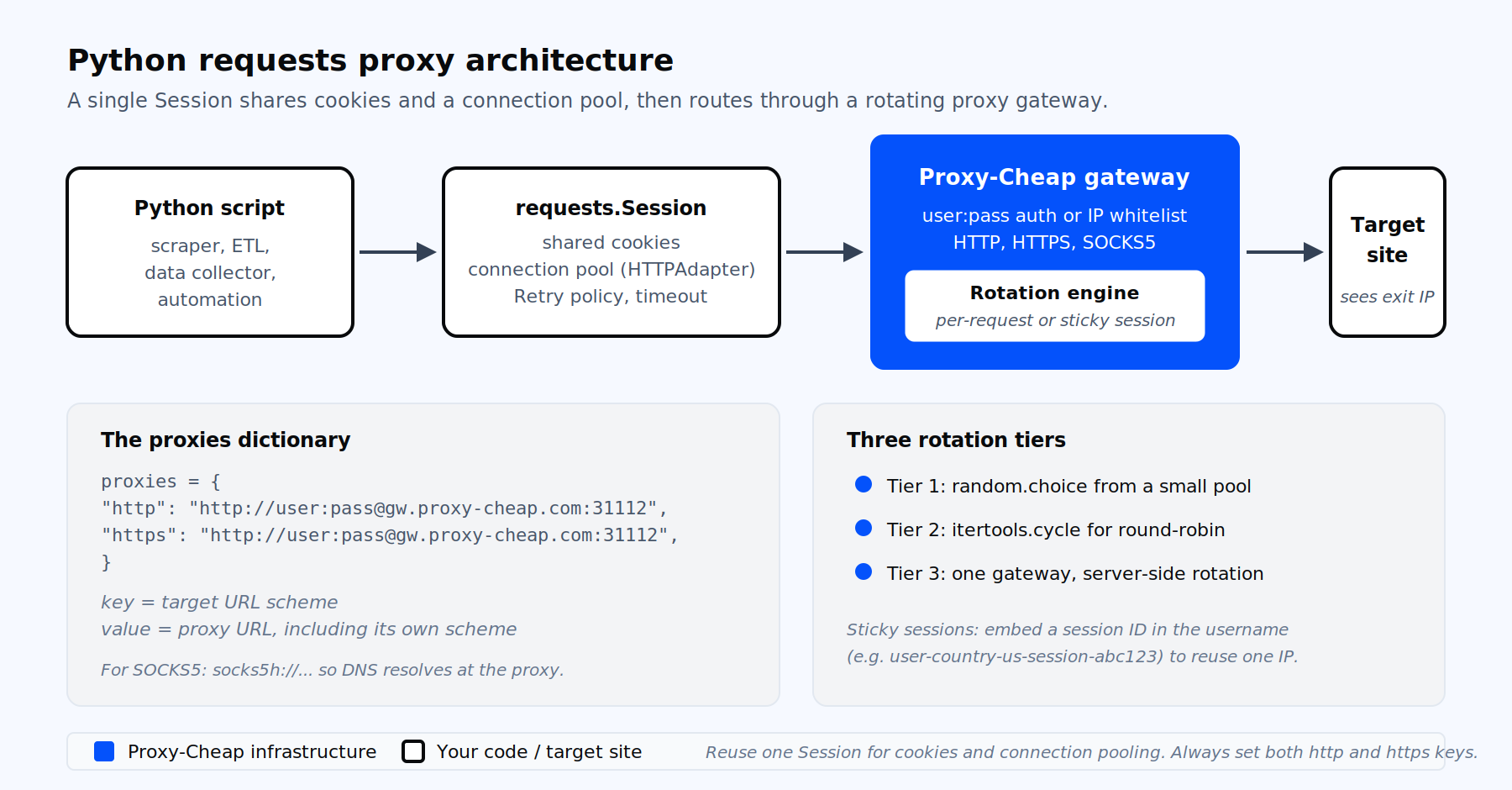
A typical Python requests proxy architecture: one Session shares cookies and a connection pool, then routes through a rotating proxy gateway.
The requests library is the most-used HTTP client in Python. It wraps urllib3, adds sessions, connection pooling, cookie persistence, redirects, and pluggable auth, and exposes one of the cleanest APIs in the language. Proxy integration simply means telling requests to route outbound HTTP and HTTPS traffic through a forward proxy instead of connecting directly.
There are four practical reasons developers configure proxies in a requests workflow:
The mechanics are tiny: a dictionary, a keyword argument, and (optionally) a Session. The hard parts are picking the right proxy type, handling errors correctly, and avoiding the half-dozen quiet failure modes that make a script look like it is using a proxy when it is not.
The same article also covers when to reach for rotating residential proxies with HTTP and SOCKS5 support versus stable datacenter IPs, because that decision drives most of the rest.
Use a virtual environment, then install. The current stable version on PyPI as of May 2026 is requests 2.34.1, which requires Python 3.10 or newer.
python -m venv .venv
source .venv/bin/activate
python -m pip install --upgrade "requests>=2.34"Verify the install:
python -c "import requests; print(requests.__version__)"If you plan to use SOCKS5, install the socks extra in the same step:
python -m pip install "requests[socks]>=2.34"This pulls in PySocks, which requests loads lazily when it sees a socks5:// or socks5h:// scheme.
The minimum viable proxy integration is one dictionary and one keyword argument. The dictionary’s key is the target URL scheme; its value is the full proxy URL, including the proxy’s own scheme.
import requests

proxies = {
    "http": "http://user:[email protected]:31112",
    "https": "http://user:[email protected]:31112",
}

response = requests.get(
    "https://httpbin.org/ip",
    proxies=proxies,
    timeout=(5, 15),
)
print(response.json())A few things are worth pointing out before the rest of the article builds on this pattern:
The dictionary is parsed by destination, not by proxy. When requests prepares a request, it looks up the target URL’s scheme (and optionally its host) in the dictionary and uses the matching proxy URL.
The supported key forms are:
proxies = {
    "http": "http://pool.example.com:8000",
    "https": "http://pool.example.com:8000",
    "https://internal.example.com": "http://corp-proxy:3128",
}The proxy URL value must always include a scheme. Valid schemes are http, https (TLS to the proxy itself, see below), socks5, and socks5h. The proxy URL may include credentials in the userinfo portion: http://user:pass@host:port.
If you need to route only a single request through a proxy without modifying the session-wide setting, pass proxies= directly to the call. Per-request values merge with Session.proxies and override on conflict.
For any script that issues more than one request, a Session is the right default. It persists cookies, applies a shared header set, and (most importantly) reuses TCP connections through urllib3’s connection pool. For HTTPS traffic, this avoids paying the 100 to 300 ms TLS handshake cost on every call.
import requests

session = requests.Session()
session.headers.update({"User-Agent": "data-collector/1.0"})
session.proxies.update({
    "http": "http://user:[email protected]:31112",
    "https": "http://user:[email protected]:31112",
})

urls = [
    "https://httpbin.org/ip",
    "https://httpbin.org/headers",
    "https://httpbin.org/user-agent",
]

with session:
    for url in urls:
        r = session.get(url, timeout=(5, 15))
        r.raise_for_status()
print(url, r.json())One caveat from the official docs that catches almost everyone: if the environment defines HTTP_PROXY or HTTPS_PROXY, those values can override Session.proxies on a per-request basis. To make the Session authoritative, either pass proxies= on every call or disable environment trust on the Session: session.trust_env = False. That switch also disables .netrc lookup and REQUESTS_CA_BUNDLE resolution, so use it deliberately.
There are three legitimate ways to authenticate to a proxy from requests. Only the first is documented as a public API; the others matter for edge cases.
1. Credentials in the proxy URL (preferred):
proxies = {
    "http": "http://acme_user:[email protected]:31112",
    "https": "http://acme_user:[email protected]:31112",
}2. URL-encoded credentials for special characters. Characters that require percent-encoding inside the userinfo portion of a URL include @, :, /, ?, #, [, ], %, and frequently $, &, +. Leaving them raw is the dominant cause of 407 Proxy Authentication Required errors:
from urllib.parse import quote

user = quote("acme_user", safe="")
password = quote("p@ss:w/rd!", safe="")

proxy_url = f"http://{user}:{password}@gateway.proxy-cheap.com:31112"
proxies = {"http": proxy_url, "https": proxy_url}3. A manual Proxy-Authorization header for cases where URL parsing fails outright:
import base64
import requests

creds = base64.b64encode(b"acme_user:p@ss").decode()
headers = {"Proxy-Authorization": f"Basic {creds}"}
proxies = {
    "http": "http://gateway.proxy-cheap.com:31112",
    "https": "http://gateway.proxy-cheap.com:31112",
}
requests.get("https://httpbin.org/ip", proxies=proxies, headers=headers, timeout=10)One trap worth flagging: HTTPBasicAuth (or the auth=("user", "pass") shorthand) authenticates to the target server, not to the proxy. It sets the Authorization header, not Proxy-Authorization. If you confuse the two, the proxy returns 407 even with credentials supplied.
For long-lived authenticated workflows, such as account management or cart sessions, static residential proxies for long-lived sessions pair well with this pattern because the egress IP stays constant across the entire Session.
requests reads four environment variables, in both upper and lower case: HTTP_PROXY, HTTPS_PROXY, ALL_PROXY, and NO_PROXY. ALL_PROXY is the SOCKS-friendly variant.
export HTTP_PROXY="http://user:[email protected]:31112"
export HTTPS_PROXY="http://user:[email protected]:31112"
export NO_PROXY="localhost,127.0.0.1,.internal.corp"
export ALL_PROXY="socks5h://user:[email protected]:31200"After exporting, any requests call without an explicit proxies= argument will pick them up automatically. NO_PROXY accepts a comma-separated list of hosts and suffixes that should connect directly without going through the proxy.
Two behaviors to remember:
Once requests[socks] is installed, SOCKS5 looks identical to HTTP from the calling code:
import requests

proxies = {
    "http": "socks5h://user:[email protected]:31200",
    "https": "socks5h://user:[email protected]:31200",
}

r = requests.get("https://httpbin.org/ip", proxies=proxies, timeout=(5, 15))
print(r.json())The difference between socks5 and socks5h is small but consequential. With socks5, your client resolves the target hostname locally before sending it to the proxy. With socks5h, the proxy resolves DNS on your behalf. Three reasons to prefer socks5h for most scraping work:
If requests raises InvalidSchema: Missing dependencies for SOCKS support, the socks extra is not installed in the same interpreter running the script. Run python -m pip install "requests[socks]" from inside the venv and confirm with python -c "import socks; print(socks.__version__)". Provider-side, this pattern fits naturally with SOCKS5 proxies where UDP and TCP support matter.
There is a difference between "proxying HTTPS traffic" (routine, supported since forever) and "speaking TLS to the proxy itself" (newer, sometimes brittle). The first uses an http://... proxy URL value and tunnels HTTPS through CONNECT. The second uses an https://... proxy URL value and adds a TLS handshake between your client and the proxy.
proxies = {
    "https": "https://user:[email protected]:443",
}TLS-to-proxy depends on urllib3 >= 1.26, which requests has bundled since 2.25. In practice the behavior became reliably stable from requests 2.27 onward. If you see SSL: WRONG_VERSION_NUMBER or persistent handshake errors, upgrade both requests and urllib3 first, and switch the proxy URL back to http:// if you do not actually need TLS to the proxy.
Rotation strategies cluster into three tiers. Pick based on volume, target sophistication, and how much state you want to manage yourself. A wider treatment lives at what IP rotation is and why it matters.
Tier 1: random pick per request. Cheap and good enough for short, low-volume jobs.
import random
import requests

proxy_pool = [
    "http://user:[email protected]:8000",
    "http://user:[email protected]:8000",
    "http://user:[email protected]:8000",
]

def fetch(url: str) -> requests.Response:
    proxy = random.choice(proxy_pool)
    return requests.get(
        url,
        proxies={"http": proxy, "https": proxy},
        timeout=(5, 15),
)Tier 2: round-robin with itertools.cycle. Deterministic, fair distribution.
from itertools import cycle
import requests

proxy_iter = cycle([
    "http://user:[email protected]:8000",
    "http://user:[email protected]:8000",
    "http://user:[email protected]:8000",
])

def fetch(url: str) -> requests.Response:
    proxy = next(proxy_iter)
    return requests.get(
        url,
        proxies={"http": proxy, "https": proxy},
        timeout=(5, 15),
)Tier 3: provider gateway with server-side rotation. A single endpoint where the provider handles rotation behind the scenes. This is the production default for high volume.
import requests

# One endpoint, server-side rotation per request
proxy = "http://user-country-us:[email protected]:31112"
session = requests.Session()
session.proxies.update({"http": proxy, "https": proxy})For sticky sessions, providers typically accept a session ID inside the username. The same IP is then reused for the lifetime of that session ID, which is what you want for cart flows, multi-step forms, or login-protected pages.
import requests

# Sticky session: same egress IP across all calls that share this ID
session_id = "sess-7f3c-aabb"
proxy = f"http://user-country-us-session-{session_id}:[email protected]:31112"
session = requests.Session()
session.proxies.update({"http": proxy, "https": proxy})A deeper comparison of the two models lives at static vs rotating proxies, and a working Python implementation walkthrough is in how to rotate proxies in Python with requests and aiohttp.
Out of the box, a Session mounts an HTTPAdapter with pool_connections=10, pool_maxsize=10, and max_retries=0. That is fine for a smoke test and insufficient for anything that ships. Mount a custom adapter to set retry policy and pool sizing in one place.
import requests
from requests.adapters import HTTPAdapter
from urllib3.util import Retry

retry_strategy = Retry(
    total=5,
    backoff_factor=0.5,
    status_forcelist=(429, 500, 502, 503, 504),
    allowed_methods=frozenset({"GET", "HEAD", "OPTIONS", "POST"}),
    respect_retry_after_header=True,
)

adapter = HTTPAdapter(
    max_retries=retry_strategy,
    pool_connections=20,
    pool_maxsize=50,
)

session = requests.Session()
session.mount("http://", adapter)
session.mount("https://", adapter)
session.proxies.update({
    "http": "http://user:[email protected]:31112",
    "https": "http://user:[email protected]:31112",
})backoff_factor=0.5 produces waits of 0.5s, 1s, 2s, 4s, 8s between retries. status_forcelist retries on the canonical "transient" responses, including 429 Too Many Requests. pool_maxsize=50 lets you run up to 50 concurrent connections to one host without urllib3 logging Connection pool is full, discarding connection.
A reusable helper saves hours of debugging time. The pattern is to ask a server-side IP reflector what address it saw, then compare it to the local egress.
import requests

def verify_proxy(proxies: dict, timeout: tuple = (5, 10)) -> dict:
    """Return the IP seen by an external service when routed via proxies."""
    r = requests.get("https://httpbin.org/ip", proxies=proxies, timeout=timeout)
    r.raise_for_status()
    return r.json()

proxies = {
    "http": "http://user:[email protected]:31112",
    "https": "http://user:[email protected]:31112",
}

direct_ip = requests.get("https://httpbin.org/ip", timeout=10).json()
proxy_ip = verify_proxy(proxies)
assert direct_ip["origin"] != proxy_ip["origin"], "Proxy did not change egress IP"
print("Direct:", direct_ip, "Proxied:", proxy_ip)Wire that assertion into a startup health check or a CI smoke test and you will catch broken proxy configuration before any real workload runs against it.
requests itself is synchronous. For concurrent proxied requests, three options work in practice.
concurrent.futures.ThreadPoolExecutor is the simplest: requests releases the GIL during I/O, so threads scale well for network-bound workloads. Cap max_workers at or below pool_maxsize to avoid pool pressure.
from concurrent.futures import ThreadPoolExecutor

with ThreadPoolExecutor(max_workers=20) as pool:
results = list(pool.map(lambda u: session.get(u, timeout=(5, 15)).json(), urls))multiprocessing works when you are CPU-bound on parsing rather than network-bound. Each process gets its own pool, so size accordingly.
For true async, httpx exposes a nearly identical API and accepts the same proxies dictionary shape. aiohttp is another async client with a different style. Both let you scale to thousands of in-flight requests per process. The trade-off is that you cannot mix requests code into an async event loop without thread offloading.
The seven errors below account for the overwhelming majority of requests-plus-proxy support tickets. Each has one root cause and one canonical fix.
InvalidSchema: Missing dependencies for SOCKS support. PySocks is not installed in the active interpreter. Run python -m pip install "requests[socks]" inside your venv, then verify with python -c "import socks".
SSLError: CERTIFICATE_VERIFY_FAILED. Either the proxy presents a TLS cert signed by an internal CA that is not in certifi, or an intercepting proxy is performing TLS inspection. Preferred fix: point verify= at the CA bundle, for example requests.get(url, verify="/etc/ssl/certs/corp_ca.pem", proxies=proxies), or set REQUESTS_CA_BUNDLE=/path/to/ca.pem in the environment. Last resort for local testing only is verify=False with urllib3.disable_warnings(). Do not ship that.
407 Proxy Authentication Required. Three causes in order of frequency: special characters in the password are not URL-encoded, credentials were passed via auth= instead of in the proxy URL, or the proxy expects NTLM or Digest instead of Basic. Fix the first with urllib.parse.quote(password, safe=""). Fix the second by moving credentials into the proxy URL itself.
ProxyError: HTTPSConnectionPool(...) Cannot connect to proxy. Either the proxy host is unreachable, the port is wrong, or the proxy scheme does not match what the proxy actually serves. Test from the same host with curl -x http://proxy:port https://example.com. If the proxy serves plain HTTP, your proxy URL must start with http://, not https://.
"Different IPs but same response" or "proxy returns my real IP". The proxies dict is missing the https key while the target URL uses HTTPS. The lookup misses, the request goes direct. Always set both keys, even if they point to the same proxy URL.
Connection pool is full, discarding connection. More concurrent connections to one host than pool_maxsize allows. Mount an HTTPAdapter(pool_maxsize=50) (or higher) on the Session, and consider pool_block=True plus a sane timeout if you would rather queue than discard.
MaxRetryError wrapping something else. This is urllib3’s internal exception. Catch the higher-level requests.exceptions.ProxyError, SSLError, ConnectionError, or Timeout instead, and read the Caused by clause in the message for the real cause.
import requests

try:
    r = requests.get(url, proxies=proxies, timeout=(5, 15))
    r.raise_for_status()
except requests.exceptions.ProxyError as e:
    print("Proxy unreachable or rejected the request:", e)
except requests.exceptions.SSLError as e:
    print("TLS verification failed:", e)
except requests.exceptions.Timeout:
    print("Proxy or target exceeded the timeout window")
except requests.exceptions.HTTPError as e:
    print("Target returned an error status:", e.response.status_code)
except requests.exceptions.RequestException as e:
print("Generic request failure:", e)The proxy type matters more than the rotation code. The table below maps common Python requests workloads to the product line that fits best. A more detailed treatment lives at proxies for web data scraping.
| Workload | Best fit | Why |
|---|---|---|
| High-volume scraping of well-protected targets | Rotating residential | Large IP pool, real ISP egress, per-request rotation |
| Logged-in account workflows, cart flows, QA testing | Static residential or ISP | Stable, ISP-issued IPs for session continuity |
| High-throughput scraping of low-protection targets, APIs, internal QA | Dedicated datacenter | Fastest, cheapest per request, predictable |
| Hardened mobile-first targets, app QA | Mobile (4G/5G/LTE) | Carrier-grade IPs with natural rotation |
| Any of the above where the tool needs SOCKS5 specifically | SOCKS5 endpoints | UDP and TCP, lower-overhead protocol |
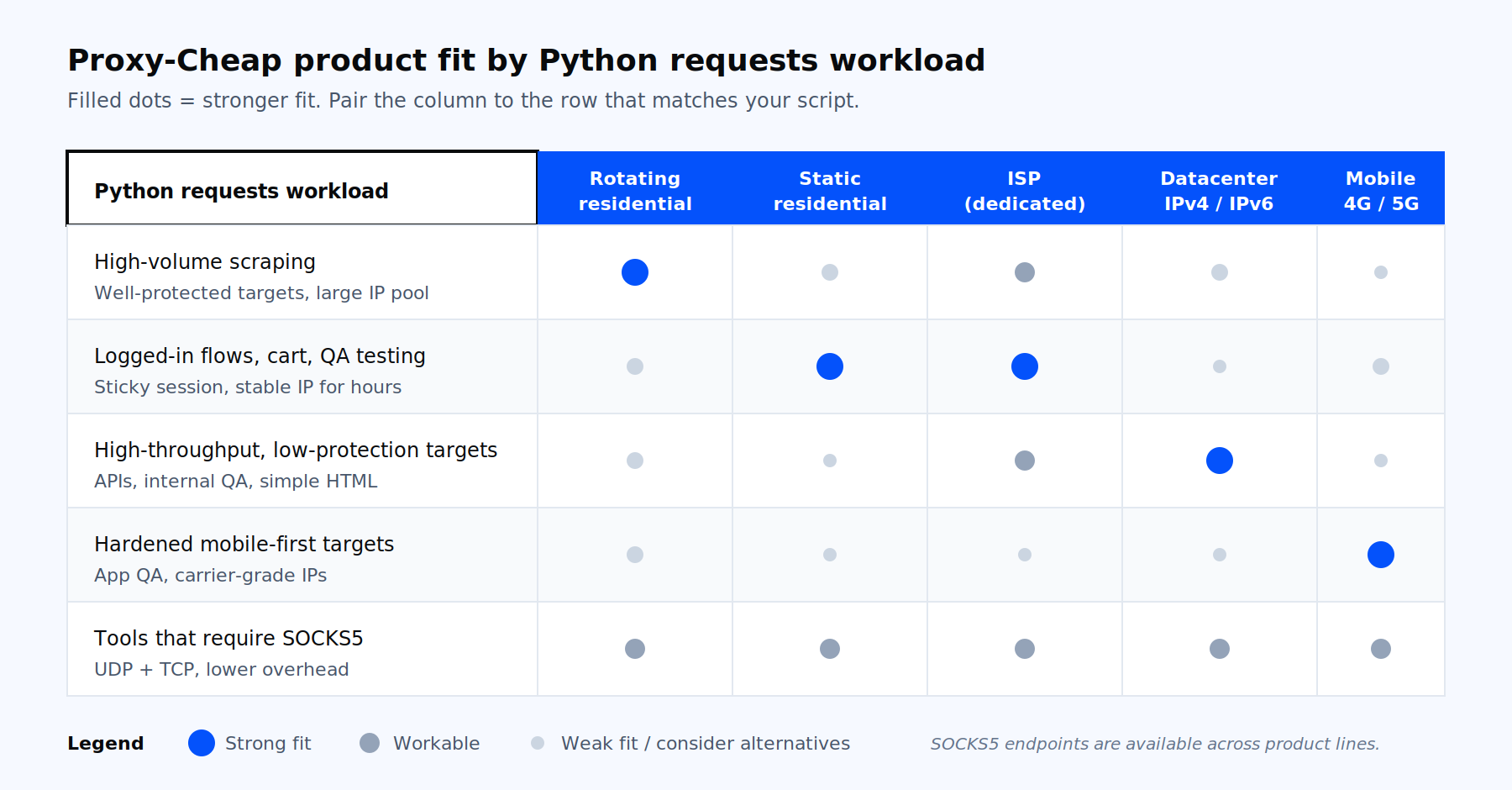
Which Proxy-Cheap product fits which Python requests workload.
For developers who want a deeper, hands-on comparison before picking, best proxies for web scraping in 2026 walks through the trade-offs with benchmarks, and the foundational residential proxies and dedicated datacenter proxies pages document pricing, country coverage, and authentication. Open a Proxy-Cheap account on pay-as-you-go billing, paste the credentials into the proxies dict shown earlier, and the rest of this article is your reference.