
Picking an Instagram proxy is mostly a question of which IP type the platform trusts and how many accounts you plan to run. The guide below ranks eight established providers, explains the proxy types that work for account tasks, and walks through setup so each account stays on its own clean IP.
An Instagram proxy is an intermediary server that routes your connection through a different IP address before it reaches Instagram. Instead of the platform seeing the IP your device was assigned, it sees the proxy’s IP. That single layer changes what Instagram associates with your activity: the network, the location, and the session that travels with each request.
For Instagram, the IP type matters more than it does on almost any other site. Instagram is a mobile-first platform, so it places the most trust in IPs that come from real mobile carriers and home internet connections. A good Instagram proxy gives each account an IP that matches the kind of network a real user in that market would connect from, plus the choice to keep that IP fixed (static) or refresh it on a schedule (rotating), depending on the task.
Most people who buy Instagram proxies are not doing anything secretive. They are running more accounts than one home connection can support. Instagram links activity to IP addresses, so logging into ten accounts from a single IP looks nothing like ten separate users. Proxies let each account sit on its own market-matched IP.
The common, terms-respecting use cases:
Four proxy types show up in Instagram workflows. Here is how they compare for account work.
Mobile proxies route through real 5G, 4G, and LTE carrier IPs. Because many real users share a single mobile IP at any moment, mobile is the IP type Instagram treats with the most trust, and it is the first choice for creating and warming new accounts.
Rotating residential proxies use real home-internet IPs and refresh on a schedule or per request. They suit research and spreading activity across many IPs. Proxy-Cheap rotating residential proxies cover 180+ countries with country and city targeting.
Static residential and ISP proxies give each account one fixed, location-accurate IP for long, consistent sessions, which is what most account managers want day to day. Compare static residential proxies and read static vs rotating proxies to pick a session style.
Datacenter proxies deliver high throughput from data-center IPs. Reserve datacenter proxies for high-volume public research and monitoring. For logging into and managing accounts, choose mobile or residential IPs that match the networks real users connect from.
| Proxy type | How the IP behaves | Best Instagram use |
|---|---|---|
| Mobile (5G/4G/LTE) | Shared real carrier IP, high trust | Creating, warming, and running accounts |
| Rotating residential | Real home IP, refreshes on a schedule | Research and broad public data collection |
| Static residential / ISP | Fixed real-network IP, long sessions | Day-to-day management of specific accounts |
| Datacenter | Fast data-center IP, public targets | High-volume research and monitoring |
There is no official public number, but Instagram clearly caps how many accounts one IP can comfortably support. Inside the app you can link a small group of accounts (often around five) to a single login, and pushing far past that from one IP is what tends to get accounts flagged or rate-limited.
Practical guidance:
These providers are ranked on the factors that decide Instagram outcomes: whether they offer the mobile and residential IPs the platform trusts, pool size and country coverage, session control (sticky or rotating), pricing model, and support. Every option here is an established network. The order reflects overall fit for Instagram account work, starting with the best value.
Proxy-Cheap pairs the two IP types Instagram trusts most, mobile and residential, with pay-as-you-go pricing and no monthly commitment, which makes it a strong starting point for solo creators and agencies alike. Mobile proxies span 100+ countries on real 5G, 4G, and LTE carrier IPs. Rotating residential covers 180+ countries with country and city targeting, while static residential and ISP options give each account a fixed, location-accurate IP for long sessions.
A polished, beginner-friendly platform with a large residential and mobile pool (around 115M+ IPs) and a clean dashboard. Sticky sessions and flexible targeting make it comfortable for managing a handful of accounts.
The enterprise-scale option, with one of the industry’s largest networks (roughly 72M residential and 7M mobile IPs), granular targeting, and a free trial. Setup is more involved and pricing sits at the premium end.
A value-focused provider popular with social-media users. Its Royal Residential pool offers pay-as-you-go pricing, and mobile options suit account work.
A self-serve favorite with a free tier, low entry pricing, a strong API, and a simple dashboard. Its core strength is affordable datacenter and residential IPs.
A clean residential and mobile network with flexible, location-level targeting and a reputation for pool quality.
Known for ISP-based residential IPs that combine home-network trust with datacenter speed and stable, long-lived sessions.
A growing residential and mobile provider with per-GB pricing and granular targeting, positioned as a flexible mid-market option.
Setup follows the same shape whether you connect a phone, an antidetect browser, or an automation tool. Five steps:
Host: proxy-us.proxy-cheap.com Port: 5959 Username: <your-proxycheap-username> Password: <your-proxycheap-password> |
For the EU gateway, use proxy-eu.proxy-cheap.com on the same port.
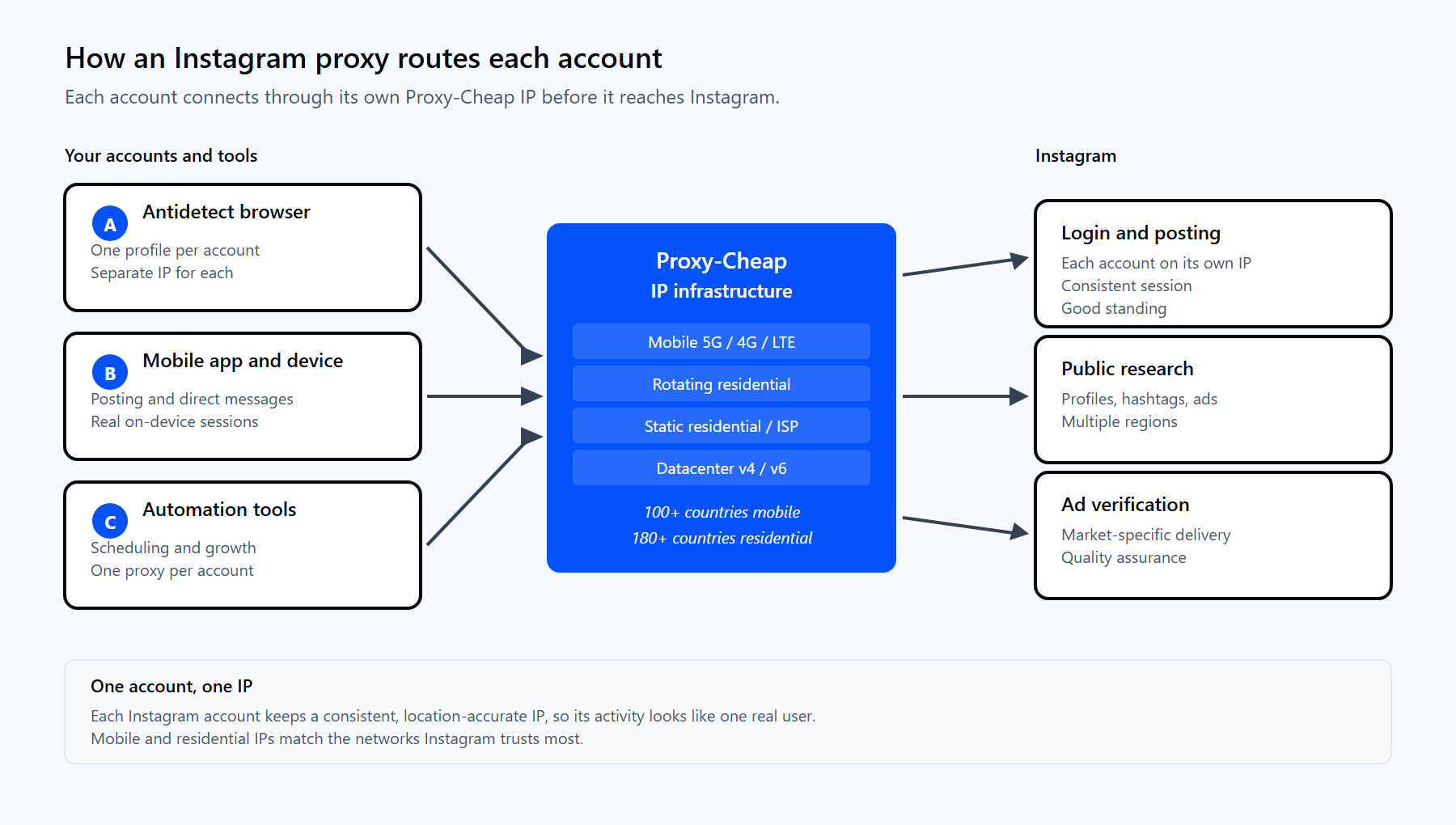
How an Instagram proxy routes each account’s session through a Proxy-Cheap IP before it reaches Instagram.
Different Instagram jobs reward different IP types. This matrix maps the most common workflows to the Proxy-Cheap product that fits each one.
| Workflow | Mobile | Rotating residential | Static residential / ISP | Datacenter |
|---|---|---|---|---|
| Create and warm new accounts | First choice | Also works | Also works | Better suited elsewhere |
| Manage a few brand accounts | Also works | Better suited elsewhere | First choice | Better suited elsewhere |
| Run many accounts at scale | First choice | Also works | Also works | Better suited elsewhere |
| Growth automation and scheduling | First choice | Also works | First choice | Better suited elsewhere |
| Market and competitor research | Also works | First choice | Also works | Also works |
| Ad verification | First choice | Also works | Also works | Also works |
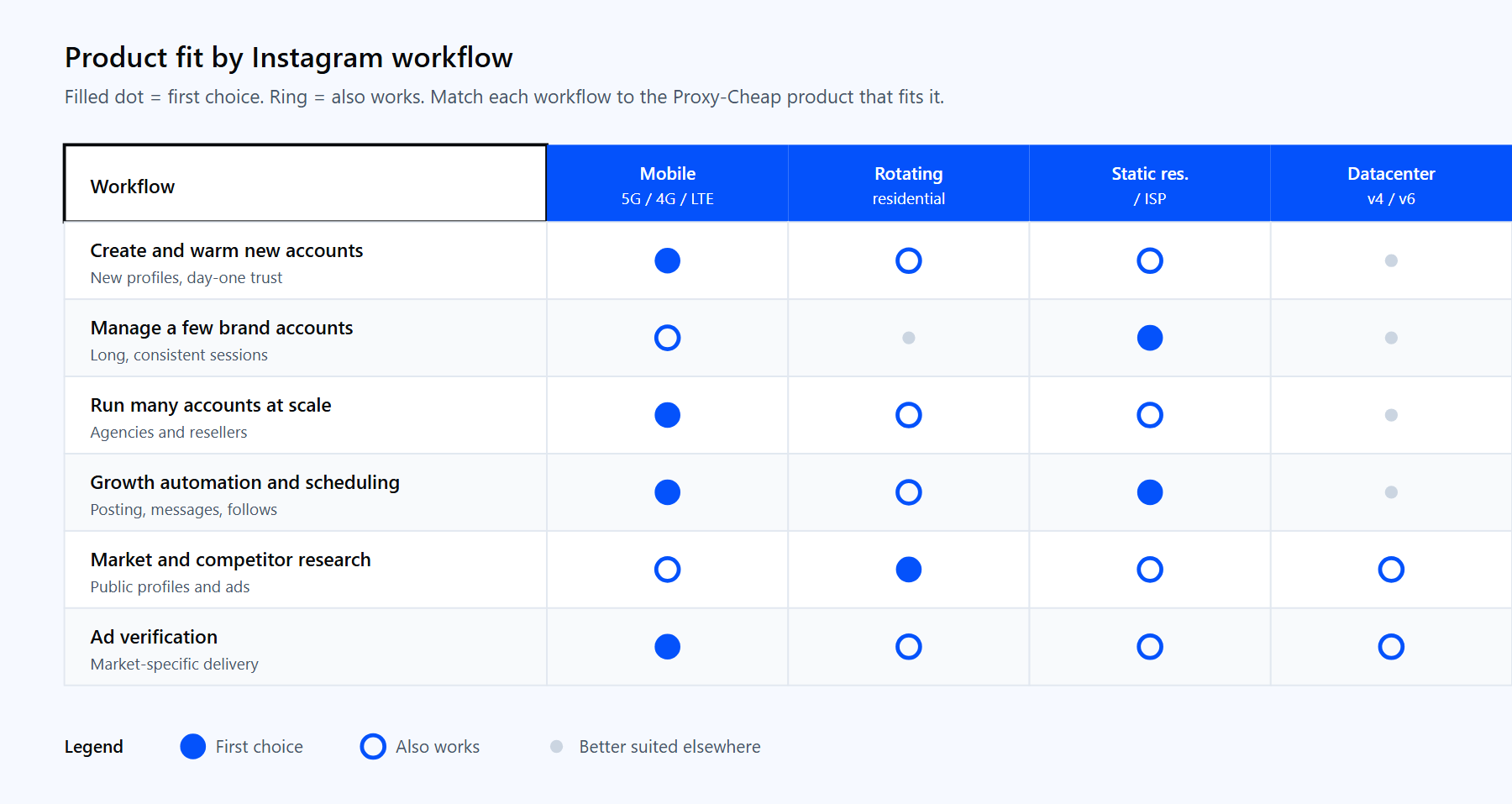
Match each Instagram workflow to the Proxy-Cheap proxy type that fits it best.
For most Instagram teams, the simplest path is to start with Proxy-Cheap mobile proxies for account creation and scale, add static residential or ISP IPs for the brand accounts you manage long term, and pay only for what you use.