Key takeaways:
What is NextCaptcha?
NextCaptcha is a CAPTCHA-solving service you reach over a REST API. You hand it the target page URL and the site key, and it returns a valid token that you drop into the form your automation is filling out. It solves the reCAPTCHA family (v2, v2 Enterprise, v3, and reCAPTCHA Mobile), hCaptcha, and Cloudflare Turnstile.
The service follows the familiar anti-captcha style: you POST a task to createTask, then poll getTaskResult until the solution is ready. Everything runs against https://api.nextcaptcha.com, authenticated with a single clientKey. There is an official Python SDK, nextcaptcha-python, which was at version 1.1.5 at the time of writing, and the same API answers from any language over plain HTTP.
One thing to keep clear from the start: NextCaptcha solves the challenge, it does not fetch the page for you. Your code still makes the request that loads the form and the request that submits it. That distinction is exactly why proxies matter here, and it shapes the rest of this guide.
What is NextCaptcha used for?
NextCaptcha earns its place wherever automation runs into a CAPTCHA and needs a valid token to continue. The common applications:
The unifying thread is simple. Your script needs a valid CAPTCHA token to proceed, and NextCaptcha supplies it programmatically so the automation does not stall. Because the request carrying that token still leaves your own infrastructure, most of these use cases pair NextCaptcha with a proxy network.
Key features of NextCaptcha
The capabilities that matter for production work:
Is NextCaptcha free to use?
No. NextCaptcha is a paid service billed per solve. You add funds to a balance in the dashboard and each solved challenge draws down that balance in USD. There is no standing free tier advertised, so plan for a small top-up before you run the quickstart below.
Pricing is set per 1,000 solves and varies by captcha type. At the time of writing, reCAPTCHA v2 started around $0.50 per 1,000 solves, with reCAPTCHA v3, Mobile, and Turnstile in a similar low range and Enterprise variants priced higher. These figures change, so confirm the current numbers on the NextCaptcha dashboard before you budget.
Two cost drivers are worth calling out. First, harder captcha types cost more per solve. Second, your proxy cost is separate from your solve cost: NextCaptcha bills for the solve, and Proxy-Cheap bills for the bandwidth or IPs you route through. Budgeting both together gives you the real per-request figure.
How to install NextCaptcha
Installation is one command in a clean Python environment on a modern Python 3 release.
# Install the official NextCaptcha Python SDK
pip install nextcaptcha-python
Next, create an account and copy your API key (the client key) from the NextCaptcha dashboard. That key authenticates every request, so keep it in an environment variable rather than hardcoding it.
Before you copy code from any tutorial, confirm the version you actually installed. The method names and parameters in this guide match the 1.1.5 series:
pip show nextcaptcha-python
Quickstart: solving your first CAPTCHA with NextCaptcha
The minimal working example does three things: build the client, check your balance, and solve a reCAPTCHA v2 challenge. reCAPTCHA v2 is the simplest place to start because it solves without a proxy.
import os
from nextcaptcha import NextCaptchaAPI
# Keep the client key in an environment variable, not in source control.
api = NextCaptchaAPI(client_key=os.environ["NEXTCAPTCHA_KEY"])
# get_balance returns your remaining USD balance (or an error dict on a bad key).
print("Balance:", api.get_balance())
# Solve a reCAPTCHA v2 challenge. Pass the page URL and the site key from the target.
result = api.recaptchav2(
website_url="https://example.com/login",
website_key="6Lxxxxxxxxxxxxxxxxxxxxxxxxxxxx",
)
if result.get("status") == "ready":
token = result["solution"]["gRecaptchaResponse"]
print("Solved. Token starts with:", token[:40])
else:
# On failure you get errorId and errorDescription instead of a solution.
print("Failed:", result.get("errorId"), result.get("errorDescription"))
The client instantiation takes only client_key in the simplest form. Optional arguments (callback_url for async delivery, open_log for verbose logging) exist but are not needed to get started. The SDK handles the createTask and getTaskResult polling for you and waits until the challenge is solved, fails, or hits its internal 45-second timeout.
What does NextCaptcha return?
Every solver method returns a plain Python dictionary. You read two or three keys from it depending on the outcome.
| Key | What it contains | When it is present |
|---|---|---|
| status | "ready" when solved, "failed" when the task could not be completed | On any task that reached the queue |
| solution | The object holding the token, for example gRecaptchaResponse for reCAPTCHA | When status is "ready" |
| errorId | A numeric error identifier, 0 means success | On failures and on rejected requests |
| errorCode | A string such as ERROR_KEY_DOES_NOT_EXIST | On rejected requests |
| errorDescription | A human-readable reason for the failure | On failures and rejected requests |
For reCAPTCHA, the token lives at result["solution"]["gRecaptchaResponse"]. For Turnstile and hCaptcha the same solution object carries the token you submit to the site. The pattern is always the same: check status first, read the token on success, and inspect errorId and errorDescription on failure. Robust code never assumes a solution is present without checking status.
Why you need a proxy with NextCaptcha
A solved token is only half the job. The request that carries that token back to the target still comes from your machine, and for many challenges the token is only valid from an IP that looks consistent and geo-appropriate. That is why every serious solving pipeline pairs the API with a proxy network, and choosing the right one starts with a look at the best CAPTCHA proxies for the job.
Three concrete reasons to put a proxy in front of your NextCaptcha workflow:
Proxy-Cheap offers several product lines that map cleanly onto NextCaptcha workloads.
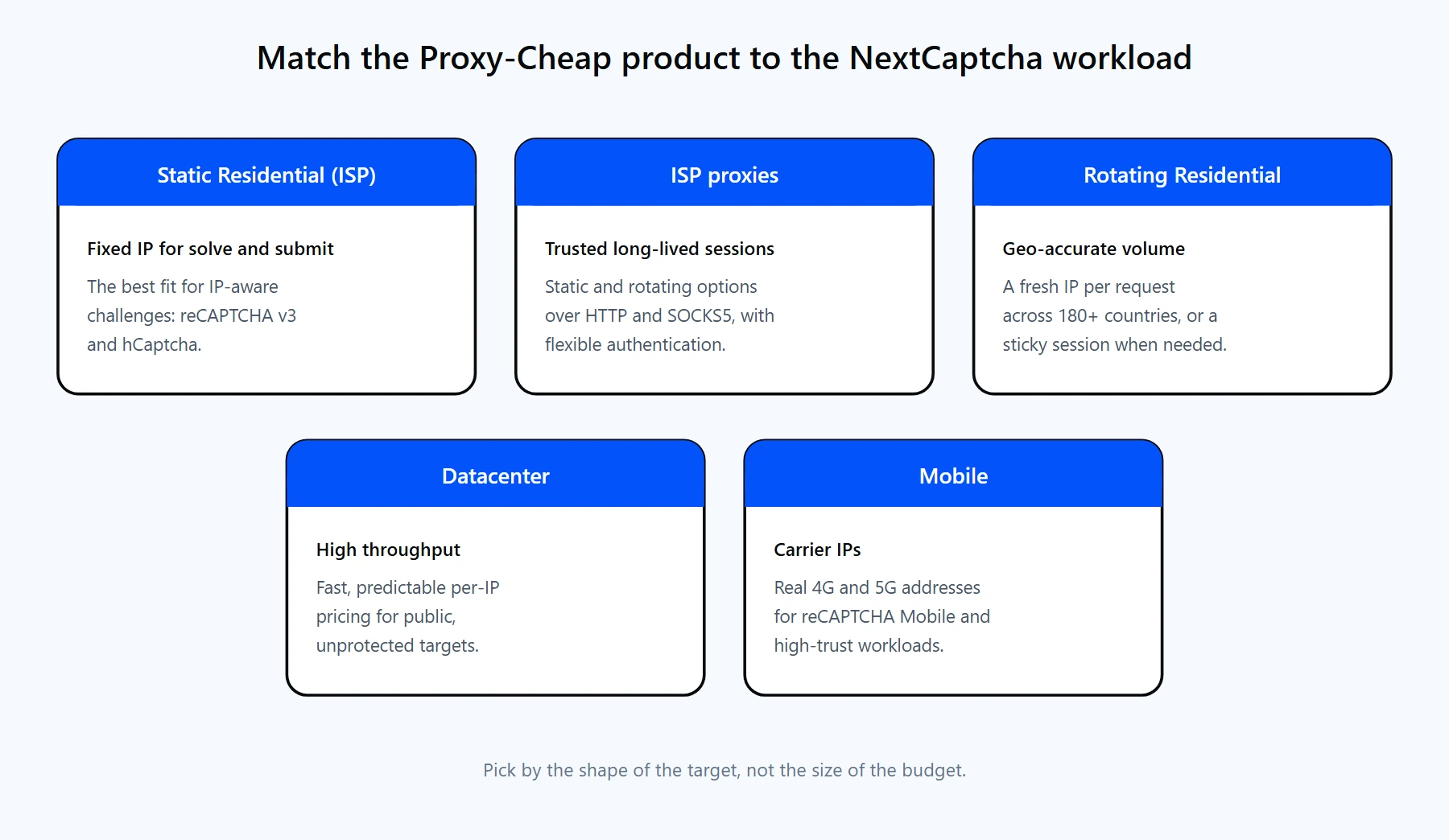
Each product line fits a different shape of solving workload. The links below match the cards above.
For most solving projects the answer is one of these, picked by the shape of the target rather than the size of the budget.
How to set up a proxy with NextCaptcha
NextCaptcha encodes proxy behavior in the task type itself, and the Python SDK handles the switch for you. Call a method with no proxy and it sends a proxyless task that solves on NextCaptcha infrastructure. Pass a proxy_address and the same method sends a proxied task that solves through your IP.
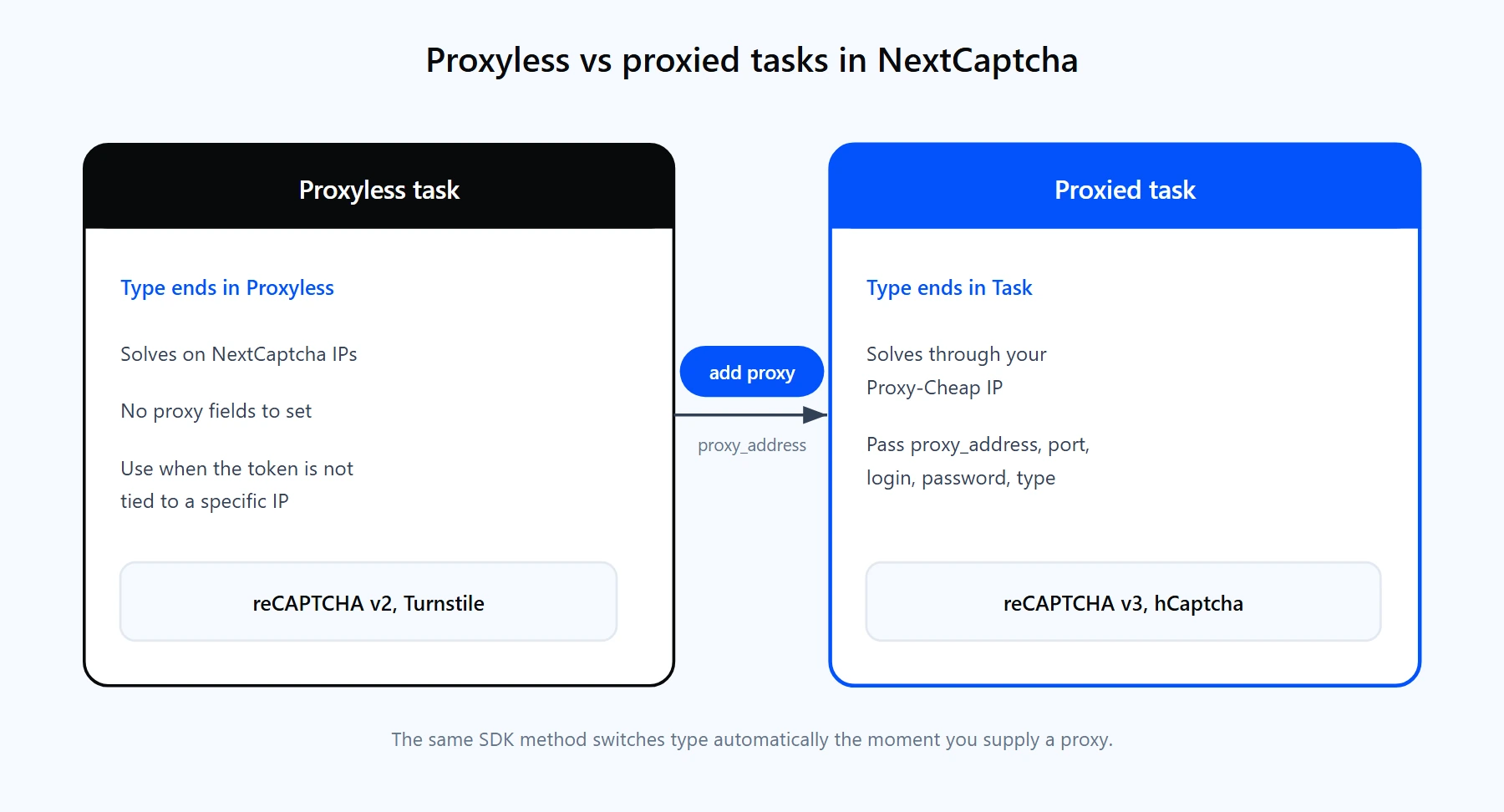
A method sends a proxyless task by default. Supplying a proxy switches it to the proxied task type that solves through your own IP.
Here is reCAPTCHA v3 solved through a Proxy-Cheap proxy. The five proxy arguments are all it takes:
import os
from nextcaptcha import NextCaptchaAPI
api = NextCaptchaAPI(client_key=os.environ["NEXTCAPTCHA_KEY"])
# Passing proxy_address switches recaptchav3 from RecaptchaV3TaskProxyless
# to the proxied RecaptchaV3Task, so NextCaptcha solves through your IP.
result = api.recaptchav3(
website_url="https://example.com/checkout",
website_key="6Lxxxxxxxxxxxxxxxxxxxxxxxxxxxx",
page_action="checkout",
proxy_type="http", # http, https, socks4, or socks5
proxy_address="thehub.proxy-cheap.com", # rotating residential hub, country set in the dashboard
proxy_port=8080,
proxy_login=os.environ["PROXY_USER"],
proxy_password=os.environ["PROXY_PASS"],
)
print(result.get("status"), result.get("errorId"))
A quick note on Proxy-Cheap endpoint formats, because they differ by product:
Two rules keep this reliable:
Rotating proxies with NextCaptcha
How you rotate depends on which product line you use:
For the second case, a small round-robin helper hands the next proxy to each solve. The example rotates a pool of static proxies across reCAPTCHA v3 tasks:
import os, itertools
from nextcaptcha import NextCaptchaAPI
api = NextCaptchaAPI(client_key=os.environ["NEXTCAPTCHA_KEY"])
# Each proxy is a fixed IP and port copied from the Proxy-Cheap dashboard.
PROXY_POOL = [
{"host": "1.2.3.4", "port": 12345, "user": "user1", "pass": "pass1"},
{"host": "1.2.3.5", "port": 12345, "user": "user2", "pass": "pass2"},
{"host": "1.2.3.6", "port": 12345, "user": "user3", "pass": "pass3"},
]
pool = itertools.cycle(PROXY_POOL)
def solve_v3(website_url, website_key, action="submit"):
p = next(pool) # take the next proxy in the rotation
return api.recaptchav3(
website_url=website_url,
website_key=website_key,
page_action=action,
proxy_type="http",
proxy_address=p["host"],
proxy_port=p["port"],
proxy_login=p["user"],
proxy_password=p["pass"],
)
for _ in range(6):
r = solve_v3("https://example.com/checkout", "6Lxxxxxxxxxxxx")
print(r.get("status"), r.get("errorId"))
Choosing between rotating and static comes down to the challenge. Rotating residential is the default for high volume, where a fresh IP per request keeps response quality steady. Static residential or ISP is the right call when you need the same IP to persist, which is the case for the IP-aligned flow in the next section. For a fuller comparison, read static vs rotating proxies and the walkthrough on how to rotate proxies in Python.
Advanced: keeping the solve IP and submit IP aligned
This is the pattern that separates a demo from a production pipeline. For IP-aware challenges, the token NextCaptcha returns is only trusted when the request that submits it comes from the same IP that solved it. Solve through one IP and submit through another, and the token is likely to be rejected.
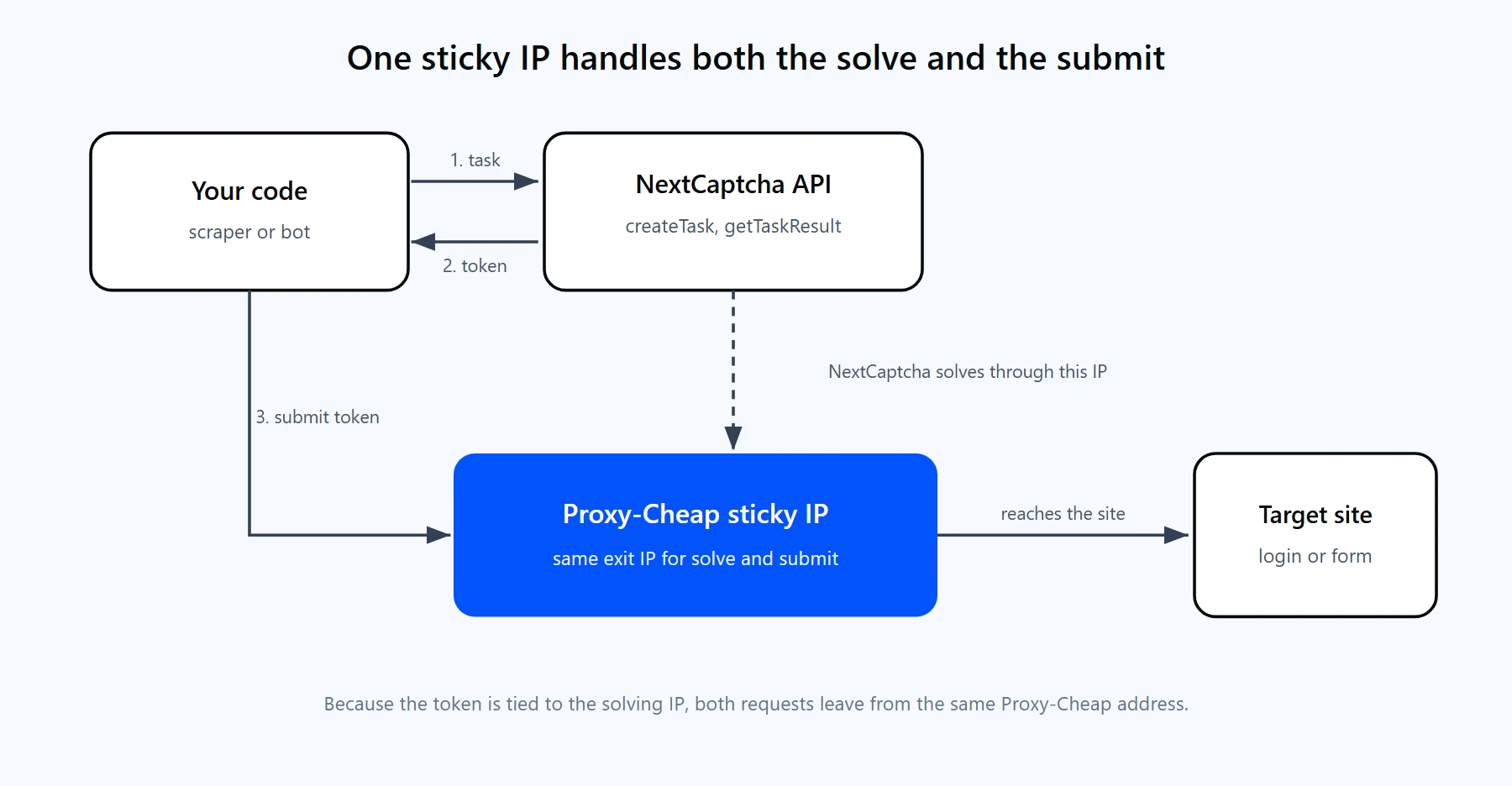
One sticky Proxy-Cheap IP does double duty: NextCaptcha solves through it, and your code submits the token through it, so the solve IP and submit IP match.
The fix is to pin one sticky IP and use it for both steps. Hand that proxy to NextCaptcha for the solve, then route your own submit request through the identical proxy with requests:
import os, requests
from nextcaptcha import NextCaptchaAPI
api = NextCaptchaAPI(client_key=os.environ["NEXTCAPTCHA_KEY"])
# One sticky IP for both the solve and the submit. A Static Residential (ISP)
# proxy is ideal here because the address stays fixed for the whole flow.
PROXY_HOST = "thehub.proxy-cheap.com"
PROXY_PORT = 8080
PROXY_USER = os.environ["PROXY_USER"]
PROXY_PASS = os.environ["PROXY_PASS"]
# 1. Hand the proxy to NextCaptcha so it solves through this IP.
solve = api.recaptchav3(
website_url="https://example.com/login",
website_key="6Lxxxxxxxxxxxxxxxxxxxxxxxxxxxx",
page_action="login",
proxy_type="http",
proxy_address=PROXY_HOST,
proxy_port=PROXY_PORT,
proxy_login=PROXY_USER,
proxy_password=PROXY_PASS,
)
if solve.get("status") == "ready":
token = solve["solution"]["gRecaptchaResponse"]
# 2. Submit the token from the SAME IP by routing requests through the proxy.
proxies = {
"http": f"http://{PROXY_USER}:{PROXY_PASS}@{PROXY_HOST}:{PROXY_PORT}",
"https": f"http://{PROXY_USER}:{PROXY_PASS}@{PROXY_HOST}:{PROXY_PORT}",
}
resp = requests.post(
"https://example.com/login",
data={"g-recaptcha-response": token},
proxies=proxies,
timeout=30,
)
print("Submit status:", resp.status_code)
else:
print("Solve failed:", solve.get("errorId"), solve.get("errorDescription"))
A Static Residential (ISP) proxy is the cleanest fit for this flow because the IP stays fixed for the whole sequence. If you use the rotating gateway instead, request a sticky session so the same exit IP holds long enough to cover both the solve and the submit.
Common errors and how to fix them
Most NextCaptcha failures show up as an errorId and errorCode in the result dict. The proxy-related ones are the most common in an integration, so start there.
Is NextCaptcha good? Pros and cons
For teams that need programmatic CAPTCHA solving wired into a proxy workflow, NextCaptcha is a practical, developer-friendly choice. It covers the challenge types most automation runs into, the API is a standard shape, and the proxyless-to-proxied toggle keeps the code clean. A few honest tradeoffs are worth weighing.
Pros
Cons
The middle ground for most teams: run NextCaptcha for the solve, pair it with a value-tier proxy provider on pay-as-you-go billing, and keep the solve and submit on one clean IP. That combination handles the large majority of CAPTCHA-gated automation without enterprise overhead.