Nstbrowser is a Chromium-based antidetect browser built for multi-account management, web scraping, and automation. Each profile you create runs as its own browser identity, with a distinct fingerprint (canvas, WebGL, fonts, WebRTC, time zone, and geolocation), isolated cookies and cache, and its own assigned proxy. Two profiles opened side by side look like two separate people on two separate devices.
The desktop client is at version 1.21.1 at the time of writing and runs on Windows 10 and above (64-bit) and macOS on both Apple Silicon and Intel. There is no Linux desktop build, but Nstbrowser also ships a Cloud Browser, so headless and Linux workflows run profiles in the cloud through the API instead of a local install. Around the browser sit a few extra surfaces: a Smart Scraping API, a CAPTCHA solver, and an RPA tool for point-and-click automation.
Nstbrowser sits in the same category as the other tools covered in the best antidetect browsers roundup. What sets it apart for most teams is the generous free plan and the built-in automation server, which we cover in the advanced section below.
The common thread is running many separate identities from one machine without letting them look connected. Typical jobs:
In every one of these, the proxy is not optional. The fingerprint keeps profiles distinct on the client side, but without a matching IP per profile the accounts still share one network origin, and that is what ties them together.
The features that matter once you move past a single profile:
Yes. Nstbrowser has a permanent free plan, not a time-limited trial. At the time of writing the free tier covers up to 500 browser profiles, 3 team members, and a daily cap on unique profile launches, along with the core fingerprint and basic automation features. That is enough to run a real multi-account setup before you spend anything. Verify the current limits on the live pricing page, since the numbers change.
Paid plans scale the launch limits, seats, and automation hours. Professional runs around $29.90 per month and Enterprise around $59.90 per month, with a discount for annual billing. Nstbrowser also sells its own Platform Proxy (built-in proxies billed per gigabyte), but you are not tied to it: the Custom Proxy option lets you bring your own provider, which is exactly what we do with Proxy-Cheap in the sections below. Treat every price here as a figure to re-check on the pricing page before you quote it.
Installation is a short, standard flow:
Minimum hardware is light: 2 CPU cores, 2 GB of RAM, and at least 2 GB of free disk. If you are on Linux or need a headless setup, skip the desktop client and drive the Cloud Browser through the API instead, which we cover in the advanced section.
A profile is one browser identity. Create your first one before you touch proxies so you can see where the proxy settings live.
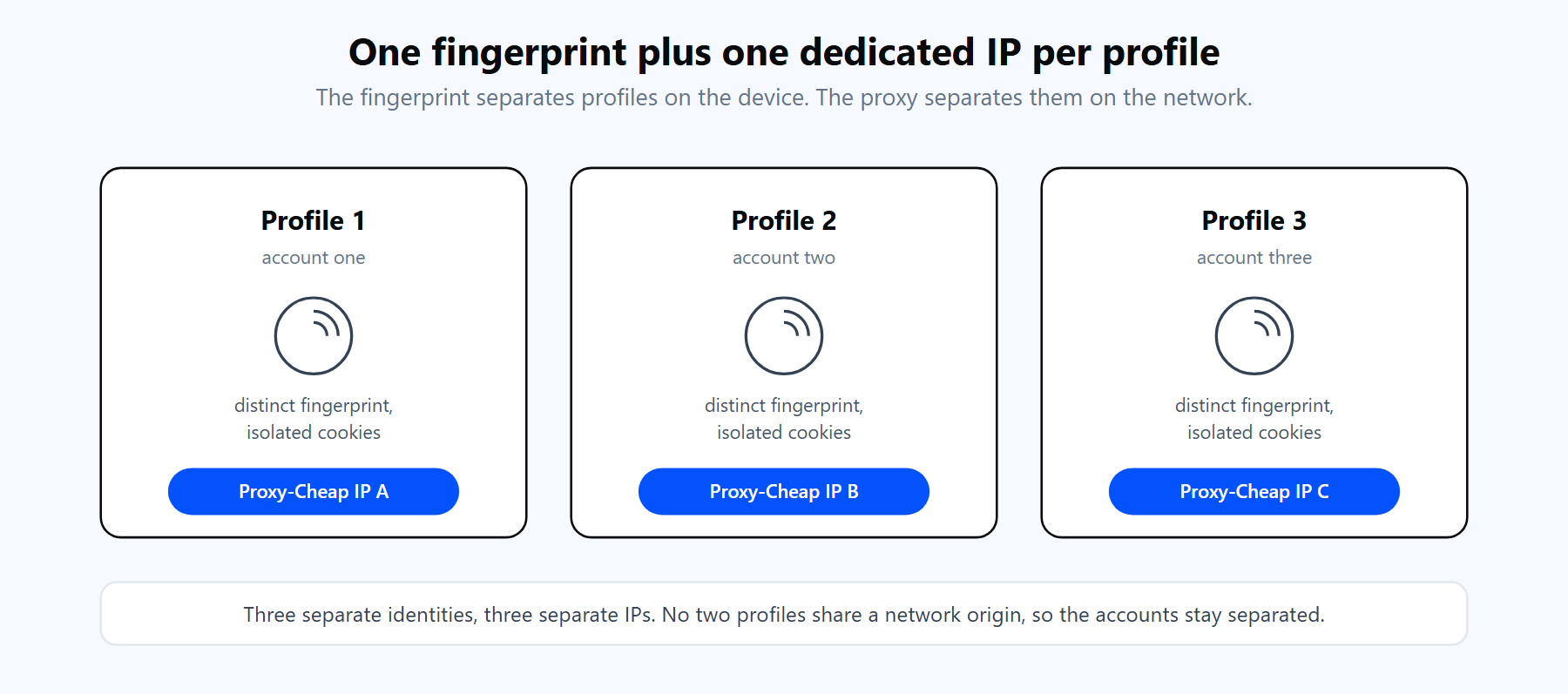
Each Nstbrowser profile pairs a distinct fingerprint with one dedicated IP. The fingerprint separates profiles on the client side; the proxy separates them on the network side.
One detail to note early: if you attach a proxy to a profile, Nstbrowser makes you pass a proxy check before it will save the profile. That is a feature, not an obstacle. It stops you from creating a profile that silently runs on your real IP.
A fingerprint alone does not separate accounts. If ten profiles all leave your home or office connection, they all share one public IP, and platforms read that shared origin as one operator running ten accounts. The proxy is the other half of separation: one dedicated IP per profile, matched to the market that profile operates in. That is why serious multi-account work runs every profile through a residential proxy network.
Three concrete reasons to put a proxy behind every Nstbrowser profile:
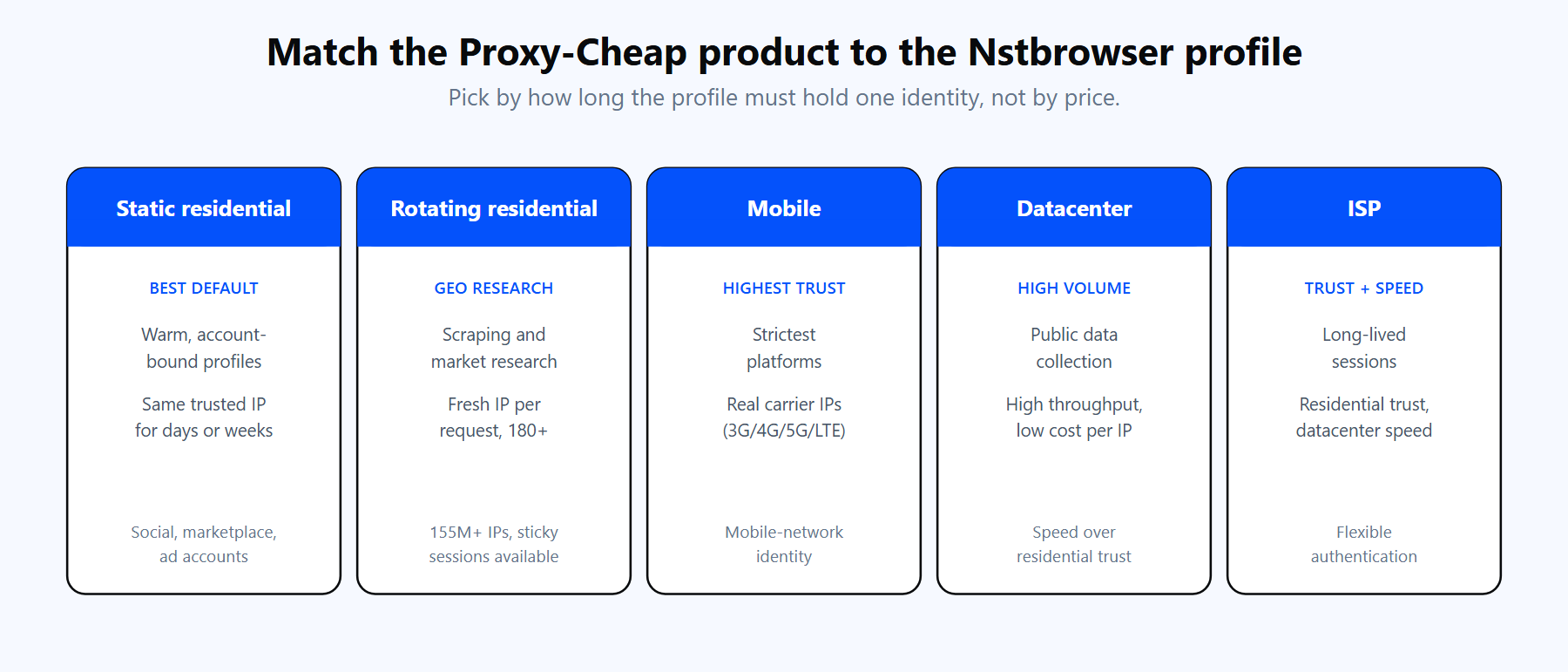
Each product line fits a different shape of profile. The links below match the cards above.
Proxy-Cheap offers five product lines that map cleanly onto Nstbrowser profiles:
Pick by the profile, not the budget: a warm, long-lived account wants a static residential or mobile IP, while a throwaway research profile is fine on rotating residential or datacenter.
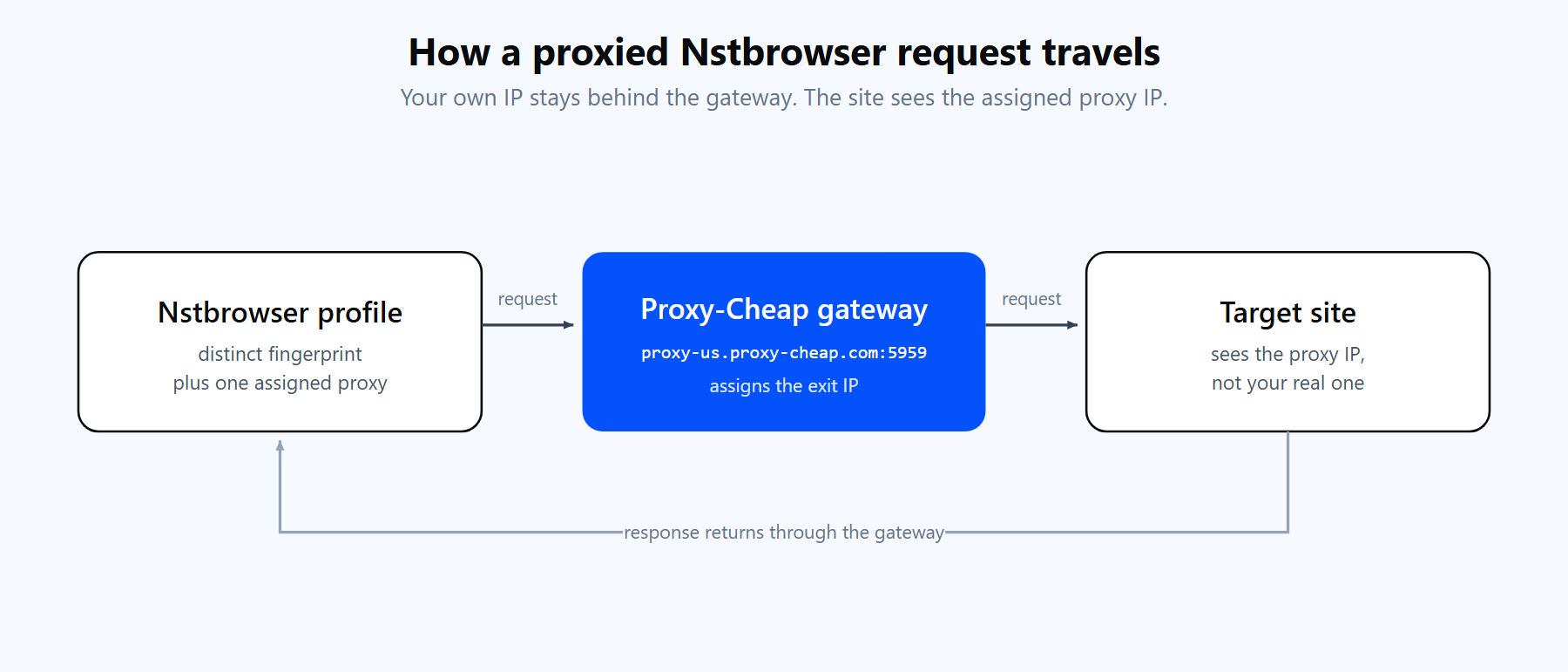
A profile sends its traffic through the Proxy-Cheap endpoint, so the target site sees the assigned IP and the profile stays consistent with its region.
Nstbrowser configures proxies per profile, in the Proxy section of the create or edit screen. Here is the full flow with a Proxy-Cheap proxy.
First, get your credentials from Proxy-Cheap. RRotating residential now uses one shared hub for every region:
Static residential, ISP, mobile, and datacenter proxies each get a unique host and port. Copy the exact host, port, username, and password from the Proxy-Cheap dashboard in the Setup Credentials panel.
Proxy-Cheap delivers credentials in a simple bundled format you can paste, or type into the separate fields:
# HTTP/HTTPS paste format (host:port:account:password)
thehub.proxy-cheap.com:8080:<your-proxycheap-username>:<your-proxycheap-password>

# SOCKS5 paste format (note the socks5:// prefix)
socks5://<your-static-ip>:<port>:<your-proxycheap-username>:<your-proxycheap-password>With that ready, add the proxy to the profile:
A few notes that save time:
Nstbrowser holds one proxy per profile, so rotation comes from the endpoint you point that profile at, not from the app cycling IPs for you. You get rotation two ways.
Hub rotation (rotating residential). Point the profile at the Proxy-Cheap hub (thehub.proxy-cheap.com:8080). Rotation is set by the credential you generate in the dashboard, not by a separate link. When you need the same IP to persist, the gateway also supports sticky sessions of around 30 minutes. This is the right setup for research and data collection where a changing IP is fine or even wanted.
Manual rotation with a saved-proxy pool (static IPs). For account-bound work you want a stable IP, not a rotating one. Save your static residential, ISP, or mobile proxies to the Nstbrowser proxy pool (or import a list with the CSV batch import), then assign one saved proxy per profile. Each account keeps its own dedicated IP, and you rotate by assigning a different saved proxy to a new profile rather than changing an existing one.
The choice between the two comes down to the workload, and the static vs rotating proxies guide breaks it down in detail:
One rule for account-bound profiles: do not swap the IP under a live, logged-in account. A sudden IP change mid-session is one of the fastest ways to get a profile flagged.
Nstbrowser exposes a local automation server on port 8848, so you can drive a profile from code while it keeps the fingerprint and proxy you configured. Puppeteer, Playwright, and Selenium all attach over the Chrome DevTools Protocol.
The cleanest pattern is to bind the Proxy-Cheap proxy to the profile in the app, then connect to that profile by ID from code. The automation carries no proxy credentials of its own, because the profile already has them.
// npm install puppeteer-core
const puppeteer = require('puppeteer-core');

async function main() {
  // Nstbrowser runs a local automation server on port 8848.
  // Get your API key from the Nstbrowser dashboard (API section).
  const apiKey = process.env.NSTBROWSER_API_KEY;

  // This profile already has your Proxy-Cheap proxy bound in the app,
  // so the connection below sends no proxy credentials of its own.
  const profileId = '<your-profile-id>';

  // Copy the exact connect path from your Nstbrowser API docs. The host and
  // port (localhost:8848) and the x-api-key query stay the same across versions.
  const query = new URLSearchParams({ 'x-api-key': apiKey });
  const browserWSEndpoint =
    `ws://localhost:8848/devtool/launch/${profileId}?${query.toString()}`;

  const browser = await puppeteer.connect({
    browserWSEndpoint,
    defaultViewport: null,
  });

  const page = await browser.newPage();
  await page.goto('https://ipinfo.io/json', { waitUntil: 'networkidle0' });
  console.log(await page.evaluate(() => document.body.innerText));

  await browser.disconnect();
}

main().catch(console.error);If you would rather launch a fresh profile from code and pass the proxy inline, Nstbrowser accepts a config object on the launch call, with the proxy as a single string:
// Launch config with the proxy passed inline (placeholders, not real creds).
const config = {
  once: true,
  headless: false,
  proxy: 'http://<your-proxycheap-username>:<your-proxycheap-password>@thehub.proxy-cheap.com:8080',
  fingerprint: { name: 'proxy-cheap-demo' },
};

const query = new URLSearchParams({
  'x-api-key': process.env.NSTBROWSER_API_KEY,
  config: encodeURIComponent(JSON.stringify(config)),
});
const browserWSEndpoint = `ws://localhost:8848/devtool/launch/?${query.toString()}`;
// puppeteer.connect({ browserWSEndpoint }) as above.Playwright attaches the same way. Swap the connect call for chromium.connectOverCDP(browserWSEndpoint) and the rest of the script is identical. Reading https://ipinfo.io/json at the start of a run is a cheap sanity check: if the IP it prints is your assigned Proxy-Cheap IP and not your own, the proxy is wired up correctly.
Most proxy problems in Nstbrowser fall into a handful of buckets. Each has a quick fix.
1. Check Proxy fails. The most common cause is a small typo in the host, port, account, or password. Re-copy all four straight from the Proxy-Cheap dashboard. Confirm the Proxy Type matches the credentials (HTTP/HTTPS for the gateway; SOCKS5 with the socks5:// prefix for a SOCKS5 endpoint).
2. The profile runs on your real IP. You saved a proxy to the pool but never assigned it to the profile, so the profile fell back to no proxy. Open the profile, confirm a proxy is selected in the Proxy section, and re-run Check Proxy. Reading ipinfo.io inside the profile confirms which IP is live.
3. Wrong protocol selected. An HTTP endpoint set to SOCKS5 (or the reverse) will not connect. HTTP/HTTPS is correct for the Proxy-Cheap rotating gateway. For a SOCKS5 endpoint, set the type to SOCKS5 and include the socks5:// prefix in the paste format.
4. Time zone or geolocation does not match the IP. If the profile time zone or fingerprint geolocation disagrees with the proxy IP country, the profile looks inconsistent. Set the profile to match the IP, or let Nstbrowser align the time zone and geolocation to the proxy automatically.
5. IP allowlist authentication is not working. On the Cloud Browser, allowlisting your own machine's IP fails, because the traffic leaves Nstbrowser's servers, not your computer. Use username and password authentication for cloud runs, and reserve IP allowlist for the desktop client from a stable connection.
6. The account is logged out mid-session. A rotating IP changed under a live account, or you swapped the proxy on an active profile. For account-bound profiles, use a static residential, ISP, or mobile IP and keep it fixed for the life of the account.
7. A firewall or antivirus stops the connection. Local security software can filter outbound traffic on the proxy port. Allow Nstbrowser through your firewall and antivirus, and make sure outbound connections on the proxy port are permitted.
8. A datacenter IP gets flagged on a sensitive platform. High-trust platforms are stricter with datacenter ranges. Move high-value accounts to residential or mobile IPs, and keep datacenter proxies for high-volume public data collection where trust matters less.
For multi-account and automation work, Nstbrowser is a strong pick, especially given the free plan. A balanced view before you commit:
Pros
Cons
The practical setup for most teams: run Nstbrowser on the free or Professional plan, pair each profile with a Proxy-Cheap static residential or mobile IP for warm accounts, and keep rotating residential or datacenter on hand for research profiles. That covers the large majority of multi-account and scraping work without enterprise-tier cost.