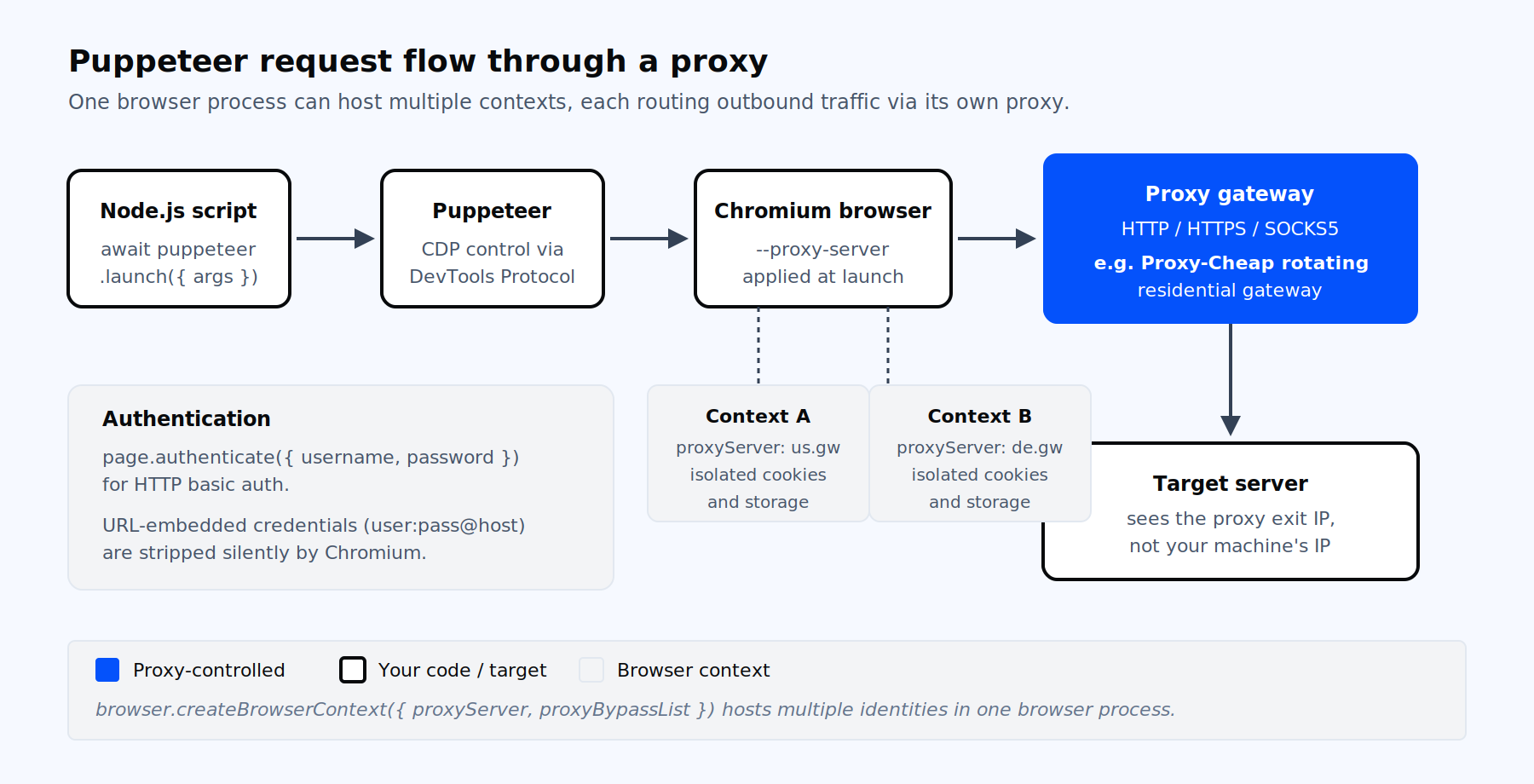
Puppeteer drives Chromium over the DevTools Protocol. Every outbound request from the browser exits through the configured proxy.
Puppeteer is a Node.js library that controls Chrome or Chromium through the Chrome DevTools Protocol. It launches a real browser, renders JavaScript, drives forms, captures screenshots, generates PDFs, and runs end-to-end tests. Headless is the default in Puppeteer 22 and later, and headless: false opens a visible window for debugging.
Browser automation produces traffic that looks very different from a plain HTTP client. A single page load can fire fifty or more requests, run third-party scripts, execute fingerprint probes, and hold a TLS session open for the duration. When that traffic all originates from one IP, anti-bot scoring picks up the pattern within a few page loads. That is where proxies enter: they let you spread Puppeteer traffic across many exit IPs, target specific geographies, and keep session quality stable across long-running jobs. Picking the right proxy type, and wiring it correctly, is the difference between a script that runs once and a pipeline that runs daily.
The --proxy-server flag accepts five schemes: http://, https://, socks4://, socks5://, and direct://. The format applies to one proxy that handles all traffic from that browser instance, unless you scope it to a context. Chromium also supports a per-scheme map syntax, useful when you want HTTP and HTTPS requests routed differently:
// per-scheme proxy map: HTTPS uses proxy1, plain HTTP uses a SOCKS4 proxy
const args = ['--proxy-server=https=proxy1.example.com:8443;http=socks4://proxy2.example.com:1080'];Two flags partner with --proxy-server. --proxy-bypass-list excludes hosts from proxying, and --no-proxy-server disables proxying entirely. The exclusion list is helpful when local services (a local API on 127.0.0.1, a Docker registry, a metadata endpoint) must skip the proxy.
If you want SOCKS5 specifically, SOCKS5 proxies are available across Proxy-Cheap product lines and carry both TCP and UDP. Note that Chromium has no built-in mechanism to send SOCKS5 username and password, so authenticated SOCKS5 should be paired with an IP whitelist or a local forwarder (covered below).
This is the simplest configuration. One proxy handles every request from the browser, and you set it once at launch.
import puppeteer from 'puppeteer';

const browser = await puppeteer.launch({
  headless: true,
  args: [
    '--proxy-server=http://gateway.example.com:8000',
    '--no-sandbox',
  ],
});

const page = await browser.newPage();
await page.goto('https://httpbin.org/ip');
const body = await page.evaluate(() => document.body.innerText);
console.log(body);

await browser.close();Use this when you need one consistent identity per browser process, for example with a single static IP or a server-rotating gateway.
A single browser process can host multiple browser contexts, each with its own cookies, storage, and proxy. This is the modern way to run multiple identities without the cost of launching N browsers.
import puppeteer from 'puppeteer';

const browser = await puppeteer.launch({ headless: true });

const usContext = await browser.createBrowserContext({
  proxyServer: 'http://us.gateway.example.com:8080',
  proxyBypassList: ['localhost', '127.0.0.1'],
});

const deContext = await browser.createBrowserContext({
  proxyServer: 'http://de.gateway.example.com:8080',
});

const pageUS = await usContext.newPage();
const pageDE = await deContext.newPage();

await pageUS.authenticate({ username: 'user1', password: 'pass1' });
await pageDE.authenticate({ username: 'user2', password: 'pass2' });

await Promise.all([
  pageUS.goto('https://httpbin.org/ip'),
  pageDE.goto('https://httpbin.org/ip'),
]);

await browser.close();The API name createBrowserContext replaced createIncognitoBrowserContext in Puppeteer 22.0.0. If you are reading older code or stuck on Puppeteer 21.x, you may see browser.createIncognitoBrowserContext({ proxyServer, proxyBypassList }) with proxyBypassList passed as a semicolon-separated string instead of an array. The semantics are otherwise the same.
This pattern is the foundation for multi-account management workflows, where each account needs its own session jar and its own exit IP without the memory overhead of separate browser processes.
page.setRequestInterception(true) lets you observe, modify, or short-circuit every request the browser issues. It does not itself reroute traffic through a different proxy; the browser still emits the outbound TCP connection. What it does well is header rewriting, resource filtering to save bandwidth, and pairing with an external Node-side fetcher that replays the request through a chosen upstream and returns the response.
import puppeteer from 'puppeteer';

const browser = await puppeteer.launch({
  args: ['--proxy-server=http://gateway.example.com:8000'],
});

const page = await browser.newPage();
await page.authenticate({ username: 'user', password: 'pass' });

await page.setRequestInterception(true);
page.on('request', (req) => {
  if (req.isInterceptResolutionHandled()) return;
  const blocked = ['image', 'media', 'font', 'stylesheet'];
  if (blocked.includes(req.resourceType())) {
    return req.abort();
  }
  return req.continue();
});

await page.goto('https://example.com', { waitUntil: 'domcontentloaded' });
await browser.close();Two cautions. First, page.authenticate() enables interception under the hood, so always call req.isInterceptResolutionHandled() before continue, abort, or respond to avoid the runtime error about a request already being handled. Second, replaying requests from Node strips Chrome’s real TLS fingerprint and substitutes Node’s, which can hurt session quality on targets that fingerprint TLS.
When you need a different exit IP per worker, the most robust pattern is one browser per IP. It is heavier on memory than per-context rotation, but it guarantees process-level isolation, which matters for cookies, service workers, and CDP state.
import puppeteer from 'puppeteer';

const proxies = [
  'http://gateway-1.example.com:8080',
  'http://gateway-2.example.com:8080',
  'http://gateway-3.example.com:8080',
];

async function fetchWithProxy(url, proxyUrl, credentials) {
  const browser = await puppeteer.launch({
    headless: true,
    args: [`--proxy-server=${proxyUrl}`, '--no-sandbox'],
  });
  try {
    const page = await browser.newPage();
    await page.authenticate(credentials);
    await page.setDefaultNavigationTimeout(60000);
    await page.goto(url, { waitUntil: 'domcontentloaded' });
    return await page.content();
  } finally {
    await browser.close();
  }
}

const credentials = { username: 'user', password: 'pass' };
const results = await Promise.all(
  proxies.map((p) => fetchWithProxy('https://httpbin.org/ip', p, credentials))
);
console.log(results.map((html) => html.length));For high parallelism, wrap this in a worker queue with a hard cap on concurrent browsers (typically four to eight per host, depending on RAM). Recycle each browser after a fixed number of pages to avoid the renderer-process memory drift documented in long-running Puppeteer jobs.
The single most common Puppeteer proxy mistake is putting credentials in the URL. Chromium intentionally strips the userinfo portion of --proxy-server, so http://user:pass@host:port becomes http://host:port before the network stack ever sees it. This is documented behavior in the Chromium network code, not a bug, and it is the source of the majority of 407 reports filed against Puppeteer.
The canonical authentication call is page.authenticate:
const page = await browser.newPage();
await page.authenticate({ username: 'user', password: 'pass' });
await page.goto('https://example.com');This works cleanly for HTTP basic auth proxies and answers the request-level 407 challenge through the DevTools Fetch domain. It has three real limitations worth knowing in advance.
Limitation one: HTTPS proxies that require CONNECT-level auth. When the proxy is itself reached over HTTPS, the 407 happens during the CONNECT tunnel setup, before Chromium hooks the Fetch domain. page.authenticate never sees the challenge, so you get ERR_TUNNEL_CONNECTION_FAILED. The fix is a local forwarder: run a small Node process on 127.0.0.1 that listens for plain HTTP and forwards each request upstream with the credentials baked in. Then point Puppeteer at the local forwarder.
import puppeteer from 'puppeteer';
import { anonymizeProxy } from 'proxy-chain';

const upstream = 'http://user:[email protected]:8443';
const localUrl = await anonymizeProxy(upstream);

const browser = await puppeteer.launch({
  args: [`--proxy-server=${localUrl}`],
});Limitation two: SOCKS5 username and password. Chromium does not implement SOCKS5 auth at all. If you need authenticated SOCKS5, configure an IP whitelist on the proxy account or wrap the SOCKS5 upstream behind a local HTTP forwarder.
Limitation three: conflict with site-level basic auth. page.authenticate sets one credential pair per page. If both your proxy and the target origin require basic auth, you must offload the proxy auth to the local forwarder and reserve page.authenticate for the target.
Puppeteer offers four practical rotation strategies. Each has a different cost and reliability profile.
The first is gateway rotation, where a provider serves a single endpoint and rotates the underlying IP server-side every request or on a sticky session window. Your code uses one --proxy-server value and never thinks about pools. This is the lowest-friction option and the right default for high-volume scraping, which is why most users start with rotating residential proxies backed by a gateway endpoint.
The second is per-context rotation, using createBrowserContext with a different proxyServer value per context. One browser hosts many identities; each context has isolated cookies and storage. This is ideal for parallel logged-in sessions and multi-profile workflows where the proxy and the session jar must stay paired.
The third is per-browser rotation, launching one browser per IP. It is the heaviest pattern in memory terms but the most isolated. Use it when service workers, cached HTTP responses, or other process-scoped state would otherwise leak between identities.
The fourth is sticky-session rotation, where the gateway holds the same exit IP for a configurable window (typically ten minutes for residential, longer for ISP). Sticky sessions are essential when a workflow spans several requests that the target ties to a session cookie. The static versus rotating proxies explainer walks through the trade-off in more depth.
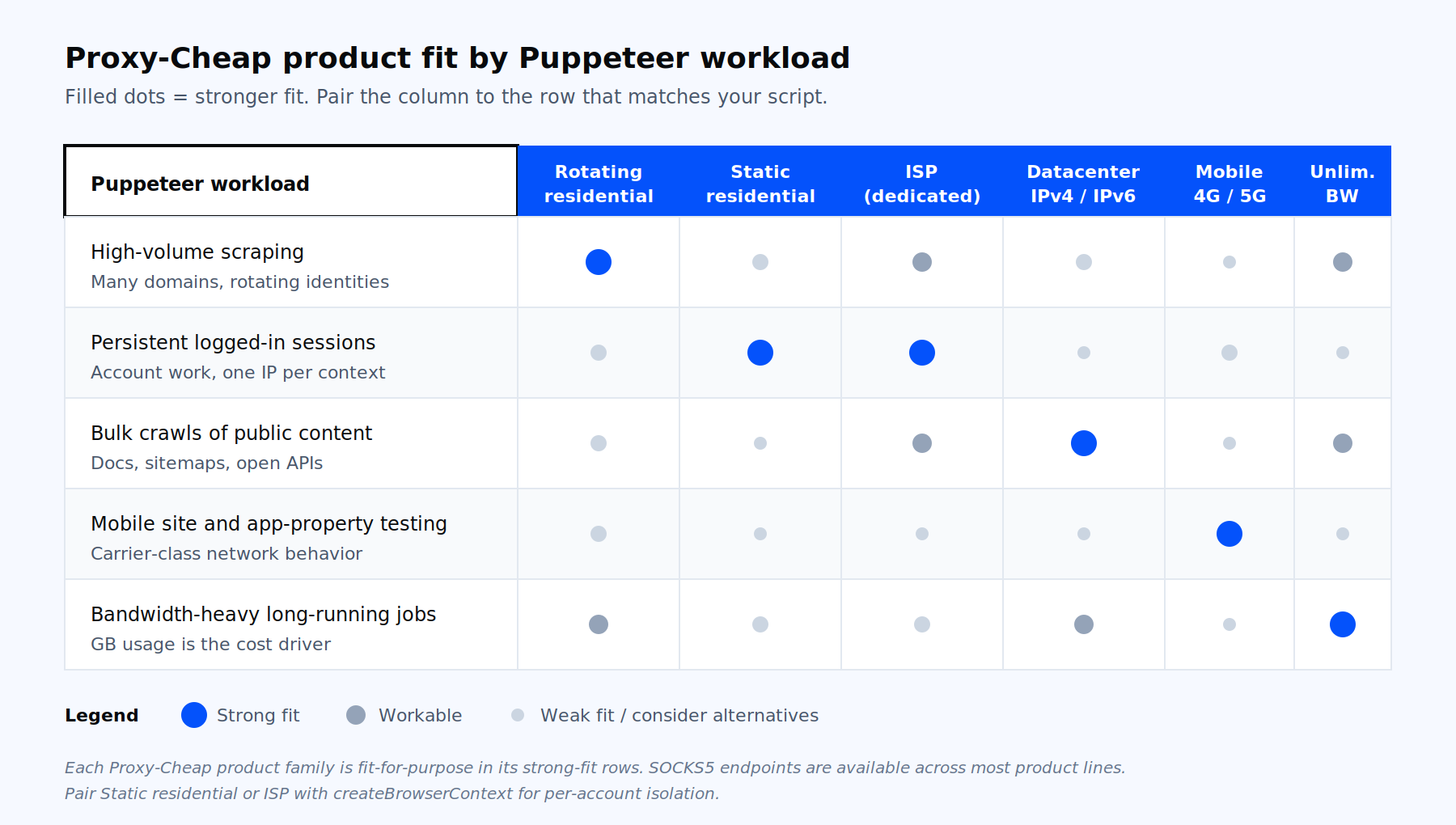
Match the Puppeteer workload to the right product line: throughput, session persistence, identity quality, or mobile-property coverage.
A clean exit IP alone is not enough. Default headless Chromium exposes the string HeadlessChrome in the user agent, sets navigator.webdriver to true, and ships a handful of CDP-detectable runtime quirks. Anti-bot scoring picks those up before it even looks at the IP.
Three practical pairings turn a working proxy into a stable session. First, run a stealth or fingerprint plugin that patches the obvious leaks (navigator.webdriver, the missing chrome runtime object, plugin and language enumeration, WebGL vendor strings). Second, match the browser locale, timezone, and accept-language headers to the proxy exit-node country. A US residential IP combined with Europe/Vilnius timezone is a strong tell. Third, randomize the viewport and user agent within realistic distributions, not arbitrary values. Setting the user agent to a six-month-old Chrome version on Windows 11 while running new headless Chromium 130 on Linux is itself a fingerprint.
Even with stealth plugins, the IP class matters. High-volume scraping calls for rotating residential or unlimited bandwidth proxies when GB usage is the bottleneck. Persistent account sessions favor static residential proxies or ISP proxies for stable identity. Bulk crawls of public content can run on datacenter proxies at a fraction of the cost. Mobile-property testing and the most challenging consumer targets are a fit for mobile proxies.
A few Chromium flags and Puppeteer options come up repeatedly when running proxies in production.
--ignore-certificate-errors is necessary when the proxy presents an intercepting certificate. Combine it with the launch option acceptInsecureCerts: true (which replaced the older ignoreHTTPSErrors field in recent versions). Apply this only to traffic that genuinely needs it; do not leave it on for general browsing.
--disable-blink-features=AutomationControlled removes the automation banner and the navigator.webdriver property surface. It is one of the cheapest fingerprint cleanups available.
WebRTC requires an extra flag, because Chromium routes UDP STUN packets outside HTTP and SOCKS proxies. Without an override, a page can read the host’s real public IP via WebRTC ICE candidates while every other request goes through the proxy. The verified fix:
args: [
  `--proxy-server=${proxyUrl}`,
  '--force-webrtc-ip-handling-policy=disable_non_proxied_udp',
]For headless behavior, headless: true is the new headless Chrome (the default in Puppeteer 22 and later). headless: 'shell' runs the lighter legacy chrome-headless-shell binary, faster but with reduced parity to real Chrome. headless: false opens a visible window and is the right choice for debugging proxy auth flows visually.
Two timeouts matter when traffic exits through residential or mobile networks. protocolTimeout defaults to 180 seconds and can only be set at launch. defaultNavigationTimeout defaults to 30 seconds and is too short for slow exit nodes. Raise it explicitly with page.setDefaultNavigationTimeout(60000) and prefer waitUntil: 'domcontentloaded' over 'networkidle0', which rarely fires over residential connections.
| Puppeteer workload | Recommended product | Why it fits |
|---|---|---|
| High-volume scraping with rotating identities | Rotating residential | Per-request rotation or sticky session via one gateway endpoint, broad country and city targeting |
| Persistent logged-in sessions and account work | Static residential or ISP | One stable IP per context with residential or ISP trust, paired cleanly with createBrowserContext |
| Bulk crawls of public documentation, RSS feeds, sitemaps | Datacenter | High throughput, very low cost per request, ideal for unprotected public content |
| Mobile site and app-property testing | Mobile (4G or 5G) | Carrier-class IPs and mobile network behavior, the closest match to a real handset |
| Long-running jobs where bandwidth is the cost driver | Unlimited bandwidth | Flat-rate billing, no per-GB pressure on retry budgets |
| Tools that need SOCKS5 specifically | SOCKS5 across product lines | TCP and UDP support, no HTTP header rewriting overhead |
For the use-case framing rather than the product framing, the dedicated proxy for scraping page walks through headless browser support and IP rotation patterns from the workload side.
net::ERR_NO_SUPPORTED_PROXIES almost always means a bad scheme or embedded credentials. Strip user:pass@ from the URL and verify the scheme is one of http, https, socks4, or socks5. Do not use socks5h://; Chromium does not implement it.
net::ERR_PROXY_CONNECTION_FAILED is a TCP-level failure. The host is unreachable, the port is wrong, or the proxy closed the connection. Test the upstream with curl -x before debugging Puppeteer. If you are pointing at an HTTPS proxy, make sure the scheme is https://, not http://.
net::ERR_TUNNEL_CONNECTION_FAILED combined with a 407 on the CONNECT request means CONNECT-level auth. page.authenticate cannot fix this; chain through a local forwarder that injects Proxy-Authorization.
net::ERR_CERT_AUTHORITY_INVALID happens with intercepting proxies that present their own CA, or when an intermediate certificate is missing from the headless trust store. Set acceptInsecureCerts: true and add --ignore-certificate-errors only after verifying the proxy is the cause.
Navigation hangs typically point at waitUntil: 'networkidle0', which requires zero in-flight requests for 500 ms. Through a residential exit node, analytics beacons and websockets keep the network busy past that threshold. Switch to 'domcontentloaded' and wait explicitly for the selector you need. Skip heavy resource types with request interception to help the network actually go idle.
WebRTC exposing the real IP through STUN ICE candidates is solved at launch by --force-webrtc-ip-handling-policy=disable_non_proxied_udp. Patching RTCPeerConnection from evaluateOnNewDocument is not enough on its own, because the script may not run before the first peer connection.
Five patterns recur in production Puppeteer fleets that consume proxies at volume. Reuse one browser process and isolate identities with createBrowserContext, rather than launching N browsers, until per-process state forces you to. Cap browser pool size by available RAM and recycle each browser after a few hundred pages to release the slow renderer memory drift. Wrap every page.goto in a retry loop that catches ERR_TUNNEL_CONNECTION_FAILED, ERR_PROXY_CONNECTION_FAILED, and TimeoutError, and pulls a fresh upstream from the rotator on retry. Run a local forwarding proxy in front of authenticated upstreams; the price of one local hop is worth the simpler error model and the per-request rotation it enables. Treat one context as one identity: cookies, storage, fingerprint, and proxy session ID all stay paired for the life of that context.
Pulling these together: a typical production worker holds one browser, a small pool of contexts each pinned to a sticky session through a rotating residential gateway, a stealth plugin loaded once at launch, and a retry-with-new-context outer loop. Start a free Proxy-Cheap account or top up on pay-as-you-go credit to test the configuration against your actual targets before scaling out.