
Key takeaways:
OpenBullet 2 sends a lot of requests in a short window, so the IP you run it from matters as much as the config you build. This guide walks through what OpenBullet 2 is, how to install and run it, and then the part most tutorials gloss over: integrating proxies correctly, rotating them, and fixing the proxy errors that come up most often. The Proxy-Cheap endpoints and import formats shown here were tested for reachability before publishing.
OpenBullet 2 is an open-source automation suite powered by .NET. In the maintainers' own words, it "allows to perform requests towards a target webapp and offers a lot of tools to work with the results." You define a sequence of requests and parsing rules in a config, then run that config at scale over a list of input data.
The current release at the time of writing is v2.0.0, published in June 2026 under the MIT license. It is a cross-platform rewrite of the original Windows-only OpenBullet, and it ships in three forms: a native Windows desktop client, a browser-based web client, and a Docker image. The project is maintained on GitHub with an active community forum at discourse.openbullet.dev.
Three concepts hold the tool together. Configs describe what to do, written in LoliCode (a lightweight scripting language) or assembled visually in the Stacker. Jobs run a config, with the Multi-Run Job for data processing and the Proxy Check job for validating proxies. Wordlists supply the input data that a job iterates over. Around all of this sits a proxy manager that handles groups, types, and rotation.
OpenBullet 2 is general-purpose request automation, so its uses follow from that:
One ground rule sits above all of these. Use OpenBullet 2 only against web apps you own or have explicit, written authorization to test, and respect each site's terms of service and the laws that apply to you. The proxy guidance in this article is for legitimate testing, monitoring, and public-data workflows. Treating authorization and compliance as the starting point is also what keeps a proxy-backed pipeline sustainable.
The features that matter most for a proxy-backed workflow:
Yes. OpenBullet 2 is free and open source under the MIT license, which permits commercial use. There is no license key, no usage cap, and no paid tier built into the tool itself.
Your real costs come from elsewhere: the compute that runs the jobs (browser automation is heavier than plain HTTP), any optional third-party services you wire in, and proxies once you run at volume. The proxy line is the one that scales with your workload, which is why picking the right product and plan early pays off.
Pick the deployment mode that fits where you want to run it. All three open the same web interface in your browser.
Docker is the cleanest option for a server or for keeping your machine tidy:
docker run --name openbullet2 --rm -p 8069:5000 \
  -v C:/OB2/UserData/:/app/UserData/ \
  -it openbullet/openbullet2:latest
# Then open http://127.0.0.1:8069 in your browser.The -p 8069:5000 flag maps your local port 8069 to the container's port 5000, where OpenBullet 2 always listens. Change 8069 to any free local port you like.
Web client without Docker runs directly on the .NET runtime:
dotnet ./OpenBullet2.Web.dll
# Then open http://localhost:5000 in your browser.Native Windows client is a desktop download. Grab the latest release for Windows from the project's releases page, unzip it, and run the executable. It is the single-user option and needs no separate runtime setup.
Whichever you choose, once the interface loads you are ready to add proxies and build your first config.
A minimal end-to-end run proves the install works before you touch a real target. Point it at a harmless endpoint that echoes your IP, such as https://ipinfo.io/ip.
The request your config makes is the same one this validated command performs from a terminal, which is a useful way to confirm the target behaves before you wrap it in a config:
curl --max-time 10 https://ipinfo.io/ipOnce a no-proxy run works, add the proxy group from the setup section below and run it again. That sequence (config first, then proxies) keeps debugging simple, because you know the config is sound before a proxy enters the picture.
A job does not return a single document the way a scraper might. Instead, every input line gets a status, and the job tallies them as it runs:
| Status | Meaning |
|---|---|
| SUCCESS | The line met the config's success condition. These are saved as hits. |
| FAIL | The line ran cleanly but did not meet the success condition. |
| RETRY | A transient issue (often a proxy timeout); the line is queued to run again. |
| ERROR | The config hit an exception, such as a parsing failure or a malformed request. |
Successful lines are stored as hits with whatever variables your config captured, so the practical output is structured data: the fields you parsed out of each response. You can review hits in the interface and export them to a file for downstream use. The RETRY column is the one to watch during a proxy-backed run, because a climbing retry count usually points at proxy health rather than the config.
OpenBullet 2 is built to send many requests quickly. Run that from a single IP and three problems show up fast.
Proxy-Cheap offers several product lines that map cleanly onto OpenBullet 2 workloads. For a broader view of how to choose, the best proxy for web scraping guide covers selection criteria across the industry.
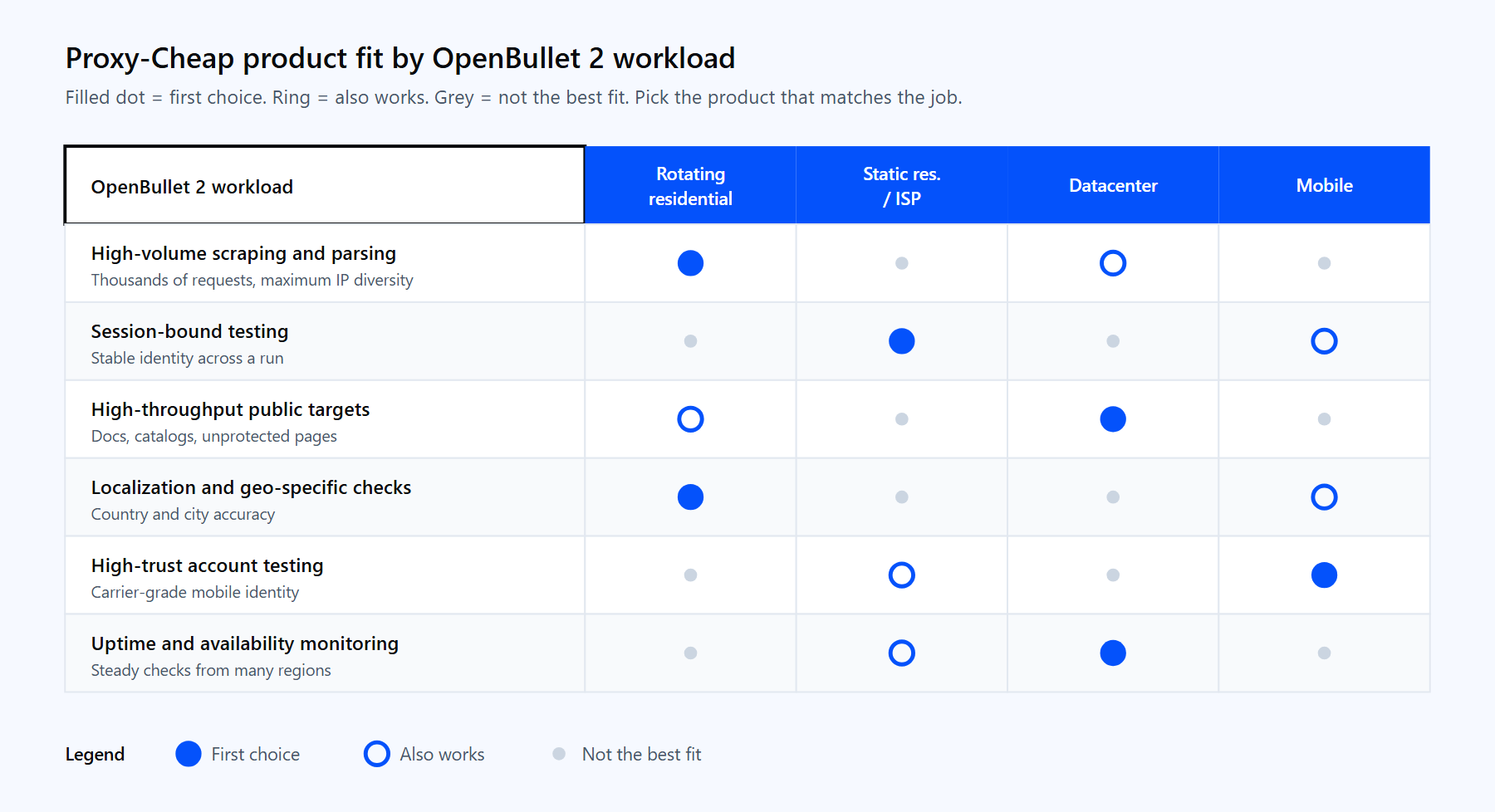
Each product line fits a different shape of job. The links below match the cards above.
Proxy setup lives in the web interface, so make sure OpenBullet 2 is running and open in your browser first. The whole flow takes about a minute.
OpenBullet 2 reads two proxy formats. The legacy format puts the type in parentheses at the front:
(type)host:port:username:passwordSo a Proxy-Cheap rotating residential gateway entry over HTTP looks like this:
(http)thehub.proxy-cheap.com:8080:<your-proxycheap-username>:<your-proxycheap-password>The standard URI format works too, and it is the cleaner option if you copy strings between tools:
http://<your-proxycheap-username>:<your-proxycheap-password>@thehub.proxy-cheap.com:8080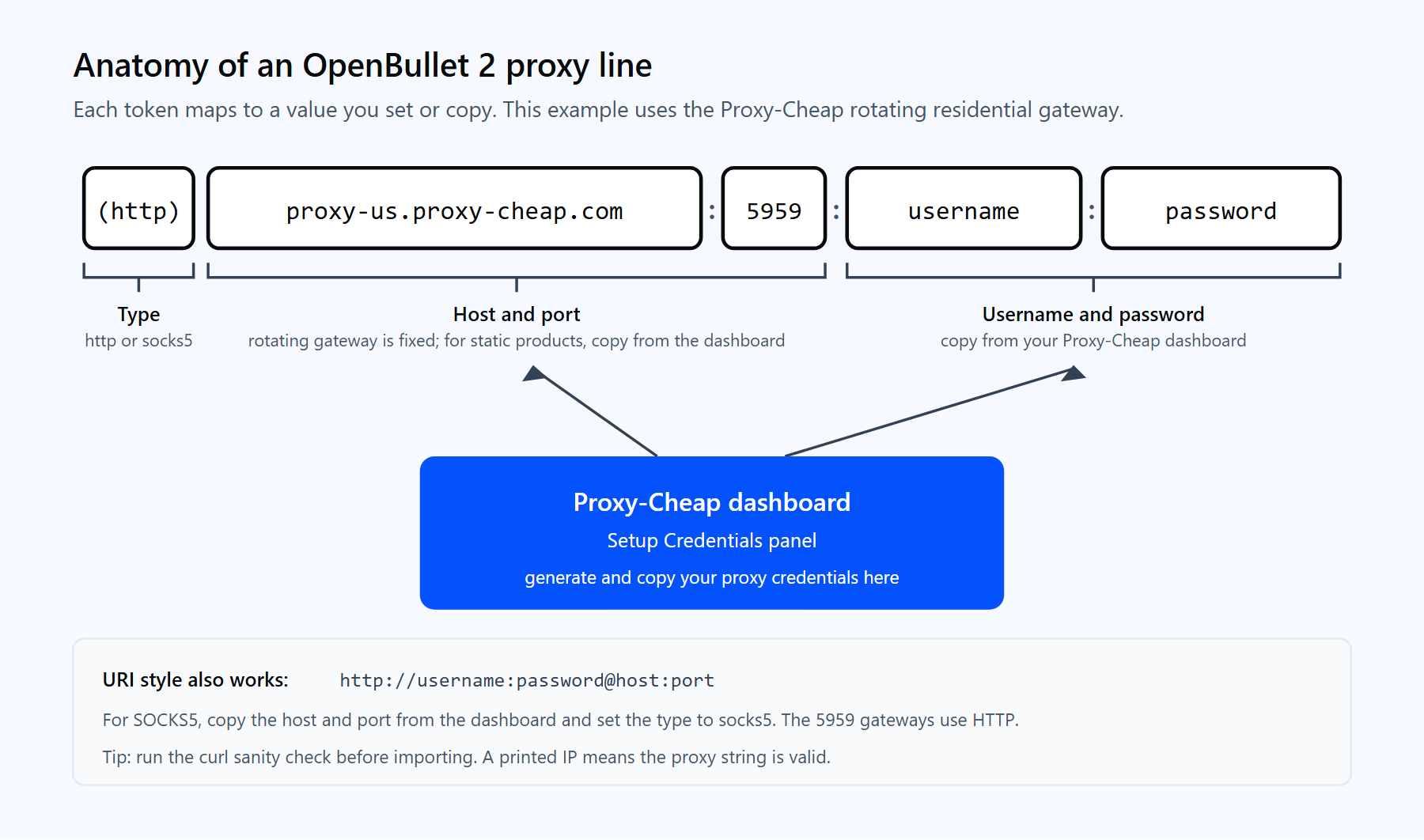
Each part of the OpenBullet 2 proxy line maps directly to a value from your Proxy-Cheap dashboard. Pick the type that matches the credential you copied.
A few details that save time:
Before you import anything, it is worth confirming the credential works at the network level. Run this quick check from a terminal. A real IP address in the response means the gateway and credentials are good:
# Quick sanity check before importing into OpenBullet 2.
# A printed IP means the proxy string and credentials are valid.
curl --max-time 10 -x "http://<your-proxycheap-username>:<your-proxycheap-password>@thehub.proxy-cheap.com:8080" https://ipinfo.io/ipIf you see a 407 response instead, the gateway is reachable but the credentials are wrong, so refresh them in the dashboard. If the connection times out, check the host and port. This same string maps one to one onto the OpenBullet 2 line above.
OpenBullet 2 gives you two rotation models, and the right one depends on which Proxy-Cheap product you bought.
Rotating residential gateway (one line). With rotating residential proxies, rotation happens at the gateway. You import a single line, and every request that leaves through thehub.proxy-cheap.com:8080 gets a fresh exit IP automatically. You do not need a long proxy list, because one endpoint already fronts a large pool. Sticky sessions of around 30 minutes are available when you need the same IP across a sequence of requests.
Static list (many lines). With static residential, ISP, or datacenter products, each proxy is a fixed IP and port. You import the full list, and OpenBullet 2 hands one proxy to each bot, then moves to the next entry on retry. The larger and more diverse your list, the more evenly the load spreads.
Either way, validate the group before a real run. OpenBullet 2 has a built-in Proxy Check job: go to Jobs, click New, choose Proxy Check, pick your group, set a test target, and start it. OpenBullet connects through each proxy and reports its status, so you can drop the dead ones before they cost you a run. For methods that work outside OpenBullet too, see the walkthrough on how to test proxies.
Choosing between the two models is the classic tradeoff. Rotating residential is the default for high-volume jobs where you want maximum IP diversity with minimal setup. Static residential or ISP wins when you need a stable identity that persists across a session. The full comparison lives in static vs rotating proxies.
A protocol note: Proxy-Cheap supports HTTP and SOCKS5 across the product line. For OpenBullet 2, HTTP with a username and password is the most compatible choice, and it is what the rotating hub uses on port 8080. SOCKS5 works well when you copy the host and port straight from the dashboard.
Importing proxies is only half the integration. The other half is telling a job to use them.
A Multi-Run Job ties together three inputs: a config, a wordlist (your input data), and proxy settings. When you create the job, enable the proxy option and select the group you imported, and OpenBullet 2 routes each bot's requests through that group.
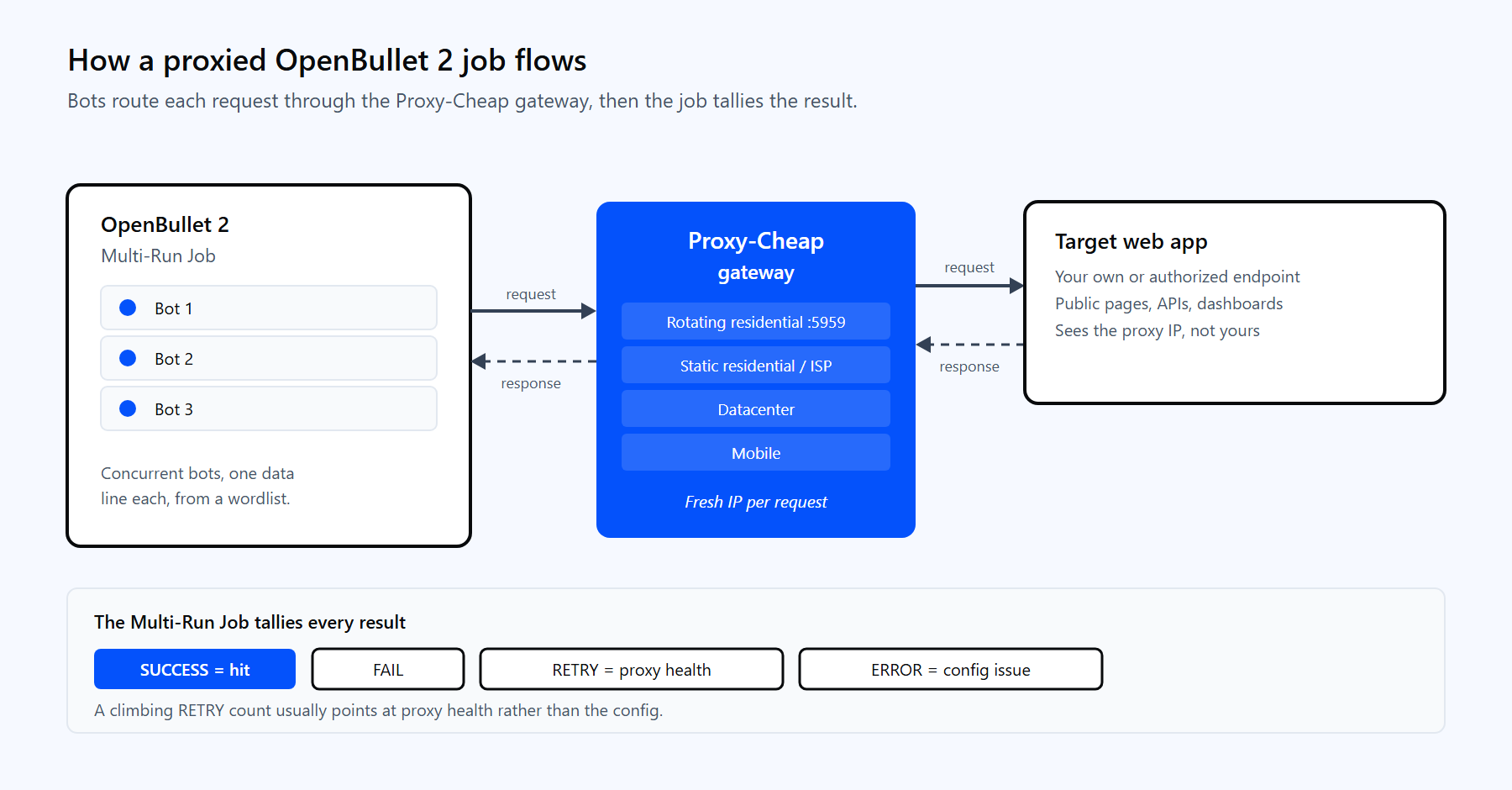
A Multi-Run Job spreads its bots across the proxy pool. Each request leaves through the Proxy-Cheap gateway, hits your target, and returns a status the job tallies.
Three settings decide whether the run is smooth or stalls:
The payoff of getting these right is throughput that holds steady across a long job instead of degrading as the pool thins out. A residential proxy network with enough pool depth is what makes that consistency possible.
Most OpenBullet 2 proxy problems map to a handful of root causes. These are the ones that surface most often in the project's issue tracker.
1. Authenticated proxies pass in the Runner but fail the Proxy Check. A known mismatch where username and password proxies behave differently between the checker and a live job. Use the full (type)host:port:username:password form, or set the default type and default credentials in the import dialog so every line is complete. Then validate with a Multi-Run Job against a known-good target rather than relying only on the checker.
2. Proxies work in other tools but show as dead in OpenBullet 2. Almost always the wrong type is selected. The Proxy-Cheap rotating hub, thehub.proxy-cheap.com:8080, accepts HTTP, so set the type to HTTP for it. Reserve SOCKS5 for the host and port you copy from the dashboard, and confirm the credentials are present on the line or in the defaults.
3. Importing from a file throws an InvalidOperationException. Some builds choke on file import while pasting works fine. Paste the proxies into the text box instead, and make sure the file is plain UTF-8 text with exactly one proxy per line and no trailing empty lines.
4. Idle connections pile up and hit a thread limit. High concurrency against thread-limited proxies leaves connections open and exhausts the per-IP cap. Lower the bot count to match your plan's allowed concurrency. With a static list, keep bots near the number of proxies; with the rotating gateway, one entry comfortably fronts many concurrent requests.
5. The job stalls because the proxy pool ran dry. When every proxy is marked unhealthy and no reload is set, the job has nothing left to route through. Enable proxy reload and retries in the job settings, and prefer the rotating residential gateway, where each request draws a fresh IP from the pool so it does not deplete the way a fixed list does.
6. A 407 proxy authentication response. The credentials are wrong, or you are on IP-allowlist authentication and the machine's IP is not on the list. Copy fresh credentials from the dashboard, or add the machine's public IP to the allowlist for static products.
For flexible, self-hosted request automation, OpenBullet 2 is one of the strongest open-source options available, especially given the price. A few honest tradeoffs are worth weighing first.
Pros
Cons
OpenBullet 2 vs OpenBullet 1. OpenBullet 2 is the maintained, cross-platform rewrite. The original OpenBullet was Windows-only and is no longer the active project. Unless you are maintaining a legacy setup, OpenBullet 2 is the version to learn, and it is the one all proxy guidance in this article targets.
The practical setup for most users: run OpenBullet 2 yourself, pair it with a value-tier proxy provider on pay-as-you-go billing, validate every group with a Proxy Check job, and you cover the large majority of legitimate testing and data workflows without enterprise overhead.