Crawl4AI is an open-source Python web crawler purpose-built for LLM workflows. It wraps Playwright to render JavaScript, then converts the rendered DOM to clean Markdown, filtered Markdown, sanitized HTML, structured JSON, or screenshots. All of it comes back in one CrawlResult object.
The project is maintained by UncleCode and has crossed 50,000+ GitHub stars. It runs on Python 3.10+, ships an async-first API (AsyncWebCrawler, arun, arun_many), and offers a self-hostable Docker image with a REST endpoint and dashboard. The current stable series is v0.9.x.
Two things set it apart from general-purpose scrapers. First, the Markdown output is tuned for token-efficient ingestion into LLMs and vector databases. Second, the 0.8.x line added adaptive crawling that stops once it has gathered enough information, and v0.8.5 introduced automatic anti-bot detection that can escalate through a proxy list you supply. Both carry into the current 0.9.x line.
Crawl4AI is used wherever a developer needs the public web turned into structured input for an AI model. The most common applications:
The unifying thread is AI web scraping. Developers want clean text more than they want raw HTML, and they want it in a format their model already understands.
The features that matter for production AI scraping:
Yes. Crawl4AI is fully free and open source under the Apache License 2.0. There is no API key, no rate limit, and no usage cap built into the library. Commercial use is permitted; attribution via the project badges is recommended but not required.
You install it with pip, run it on your own infrastructure, and pay nothing to the project. Operational costs come from three places only:
A hosted Crawl4AI Cloud is in closed beta, but the entire feature set discussed in this guide works on the free, self-hosted library.
Installation is two commands plus a verification step. Run them in a clean virtual environment on Python 3.10 or newer.
# 1. Install the library
pip install -U crawl4ai
# 2. One-time setup: downloads Playwright Chromium and initializes the local cache DB
crawl4ai-setup
# 3. Verify the install end-to-end
crawl4ai-doctor
If crawl4ai-setup fails inside a container or restricted environment, install the browser manually:
python -m playwright install --with-deps chromium
For production workloads, the Crawl4AI Docker image is the cleaner option. It exposes a REST API on port 11235 and a playground UI:
docker pull unclecode/crawl4ai:latest
docker run -d -p 11235:11235 --name crawl4ai \
--shm-size=1g unclecode/crawl4ai:latest
# Dashboard: http://localhost:11235/dashboard
# Playground: http://localhost:11235/playground
As of v0.9.0 the Docker API server is secure-by-default: authentication is on by default and the server binds to loopback unless you pass a token. If you expose the REST API beyond localhost, set a token / SECRET_KEY and review the v0.9.0 migration guide first. The core pip library is unaffected by this change.
Confirm the version you actually installed before copying code from any tutorial. The API surface changed meaningfully across the 0.5, 0.6, 0.8, and 0.9 lines:
pip show crawl4ai | grep Version
The minimal working example. It launches headless Chromium, fetches a page, and prints the first 300 characters of clean Markdown.
import asyncio
from crawl4ai import AsyncWebCrawler, BrowserConfig, CrawlerRunConfig, CacheMode
async def main():
# BrowserConfig governs the browser process (headless, viewport, user agent, proxy).
browser_config = BrowserConfig(headless=True, verbose=True)
# CrawlerRunConfig governs a single request (cache, timeouts, extraction).
run_config = CrawlerRunConfig(cache_mode=CacheMode.BYPASS)
async with AsyncWebCrawler(config=browser_config) as crawler:
result = await crawler.arun(
url="https://example.com",
config=run_config,
)
if result.success:
# result.markdown is a MarkdownGenerationResult object with multiple variants.
print(result.markdown.raw_markdown[:300])
else:
print("Crawl failed:", result.error_message)
if __name__ == "__main__":
asyncio.run(main())
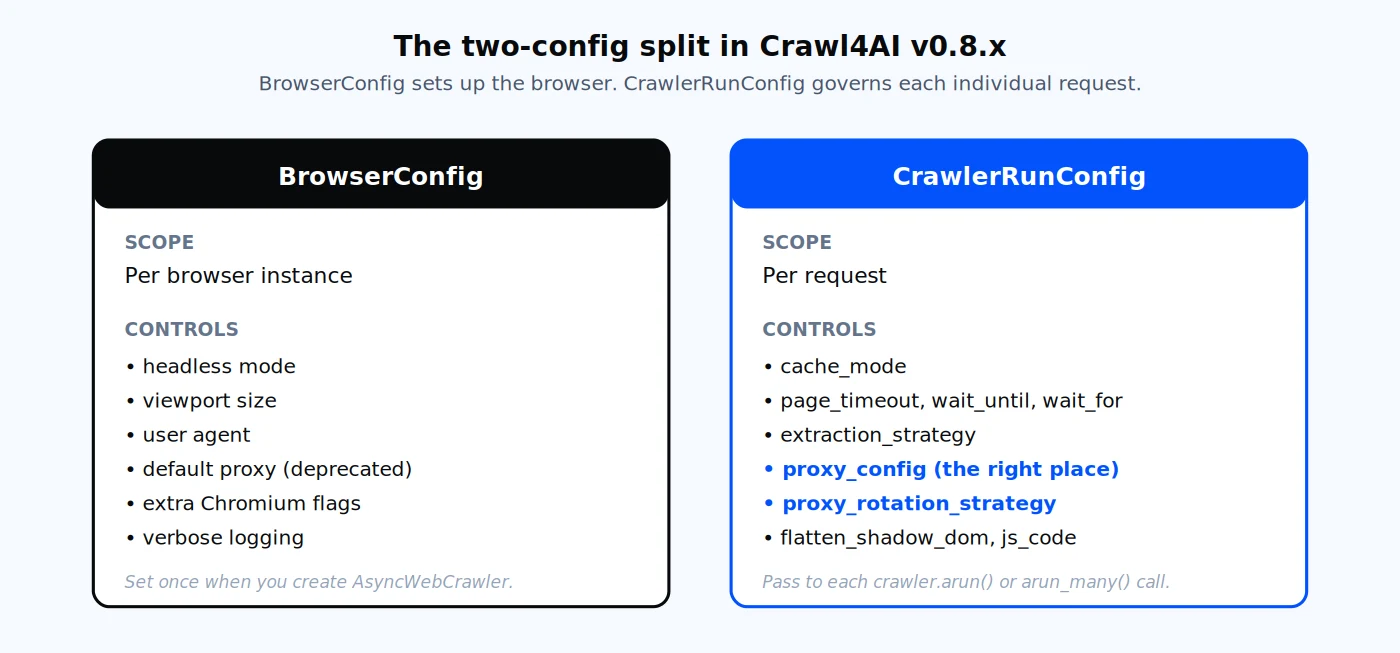
BrowserConfig governs the browser instance. CrawlerRunConfig governs each individual request, which is where Crawl4AI recommends putting proxy settings in v0.9.x.
The two-config split is important. BrowserConfig is per-browser; CrawlerRunConfig is per-request. In v0.9.x, the recommended pattern is to set proxies on the run config (CrawlerRunConfig.proxy_config) so each request can carry its own proxy.
A successful arun call returns a single CrawlResult object that exposes the page in many formats at once. You pick the field that matches your downstream use case.
| Field | What it contains | When to use it |
|---|---|---|
| result.markdown.raw_markdown | Full Markdown of the rendered DOM | Maximum recall, RAG ingestion |
| result.markdown.fit_markdown | Markdown after boilerplate pruning | Token-sensitive LLM prompts |
| result.markdown.markdown_with_citations | Markdown with numbered citation footnotes | Document-style outputs |
| result.cleaned_html | Sanitized HTML, scripts and styles stripped | Re-parsing with BeautifulSoup |
| result.html | Raw page HTML | Archival, forensic analysis |
| result.extracted_content | JSON string from your extraction_strategy | Direct DB or app ingestion |
| result.links | Dict of internal and external links | Link graphs, deep crawling |
| result.media | Image, audio, and video metadata | Multimodal pipelines |
| result.screenshot | Base64 PNG of the full page | Visual archive |
| result.pdf | PDF bytes of the rendered page | Long-page archival |
| result.metadata | Title, description, language, OG tags | Categorization, SEO research |
The default Crawl4AI output is Markdown, and that is what makes it different from Scrapy or raw requests. The fit_markdown variant in particular is worth pointing your LLM at first. It strips navigation, footers, cookie banners, and ad slots, which routinely cut token usage by 40% or more on real-world pages.
A direct connection from your server's IP is fine for a handful of pages. It stops being fine the moment you scale to a real workload, which is why every serious AI scraping pipeline runs through a residential proxy network.
For a broader comparison of what to look for, the best proxies for web scraping guide covers provider selection criteria across the industry. Three concrete reasons to put a proxy in front of every Crawl4AI run:
Proxy-Cheap offers four product lines that map cleanly onto Crawl4AI's typical workloads:
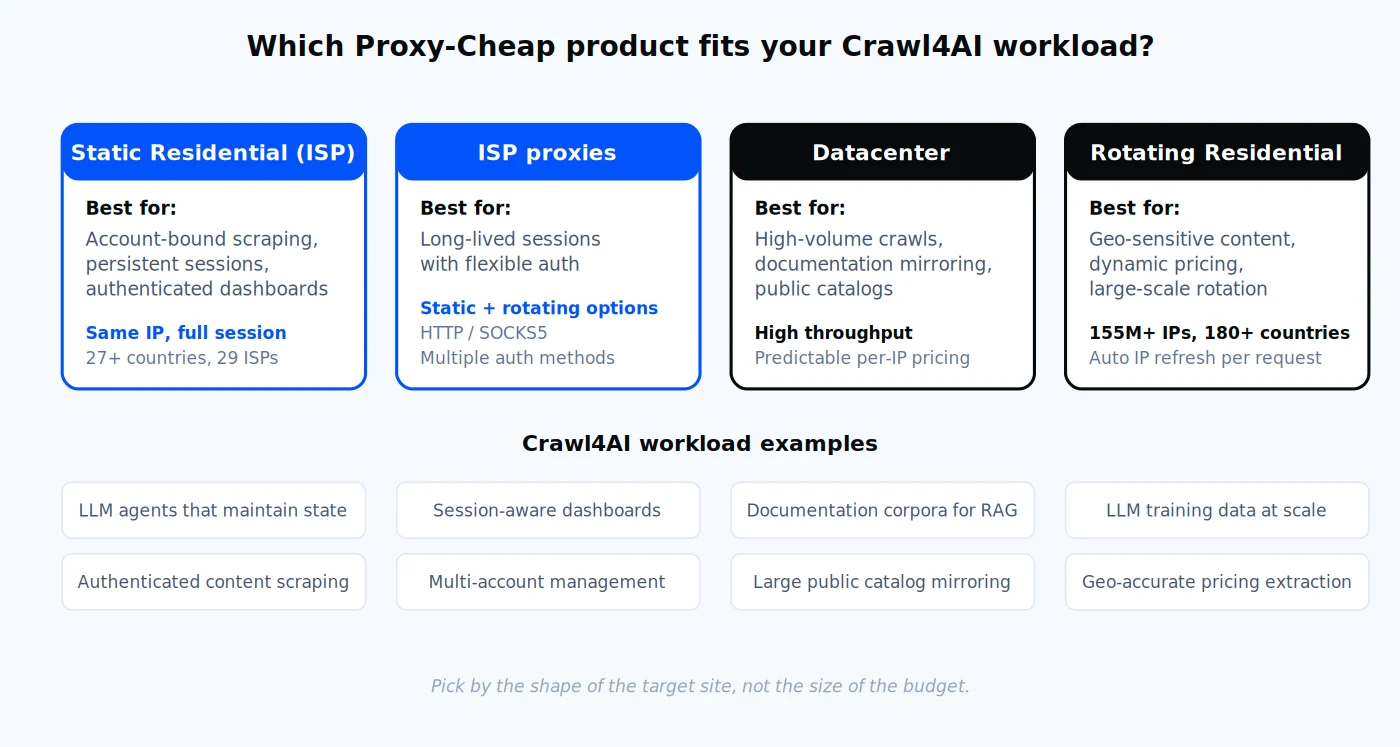
Each product line is optimized for a different shape of workload. The links below match the cards above.
For most AI scraping projects the answer is one of these four, picked by the shape of the target site rather than the size of the budget.
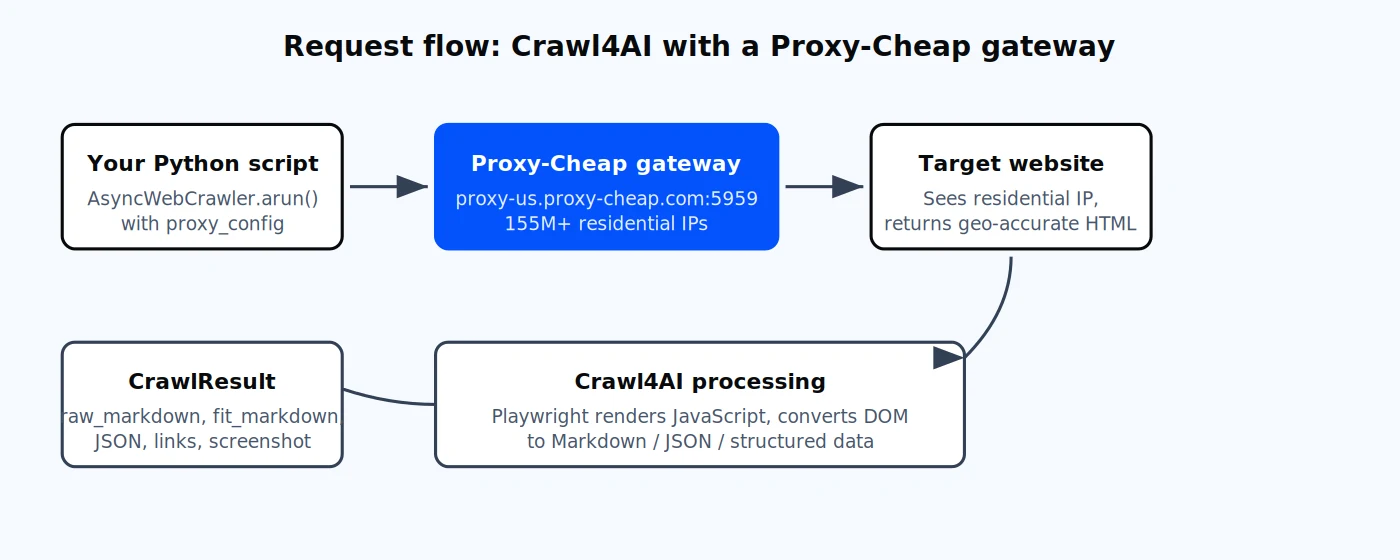
A single Crawl4AI call routes through the Proxy-Cheap gateway, fetches the target site through a residential IP, and returns a fully processed CrawlResult.
Crawl4AI gives you two equivalent ways to configure a proxy: a plain dict or the ProxyConfig class. Both attach to CrawlerRunConfig.proxy_config in v0.9.x, which is the method Crawl4AI recommends. Setting a proxy on BrowserConfig still works, but the per-request run-config approach is preferred because it enables rotation and per-site isolation.
Before the code, a quick note on Proxy-Cheap's endpoint format because it differs by product:
The dict format is the simplest entry point. The example below uses the US rotating gateway:
import asyncio
from crawl4ai import AsyncWebCrawler, BrowserConfig, CrawlerRunConfig
async def main():
# The dict format CrawlerRunConfig.proxy_config expects.
# Keys are exactly: server, username, password.
proxy_config = {
"server": "http://thehub.proxy-cheap.com:8080", # or proxy-eu...
"username": "<your-proxycheap-username>",
"password": "<your-proxycheap-password>",
}
run_config = CrawlerRunConfig(proxy_config=proxy_config)
async with AsyncWebCrawler(config=BrowserConfig(headless=True)) as crawler:
result = await crawler.arun(
url="https://httpbin.org/ip", # echoes the outbound IP
config=run_config,
)
print("Outbound HTML:", result.html[:200])
if __name__ == "__main__":
asyncio.run(main())
The ProxyConfig class adds parsing helpers and is the cleaner option once you graduate beyond a single proxy:
import asyncio
from crawl4ai import (
AsyncWebCrawler, BrowserConfig, CrawlerRunConfig, ProxyConfig
)
async def main():
# Equivalent to the dict above, but typed and importable.
proxy = ProxyConfig(
server="http://thehub.proxy-cheap.com:8080",
username="<your-proxycheap-username>",
password="<your-proxycheap-password>",
)
# ProxyConfig.from_string parses several common formats:
# "http://user:pass@host:port"
# "host:port:user:pass"
# "socks5://host:port"
# proxy = ProxyConfig.from_string("thehub.proxy-cheap.com:8080:user:pass")
run_config = CrawlerRunConfig(proxy_config=proxy)
async with AsyncWebCrawler(config=BrowserConfig(headless=True)) as crawler:
result = await crawler.arun(
url="https://httpbin.org/ip",
config=run_config,
)
print(result.success, result.status_code)
if __name__ == "__main__":
asyncio.run(main())
Three practical notes from production use:
Proxy-Cheap delivers credentials in standard host:port plus username:password form, generated in the dashboard's "Setup Credentials" panel. That maps one-to-one onto the dict above. For a deeper walkthrough of credential generation, see the step-by-step guide to using residential proxies.
You get rotation in two different ways depending on the product line:
Crawl4AI ships a built-in rotation strategy for the second case. Pair RoundRobinProxyStrategy with arun_many and the crawler cycles through the proxies in your list in order. Each entry is a distinct Proxy-Cheap IP, so the variety of exit IPs comes from the list you build, not from Crawl4AI.
Important: Crawl4AI does not perform IP rotation on its own. RoundRobinProxyStrategy only cycles through the proxies you provide. The change of exit IP is delivered by Proxy-Cheap, either by the rotating-residential gateway (a new IP per request, or a sticky session you configure) or by the distinct static IPs you list. IP rotation therefore depends on your Proxy-Cheap credentials and session settings, not on Crawl4AI.
The example below uses both rotating residential gateways for geographic diversity, but the same pattern works for any list of static proxies:
import asyncio, os, re
from crawl4ai import (
AsyncWebCrawler, BrowserConfig, CrawlerRunConfig,
CacheMode, ProxyConfig,
)
from crawl4ai.proxy_strategy import RoundRobinProxyStrategy
async def main():
# PROXIES env var format: "host:port:user:pass,host:port:user:pass,..."
# The example below uses the US and EU rotating gateways for geographic
# rotation. For static residential / ISP / datacenter, list the unique
# IPs and ports from your dashboard instead.
os.environ.setdefault(
"PROXIES",
"thehub.proxy-cheap.com:8080:<user>:<session-1-pass>,"
"thehub.proxy-cheap.com:8080:<user>:<session-2-pass>",
)
proxies = ProxyConfig.from_env() # parses PROXIES into list[ProxyConfig]
if not proxies:
raise SystemExit("Set the PROXIES env var first.")
strategy = RoundRobinProxyStrategy(proxies)
run_config = CrawlerRunConfig(
cache_mode=CacheMode.BYPASS,
proxy_rotation_strategy=strategy, # rotates per request
)
urls = ["https://httpbin.org/ip"] * (len(proxies) * 3)
async with AsyncWebCrawler(config=BrowserConfig(headless=True)) as crawler:
results = await crawler.arun_many(urls=urls, config=run_config)
for i, r in enumerate(results):
if r.success:
ip = re.search(r"(?:\d{1,3}\.){3}\d{1,3}", r.html)
print(f"[{i+1}] outbound IP -> {ip.group(0) if ip else '?'}")
else:
print(f"[{i+1}] FAIL -> {r.error_message}")
if __name__ == "__main__":
asyncio.run(main())
The strategy hands out the next proxy from your list each time the crawler requests one. With arun_many, every URL in the batch gets the next entry in sequence.
When to use rotating residential versus static residential depends on the workload:
For a deeper comparison, read static vs rotating proxies: which type works better and how to rotate proxies in Python with Requests and AIOHTTP.
A protocol note: Proxy-Cheap supports HTTP/SOCKS5 across rotating and static products. For Crawl4AI integrations, HTTP with username and password is the most compatible option because Playwright handles HTTP proxy authentication natively. Static residential, ISP, and datacenter products also support IP whitelist authentication if you prefer not to embed credentials.
The real payoff of Crawl4AI is LLMExtractionStrategy. Define a Pydantic schema, point the strategy at any model supported by LiteLLM, and the crawler returns validated structured JSON. Combine it with a proxy and you have a fully production-ready AI scraping pipeline.
import asyncio, os, json
from pydantic import BaseModel, Field
from crawl4ai import (
AsyncWebCrawler, BrowserConfig, CrawlerRunConfig,
CacheMode, LLMConfig, ProxyConfig,
)
from crawl4ai.extraction_strategy import LLMExtractionStrategy
class Product(BaseModel):
title: str = Field(..., description="Product name")
price: str = Field(..., description="Price including currency symbol")
description: str = Field("", description="Short product description")
async def main():
# 1. Schema-driven LLM extraction. Works with OpenAI, Anthropic, Groq, Ollama, etc.
llm_strategy = LLMExtractionStrategy(
llm_config=LLMConfig(
provider="openai/gpt-4o-mini",
api_token=os.environ["OPENAI_API_KEY"],
),
schema=Product.model_json_schema(),
extraction_type="schema",
instruction="Extract every product on the page as a Product object.",
)
# 2. Residential proxy for accurate, geo-specific pricing.
proxy = ProxyConfig(
server="http://thehub.proxy-cheap.com:8080",
username=os.environ["PROXY_USER"],
password=os.environ["PROXY_PASS"],
)
run_config = CrawlerRunConfig(
cache_mode=CacheMode.BYPASS,
extraction_strategy=llm_strategy,
proxy_config=proxy,
)
async with AsyncWebCrawler(config=BrowserConfig(headless=True)) as crawler:
result = await crawler.arun(
url="https://web-scraping.dev/products",
config=run_config,
)
if result.success:
products = json.loads(result.extracted_content)
print(json.dumps(products[:3], indent=2))
else:
print("Extraction failed:", result.error_message)
if __name__ == "__main__":
asyncio.run(main())
Two things to verify when you put this into production:
Most Crawl4AI failures fall into one of seven buckets. Each has a simple fix.
1. `BrowserType.launch: Executable doesn't exist`. Playwright Chromium is missing or installed to a path the runtime cannot see. Run crawl4ai-setup. If that fails, run python -m playwright install --with-deps chromium. In containers, install libnss3 and libatk1.0-0.
2. `Page.wait_for_selector: Timeout 30000ms exceeded`. The default page timeout is too short for JavaScript-heavy pages. Extend it on the run config:
run_config = CrawlerRunConfig(
page_timeout=120_000, # 2 minutes
wait_until="networkidle", # wait for the network to settle
wait_for="css:main", # or a specific selector
)
3. `net::ERR_INVALID_AUTH_CREDENTIALS` with an authenticated proxy. You put credentials inline in the server URL. Move them into explicit username and password fields on the dict or ProxyConfig. Playwright handles proxy auth out-of-band and ignores credentials embedded in the URL on some platforms.
4. Rotating proxy snippet from an old tutorial does not run. Older docs passed BrowserConfig to arun(config=...), which arun rejects. The current pattern is CrawlerRunConfig(proxy_rotation_strategy=RoundRobinProxyStrategy(proxies)), as shown in the rotation section above.
5. `Object of type ProxyConfig is not JSON serializable` against the Docker REST API. When calling the containerized REST endpoint, send proxy_config as a plain dict in the JSON body, not as a ProxyConfig instance. The serialization gap was fixed in v0.7.8 and remains fixed in the current 0.9.x line. Sending proxy_config as a plain dict in the JSON body is still the safe pattern for the Docker REST API.
6. Missing links or empty Markdown on JavaScript-rendered pages. The page is not fully hydrated when extraction runs. Add wait_until="networkidle", delay_before_return_html=3, and flatten_shadow_dom=True for sites that use Web Components.
7. High memory usage during concurrent crawls. Each Chromium instance is heavy. Use arun_many with the built-in MemoryAdaptiveDispatcher rather than wrapping arun in asyncio.gather, share a single AsyncWebCrawler per worker, and pass extra_args=["--no-sandbox", "--disable-dev-shm-usage"] to BrowserConfig.
For AI-focused workloads, Crawl4AI is the strongest open-source choice today. It is free under Apache 2.0, the API is sensibly designed, the Markdown output saves real money on LLM tokens, and the maintainer ships features at a pace most paid scrapers cannot match. A few honest tradeoffs to weigh before you commit.
Pros
Cons
The middle ground for most teams: run Crawl4AI yourself, pair it with a value-tier proxy provider on pay-as-you-go billing, and you cover 90% of AI scraping use cases without enterprise-tier overhead.
Crawl4AI vs Scrapy. The two tools solve different problems. Scrapy is the right choice for high-volume HTTP-only crawls of static pages where you need maximum throughput and don't need a browser. Crawl4AI is the right choice when the target sites require JavaScript rendering, when you want Markdown output ready for an LLM, or when you want schema-driven structured extraction without writing parsers by hand. Many teams use both: Scrapy for discovery and link harvesting across millions of URLs, then Crawl4AI for AI-ready content extraction on the pages that matter.