
Interested in securing your browsing experience, but aren't exactly sure how to configure a Safari proxy on your Apple devices? It's much easier than you think. Proxies have come a long way since they were first introduced in the 90s.
Regardless of the proxy service you choose, setting up a proxy for your Safari browser will add an extra layer of privacy, boost security against trackers, and give you more control over how your data is accessed and viewed online. Let's go step-by-step through configuring your Safari proxies.
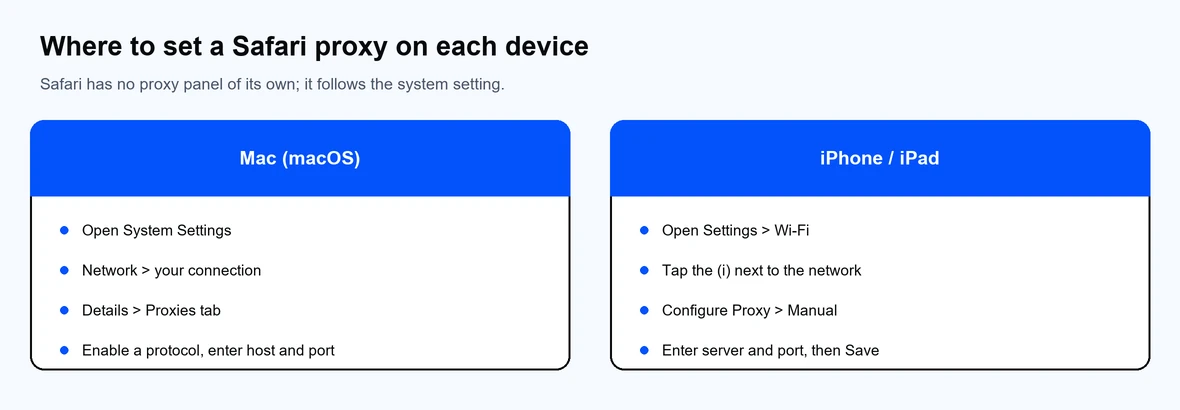
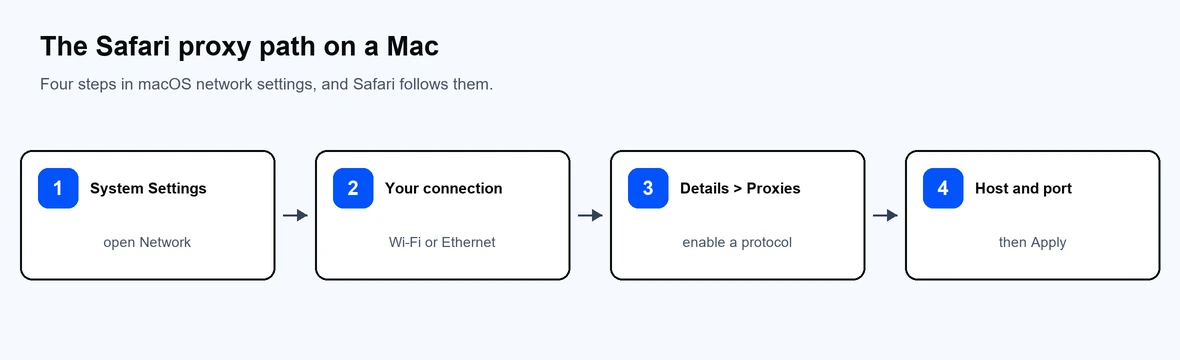
While proxy configuration for your Safari might differ depending on your macOS version, the process remains generally the same. In this section, we'll go over every individual action to get you on your way to successfully enabling proxies, whether you have datacenter, residential proxies, or other.
That's it! Now that you've configured your proxy, Safari should route traffic through it. If you need to change settings for your proxies, simply repeat the process and enter the different details.
As an alternative to manually configuring your proxies, you can use an Automatic Proxy Configuration (PAC) file. This script instructs your default browser, in this case Safari, to route your internet traffic through the correct proxy server.
PAC files are usually provided by proxy providers, but not in all cases. If you're using Proxy-Cheap and want to use a PAC file, you'll have to generate it yourself. Once you have the file, all you have to do is:
http://proxy.example.com/proxy.pacNow that you've successfully set up a secure web proxy in Safari, you may be wondering how to do the same on your iPad or iPhone. In truth, the process is virtually the exact same, even if you use mobile proxies.
The only thing to note here is that for all your devices, setting up a proxy will only work for the network you choose. If you ever connect to another Wi-Fi network, you'll need to configure your proxies again. Other than that, let's get into configuring proxies on your other Apple devices.
To set up your proxy manually, you'll need to have the proxy server IP (e.g., 203.0.113.45) and a port number (e.g., 8080). Also, if you choose to enable authentication, you'll need your username and password. After that, just hit Save and you're good to go.
For an automatic proxy setup, you just need to have a PAC URL, like http://proxy.example.com/proxy.pac. You can copy-paste the URL in the dedicated field under Automatic proxy configuration.
A proxy acts as a middleman between the device you're using and the website or apps you connect to. Without a proxy, all your connection requests go directly from your device to the website or mobile app you want to access.
However, once you set up a proxy, this process changes. Instead of connecting directly with websites, your connection request first goes through the proxy, which shields your actual IP and sends the request under a different IP.
By doing so, all your online connections become disguised and completely secured from any prying eyes, third-party trackers, or malicious parties.
First things first, Safari doesn't actually manage your proxies directly, but it relies on the configurations you've made on your macOS. Once you enable a proxy, Safari will then automatically route all browsing traffic through it.
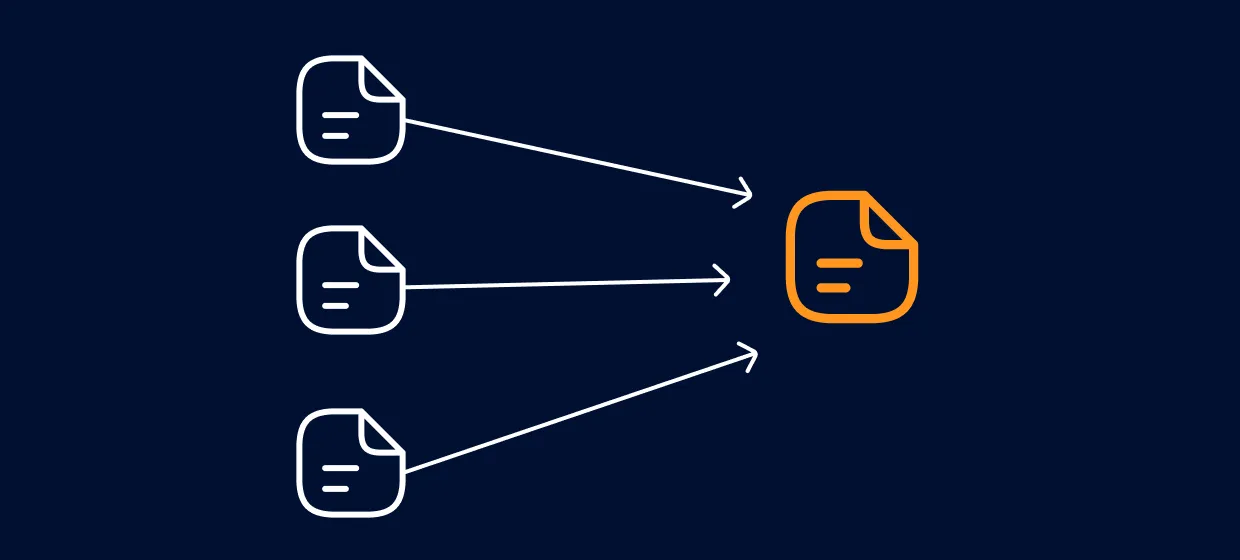
From that point on, whatever you do online, from loading pages to retrieving images or scripts, will first go through your proxy. The process looks something like this:
If you'd like to learn more about what a proxy server is, visit the Proxy-Cheap blog.
By default, your Safari browser will follow your Mac's proxy configuration, but you can change proxy settings to customize them to suit your needs. For example:
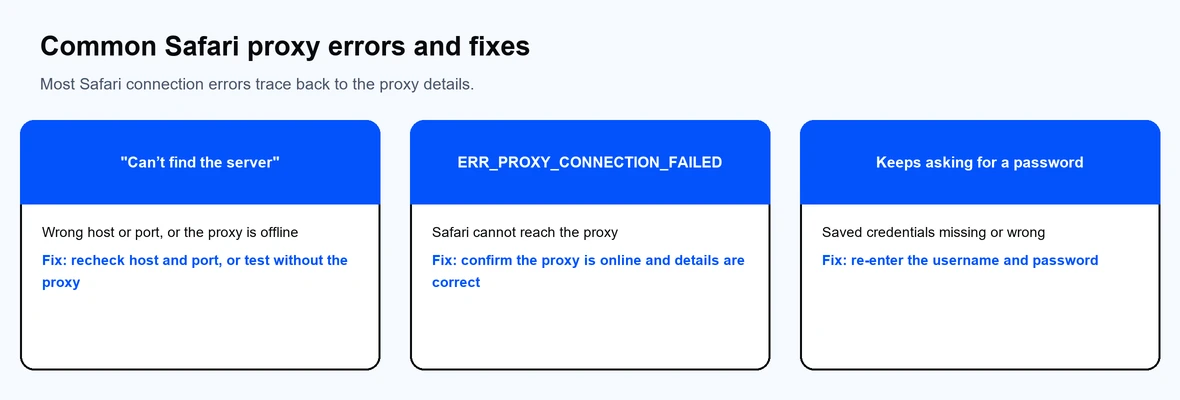
As with anything, even the most well-oiled machines sometimes malfunction. And this can also happen with proxies. No worries, in this part of the guide, we'll list the most common issues that may hinder your proxy connection, and how to fix them.
Another common, but rather troublesome issue is when Safari doesn't load websites. Typically, the cause of this is an incorrect proxy IP address or port, which in turn prevents Safari from connecting to your desired websites. However, in some cases, the error might also be caused by a temporarily offline proxy server or your network being blocked entirely.
Ways to fix this problem:
Proxies have become increasingly popular in recent years, with everyday users getting proxies to freely access all content globally, without any restrictions. But proxies do more than that – they mask your IP address.
This means that while you go about the internet, working, browsing, or web scraping, you remain hidden in the eyes of the internet. With a good proxy service, when you connect to the internet, websites see the proxy's IP address instead of your own, making it more difficult for trackers and ads to track you.
Moreover, if you're someone who travels a lot for work, proxies secure all public Wi-Fi connections, which are often vulnerable to all kinds of attacks and traps. This keeps all your sensitive information, like passwords, account details, or bank card information, from being monitored.
Proxy-Cheap offers a wide range of proxies, from high-speed residential proxies to the best proxy server for iPhone and Safari, all designed to be easily used by anyone, anywhere.
Proxy-Cheap is a globally trusted proxy provider, offering fast, dependable, affordable, and high-performance servers for all your needs, whether you're using proxies for work or everyday activities. Our servers are located in multiple locations worldwide, providing fast and uninterrupted connections for consistent and seamless page load times.
Speed and reliability are crucial for any proxy provider, but accessibility is just as important. Proxy-Cheap is recognized and preferred by many users for its affordable and scalable pricing plans, enabling you to select secure, high-quality proxies without overpaying.
With Proxy-Cheap, all Safari users can enjoy a faster and thoroughly protected online experience without complex setup manuals/
Browser proxies aren't just for privacy – they give back control to the end user. Whether it's securing your connection requests, shielding your device and personal data, a reliable proxy service like Proxy-Cheap will protect your identity, help avoid trackers, and secure all your outgoing connections.
Protect your browsing today with Proxy-Cheap and enjoy a safer, faster, and smarter way to surf the web. Sign up now to get started or visit the homepage to explore available plans!