
Tutorials
March 2, 2026
8 min

How to buy a proxy: a step-by-step buyer's guide for 2026

Jason Wright
Jason Wright
Copywriting & Data Intelligence Specialist
How to buy a proxy: a step-by-step buyer's guide for 2026
Краткое содержание
Learn how to choose, buy, and set up the right proxy — from residential to datacenter — to boost privacy, bypass geo-blocks, or collect data.

Key takeaways

  • To buy a proxy, work through five steps: define your use case, choose a proxy type, compare providers, pick a pricing model, then buy the proxy and test it.
  • Match the proxy type to the job. Residential fits consumer-facing targets, datacenter fits high-throughput public data, static residential (ISP) fits account-bound sessions, and mobile fits app and social testing.
  • Proxies are billed two main ways: per GB (rotating residential and mobile) and per IP per month (static residential, ISP, datacenter, and IPv6). Pay-as-you-go plans carry no monthly commitment.
  • Before you pay, check the pool size, locations, protocols (HTTP and SOCKS5), authentication (username and password or IP allowlist), and support. Then confirm the proxy works with one cURL request.

Buying your first proxy is mostly a sequence of small decisions: what the proxy is for, which type matches that job, who to buy it from, and how you want to pay. This guide walks through each decision in order, then shows how to set up and test the proxy you buy. By the end you will know exactly what to look for and how to get a working proxy in a few minutes.

What does it mean to buy a proxy?

Buying a proxy means paying a provider for the right to route your internet traffic through one or more of their IP addresses. In return you get a connection endpoint (a gateway hostname or a dedicated IP), a port, and credentials. When you point a browser, script, or app at that endpoint, the target website records the proxy IP for your request instead of your own. A proxy server sits in the middle and forwards each request on your behalf.

Yes, you can buy a proxy, and most providers sell self-serve. You create an account, pick a product and a plan, pay, and generate credentials in the dashboard, usually in a few minutes. There is no hardware to install and no contract to sign for pay-as-you-go plans.

The five steps below take you from "I think I need a proxy" to a working, tested connection.
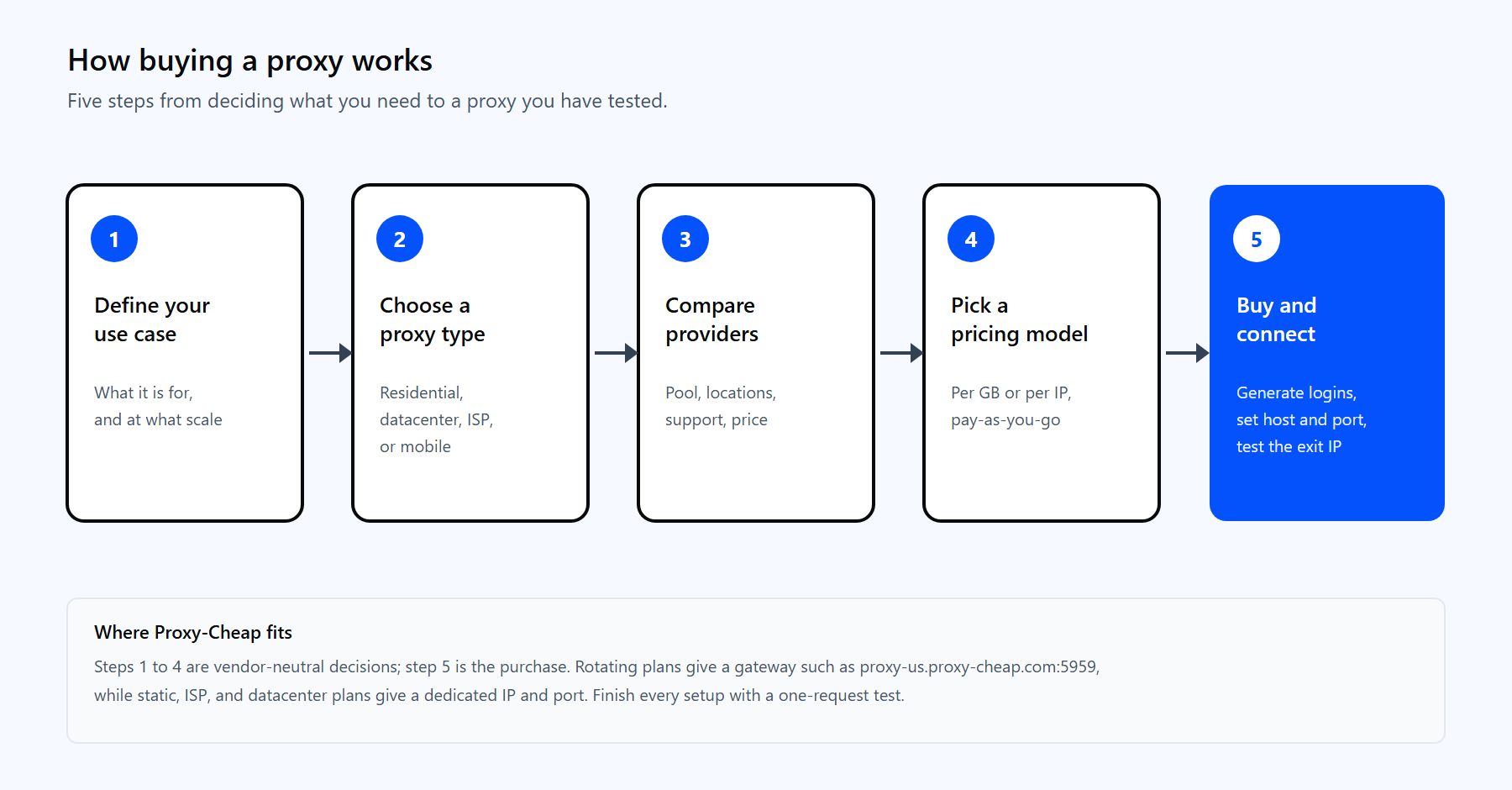
Five steps to buy a proxy: define the use case, choose a type, compare providers, pick a pricing model, then buy and connect.

The five steps of buying a proxy, from deciding what you need to a connection you have tested.

Step 1: Decide what you need a proxy for

The use case decides everything else, so start here. Write down the single task you want the proxy to handle first. A proxy that is ideal for one job can be the wrong tool for another, and the type you choose in Step 2 follows directly from this answer.

Common reasons people buy a proxy include:

  • Public-web data collection. Gather publicly available data for analytics, research, and pricing intelligence at scale.
  • SEO and rank tracking. Query public search results from several locations to monitor keyword positions and localized results.
  • Ad verification. Review publicly served ads across geo-specific markets for compliance and quality checks.
  • Price and market monitoring. Track competitor pricing and product availability on retail and travel sites.
  • Social media and multi-account management. Manage several accounts in line with each platform's terms, using IPs that match each account's real market.
  • Localization and QA testing. Confirm how a site, app, or ad renders for users in a specific region.

Be specific about scale and location too. A one-off check from a single country needs far less than a daily job that pulls thousands of pages across many regions. Those two details, volume and geography, shape both the type and the budget.

Step 2: Choose the right type of proxy

Proxies differ by where the IP comes from, whether it changes, and which protocol it speaks. Here are the four types you will choose between, followed by three quick decisions that refine the pick.

Residential proxies

residential proxy uses a real IP assigned by an internet service provider to a home connection. Because the IP looks like an ordinary household visitor, success rates stay high on consumer-facing sites. Residential IPs suit price monitoring, ad verification, and gathering publicly available data across many regions.

Datacenter proxies

A datacenter proxy comes from a server in a hosting facility rather than a home line. These IPs are fast and economical, with predictable per-IP pricing, and they deliver high throughput on documentation, public catalogs, and other unprotected content. They are the best-value option when the origin of the IP is not the priority. If you are weighing the two most common types, the datacenter vs residential proxies guide compares them in depth.

Mobile proxies

mobile proxy routes through a 3G, 4G, 5G, or LTE connection on a real carrier network. Many real users share each carrier IP, so mobile IPs carry high trust. They fit social media management, ad checks, and testing on mobile-first platforms.

Static residential (ISP) proxies

static residential proxy, also called ISP, is a fixed IP hosted in a datacenter but registered to an internet service provider. You get residential-level trust with datacenter speed, and the same IP stays with you for the whole plan. That makes it ideal for account-bound tasks and session-aware dashboards.

Three quick decisions

Once the type is clear, three smaller choices finish the job:

  • Rotating or static? A rotating proxy gives you a new exit IP per request or per sticky session, which spreads a large job across many IPs and keeps you within each site's rate limits. A static proxy holds one IP for logins and stateful work. The static vs rotating proxies guide covers when each one wins.
  • HTTP or SOCKS5? HTTP is the most compatible choice for browsers and scraping libraries. SOCKS5 works at a lower level and carries any TCP or UDP traffic, which suits non-web tools and high-throughput transfers.
  • IPv4 or IPv6? IPv4 works everywhere and is the default. IPv6 is far cheaper in bulk and fits large jobs on sites that already support it.

Step 3: Compare proxy providers before you buy

Once you know the type, compare a short list of providers on the points that affect daily use. Price matters, but it is one line on a longer checklist. Run each candidate through the same questions:

  • Pool size and locations. Does the provider cover the countries, and where needed the cities or states, your task requires? A larger pool spreads requests and improves success rates on big jobs.
  • IP type coverage. Can you get residential, datacenter, ISP, mobile, and IPv6 under one account? Breadth lets you switch types later without moving providers.
  • Protocols. Confirm HTTP and SOCKS5 support for the tools you use.
  • Authentication. Look for both username and password and IP allowlisting, so you can connect from scripts and from fixed-IP servers.
  • Performance. Check the published uptime and success rates. Reliable connectivity and stable sessions matter more than a headline price.
  • Support and documentation. Look for 24/7 support and clear setup guides. Fast help saves hours when a job stalls.
  • Payment and flexibility. Confirm the payment methods you want, including cards, PayPal, and crypto, and whether plans are pay-as-you-go with no monthly commitment.
  • Trial and refund policy. A short trial or a clear refund window lets you verify quality before you scale up.

A provider that scores well across every line, rather than only on price, is the one worth buying from.

Step 4: Choose a pricing model that fits your budget

Proxy pricing follows two main models, and the right one depends on the product you picked in Step 2.

  • Per GB (bandwidth based). Rotating residential and rotating mobile plans bill for the data you transfer. You draw from a large shared pool and pay only for the gigabytes you use, which suits variable or bursty workloads.
  • Per IP per month (subscription based). Datacenter, static residential, ISP, static mobile, and IPv6 plans assign you dedicated IPs at a fixed monthly rate per IP. This is predictable and economical when you need steady, long-lived addresses.

To estimate cost, multiply your expected monthly data by the per-GB rate for bandwidth plans, or your IP count by the per-IP rate for subscription plans. Many providers add a 7-day trial on static products and volume discounts on bulk IPv6, so a small test order is cheap. Pay-as-you-go billing keeps the entry cost low: no setup fee, and you cancel when the project ends. Broad payment options, including major cards, PayPal, and crypto, make checkout flexible.

Step 5: Buy your proxy and set it up

With the type, provider, and pricing model decided, the purchase itself is quick. The flow is similar across self-serve providers:

  1. Pick the product and plan. Choose the proxy type and the per-GB or per-IP plan that matches Step 2 and Step 4.
  2. Select location and quantity. Set the country (and city or state where offered), and the number of IPs or the amount of bandwidth.
  3. Create an account and pay. Register, choose a payment method, and complete checkout.
  4. Generate your credentials. Open the dashboard and find the setup panel. For rotating products you get a gateway hostname, a port, and a username and password. For static, ISP, or datacenter products you get a dedicated IP and port.
  5. Point your tool at the proxy. Enter the host and port in your browser, script, or app, and add your credentials. Keep the username and password in their own fields, never inside the host string.

A rotating residential gateway is the clearest example. The Proxy-Cheap US endpoint is proxy-us.proxy-cheap.com:5959 and the EU endpoint is proxy-eu.proxy-cheap.com:5959, and every request through the gateway gets a fresh exit IP. For a dedicated IP from the static, ISP, or datacenter lines, copy the exact host and port shown in your dashboard. If your server runs from a fixed IP, add that IP to the allowlist and you can connect without typing credentials.

How to test your proxy after buying

Always confirm the proxy works before you build it into a real job. The fastest check sends one request through the proxy and reads back the exit IP. If the IP that returns is the proxy IP and not your own, the proxy is working.

Test it with cURL. The -x flag sets the proxy host and port, and -U passes the username and password in separate fields:

curl -x proxy-us.proxy-cheap.com:5959 -U <your-proxycheap-username>:<your-proxycheap-password> https://api.ipify.org


A working proxy returns the exit IP assigned to your request. In Python, the requests library takes the same details in a proxies dictionary:

import requests


# Keep credentials in their own variables, not inside the host string.

proxy_user = "<your-proxycheap-username>"

proxy_pass = "<your-proxycheap-password>"

proxy_host = "proxy-us.proxy-cheap.com:5959"


proxy = "http://%s:%s@%s" % (proxy_user, proxy_pass, proxy_host)

proxies = {"http": proxy, "https": proxy}


resp = requests.get("https://api.ipify.org?format=json", proxies=proxies, timeout=15)

print(resp.json())   # prints the proxy exit IP, which confirms the proxy works


If the request returns a 407 status, the credentials are wrong or in the wrong field. If it times out, check the host and port and whether your IP needs to be on the allowlist. Once the exit IP comes back clean, the proxy is ready for the real workload.

Which proxy should you buy? A use-case matrix

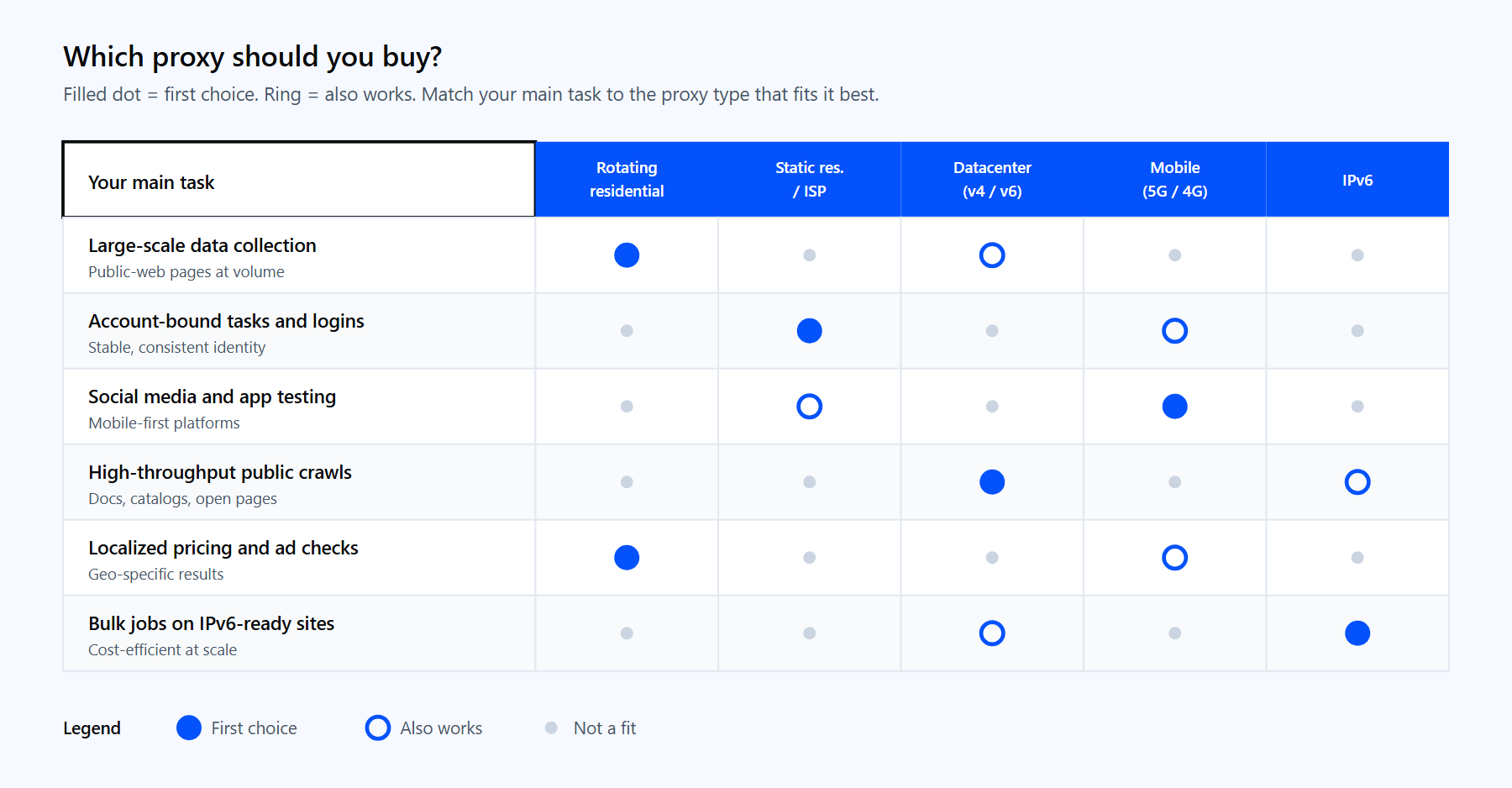
The best proxy to buy is the one that matches your main task. Use the matrix below to map a task to a first choice, then refine by rotation, protocol, and IP version using the three quick decisions from Step 2.

Your main taskFirst choiceAlso works
Large-scale public-web data collectionRotating residentialDatacenter
Account-bound tasks and loginsStatic residential (ISP)Mobile
Social media and app testingMobileStatic residential (ISP)
High-throughput public crawlsDatacenterIPv6
Localized pricing and ad checksRotating residential, geo-targetedMobile
Bulk jobs on IPv6-ready sitesIPv6Datacenter


Matrix mapping common tasks to the proxy type to buy, from rotating residential for data collection to IPv6 for bulk jobs.

Match your main task to the first-choice proxy type, then refine by rotation, protocol, and IP version.

Whichever type fits, Proxy-Cheap offers it on pay-as-you-go billing with no setup costs and no monthly commitment. Compare the options on the pricing page and start with the proxy type that matches your first project.

Часто задаваемые вопросы

Yes, buying and using a proxy is legal in most countries for legitimate purposes such as testing, research, privacy, and gathering publicly available data. The activity you carry out through the proxy still has to follow the law and each site's terms of service. Do not use a proxy for fraud or unauthorized access.

Free public proxy lists exist and are fine for a quick one-off test. For anything ongoing they tend to be slow, short-lived, and shared with many strangers, and some log your traffic. A paid proxy with its own credentials is more reliable, faster, and keeps your traffic private, which is why most regular tasks use paid plans.

A proxy routes traffic for a single app or tool, such as a browser or a script, at the application level. A VPN routes all of a device's traffic at the system level and encrypts it. Proxies give you finer control and per-request IP choice, which is why data and testing teams often prefer them.

Usually within minutes. Self-serve providers generate credentials right after checkout, so you can copy the host, port, and login from the dashboard and connect straight away. Crypto or manual payments can add a short verification delay, but card and PayPal checkouts are typically instant.

It depends on concurrency, not on the number of tasks. For bandwidth-based rotating plans you buy gigabytes, not IPs, and the gateway spreads requests across the pool. For per-IP plans, size the count to how many parallel sessions or accounts you run, then add a small buffer.

A proxy adds a short extra hop, so expect a small latency increase. Datacenter and ISP proxies are the fastest because of their network paths, while residential and mobile trade a little speed for higher trust. For most data collection and testing work the difference is minor and worth the routing control.

It varies by provider. Proxy-Cheap accepts major cards (Visa, Mastercard, Maestro, American Express), PayPal, Alipay, and crypto through CoinGate. Crypto checkout suits buyers who prefer to keep payment details private.

Often yes. Many providers offer a short trial or a clear refund window so you can verify quality first. Proxy-Cheap lists a 7-day trial on static residential proxies, and pay-as-you-go billing lets you buy a small amount, test it, and scale up only once the results look right.