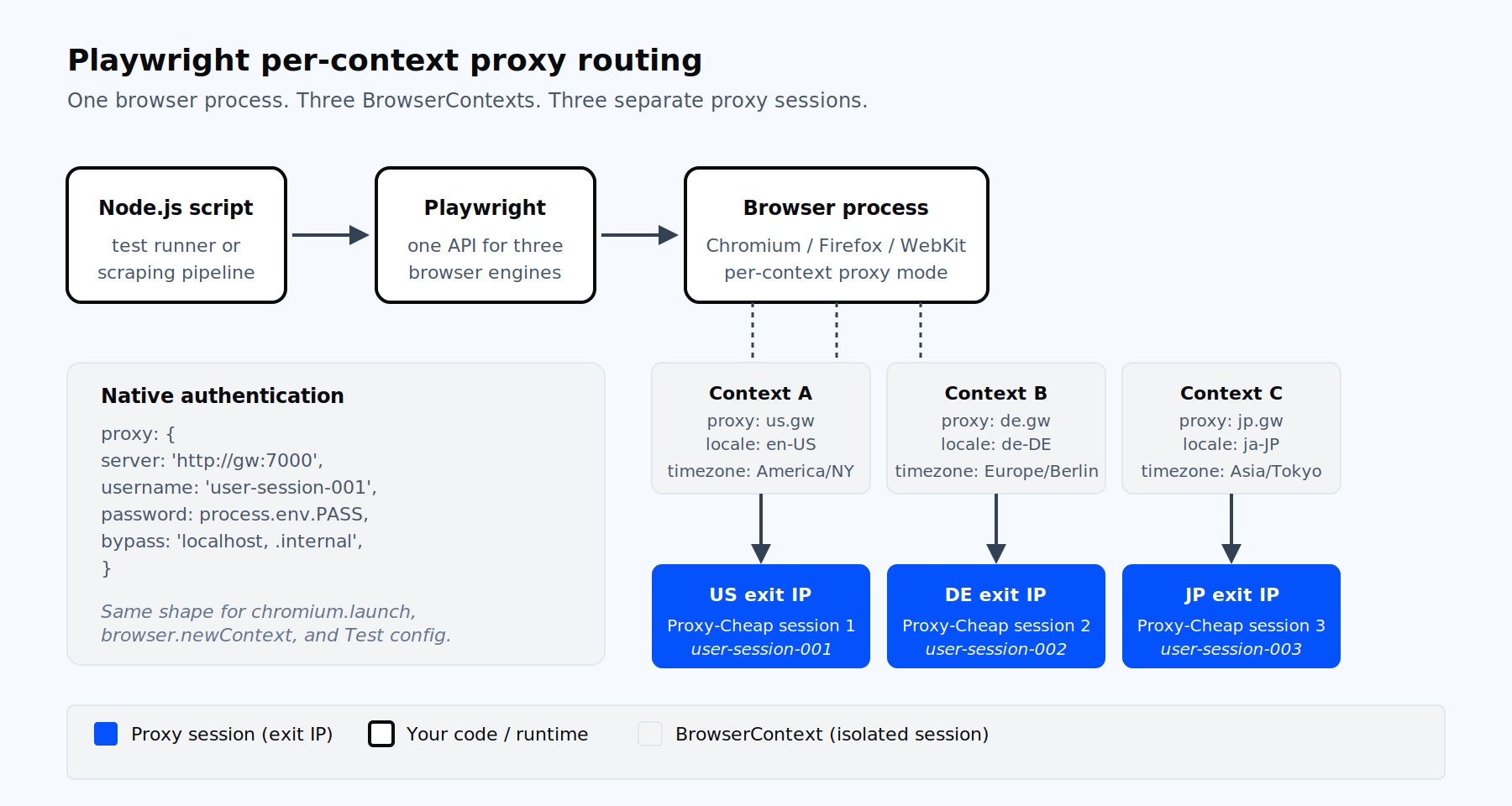
Per-context proxy routing: one browser process, many isolated identities.
Playwright is Microsoft’s open-source library for browser automation in Node.js, Python, Java, and .NET. One API drives Chromium, Firefox, and WebKit, which is why teams use it for end-to-end testing and for scraping publicly available content. Both jobs share the same network constraints: rate limits per IP, geo-specific responses, and TLS fingerprinting that flags repeat callers from the same address.
A proxy gives every BrowserContext its own egress identity. That matters for three workloads. QA teams validate localized UX from multiple regions by routing tests through proxies in those countries. Data engineers collect publicly available product, pricing, and SERP data without saturating a single IP. Multi-account operators keep sessions cleanly separated by binding each context to a distinct residential or mobile exit.
Playwright’s proxy API is structurally clean. Authentication lives in the same options object as the server URL, so there is no separate authenticate-on-request call. The same proxy object works in all three browser engines through one shared abstraction. And per-context overrides mean a single browser process can drive dozens of concurrent sessions, each on its own IP.
Playwright exposes the same proxy object shape in four places:
type ProxySettings = {
  server: string;            // 'http://host:port' or 'socks5://host:port'
  bypass?: string;           // 'localhost, .internal.example.com'
  username?: string;         // HTTP/HTTPS auth only
  password?: string;         // HTTP/HTTPS auth only
};You pass it to chromium.launch({ proxy }), to browser.newContext({ proxy }), to request.newContext({ proxy }) for API tests, and to use.proxy inside playwright.config.ts. The shape never changes. What changes is the scope: launch applies to every context unless overridden, context applies only to that session, and config applies to every test in a Playwright Test project.
Two rules matter for production. First, you no longer need a launch-time placeholder. Current Playwright (1.40+) applies a per-context proxy the moment you pass it to browser.newContext, so launch the browser normally with chromium.launch() and set the proxy on each context. Second, the short form host:port (no scheme) is treated as HTTP. Always include http://, https://, or socks5:// to remove ambiguity.
The fastest path to a proxied browser is chromium.launch with a single proxy object. Every context that browser opens inherits the setting.
import { chromium } from 'playwright';

const browser = await chromium.launch({
  headless: true,
  proxy: {
    server: 'http://gateway.example.com:7000',
    username: process.env.PROXY_USER,
    password: process.env.PROXY_PASS,
    bypass: 'localhost, .internal.test',
  },
});

const page = await browser.newPage();
await page.goto('https://api.ipify.org?format=json');
console.log(await page.textContent('body'));
await browser.close();This pattern fits scripts that only need one egress IP for the whole run. It is also the right shape for the launch step in rotating residential proxies workloads, where a single gateway endpoint handles all traffic and rotation happens server-side.
For most production cases, set the proxy on the BrowserContext, not on the Browser. Per-context proxies give you parallel sessions, isolated cookies, and independent retry logic, all from one Chromium process.
import { chromium } from 'playwright';

const browser = await chromium.launch({ headless: true });

async function fetchWithProxy(url, proxyConfig) {
  const context = await browser.newContext({
    proxy: proxyConfig,
    locale: 'en-US',
    timezoneId: 'America/New_York',
    viewport: { width: 1366, height: 768 },
    userAgent:
      'Mozilla/5.0 (Windows NT 10.0; Win64; x64) AppleWebKit/537.36 ' +
      '(KHTML, like Gecko) Chrome/124.0.0.0 Safari/537.36',
  });
  const page = await context.newPage();
  await page.goto(url, { waitUntil: 'domcontentloaded', timeout: 60000 });
  const html = await page.content();
  await context.close();
  return html;
}

const html = await fetchWithProxy('https://example.com/catalog', {
  server: 'http://gateway.example.com:7000',
  username: 'user-session-001',
  password: process.env.PROXY_PASS,
});Three details earn their place here. The locale and timezoneId options align the browser context with the proxy exit region, which keeps navigator.language, the Accept-Language header, and Intl date formatting consistent. The 60-second timeout absorbs the TLS handshake cost typical of residential exits on first navigation. And the session ID embedded in the username (user-session-001) is the standard way to request a sticky IP from a rotating gateway, useful for rotating residential proxies when a flow spans multiple page loads.
If your source proxy is stored as a single URL string (http://user:pass@host:port), split it before passing to Playwright. The server field does not accept embedded credentials.
function parseProxyUrl(raw) {
  const u = new URL(raw);
  return {
    server: `${u.protocol}//${u.host}`,
    username: decodeURIComponent(u.username),
    password: decodeURIComponent(u.password),
  };
}Playwright Test reads use.proxy from playwright.config.ts and applies it to every test in the project. Override per file or per describe with test.use.
// playwright.config.ts
import { defineConfig } from '@playwright/test';

export default defineConfig({
  workers: process.env.CI ? 2 : 4,
  retries: 2,
  use: {
    baseURL: 'https://example.com',
    proxy: {
      server: 'socks5://gateway.example.com:PORT',
      bypass: 'localhost, 127.0.0.1, .internal',
    },
    locale: 'en-US',
    timezoneId: 'America/New_York',
    ignoreHTTPSErrors: false,
    navigationTimeout: 60000,
    actionTimeout: 15000,
  },
  projects: [
    { name: 'chromium', use: { browserName: 'chromium' } },
    { name: 'firefox',  use: { browserName: 'firefox'  } },
    { name: 'webkit',   use: { browserName: 'webkit'   } },
  ],
});A single test file can override the project proxy for a specific scenario:
// tests/eu-checkout.spec.ts
import { test, expect } from '@playwright/test';

test.use({
  proxy: {
    server: 'http://gateway.example.com:7000',
    username: 'user-country-de',
    password: process.env.PROXY_PASS!,
  },
  locale: 'de-DE',
  timezoneId: 'Europe/Berlin',
});

test('checkout shows EUR pricing for DE exit IP', async ({ page }) => {
  await page.goto('/cart');
  await expect(page.getByTestId('total')).toContainText('EUR');
});Keep test.use at file or describe scope. Playwright Test does not allow it inside a test() body. The same rule applies to the proxy option specifically.
Rotation strategies differ by cost, fingerprint stability, and operational complexity. Pick by workload.
Gateway rotation is the simplest: one endpoint, server-side IP rotation, no client logic. You point Playwright at a single server and the proxy provider rotates the exit IP per request or per session. Fits high-volume scrapers and most ETL pipelines.
Per-context rotation in a single browser process gives you concurrent isolated sessions. Open one BrowserContext per proxy session, run pages in parallel, close, repeat.
import { chromium } from 'playwright';

const proxies = [
  { server: 'http://gw.example.com:7000', username: 'sess-1', password: 'p' },
  { server: 'http://gw.example.com:7000', username: 'sess-2', password: 'p' },
  { server: 'http://gw.example.com:7000', username: 'sess-3', password: 'p' },
];

const browser = await chromium.launch({
  headless: true
});

await Promise.all(
  proxies.map(async (proxy, i) => {
    const ctx = await browser.newContext({ proxy });
    const page = await ctx.newPage();
    await page.goto(`https://example.com/page/${i + 1}`);
    await ctx.close();
  }),
);

await browser.close();Per-worker rotation assigns one proxy session to each Playwright Test worker, so the N parallel workers see N distinct exits. Use a worker-scoped fixture keyed on testInfo.parallelIndex:
// tests/fixtures.ts
import { test as base } from '@playwright/test';

type Proxy = { server: string; username: string; password: string };

const POOL: Proxy[] = [
  { server: 'http://gw.example.com:7000', username: 'sess-a', password: 'p' },
  { server: 'http://gw.example.com:7000', username: 'sess-b', password: 'p' },
  { server: 'http://gw.example.com:7000', username: 'sess-c', password: 'p' },
  { server: 'http://gw.example.com:7000', username: 'sess-d', password: 'p' },
];

export const test = base.extend<{}, { workerProxy: Proxy }>({
  workerProxy: [
    async ({}, use, info) => {
      await use(POOL[info.parallelIndex % POOL.length]);
    },
    { scope: 'worker' },
  ],
  context: async ({ browser, workerProxy }, use) => {
    const ctx = await browser.newContext({ proxy: workerProxy });
    await use(ctx);
    await ctx.close();
  },
});

export { expect } from '@playwright/test';For background on choosing time-based versus request-based rotation, see this primer on IP rotation strategies and trade-offs.
A Python equivalent of the per-context rotation pattern is short enough to include verbatim:
import asyncio
from playwright.async_api import async_playwright

PROXIES = [
    {"server": "http://gw.example.com:7000", "username": "sess-1", "password": "p"},
    {"server": "http://gw.example.com:7000", "username": "sess-2", "password": "p"},
]

async def fetch(browser, proxy, url):
    ctx = await browser.new_context(proxy=proxy, locale="en-US")
    page = await ctx.new_page()
    await page.goto(url, wait_until="domcontentloaded", timeout=60000)
    html = await page.content()
    await ctx.close()
    return html

async def main():
    async with async_playwright() as p:
        browser = await p.chromium.launch(
            headless=True
        )
        results = await asyncio.gather(*[
            fetch(browser, px, f"https://example.com/p/{i}")
            for i, px in enumerate(PROXIES)
        ])
        await browser.close()
        print(len(results))

asyncio.run(main())Playwright’s APIRequestContext runs HTTP calls without launching a browser. It accepts the same proxy object, which makes hybrid suites (UI plus API) trivial to route consistently.
import { request, test, expect } from '@playwright/test';

test('inventory API returns 200 from a US exit', async () => {
  const api = await request.newContext({
    baseURL: 'https://api.example.com',
    proxy: {
      server: 'http://gateway.example.com:7000',
      username: 'sess-us-1',
      password: process.env.PROXY_PASS!,
    },
    extraHTTPHeaders: { 'X-Client': 'qa-suite' },
  });

  const res = await api.get('/v1/inventory?sku=ABC-001');
  expect(res.status()).toBe(200);
  await api.dispose();
});If the Playwright Test config already sets use.proxy, the bundled request fixture inherits it automatically. Override with a fresh request.newContext only when one API call needs a different exit IP than the UI tests.
Playwright runs the same proxy code in three different engines, but they do not behave identically.
Chromium supports HTTP, HTTPS, and SOCKS5 servers. Username and password fields work for HTTP and HTTPS, not for SOCKS5 (a Chromium limitation, not a Playwright bug). Chromium also routes loopback directly: localhost and 127.0.0.1 go direct unless you set the PLAYWRIGHT_DISABLE_FORCED_CHROMIUM_PROXIED_LOOPBACK=1 environment variable.
Firefox supports the same schemes and handles native authentication through the proxy options object. Two cautions: Firefox does not honor HTTP_PROXY or HTTPS_PROXY shell variables the way Chromium does, so always pass the proxy option explicitly in containerized runs. And avoid rewriting headers with page.route during the first navigation when a proxy is configured, because Firefox can drop the proxy auth header on the affected request and surface NS_ERROR_PROXY_CONNECTION_REFUSED.
WebKit mirrors the documented proxy API and sends Proxy-Authorization correctly in scenarios where Chromium does not. On macOS, WebKit ignores client certificates for localhost regardless of proxy settings; substitute the test hostname local.playwright when that affects you. SOCKS5 with auth remains unsupported on every engine.
A clean exit IP solves only part of the problem. The browser context itself must look consistent with the IP it appears to come from. Four settings move the needle.
First, set locale and timezoneId on browser.newContext to match the proxy region. A US exit with de-DE and Europe/Berlin is a clear inconsistency to any half-decent scoring service. Second, set viewport, userAgent, and deviceScaleFactor to plausible desktop or mobile values. Third, keep the product and the browser separate: Proxy-Cheap SOCKS5 carries both TCP and UDP, but Chromium sends page traffic over TCP and does not route WebRTC UDP through the proxy. Enable the WebRTC handling policy with Chromium command-line flags so a real IP cannot leak over WebRTC UDP:
const browser = await chromium.launch({
  headless: true,
  args: [
    '--force-webrtc-ip-handling-policy=disable_non_proxied_udp',
    '--disable-features=WebRtcHideLocalIpsWithMdns',
    '--disable-blink-features=AutomationControlled',
  ],
});These flags are Chromium switches, not part of the Playwright API, so verify them against your installed Chromium build before shipping. For Firefox, pass firefoxUserPrefs: { 'media.peerconnection.enabled': false } to firefox.launch to disable WebRTC entirely.
Fourth, default Playwright Chromium sets navigator.webdriver to true and runs without the window.chrome runtime that real browsers expose. A fingerprint or stealth plugin patches these surfaces. Combined with a residential exit IP, locale alignment, and human-paced timing, this is the realistic minimum for tougher targets. See the full vendor-neutral comparison in this round-up of the best proxies for web scraping.
Most production failures fall into one of seven buckets. Each entry below states the error string, the cause, and the fix.
net::ERR_TUNNEL_CONNECTION_FAILED. Chromium issued an HTTP CONNECT to the proxy for an HTTPS target and the tunnel was rejected, almost always because the proxy returned 407 without valid credentials. Move credentials from extraHTTPHeaders into the dedicated proxy.username and proxy.password fields. Chromium ignores Proxy-Authorization set via extraHTTPHeaders and may also throw net::ERR_INVALID_ARGUMENT.
HTTP 407 Proxy Authentication Required. Same root cause as above but visible directly in network logs. In Python, double-check the dict keys are username and password, not user and pass. In Node, confirm you split user:pass@host:port URLs with new URL() before passing to Playwright.
net::ERR_NO_SUPPORTED_PROXIES. Chromium does not accept some proxy URL schemes, notably socks5h://. Use socks5:// and pass auth via separate fields, or switch to an HTTP endpoint. Also appears when credentials are embedded directly in the server URL.
net::ERR_PROXY_CONNECTION_FAILED. The proxy passed to newContext could not be reached: wrong host or port, the endpoint is down, or the exit refused the connection. Confirm the server value and port, test the same endpoint with curl -x, and make sure every context that should route through a proxy actually receives a proxy object (a context created without one connects directly).
NS_ERROR_PROXY_CONNECTION_REFUSED (Firefox). Three common triggers: omitting the http:// scheme on server, rewriting headers with page.route during the first request, or relying on HTTPS_PROXY shell variables that Firefox does not read. Pass the proxy explicitly with a scheme and keep page.route off the initial navigation.
SOCKS5 authentication errors in Chromium. Chromium does not implement SOCKS5 user/pass auth. Either front the authenticated SOCKS5 proxy with a local unauthenticated tunnel (for example, an ssh -D forwarder) and point Playwright at socks5://127.0.0.1:PORT, or use the provider’s HTTP endpoint, or use IP whitelisting via SOCKS5 proxies with IP authentication.
Slow first context creation through residential exits. Each new BrowserContext through a residential proxy performs a fresh CONNECT plus upstream TLS handshake. Bump navigationTimeout to 60 seconds, prefer waitUntil: 'domcontentloaded' over 'networkidle', and reuse contexts where session isolation allows it. Combine with retries: 2 and 3-attempt page.goto wrappers; transient residential failures are expected.
A final operational note for Playwright Test: each worker is a separate Node.js process opening its own proxy CONNECT tunnels. Cap workers in CI (workers: process.env.CI ? 2 : undefined) and assign one proxy session per worker so providers do not see multiple concurrent logins under one sub-user.
Different Playwright workloads have different network requirements. The table below maps the common patterns to the product that fits.
| Playwright workload | Best-fit proxy type | Why it fits |
|---|---|---|
| High-volume scraping with per-context rotation | Rotating residential | Large pool, session IDs in username, geo-specific exits |
| Parallel test workers, stable sessions per worker | Static residential or ISP | Sticky IPs, unlimited bandwidth, fast handshakes |
| Account isolation across many contexts | Static residential or mobile | One persistent identity per context, clean sessions |
| Pure throughput against unprotected endpoints | Datacenter | Lowest cost per request, gigabit speeds |
| Mobile UA emulation or app-style targets | Mobile (4G / 5G) | Real carrier IPs, mobile network signatures |
| Hybrid API plus UI tests routed through one egress | ISP or static residential | One stable IP for request.newContext and UI contexts |
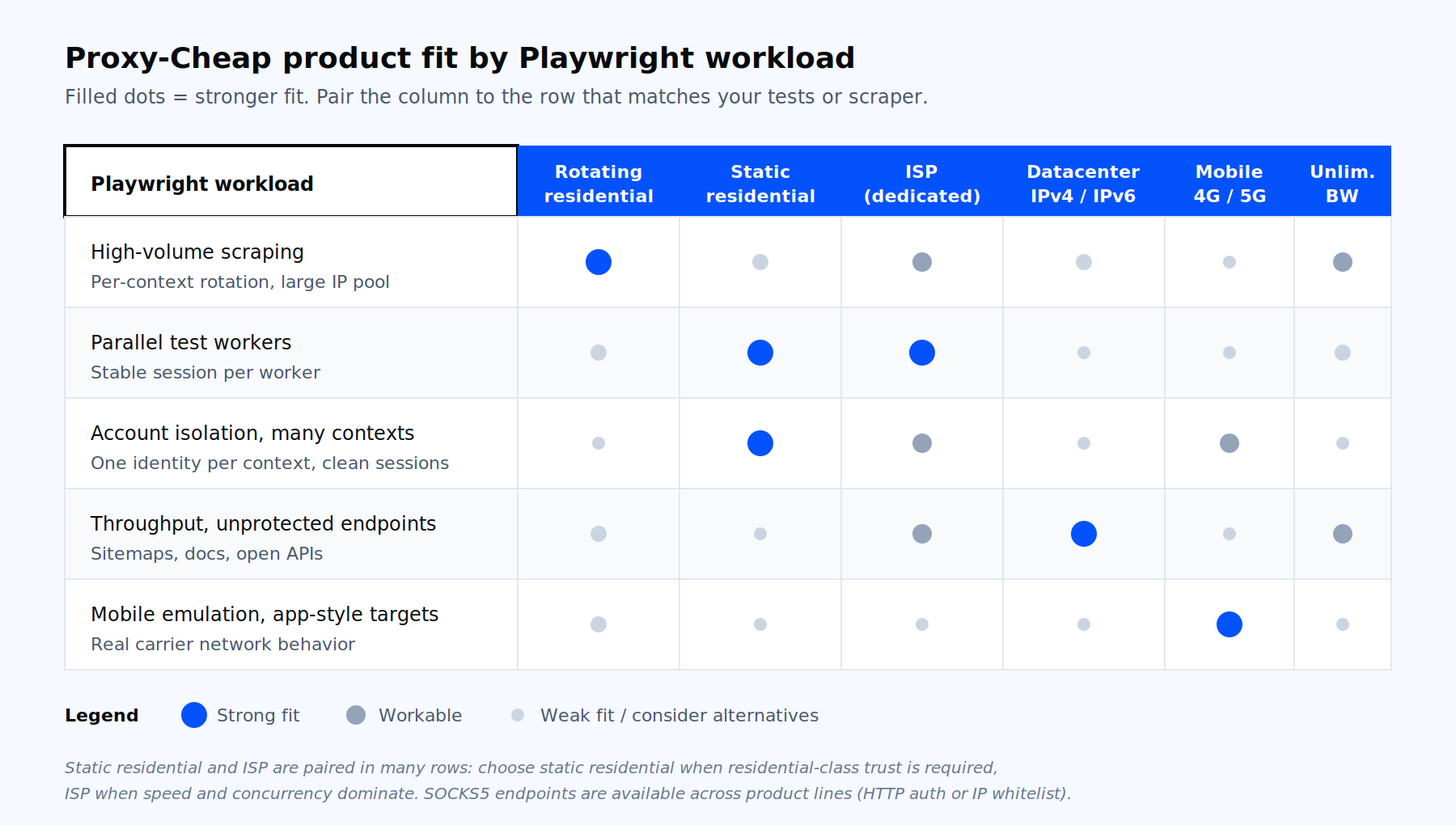
Which Proxy-Cheap product fits which Playwright workload.
For most Playwright scraping work, rotating residential proxies give you the per-context exit variety the multi-browser API was designed for. When sessions must persist across hundreds of requests (logged-in dashboards, checkout flows, multi-step QA scripts), static residential proxies hold one IP at gigabit speed with unlimited bandwidth. ISP proxies sit between the two: residential-appearance IPs hosted in datacenters, fast enough for high-concurrency Playwright Test suites and stable enough for sticky sessions. For unprotected scrapes where speed and cost dominate, datacenter proxies deliver the cheapest per-request economics. For the toughest fingerprinting and for mobile emulation testing, mobile proxies route through real carrier networks.
The proxies for data scraping use case covers headless-browser routing patterns relevant to every Playwright scraper. Open a Proxy-Cheap account on pay-as-you-go billing, generate session credentials in the dashboard, and drop them straight into the proxy object shown above.