ParseHub runs your scraping projects on its own cloud servers, so the IP that reaches the target site is the one you set in the project. Adding your own proxy gives you control over location, rotation, and pool quality. This guide covers what ParseHub is, why a proxy helps, and the exact steps to connect Proxy-Cheap proxies, rotate them, and fix the errors people hit most.
ParseHub is a visual web scraper that turns websites into structured data without code. You click the elements you want in a built-in browser, and ParseHub records the pattern, then repeats it across pages. It ships as a desktop app for Windows, macOS, and Linux, and it runs finished projects on ParseHub's cloud.
Because it drives a real browser, ParseHub renders JavaScript and handles AJAX, infinite scroll, dropdowns, pagination, and basic login steps. That makes it a fit for dynamic sites that a plain HTTP request cannot read. You build a project once, then export the results as JSON, CSV, or Excel, or pull them through the REST API on paid plans.
The tool sits in the no-code scraping category, aimed at analysts, marketers, and developers who want data without maintaining a scraping codebase. You design the project locally, then let ParseHub execute the run and store the result in the cloud.
ParseHub is used wherever someone needs web data but does not want to write and maintain a scraper. The common jobs:
The thread that ties these together is structured output from messy pages. Most of these jobs also need a proxy once you move past a handful of pages, which is the next section.
The features that matter for real scraping work:
ParseHub has a free plan, with limits. The free tier covers up to 200 pages per run, a small number of public projects, shorter run windows, and limited data history. It does not include the API, scheduling, or any proxy features.
Custom proxies and IP rotation live on the paid plans. So to route ParseHub through your own residential or datacenter proxies, you need a paid subscription, and you need custom proxies enabled on your account. ParseHub turns the feature on per account, so you contact its support team once and they switch it on. For current page-per-run limits and prices on each tier, check ParseHub's pricing page, since the numbers change.
ParseHub includes its own pool of IPs, but that pool covers a limited set of locations and is shared across users. Bringing your own proxy gives you a larger pool, country-level choice, and residential IPs that match real user networks. For a wider view of what to look for, the best proxies for web scraping guide compares the main options.
Three concrete reasons to put a proxy in front of every serious ParseHub run:
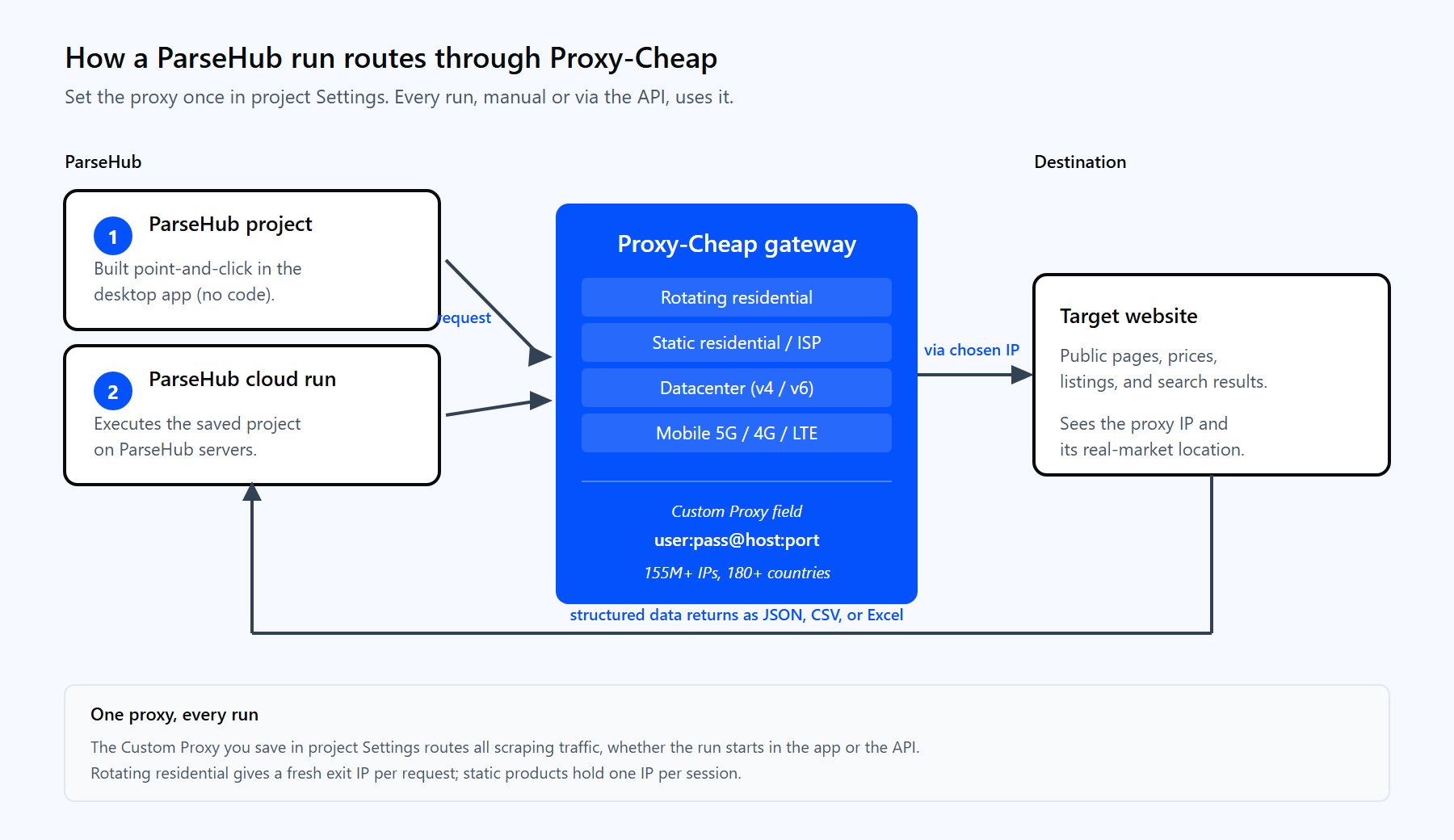
One ParseHub run routes through the Proxy-Cheap gateway, fetches the target through a residential IP, and returns structured data.
ParseHub sets proxies per project, inside the project Settings. The control that turns on custom proxies is the IP rotation option. Follow these steps in order.
A rotating residential gateway in ParseHub's format looks like this:
<your-proxycheap-username>:<your-proxycheap-password>@thehub.proxy-cheap.com:8080The rotating hub serves every country from the same address; you pick the country in the dashboard credential generator rather than by changing the host. If you authenticate by IP allowlist instead of a password, use the shorter host:port form. HTTP with username and password is the most compatible choice, because ParseHub and its browser handle HTTP proxy authentication cleanly.
You get IP rotation in two ways, depending on the Proxy-Cheap product you use.
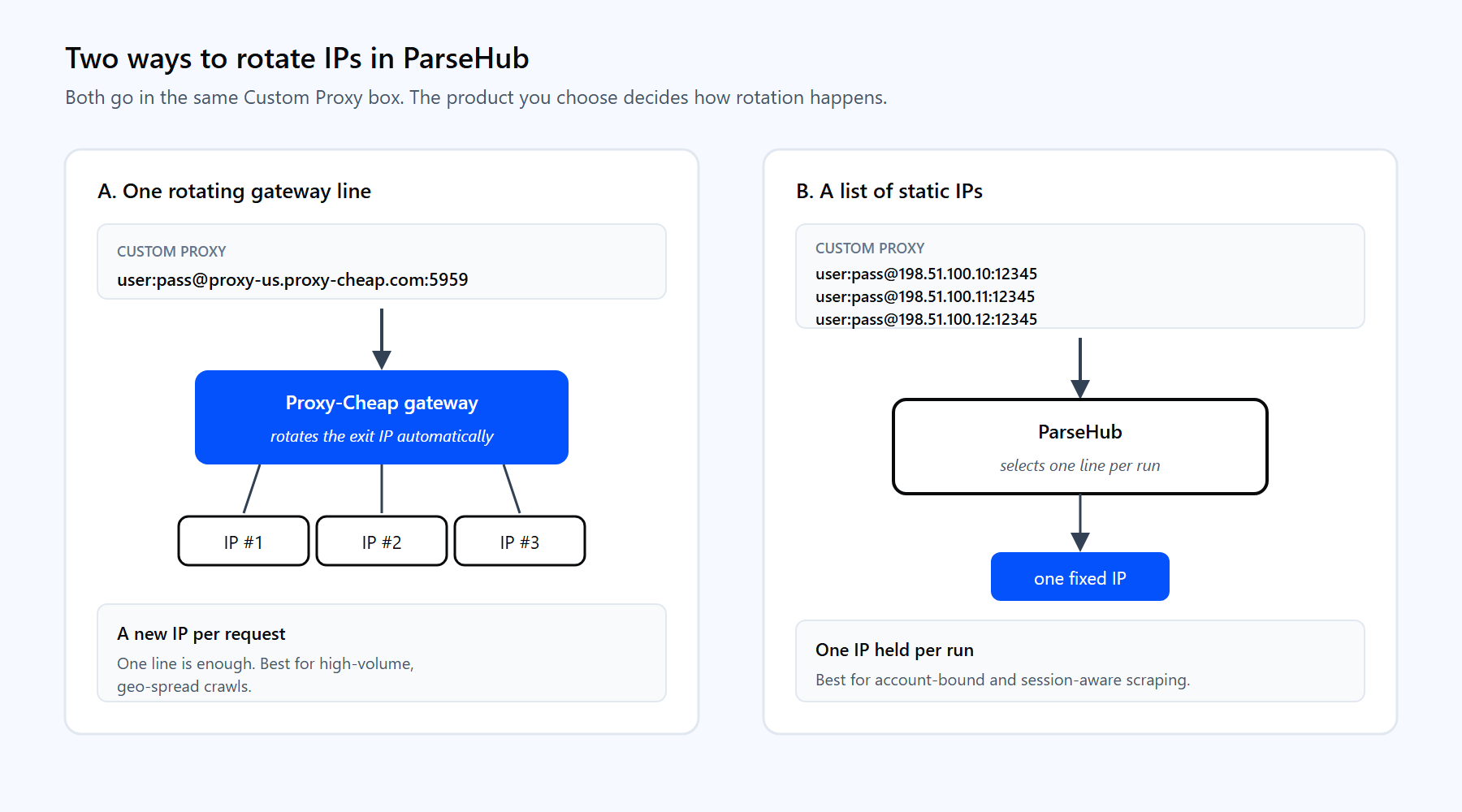
Use one rotating gateway line for automatic rotation, or paste several static proxies and let ParseHub pick one per run.
A list of static proxies looks like this, one proxy per line:
<your-proxycheap-username>:<your-proxycheap-password>@198.51.100.10:12345
<your-proxycheap-username>:<your-proxycheap-password>@198.51.100.11:12345
<your-proxycheap-username>:<your-proxycheap-password>@198.51.100.12:12345Which approach fits depends on the job. Rotating residential is the default for large, geo-spread crawls where a fresh IP per request keeps success rates steady. Static residential or ISP is better when you need the same IP to persist across a session, such as account-bound scraping. For a deeper comparison, read static vs rotating proxies and the primer on how IP rotation works. When you mostly need consistent sessions, static residential (ISP) proxies hold one IP for the full run.
Once a project has a proxy saved in its Settings, every run uses that proxy, including runs you start through the API. The proxy lives with the project, not with the API call, so you configure it once and automate from there. The API is available on paid plans.
Start a run with a POST request:
curl "https://www.parsehub.com/api/v2/projects/{PROJECT_TOKEN}/run" \
  -X POST \
  -d api_key={YOUR_API_KEY} \
-d start_url=https%3A%2F%2Fexample.comFetch the latest finished run as JSON or CSV:
curl --compressed -X GET \
"https://www.parsehub.com/api/v2/projects/{PROJECT_TOKEN}/last_ready_run/data?api_key={YOUR_API_KEY}&format=json"ParseHub gzip-encodes API responses, so --compressed lets curl decode them for you. Because the proxy is attached to the project, the data that comes back was gathered through your Proxy-Cheap IPs, with no proxy details in the request itself.
Most proxy problems fall into a few buckets. Each has a quick fix.
The right product depends on the shape of the target site, not the size of your budget. The table maps common ParseHub workloads to the Proxy-Cheap product that fits first, with a workable second choice.
| ParseHub workload | First choice | Also works |
|---|---|---|
| Geo-specific pricing and listings | Rotating Residential | Static Residential (ISP) |
| High-volume public pages | Datacenter | Rotating Residential |
| Account-bound or session-aware scraping | Static Residential (ISP) | ISP proxies |
| Localized SERP and ad checks | Rotating Residential | Mobile |
| App and social data that expects mobile IPs | Mobile | Static Residential (ISP) |
| Long-lived sessions with flexible auth | ISP proxies | Static Residential (ISP) |
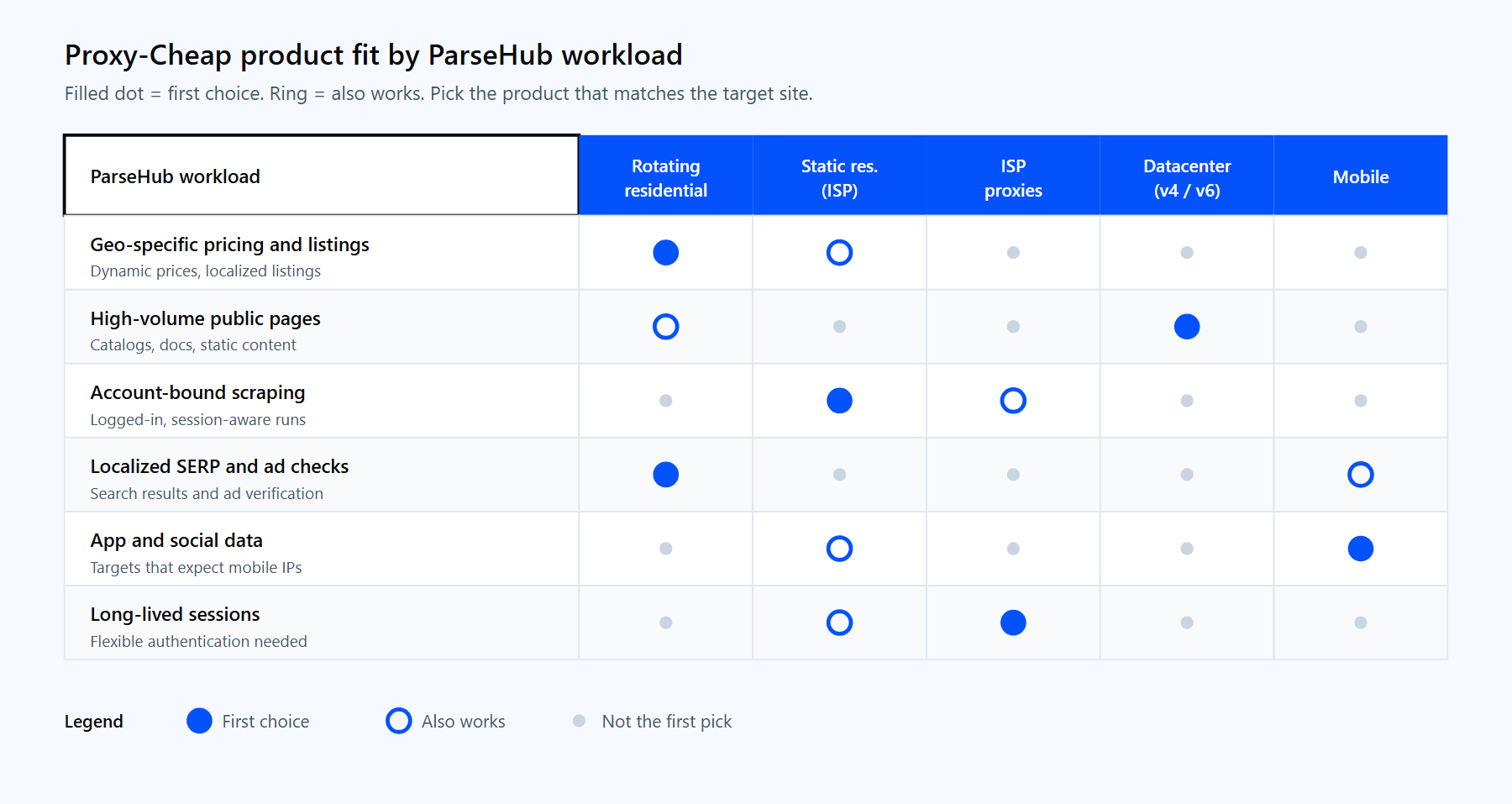
Match the Proxy-Cheap product to the shape of your ParseHub workload.
For high-throughput crawls of public catalogs and documentation, datacenter proxies deliver speed at a low per-IP price. For trusted, long-lived sessions, ISP proxies pair residential legitimacy with flexible authentication. If you are weighing the two networks, the datacenter vs residential proxies guide breaks down the tradeoffs.
Most ParseHub projects start well with rotating residential proxies: paste one gateway line, turn on IP rotation, and you get geo-accurate data on pay-as-you-go pricing with no monthly commitment. Add static residential or datacenter IPs as specific jobs call for them.